Top 14 Features to Use in eCommerce WordPress Development

According to Statista’s most recent estimate, global e-commerce sales will rise from $3.35 trillion in 2019 to $6.91 trillion in 2024. With such a staggering development rate, it is obvious that e-commerce is not just a fad but a crucial element for any prosperous company.
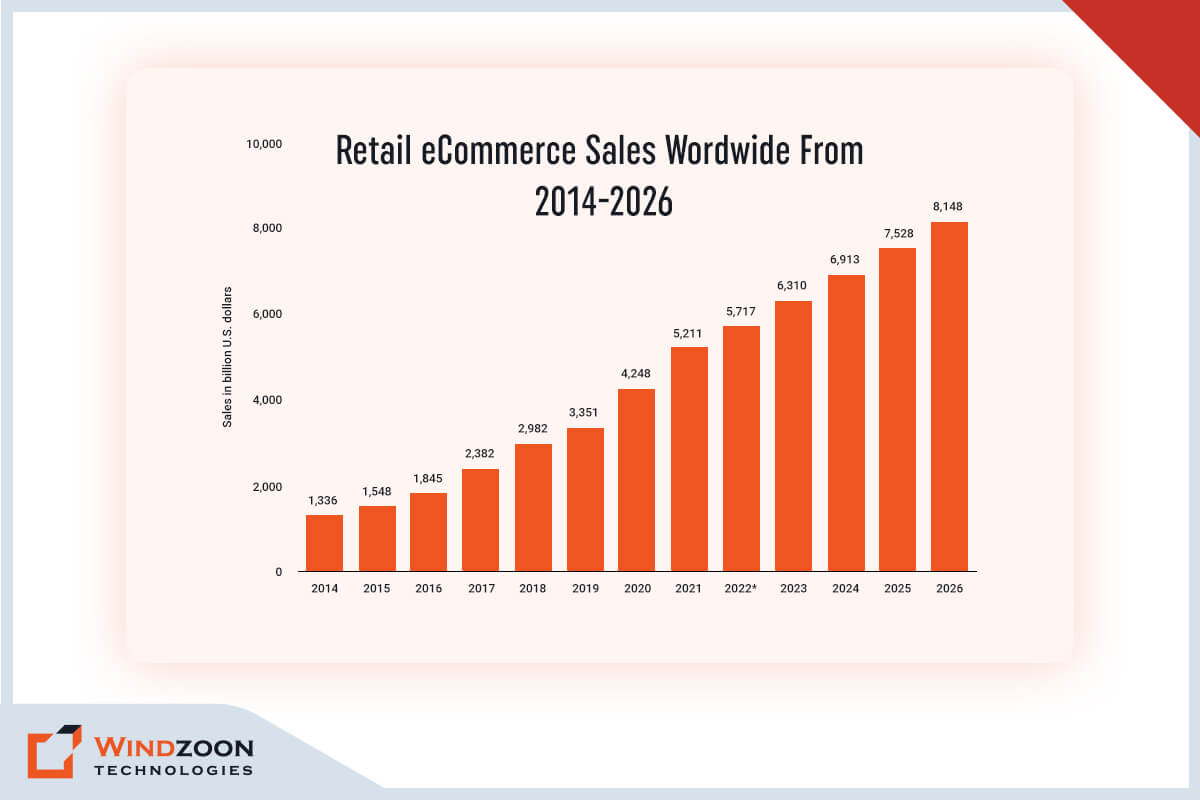
Retail eCommerce Sales Wordwide

If you are operating or planning to start an e-commerce store, you must make sure that it has the most up-to-date and efficient features in order to compete in the ever-changing e-commerce market.

However, to accomplish this, you’ll require the most well-known web development platform to create your online shop. And what is more, tried and trusted than WordPress? It ranks among the most popular and well-known platforms for developing an online store.

But simply having a WordPress website is insufficient; you must also incorporate the latest features to ensure that your online store stands out and generates conversions.

As a leading WordPress Development services provider, we have set aside some crucial and cutting-edge features for your WordPress e-commerce website. So, keep reading to learn how you can make your WordPress e-commerce website more competitive and successful.

Read More: ECommerce Web Design Trends

So, let’s begin our article with this very first topic:

14 Must-Have Features for Your WordPress eCommerce Website
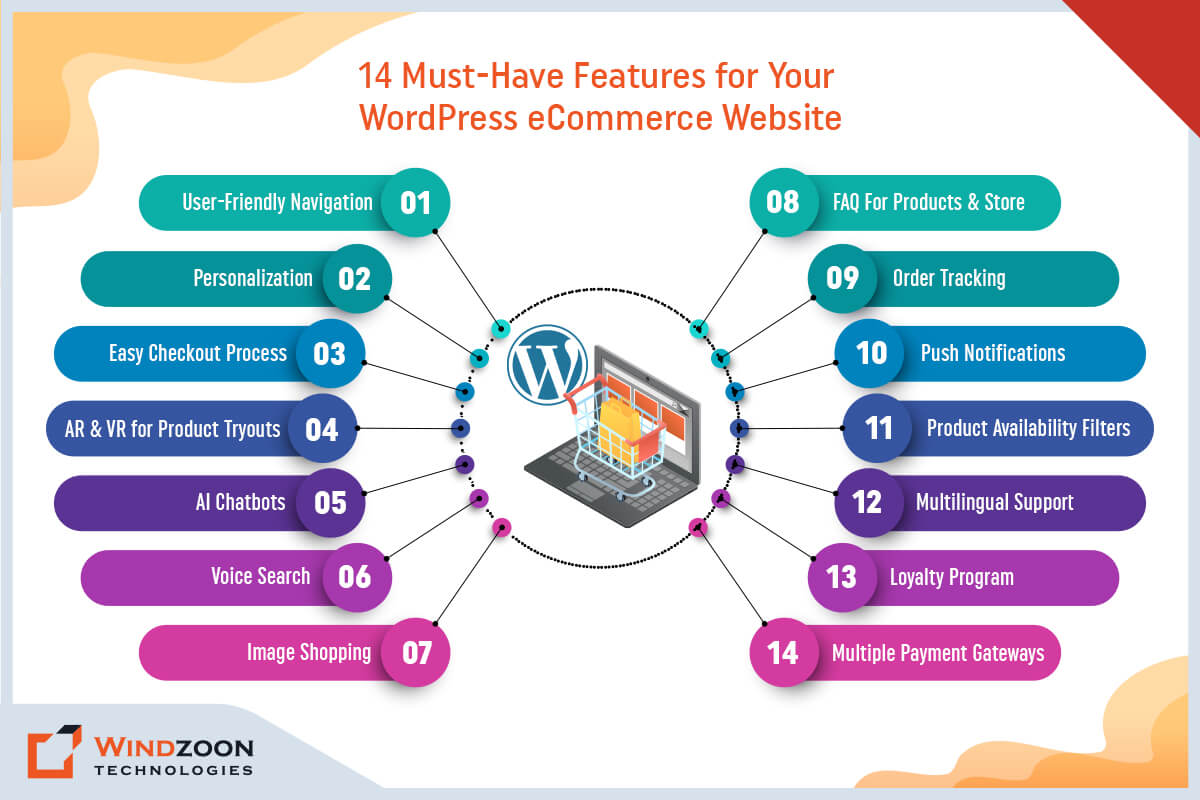
Features for Your WordPress eCommerce Website

1. User-Friendly Navigation

A simple navigation system makes it quick and simple for your customers to discover what they’re looking for. A good e-commerce website must have clear and concise menus, accessible search bars, and understandable categories and subcategories.

Furthermore, most smartphones that have been launched in recent years have larger screens. Although larger displays are excellent for accurate finger tapping, it is harder to navigate with just one hand when using the thumb. Naturally, app developers must emphasize thumb-friendly design more than ever before.

2. Personalization

Personalization is the key to providing your consumers with an exceptional online shopping experience. Utilize consumer information, such as past purchases and browsing patterns, to tailor product recommendations, offers, and advertising messages. Additionally, you can increase brand loyalty and foster stronger relationships with your consumers by using personalized content and messaging.

3. Easy Checkout Process

A complicated checkout process can lead to abandoned shopping carts and lost sales. By providing a guest checkout option, reducing the number of steps needed to complete a purchase, and giving clear and concise directions at each step, you can streamline your checkout process. And give consumers the fastest, easiest checkout experience possible.

Read More: Why WordPress is the Best for Online Store Development?

4. AR & VR for Product Tryouts

Modern technologies like augmented reality (AR) and virtual reality (VR) enable customers to virtually experience products in their own environments. For instance, the well-known furniture retailer IKEA allows customers to visualize how a sofa or table will appear in their living room. While a recently released cosmetics line called Myntra Beauty enables customers to virtually try on different lipstick colors to find the ideal match.

5. AI Chatbots

An AI chatbot is an automated messaging system that can assist with online purchases and offer personalized customer support.

These intelligent bots can respond to customer questions, make tailored recommendations, and even finish transactions. For instance, a customer might ask a chatbot to propose products based on their preferences, and the chatbot will offer advice and direct them to the appropriate product pages.

Therefore, adding an AI Chatbot to your WordPress e-Commerce site can help boost user interaction and revenue.

Since the introduction of smart speakers and voice assistants like Google Assistant, Alexa, Siri, etc., people’s lives have changed and gotten simpler in many ways. These innovations make people’s lives better by enabling them to switch from “typing” to “speech.”

Voice tools and devices are designed to respond to specific voice commands, giving users access to a wide variety of services. Customers can do a lot of things without even typing on their device, like request suggestions, order food or groceries, reserve a hotel or cab, and much more.

Many e-commerce sites provide various Voice User Interface options that enable users to conduct voice-based product searches. By optimizing your e-commerce WordPress website for voice search, you can effectively grow your business.

7. Image Shopping

Image purchasing will become more popular in e-commerce. It is a function that enables users to buy something from an online shop by simply pointing their camera at the thing they want to buy. Similar to CamFinder, there is a tonne of photo applications out there, and there will be a tonne more this year.

This feature streamlines the shopping process and saves time. For instance, a customer can click on an image of a celebrity sporting a specific outfit to make an immediate purchase of the products.

Companies like Asos and Zara are already utilizing image shopping technology to give their consumers a more seamless shopping experience.

8. FAQ For Products & Store

Customers are more likely to make a purchase from an online shop that offers clear and concise information about their goods and services. A frequently asked questions (FAQ) section can help address frequent customer concerns and questions, eventually enhancing the user experience and boosting conversions.

Your FAQ page should answer commonly asked questions about shipping, returns, payment methods, and other relevant information. For example, if you sell clothing, you may want to include sizing and fit details, as well as material and care instructions. If you trade electronics, you might want to include details about compliance, warranties, and technical specifications.

Read More: Why Choose WordPress CMS for Your Website?

9. Order Tracking

One of the biggest advantages of online shopping is the ease of having items delivered right to your door. However, it can be aggravating to wait for a package to come, especially if you don’t know when it will.

Giving customers a means to follow their orders can increase customer satisfaction and lower customer service calls. Order tracking should be simple to use and provide real-time updates on the progress of the order, including tracking information and expected delivery dates.

For instance, Amazon & Myntra give customers comprehensive tracking information and let them track their packages in real time through their websites or mobile apps. Additionally, they notify customers via email and push notifications throughout the delivery process.

10. Push Notifications

Push notifications have the potential to be an effective instrument for attracting customers and boosting sales. They enable you to inform consumers about new products, discounts, and other promotions by sending them personalized messages right to their devices.

For instance, a clothing shop might notify customers via push notifications of a summer dress sale that is only available for a short period of time. Customers may receive push notifications from a meal delivery service about new menu items or promotional offers.

However, it’s crucial to use push notifications sensibly and avoid sending out an excessive number of them, as doing so may be perceived as intrusive and result in consumers unsubscribing. Additionally, you can use segmentation to send pertinent messages to certain client groups.

11. Product Availability Filters

Online shoppers anticipate being able to discover the products they’re looking for quickly and easily. Product availability filters help customers find products that are in stock and available for purchase.

This feature can help to improve the user experience and alleviate the frustration of customers who are looking for specific products. For instance, an online shoe store might let customers filter their search results by size, color, and style to locate the shoes they’re searching for quickly.

You should also think about introducing a “back in stock” notification function to let customers know when an item they want becomes available again.

12. Multilingual Support

Accessing a worldwide audience through e-commerce stores can be significantly hampered by language barriers. By providing multilingual support, you can increase your client base and improve the user experience for users who speak different languages.

This is important for e-commerce companies that operate in places with a diverse populace. For instance, a global e-commerce site might offer bilingual support for languages like English, Spanish, French, and Chinese.

In addition, you ought to consider using machine translation to automatically translate the text of your website into various languages. However, it’s imperative to guarantee that the interpretations are exact and knowledgeable.

Read More: How to Pick the Right Offshore WordPress Development Agency?

13. Loyalty Program

Acquiring new customers can be costly and time-consuming, which is why it’s critical to prioritize customer retention. A loyalty program can be a powerful tool for encouraging repeat purchases and fostering consumer loyalty.

An online store can offer rewards such as exclusive discounts, free shipping, or early access to sales for customers who make a certain number of purchases or reach a certain spending threshold.

As an illustration, Myntra uses its Insider program to give customers points for each transaction they make. Customers can exchange their points for exclusive products, deluxe samples, or freebies. Additionally, the program provides tiers of rewards, with higher spending customers receiving greater privileges and benefits.

14. Multiple Payment Gateways

Numerous payment choices can increase conversions and lower cart abandonment rates. Customers have a variety of preferences when it comes to payment methods, so providing an option can help to satisfy their needs and improve the user experience.

On your WordPress e-commerce site, you might even consider allowing users to pay using a variety of methods, such as credit cards, PayPal, Apple Pay, Google Pay, and other popular payment methods. However, make Make sure your payment gateway is secure and complies with industry standards.

Amazon Pay, for example, enables customers to use their Amazon account to make transactions on third-party websites. It can expedite the checkout procedure while providing customers with a trusted and well-known payment option.

After this, we will learn about the steps for creating an e-commerce website using WordPress.

A Quick Guide for Building an e-Commerce Store with WordPress

Want to create an online store with WordPress? Here’s a quick start guide to get you started:

  • Begin by coming up with a memorable and relevant domain name that represents your brand and product offering.
  • Next, find a reputable web hosting company that guarantees high uptime and quick site load times.
  • Install WordPress and select an e-commerce theme that suits your tastes and preferences.
  • Add an e-commerce plugin to your site, such as WooCommerce, and configure your store settings, such as payment and shipping options.
  • Make sure your product pages have high-quality images and descriptions that are search engine optimized.
  • Customize your store’s design and layout to provide your customers with a unique and intuitive shopping experience.
  • Set up website analytics to monitor important metrics such as site traffic and user behavior.
  • Put strong security steps in place to protect your website and customer data.
  • Check the pace and responsiveness of your website to make sure users can access it quickly.
  • Launch your shop at this point and advertise it online with email marketing and social media.

With this checklist in hand, you can be confident that your e-commerce website is equipped with all the essential features and tactics needed to increase sales, attract and retain consumers, and establish a successful and profitable online business.

Read More: WordPress Website Development Cost

Conclusion

Building an effective e-commerce website with WordPress is no piece of the cake. It necessitates meticulousness, originality, and a readiness to change with shifting market patterns. However, you can take your website to the next level and provide your consumers with the seamless and enjoyable shopping experience they deserve by putting these 14 must-have features into practice.

You could even enlist the assistance of a qualified WordPress developer in this effort. Windzoon is a prominent Custom WordPress development company with 10+ years of experience in developing various kinds of WordPress solutions. To avail of our industry-specified custom services contact us and get a quote for different WordPress Packages.
14 Reasons Why Agency Need White Label WordPress Development Services

Once in Paris there was a chef named Alice. She has invented a very special recipe and shared her secret recipe with a restaurant. The restaurant takes the recipe and puts its own name on it, so it appears as if it created it itself. This way, the restaurant gets a new menu item without having to do all the work. And Alice gets a share in the profit the restaurant earns from her recipe.

The preceding anecdote describes the procedure of white labeling. It is a well-known and well-established business strategy that is used extensively in web development. And when 43.2% of web development is done with a content management system, and 63.4% of those websites are built with WordPress. You can easily conclude that white labeling is a popular concept in WordPress web development as well.

However, what precisely are these White Label WordPress Development Services, and does your company actually require them? Stay tuned to this blog for answers to all of your queries.

What is White Labeling?

White labeling is like dressing up your products in disguise. It occurs when a business develops a product or service, but instead of marketing it under its own brand name, permits another business to do so.

It’s kind of like a secret identity for the product, where it can blend in with the branding of another company. It may result in a win-win situation for both companies, as the initial company expands its reach and the company selling the product provides a fresh product without investing any money in its development.

Therefore, think of white labeling as a method for products to transform into undercover agents, concealing their true origins in order to attract more customers.

Now, we’ll understand the difference between a white-label company and a private-label company.

What is The Difference Between a White-Label Company and a Private-Label Company?

In the realm of branding and product manufacturing, the terms “white-label” and “private-label” are frequently used. Despite their outward similarity, they contrast significantly in terms of their branding strategy, target market, and method of product development.

A white-label business usually develops products or services which are sold by another business under its own brand name. The product is frequently generic or unbranded, allowing the purchaser to brand and sell it there own. A private-label business, on the other hand, develops products, especially for another business under its own brand name.

Here are 10 significant distinctions between a white-label business and a private-label business:

[wpdatatable id=13]

After this, we will learn about a white-label WordPress development company.

What is a White Label WordPress Development Company?

A white-label WordPress development company is a third-party organization that specializes in developing unique WordPress websites and plugins for other companies or organizations to resell under their brand name.

They operate in the background, offering development services to companies that want to give WordPress development as a service but may not have the resources, time, or knowledge to do so themselves.

Next, we will understand who can reap advantages from a white-label WordPress development company.

Who Can Benefit From a White-Label WordPress Development Company?

A white-label WordPress development company can help a broad variety of businesses and organizations that want to provide WordPress development services to their clients without having to invest in their own development team. The primary gainers from white-label WordPress development firms include

  1. Marketing Agencies: By utilizing white-label WordPress development services, marketing agencies can broaden their product lines and offer their clients completely customized websites and plugins that are tailored to their branding and individual requirements.
  2. Web Design Agencies: Without having to invest in their own development team, web design agencies can offer their customers a full website development solution by partnering with white-label WordPress development companies.
  3. Hosting Companies: Hosting companies can include custom WordPress development services in their hosting packages, enabling them to provide their clients with a more comprehensive solution.
  4. Freelancers: Without having to handle the development themselves, freelancers can offer their customers high-quality website development services by using white-label WordPress development services.
  5. eCommerce Businesses: eCommerce businesses can create fully customized eCommerce websites that incorporate their existing systems and provide a hassle-free shopping experience to their customers using white-label WordPress development services.
  6. Startups: White-label Startups can now easily and cheaply create a professional website or app thanks to WordPress development services, releasing them to focus on their core business activities.

Overall, working with a white-label WordPress development firm can be advantageous for any company or institution that wants to provide its customers with WordPress development services.

With this, Now, we have reached the most crucial section of this blog post: why do you need to hire a white-label WordPress development agency?

Read More: How to Pick the Right Offshore WordPress Development Agency? – 8 Useful Tips

Benefits of Working with a White-Label WordPress Development Company

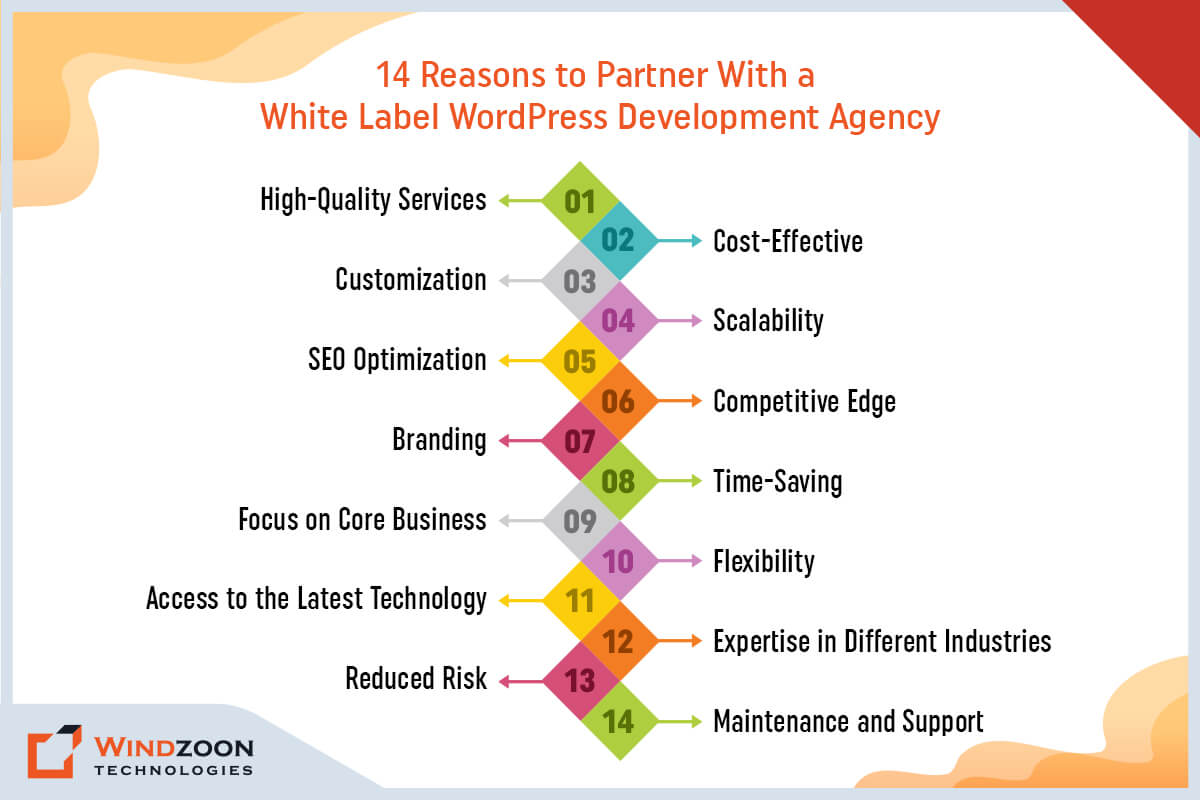
Here are 14 detailed points outlining the advantages that businesses can enjoy when working with a white-label WordPress development agency.

Reasons to Partner With White Label WordPress Development Agency

1. High-Quality Services

One of the biggest advantages of working with a white-label WordPress development company is the assurance of getting high-quality services. These businesses employ a group of skilled workers who focus on WordPress development and have experience creating unique WordPress websites.

They possess the know-how to create websites that are safe, scalable, and search engine optimized. It means that businesses can rest assured that their website is in excellent hands and will be delivered to the highest quality standards.

2. Cost-Effective

Another significant benefit of working with a white-label WordPress development firm is cost-effectiveness. Hiring an in-house development team can be costly due to the costs of wages, incentives, and office space.

You can cut these expenses by entrusting your WordPress development requirements to a white-label business. These companies usually provide competitive rates, and businesses can choose to work with them on a project-by-project or ongoing retainer basis.

3. Customization

White-label WordPress development firms provide customization services that can assist businesses in developing a distinctive online presence that is consistent with their brand and organizational objectives.

These businesses can alter the appearance, usability, and features of a website to suit particular needs. It means that businesses can have a website that is tailored to their requirements and reflects their brand identity.

Read More: Why Choose WordPress for Enterprise Website Development?

4. Scalability

The next benefit of working with a white-label WordPress development company is scalability. These businesses are capable of creating scalable websites that can expand along with a company.

As a business expands and needs additional features or functionality, a white-label company can add these elements to the website. It means that companies can escape having to completely rebuild their website, which can be expensive and time-consuming.

5. SEO Optimization

White-label Companies that specialize in WordPress development offer SEO optimization services that can raise a company’s exposure and search engine rankings.

These companies have experience creating search engine-optimized websites. And therefore, can assist businesses in developing a content strategy that targets their audience and achieves their marketing objectives. Thus, businesses may boost website traffic, lead and sales generation, and exposure to their websites.

6. Competitive Edge

Collaborating with a white-label WordPress development company can give businesses a competitive edge. Because these companies stay up-to-date with the latest technology and trends in WordPress development. Therefore, can help businesses create a website that is modern, functional, and user-friendly. And enable businesses to stand out from their competitors and attract more customers.

Read More: Why WordPress is the Best for Online Store Development?

7. Branding

White-label WordPress development firms may assist businesses to establish their brand by building a website that mirrors their brand identity and values.

These businesses can produce a distinctive style and user experience that distinguishes a company from its rivals. As a result, companies can establish a memorable online footprint that appeals to their target market.

8. Time-Saving

White-label WordPress development companies have the resources and know-how to complete projects efficiently. They have established workflows and processes in place to ensure that projects are completed on time.

It is especially important for companies working on time-sensitive initiatives or with tight deadlines. Businesses can free up time to work on other parts of their operations by outsourcing their WordPress development requirements.

9. Focus on Core Business

A white-label company can help businesses focus on their core business. By partnering with a white-label WordPress development company, businesses can delegate their website development needs to a team of professionals. This frees up their time and resources so that they can provide more focus on their core business functions.

It can help businesses achieve their goals faster and more efficiently, while also ensuring that their website is in good hands and being developed to the highest standards.

Read More: Why Choose WordPress CMS for Your Website?

10. Flexibility

White-label WordPress development companies offer flexible engagement models. It allows businesses to choose the level of involvement they want in the development process.

Whether a business wants to be involved in every step of the process or prefers to hand over the reins entirely, white-label companies can accommodate their needs.

11. Access to the Latest Technology

The fact that white-label businesses have access to the most recent technology and development tools is another important advantage.

They stay up to current with the most recent WordPress updates and plugins. It allows businesses to take advantage of the newest features and functionality. This can assist companies in staying one step ahead of the competition and giving customers a superior user experience.

12. Expertise in Different Industries

White-label Companies that specialize in WordPress development have experience working with companies in a variety of sectors.

They can customize their services to satisfy the particular requirements of each business because they have a thorough understanding of industry-specific requirements. As a result, companies can take advantage of their knowledge of the sector and obtain a website that is tailored to that sector.

13. Reduced Risk

The possibility of making expensive errors can be decreased by working with a white-label WordPress development business. These businesses have expertise in creating websites and are able to foresee potential problems. As a result, companies can steer clear of expensive errors and guarantee that their website will be provided on time and to the highest standards.

14. Maintenance and Support

White-label Companies that specialize in WordPress development provide regular maintenance and support services to make sure that websites remain safe, secure, and search engine optimized.

It covers services like program upgrades, backups, security checks, and troubleshooting. These businesses have dedicated support groups on hand to deal with any problems as they emerge and make sure the website is operating without a hitch.

At last, we will learn some useful tips to choose a qualified white-label WordPress development company.

How to Choose a Reliable White-label WordPress Development Company?

It can be extremely important for your business to select a reputable white-label WordPress development firm. Here are some recommendations for selecting a trustworthy white-label WordPress development company:

  1. Portfolio: Look for a business that has a substantial portfolio of prior work showcasing its WordPress programming skills.
  2. Experience: Pick a business that has worked on projects comparable to yours and has years of experience developing WordPress solutions.
  3. Specialization: Search for a business that specializes in the particular aspects of WordPress development that you require, such as theme modification, plugin development, or website optimization.
  4. Reputation: To evaluate the company’s professionalism, communication, and work quality, study reviews, and testimonials from previous customers.
  5. Team: Make sure the business has a talented team of designers, developers, and project supervisors who will be working on your project.
  6. Communication: Go with a business that encourages open dialogue and teamwork and is prepared to keep you informed and actively involved at every stage of the growth process.
  7. Support: To make sure that your website is secure and up to date, find a business that provides ongoing help and maintenance services.
  8. Cost: Pick a business that provides reasonable prices without sacrificing quality.
  9. Turnaround Time: Confirm that the business can complete your project by the deadline you have set.
  10. Flexibility: To accommodate your budget, timeline, and resources, pick a business that provides flexible engagement models.

By considering these factors, you can choose a reliable white-label WordPress development company that can help you achieve your business goals and create a high-quality website that reflects your brand identity.

Read More: WordPress Website Development Cost: Top 7 Factors to Consider

Conclusion

In the digital era, where your website frequently serves as customers’ first encounter with your brand, it is essential to have a website that not only looks great but also works flawlessly. White-label WordPress programming can help with this.

By working with a white-label WordPress development company, you can create a custom website that is tailored to your brand’s unique needs, without the hassle of starting from scratch.

Windzoon is a prominent WordPress Website Development Agency in India and the United States. Hire WordPress Developers from us who are adept at building customized WordPress solutions for various types of businesses. Get in touch with us or request a quotation to utilize our professional services or learn more about our WordPress Packages.
WordPress Website Development Cost: Top 7 Factors to Consider

In the twenty-first century, websites have replaced business cards & storefronts as the primary form of advertising. Every blogger, business, and nonprofit organization wants to have their website. You’ll also need one if you want to reach out to a broad audience.

WordPress can be helpful in this situation. Most businesses (and people) use this free website builder. However, the word “free” doesn’t convey the whole picture.

So, what exactly does it cost to launch a WordPress website? As a well-known custom WordPress development company, we’ll outline everything you need to know in this blog post regarding the costs of establishing a WordPress website.

No matter your site’s complexity, the fundamental procedures are the same. So, before we go to that procedure, let’s first understand some basics of WordPress website building.

Why Choose WordPress for Website Development?

WordPress is a popular content management system (CMS) that powers many websites online. Here are some reasons why WordPress is a good choice for website development:

Easy to Use: WordPress is user-friendly and easy to learn, even for beginners. You don’t need any programming skills to create a website using WordPress.

Customizable: WordPress allows you to customize the look and feel of your website by using themes, templates, and plugins. You can choose from thousands of free premium themes and plugins to make your website unique.

SEO Friendly: WordPress is designed to be SEO-friendly, which helps your website rank higher in search engine results. You can optimize your website for search engines using plugins like Yoast SEO.

Mobile Responsive: WordPress themes are mobile responsive, meaning your website will look great on all devices, including desktops, tablets, and smartphones.

Large Community: WordPress has many developers, designers, and users who constantly create new themes, plugins, and tools to improve the platform. This means you can always find support and resources when needed.

Security: WordPress is constantly updated to address security vulnerabilities, and you can use security plugins to protect your website from attacks further.

WordPress is a flexible and powerful platform suitable for a wide range of websites, from personal blogs to large e-commerce sites.

After this, we will understand the various aspects of creating a WordPress website.

WordPress Website Creation: What is Required?

1. An Idea

Every WordPress website is born from an idea, whether for a business or a personal blog. So, before you start working on your website, you need to understand every little aspect of your website clearly. For example, what will its purpose be, how should it look, and what features should it have, etc?

2. Domain Name

Your domain name serves as the address for your website; choose one that properly reflects your brand.

3. Web Hosting

Choose between a shared and managed host depending on your requirements and financial situation.

4. WordPress Theme

Although you can continue with the standard WordPress theme, a distinctive theme will make your site stand out.

5. WordPress Plugins (optional)

Plugins are not mandatory. However, they greatly enhance the WordPress site-building process. Browse the plugin directory for the ones that will work for you.

Now, we will understand the truth behind the free WordPress website.

Is it Free to Build a WordPress Website?

Both yes and no. Here, build is the essential word. Let us elaborate.

WordPress.org is a content management system that is both free and open source (CMS). Thus, WordPress is a simple yet effective platform for building websites and blogs. All you have to do to create a decent website on your web browser is download the WordPress latest version.

So starting a WordPress website is accessible in that sense. No enrollment fees, subscription fees, or pricey courses are necessary to comprehend the software.

But once your website is up and running, you’ll undoubtedly want to share it with everyone. And that’s where WordPress expenses start to mount.

Here comes the main question and that is:

How Much Does It Cost to Create a WordPress Website?

How Much Does It Cost to Build a WordPress Website

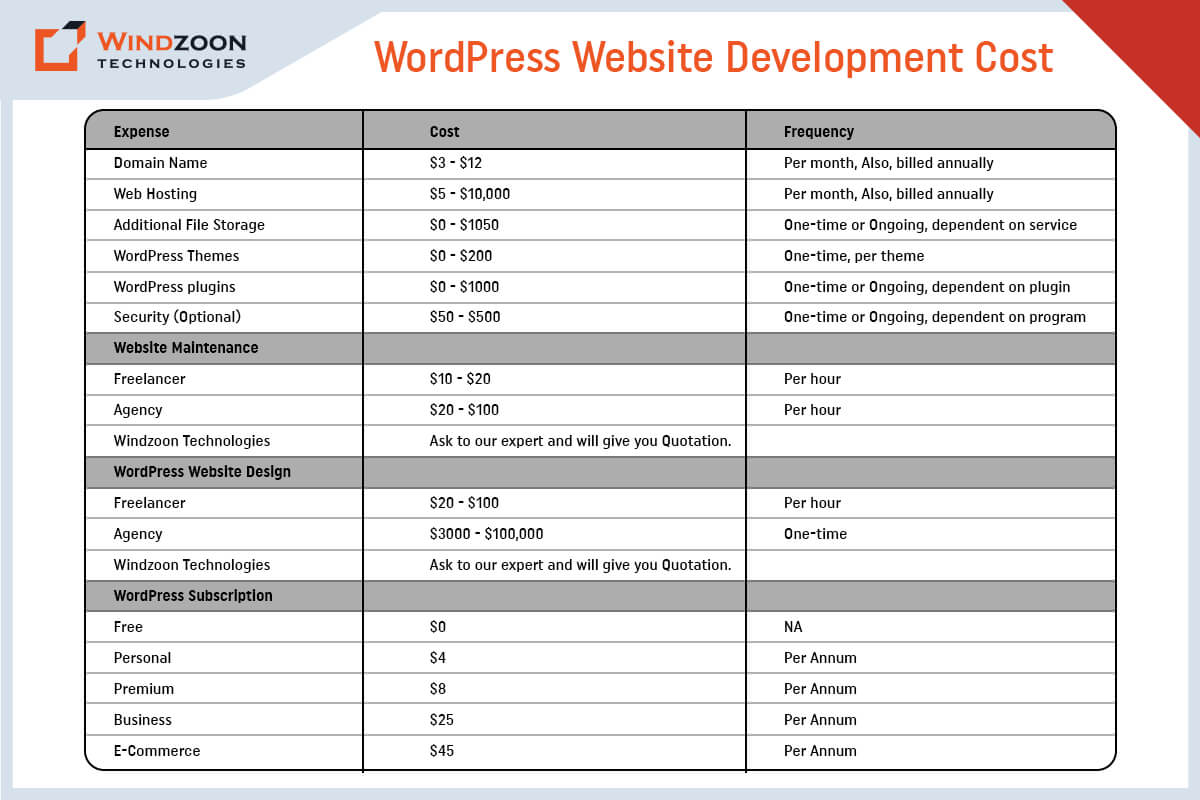
Every business has unique design and development needs, so the price of a WordPress website varies. However, the typical up-front price for a WordPress website is between $100 to $115,000. For WordPress websites, annual maintenance charges range from $75 to $15,000 PA.

[wpdatatable id=10]

Now, we will see what factors affect WordPress website development costs.

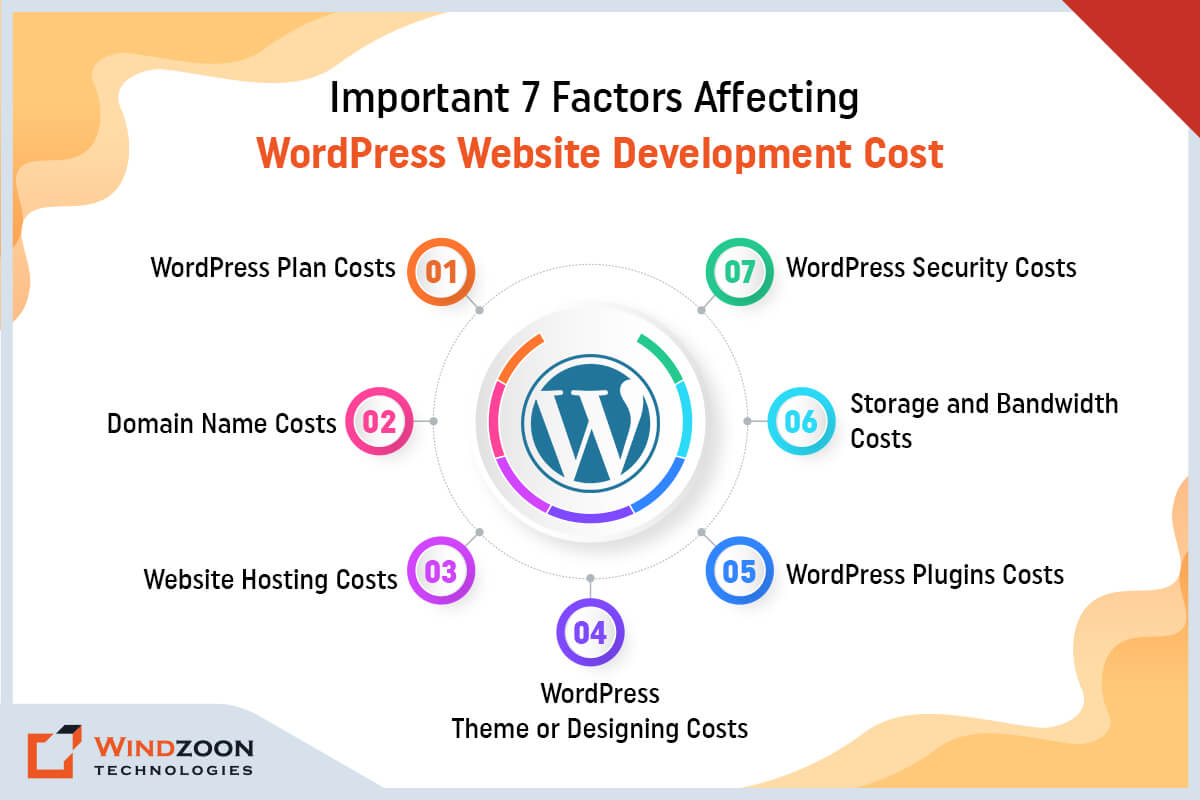
Important 7 Factors Affecting WordPress Website Development Cost

Factors Affect WordPress Website Development Cost

Creating and maintaining a WordPress website does not have to be costly, but there are unavoidable WordPress costs connected with website ownership. Let’s examine the factors affecting the cost of WordPress development.

1. WordPress Plan Costs

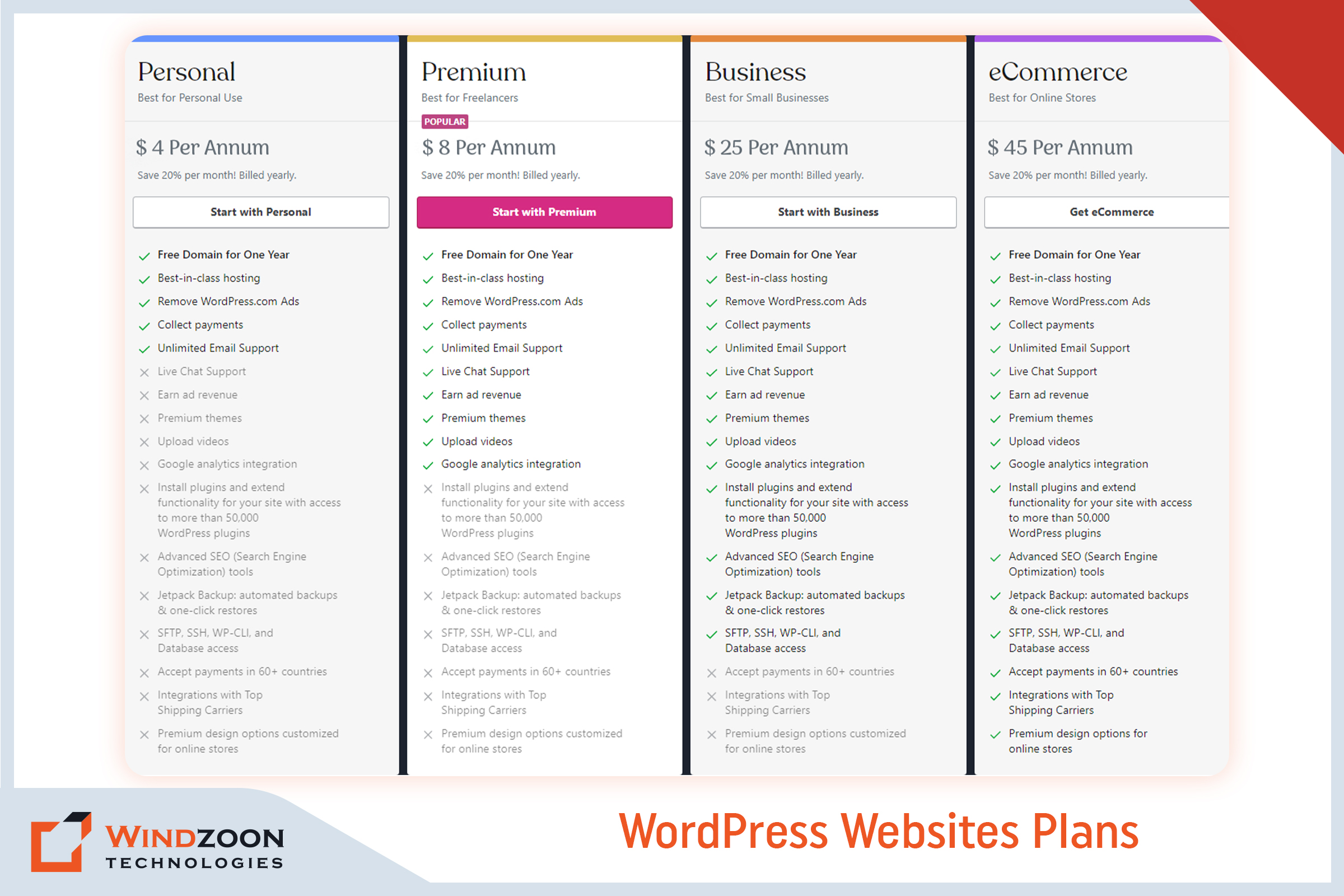
Picking a WordPress plan is the first significant expense you’ll face in calculating the price of a WordPress website. You can pick from the following types of plans:

WordPress Website Plans

The three main WordPress Websites plans are as follows:-

  • WordPress Free – $ 0
  • WordPress Personal – $ 4 Per Annum
  • WordPress Premium – $ 8 Per Annum
  • WordPress Business – $ 25 Per Annum
  • WordPress eCommerce – $ 45 Per Annum

Analyzing the price to create a WordPress website requires caution. The ‘Free’ plan is theoretically free but requires some back-end effort. For example, you must purchase a domain (more on this in the next section).

2. Domain Name Costs

Simply put, your domain name serves as the location of your website (think: [xyz].com or [abc].org). Consider using sites like GoDaddy and Bluehost to purchase a domain name. A domain name typically costs between $3 and $12 per month. If you choose the free plan, you must pay for the domain name. With the WordPress Pro plan, the domain name is complimentary for a year.

3. Website Hosting Costs

Web hosting is the main cost associated with your website. Your website must be housed on a server to be accessible online. Hosting providers rent out server space to websites and usually provide data maintenance and storage services.

There are two main types of web hosting: shared hosting and managed to host.

1. Shared Hosting:

With shared hosting, dozens or even hundreds of other websites share a single server with your website. Plans for shared hosting can start at less than $5 per month. However, there are drawbacks to using shared servers, such as increased security risks and slower website loading times.

2. Managed Hosting

Managed hosting typically includes a dedicated server, which implies your website will be hosted independently. These plans are more expensive, but they often come with better security, faster load times, round-the-clock customer service, and other benefits. You will also get facilitated with automatic backups and upgrades. Plan prices for managed WordPress hosting often start at around $30 per month.

4. WordPress Theme or Designing Costs

WordPress website prices must include costs for web hosting and a domain name. Customization costs after that are mainly up to you (though highly recommended). Themes are an approach to adding your personality to your WordPress website.

A WordPress theme is a downloadable template that affects how your site appears and feels. Your theme can determine everything from the backgrounds and colors to the general layout.

If budget is an issue, there are plenty of free themes. However, you might consider purchasing a premium theme if you want additional features and a more professional look. The average price of paid themes ranges from $20 to $1,000. You can also upgrade your WordPress theme or hire WordPress developers to tweak it later.

5. WordPress Plugins Costs

Plugins allow you to improve your WordPress website further. Like an installable program, a WordPress plugin expands the functionality of your website.

A plethora of free plugins enables a completely personalized WordPress experience. You can choose premium versions, just like themes, to add another degree of refinement to your site. Paid plugins are available as one-time purchases or monthly subscriptions, and their prices range from $10 to over $500. Additionally, some plugin updates may incur extra costs depending on the plugin.

For some instances of what plugins do, start exploring prominent paid and free options, such as

All-in-One SEO – It assists you in increasing the value of your SEO through XML sitemaps, social media integration, and on-page analysis.

WooCommerce – Creates an online store from your WordPress website.

UpdraftPlus – Produces complete backups of your website.

Page Builders Plugins: Build and customize your page layouts in WordPress.

6. Storage and Bandwidth Costs

Another cost consideration is your website’s storage and bandwidth. It typically ranges from $0 to $650 for one-time or continuing services. Given that each website is unique, it is impossible to determine the price.

For instance, a WordPress blogger won’t use as much storage space. Conversely, an eCommerce site will require more storage as it uploads its product catalog.

When you create a WordPress website or hire a website development company, you must include this cost in your budget. Hosting your WordPress site will cost extra if it has many images, videos, products, or other materials.

7. WordPress Security Costs

Your website’s security is one of its most crucial components. You want visitors to feel secure browsing or shopping on your website. You must add security to your page to entice visitors to stay on your website.

You should obtain an SSL certificate, a widely used solution for protecting websites. It keeps the user’s internet connections safe. Although you can sometimes pay a one-time fee for security, many security systems demand a monthly fee.

Usually, a simple protection plan will cost between $50 and $500 per year. But you can easily spend up to hundreds yearly on more sophisticated security features.

With this, we have come to the last important question which is:

How to Avoid Overspending While Developing A WordPress Website?

The best advice for small business owners is to start with what they can manage and afford. You don’t have to install every possible feature immediately, and you can start modestly before selecting what features to add later. When you’re just starting, you should use the free themes and plugins available and only consider investing in custom programs if you have the budget.

Outsourcing is another strategy to prevent overspending on your website’s development. There are numerous options to outsource web development, which all boils down to picking the best choice for your goals and budget.

Working with a WordPress developer is the best option; you don’t have to spend a fortune to start. The top developers would advise you to start by concentrating on the most crucial aspects of your website before scaling it as your traffic and sales increase.

Now, we will understand the process of building a WordPress website.

How to Build a WordPress Website?

In another blog, we discussed the entire process of creating a WordPress website. So, let’s confine ourselves to a quick summary here. Start your WordPress journey by following these instructions.

10 Steps to build a beautiful WordPress website

  1. Choose a WordPress plan( Choose WordPress.org or WordPress.com)
  2. Setting up a domain name and hosting provider for your site
  3. Install the WordPress software
  4. Select a theme that best suits your purpose
  5. Adding posts and pages to your WordPress site
  6. Customizing your website as per your requirements
  7. Install plugins to add functionality to your website
  8. Increase your page loading speed by optimizing your website
  9. You can get inspiration from prominent WordPress websites
  10. Don’t forget the marketing of your site

Conclusion

Developing a WordPress website can be a gratifying and satisfying experience, but only if the cost of doing so does not burden your project and business goals. This is why it’s crucial to work with a skilled WordPress developer. It could completely alter the course of your website:

One of the benefits is that it can make your website an appealing platform for your products & services.

Two, it can assist you in maintaining your website up to date.

Three, it can assist in keeping costs low without compromising the website’s quality.

Consider working with Windzoon Technologies if you’re uncertain of where to start. We have more than 10+ years of expertise in providing WordPress development services for various business concepts. Hire WordPress Developers from us and relax knowing your project development is in good hands.

Please contact us if you would like to obtain a quote or to learn more about our WordPress website development packages.

Enterprise WordPress Development: 9 Tips for Successful Growth

Enterprise businesses require a reliable and scalable web presence more than most organizations do to stay competitive. To that end, many large businesses have historically looked to pricey web solutions requiring exclusive support contracts as a quality assurance measure. Enterprise platforms are often selected because they allow for tailoring development and marketing strategies specifically to the needs of large organizations.

But is it necessary that only expensive web solutions will provide a quality guarantee while others won’t? Because this isn’t the case, especially with regard to WordPress.

The fact that WordPress has been around for more than ten years and now powers 43.0% of the web makes it clear that even the biggest companies need to pay attention to it.

Currently, WordPress powers many Fortune 500 businesses, including Xerox, Sony, Tesoro, The Walt Disney Company, Best Buy, and many more. Your business deserves a custom WordPress solution that is tailored to meet its unique needs and expectations. You can also join this league by working with a reliable Custom WordPress Development Company

In this article, we’ll discuss the unique requirements of larger organizations and examine the many benefits of using WordPress for enterprise businesses.

What is an Enterprise?

“Enterprise” is obviously a generic term, but when applied to a specific type of business, it generally refers to a large, usually multinational organization. These organizations typically consist of separate organizational parts with separate budgets and goals.

Although there are many different definitions of what an enterprise business is. But when it comes to web technology, most enterprise websites need to be able to handle a lot of traffic, especially if they are media or e-commerce sites. It is also crucial that website development is aligned with the organization’s business objectives to ensure the site effectively supports overall goals.

Now, let’s move toward our next question, that is:

6 Must-have Features in Every Enterprise CMS Website

6 Must-have Features in Every Enterprise CMS Website

Based on our experience as the preferred WordPress Website Development Company, we have identified a few key criteria for any CMS to serve as an enterprise-grade solution. High code quality is essential for ensuring reliability, security, and standards compliance in enterprise environments. Additionally, custom websites tailored to enterprise needs are crucial for providing the flexibility and scalability required for business growth. They are listed below:

1. Easy Administration

An enterprise needs a CMS that provides a variety of user-friendly and effective administrative tools in a single software package. Site administrators must be able to manage notifications, add assets, track scheduled content, and adjust plugins without switching between different programs.

2. Workflow Controls

Enterprises require a CMS with efficient workflow controls. As they are one of the most useful components of a good CMS. In essence, they offer your marketing team a planned environment for content creation. For ex.: Writers produce the content for your website, and editors edit it before sending it to the company’s legal department for a final review. Every team member has a profile with the proper permissions to speed up workflow. Managing access permissions is crucial to ensure efficient and secure workflow, especially in enterprise environments where multiple users and roles are involved.

3. Multi-Platform Capabilities

Enterprises are bound to grow their customer base over time. Having a flexible website solution from the start will allow them to launch various mobile applications, web applications, and websites as they grow. For enterprises managing multiple websites, leveraging multisite functionality enables centralized control and streamlined management from a single platform, making it easier to scale and customize as needed. To meet any of these requirements, a CMS must be capable of supporting multiple platforms.

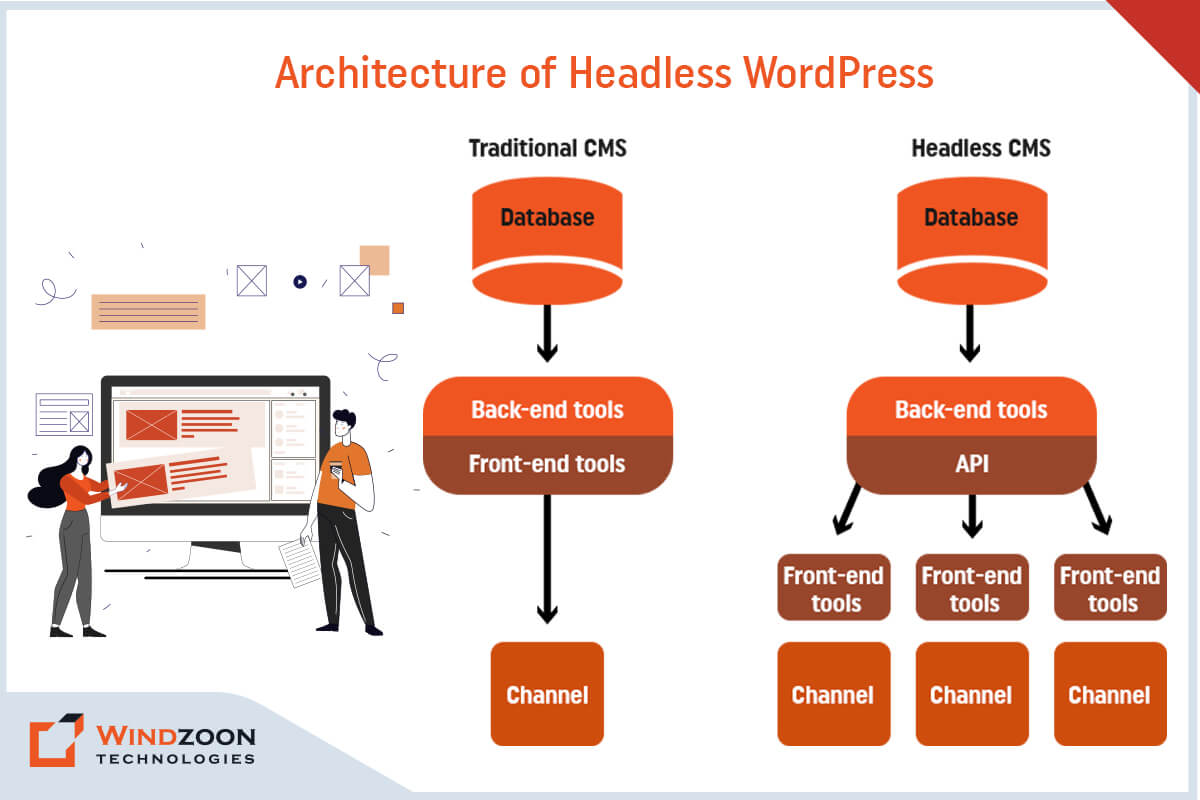
4. Headless Content Management

Enterprises are under increasing pressure to support omnichannel digital experiences across a wide range of devices. As a result, they require a headless CMS that can store frontend agnostic content and allow marketing teams to optimize and deliver it on whatever devices or channels their audience requires.

5. Detailed Analytics

Any online marketing campaign’s success depends on how much the marketing team is aware of its target market and potential customers. Enterprises are well aware of this fact. As a result, they need a CMS that either has popular analytics tools built in or can integrate the necessary plug-ins.

6. Robust security

Serious security lapses have catastrophic effects on businesses of all sizes. Therefore, enterprises need a CMS platform that prioritizes security and can be quickly updated to fix vulnerabilities as they appear. Implementing advanced security measures, such as two-factor authentication, is essential to protect sensitive enterprise data from evolving cyber threats. Anything less is simply unacceptable.

After learning about the enterprise’s expectations from the CMS, let’s see what exactly WordPress CMS is.

What is the WordPress CMS?

WordPress has long been recognized as a blogging platform. Or a system that offers small business owners and aspiring entrepreneurs incredible flexibility. Although it still offers small businesses reliable solutions, WordPress has grown to be much more.

WordPress for big enterprises includes a slew of features tailored to enterprises of all sizes. It is built using web technologies, which are extremely scalable. Professional WordPress web design services can deliver scalable and secure solutions for large organizations, ensuring the platform meets enterprise-level demands. With WordPress, businesses can also create a custom theme that reflects their unique branding and functional requirements, providing a tailored and brand-consistent online experience. WordPress is one of the most popular content management systems (CMS), so there are a lot of WordPress service providers to choose from

Thanks to the abundance of plugins available, it shouldn’t be difficult to customize the default enterprise WordPress platform to deliver the precise experience you need.

Now, Let’s learn about some of the myths related to WordPress for Enterprise Website Development.

What are the Common WordPress Misconceptions for Enterprise Website Development?

Common WordPress Enterprise Development Misconceptions

While WordPress is an excellent platform for many reasons, many people have misconceptions about its limitations and capabilities. Successful enterprise WordPress projects require technical expertise to ensure security, scalability, and reliability. Here are a few examples of common WordPress enterprise development misconceptions:

1. WordPress is not a True CMS and is Only for Blogs

As previously stated, WordPress powers nearly 42% of all websites, implying that it is capable of much more than just blogging.

2. WordPress is not Very Secure

Although there may be some risks associated with third-party plugins, the core system is actually very secure. Besides, WordPress has also recently begun to invest in rapid security releases, which are managed by a team of 50 experts. Regular security updates are essential to protect enterprise websites from emerging threats and ensure ongoing website security.

3. At the Enterprise Level, Open-source is not Trustworthy

This is untrue because large websites like Facebook and Google also rely on open-source software to power their technology.

4. WordPress Leaves you on your own and Provides no Support

It is not true. Due to its sizable open-source community, developers and contributors are constantly producing fresh plugins, themes, and features in addition to responding to user inquiries and fixing bugs as they appear. For enterprise WordPress sites, ongoing support is available to ensure continuous website maintenance, security updates, performance optimization, and feature enhancements, keeping your site secure, fast, and up-to-date after launch.

With this, we have come to the main topic of our discussion and that is:

9 Benefits of WordPress for Enterprise Website Development

Compared to other content management systems, WordPress is easier to use, cost-effective, and more flexible when it comes to customizing enterprise-level websites. Some of the exceptional benefits of WordPress are as follows:

1. Robust Security

Of course, an enterprise CMS needs to be completely secure. It guarantees the security of both user and organizational data. To achieve this, robust security measures are implemented, including vulnerability assessments, regular updates, and industry-leading security practices to protect against emerging threats.

WordPress meets and even exceeds these requirements. WordPress provides regular updates and security releases to protect users from common hacks. You can further secure your site by utilizing security plugins, as well.

While WordPress handles some minor core updates automatically, major updates and server updates frequently require manual intervention. An enterprise company can lessen its technical workload and risk of error by selecting a managed WordPress host rather than a generic host.

2. Third-Party Tools

With WordPress, you have access to a wide range of third-party tools that are compatible with your setup. This includes the ability to integrate marketing automation tools, which can enhance website functionality and support enterprise marketing strategies. As a result, your enterprise business can quickly add features and update the website without having to spend money on pricey custom solutions. There are lots of free tools and paid plugins with extra support available for enterprise businesses!

3. Substantial Flexibility and Scalability

The most crucial factors for businesses in general, or for enterprises in particular, are flexibility and the ability to grow over time. WordPress provides that with the aid of thousands of highly customizable themes and more than 54,000 plugins.

WordPress enables scalable solutions that can handle high-traffic websites and complex enterprise requirements, making it ideal for organizations with growth ambitions. Additionally, innovative solutions can be implemented to address unique business challenges, ensuring your website remains competitive and adaptable.

With respect to other CMS, this is a sizable number—possibly the largest. There’s a good chance that everything you need for your website is already available. And even if it isn’t, you can speak with a qualified WordPress website development company to create a unique solution that is completely tailored to your needs.

4. Media Management

Media management is an important aspect to consider when designing an enterprise website. For instance, whatever solution you choose must make it simple to manage organizational documents, visual media like photos and videos, and even audio.

Fortunately, WordPress allows you to upload (and manage) almost any type of media. However, managing media is not limited to the back end. Using WordPress’ built-in functionality, you can also display it conveniently on the front end in places like pages and posts.

5. Industry Support and Integration

Beyond user support, many major industry players are capitalizing on WordPress’ popularity. These companies, which include software providers and marketing services, provide integrations and support that benefit many users. In addition, collaborating with hosting partners such as WP Engine and Pantheon ensures high performance and security for enterprise WordPress sites. Enterprise-grade hosting solutions also offer scalability and dedicated support, making them ideal for large-scale or high-traffic WordPress websites.

Plugins are the most popular method of industry support and integration, and they are an inherent feature of WordPress. These specific pieces of software work to enhance WordPress’ functionality.

In fact, these plugins are specifically designed for WordPress by companies like MailChimp, Constant Contact, Buffer, and even Google Analytics. It allows you to easily integrate these companies’ services into your website, which improves UX and site flexibility.

6. Multisite Management

Operating an enterprise website entails managing multiple subdomains or microsites and restricting access to a select group of team members.

A user role in WordPress called “Super Admins” gives users the ability to build networks and control user permissions across numerous sites. Utilizing a multisite network with WordPress multisite allows you to efficiently manage multiple websites from a single WordPress installation, providing centralized content management and streamlined workflow across all sites. With this, you can safeguard your website and its contents, especially sensitive data, from unauthorized access. We have worked with many enterprise clients to implement and manage complex WordPress multisite environments, ensuring scalable and secure solutions for large organizations.

7. Multilingual

Large corporations must have a website that customers from all over the world can access. WordPress supports more than 100 languages, which means you can effectively communicate with a global audience.

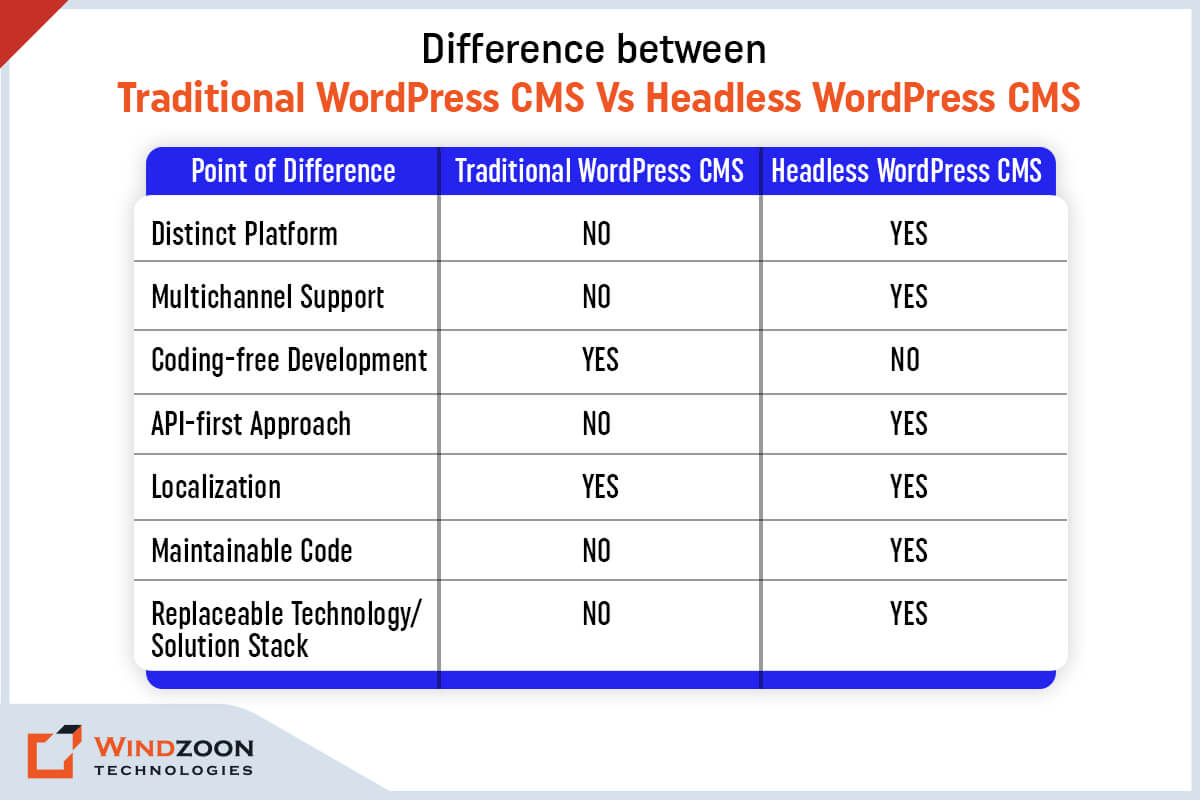
8. Headless Functioning Capabilities

Headless is a new trend in enterprise website development. It’s a method of separating the back end of the CMS from the front end. By doing this, you can create a unique user interface based on a framework, such as JavaScript, and link it to the back end (WordPress) using an API.

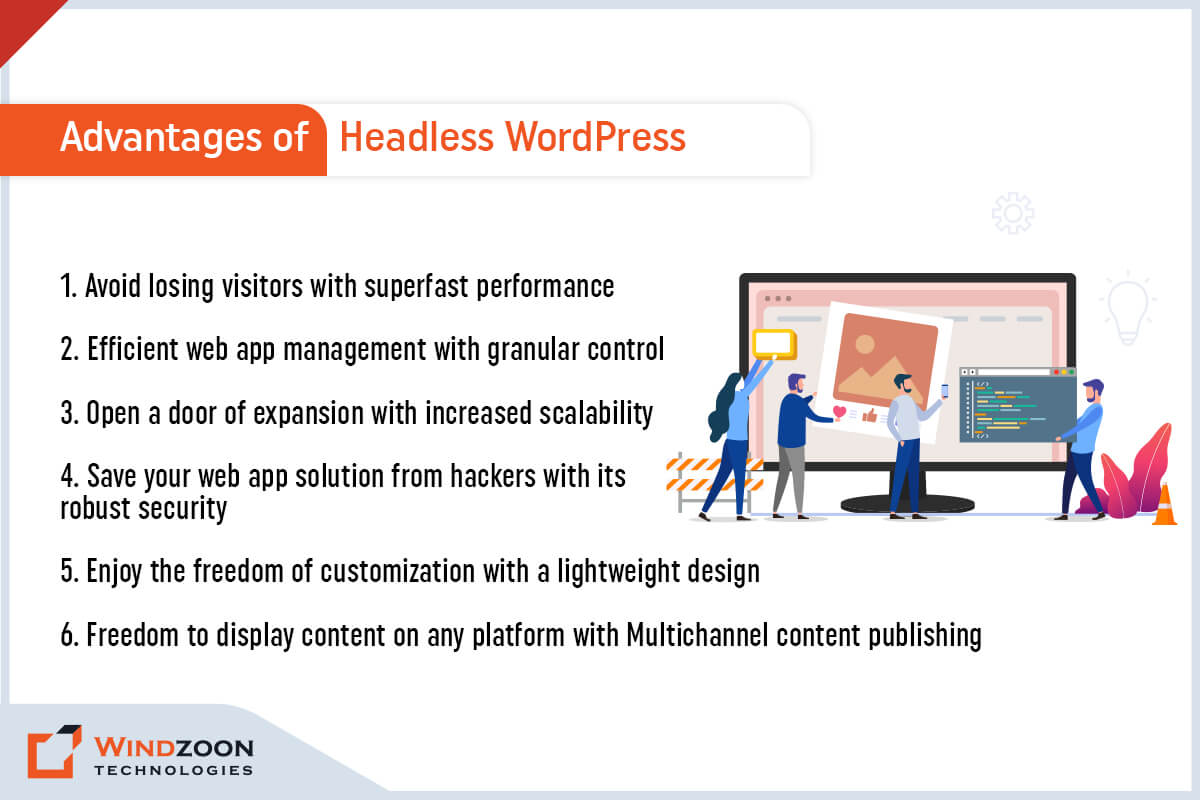
As a result, you get the best of both worlds: remarkable content management and a more responsive front end.

The REST API in WordPress allows it to support this approach out of the box. Not only that, but the API can populate almost any other object with content, including mobile apps.

As a result, headless can transform WordPress from a basic website to an omnichannel publishing tool. If you are interested in this headless concept and want to know more about it, then read our Complete Guide on Headless WordPress Development.

9. SEO Friendly

Another technical benefit of WordPress is its SEO-friendliness. WordPress naturally works well in this area, though you might need to install a plugin to make managing on-page SEO a little simpler (the Yoast SEO plugin and All-In-One SEO Pack are two popular options that come to mind). WordPress sites can be optimized for search engines by using proper site structure, clean code, and SEO plugins, which help improve visibility and ranking in search engine results. It is a key selling point for enterprise sites with potentially enormous amounts of content.

Now, let’s get to know about some easy steps to develop a WordPress website for an enterprise.

How To Develop Enterprise Websites With WordPress?

Here are the six steps you must follow to make WordPress enterprise-ready.

  • Step 1: Select a Reputable WordPress Host, such as WordPress VIP, to ensure high-security, enterprise-grade managed hosting.
  • Step 2: Configure Plugins for Advanced SEO and leverage plugin development for custom features and feature enhancements.
  • Step 3: Add multilingual support to your enterprise WordPress site and integrate an online store for seamless e-commerce functionality.
  • Step 4: Add performance-enhancing plugins and implement performance optimization strategies to optimize WordPress for speed, scalability, and reliability.
  • Step 5: Strengthen the security of your enterprise WordPress site with custom themes, custom WordPress solutions, and tailored enterprise solutions.
  • Step 6: Improve the publication process by assessing your existing tech stack to develop a customized implementation plan and ensure minimal downtime during data migration.

WordPress is an excellent CMS for large organizations and complex solutions. It is expandable, secure, and provides practical and simple solutions to complex needs. However, these features would never suffice for enterprise websites without comprehensive WordPress enterprise solutions and enterprise WordPress development services.

Enterprises require continuous website monitoring, proactive maintenance, and ongoing maintenance, which are essential services for enterprise sites. Performance monitoring and performance optimization are critical for maintaining WordPress performance, security, and scalability. Specialized enterprise WordPress development agencies have senior developers and designers with extensive experience in project management, data migration, and delivering enterprise solutions for enterprise clients. They also provide feature enhancements, plugin development, and custom features to extend website functionality, as well as custom themes to align with enterprise branding.

Maintaining a strong digital presence is vital for enterprise clients, and working with a WordPress VIP Gold Partner ensures access to the highest level of expertise and support within the WordPress VIP ecosystem. Our experience with enterprise clients includes developing custom WordPress solutions, integrating online stores, and optimizing WordPress websites for high performance and scalability. We deliver enterprise WordPress development services tailored to your unique business needs.

If your company requires WordPress Development services, partnering with Windzoon Technologies is a wise decision. We are one of the best and most remarkable WordPress Development Companies in India, recognized as a WordPress VIP Gold Partner.

Hire WordPress Developersfrom us who are experienced in creating complex and industry-specific enterprise websites. Visit us at wzadmin.windzoon.in/ to or to learn more about our WordPress website packages

12 Awesome WordPress Development Trends to Apply in 2023

Due to the dynamic nature of the digital world, there are occasional shifts in trends. As a business, you must adapt to these latest trends to keep up with the ever-increasing competition.

Because if you don’t, then your web solutions, which right now appear to be state of the art, might be outdated later. And it will harm your company’s reputation and customer base.

WordPress is an open-source platform that is also one of the most widely used web development platforms. Individuals and businesses use it to build highly customizable websites and online stores.

The primary advantage of WordPress is that the platform is constantly evolving with new upgrades and technological trends. And to keep pace with these changes, working with a Custom WordPress Development Company is always a smart move. In this blog post, we have explained the top WordPress web development trends for 2023.

WordPress Usage Statistics

You must be familiar with names like BBC America, TechCrunch, Sony Music, The Walt Disney Company, and Katy Perry. Do you know what they all have in common? A WordPress website. They all have used WordPress for developing their websites.

WordPress is the most well-known website builder and a widely used content management system.

To better understand this, let’s look at some statistics.

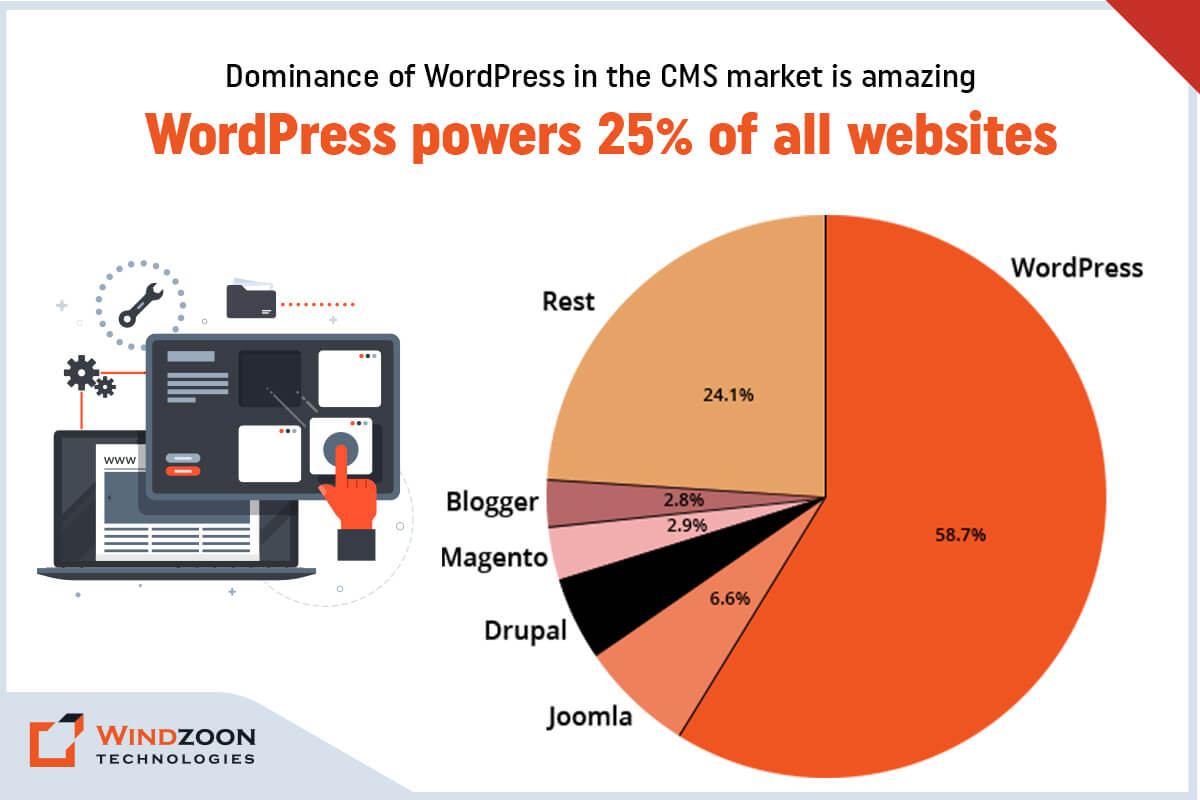
  1. Around 43%of websites on the internet are powered by WordPress.
  2. WordPress holds 63.9% of the CMS market share.
  3. WordPress powers 25% of the top 1000 websites.
  4. The most recent version of WordPress has been downloaded over 48 million times.
  5. WordPress has been the fastest-growing CMS platform for the past 11 years in a row.
  6. The WordPress plugin directory currently contains 60,031
  7. The most widely used eCommerce plugin is WooCommerce.
  8. The WordPress theme directory currently contains 10,273

Now, let’s understand why one should consider using WordPress for website development.

Why WordPress is Important for Website Development?

WordPress is an open-source and powerful content management system used by millions of people worldwide. With a wide variety of themes and plugins, WordPress is very customizable. It helps developers to create feature-rich bespoke websites that cater to the business’s needs.

Here are five reasons why you should use WordPress for web development and design:

  1. The first point to mention is that it is free and open source. Anyone, from bloggers to business owners, can use WordPress to tailor their service to their intended audience.
  2. It is fully customizable with a plethora of themes. WordPress Themes give you the ability to make websites with various designs & styles. It is a significant benefit for non-techies.
  3. Since it is scalable, you can expand your website using the WordPress plugin directory to add the features you want. WordPress provides both free and paid plugins. With plugins from every specialized area you require, you will never run out of options.
  4. WordPress websites are search engine optimized. Additionally, you can find an SEO plugin (such as Yoast SEO) that offers recommendations for your website’s content optimization, including suggestions for the meta title, metadata, H1 titles, and content length.
  5. It supports a range of media types, including images, videos, audio, and gifs. If you want to display media files, you can either upload them or insert their URLs.

With this, we have come to our primary subject of discussion and that is:

top-wordpress-development-trends

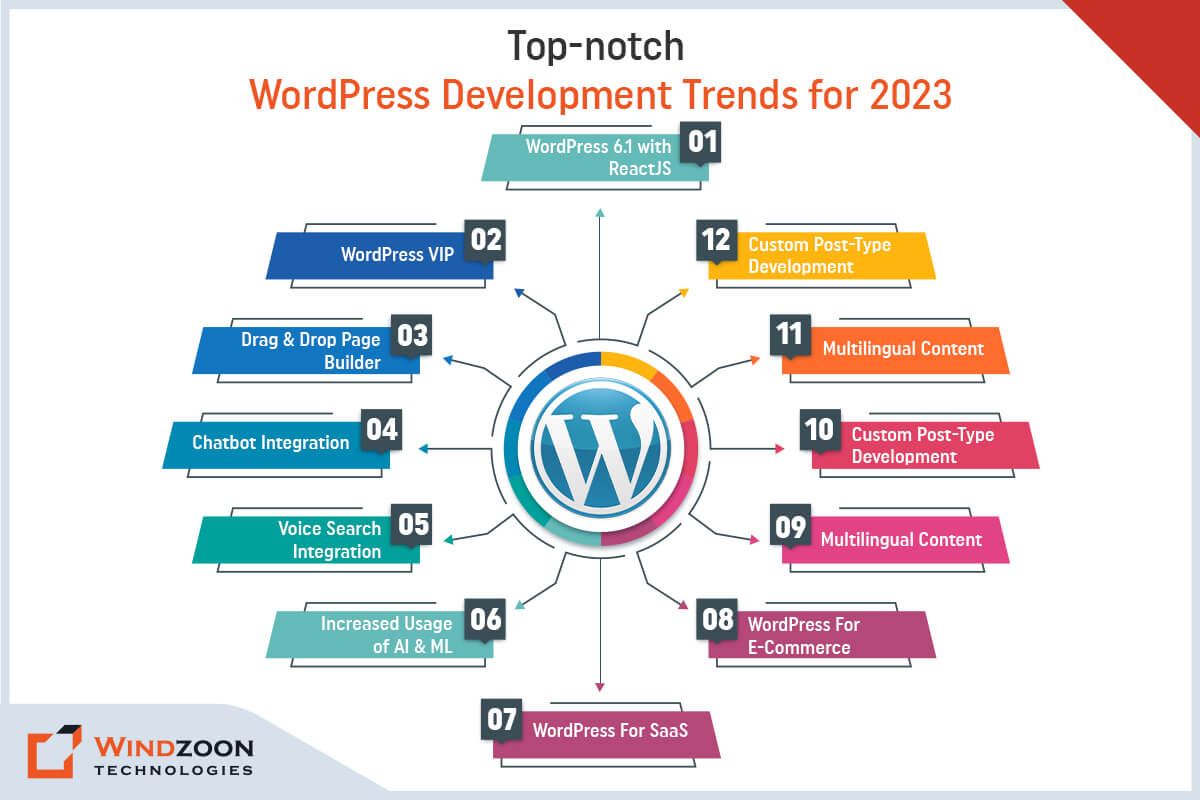
Top-notch WordPress Development Trends

Here are some of the top WordPress website development trends for 2023, including brand-new use case scenarios, features, and breakthroughs to this well-known content management system.

1. WordPress 6.1 with ReactJS

wordpress6.1-with-reactjs

WordPress is a popular Content Management System (CMS) for creating simple to complex websites. It continues to release version updates on a regular basis, and the most recent version, WordPress 6.1, was released in November 2022.

WordPress 6.1 now supports the use of ReactJS as a frontend technology alongside WordPress as a backend platform. You’re probably wondering why ReactJS was chosen for WordPress 6.1.

The answer is that ReactJS has many advantages, including virtual DOM, code reuse, and others, which make it easier to develop a website or web application. It enables greater flexibility when building intricate WordPress websites.

However, to start building a WordPress website with React you might require the help of a competitive WordPress Development Company.

If you want to know more about WordPress with ReactJS (or we can also say headless WordPress), read our Complete Guide: How to Develop Advanced Headless WordPress Website with React.

2. WordPress VIP

wordpress-vip

WordPress usage is now not just limited to small and medium-sized businesses. If you’re a big enterprise looking to develop a WordPress website, WordPress VIP is the way to go.

Unlike WordPress.com, which offers shared hosting, WordPress VIP is designed with enterprises and high traffic in mind. It is the fastest and most secure managed hosting platform, with strict coding standards.

The features and capabilities that come with WordPress VIP include efficient content management, analytics, security, performance features, and others.

Furthermore, with WordPress VIP, you will receive an SSL certificate, anti-spam features, built-in spam optimization, and round-the-clock malware monitoring and scanning.

If you have an enterprise website development project, investing in WordPress Development Services will allow you to reap the benefits of the WordPress VIP platform.

Utilizing WordPress VIP is now a significant WordPress web development trend that satisfies the demand of businesses looking to revolutionize and scale their operations.

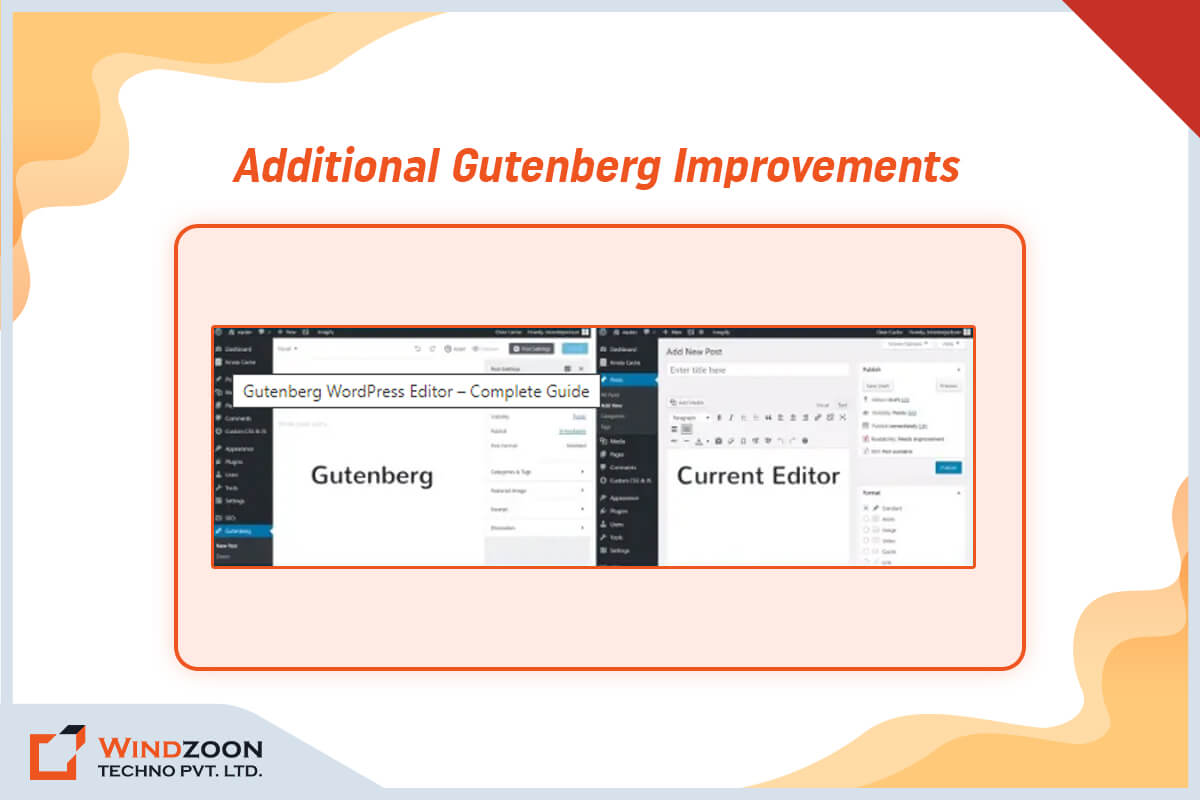
3. Additional Gutenberg Improvements

improvement-in-gutenberg

WordPress’s most recent Gutenberg Project follows a four-phase plan that reimagines how content is created on the web. The objective is to offer the audience simple, ready-to-use tools for creating an online presence from the beginning.

Currently, there are four phases of Gutenberg. They are easy editing, fluid customization, cooperation capability, and multilingualism.

Easy editing and complete site customization are two changes that are already apparent from the first two phases. Additionally, the WordPress 6.1 upgrade added new enhancements for accessibility, block editing, and making unique layouts.

The following two phases – collaboration and multilingual support – will make content management considerably easier for website owners. We anticipate their inclusion in the forthcoming releases.

4. The shift of Larger Enterprises towards WordPress

increased-usage-by-enterprise

Originally a haven for bloggers and small enterprises, WordPress has transformed into the leading content management system worldwide, earning the trust of even substantial corporations.

Esteemed enterprises such as BBC America, Vogue, The Walt Disney Company, and even The White House utilize it for their digital platforms. This is largely because WordPress is not only user-friendly and simple to customize and maintain but also SEO-optimized and capable of managing vast web traffic.

Moreover, WordPress boasts a vibrant community composed of developers, freelancers, hosting services, and agencies, all of whom play a vital role in perpetually enhancing the platform.

Given its plethora of plugins, themes, and bespoke solutions, WordPress has emerged as the go-to choice for companies seeking to bolster their online presence.

5. Drag and Drop Page Builder

drag-drop-page-builders

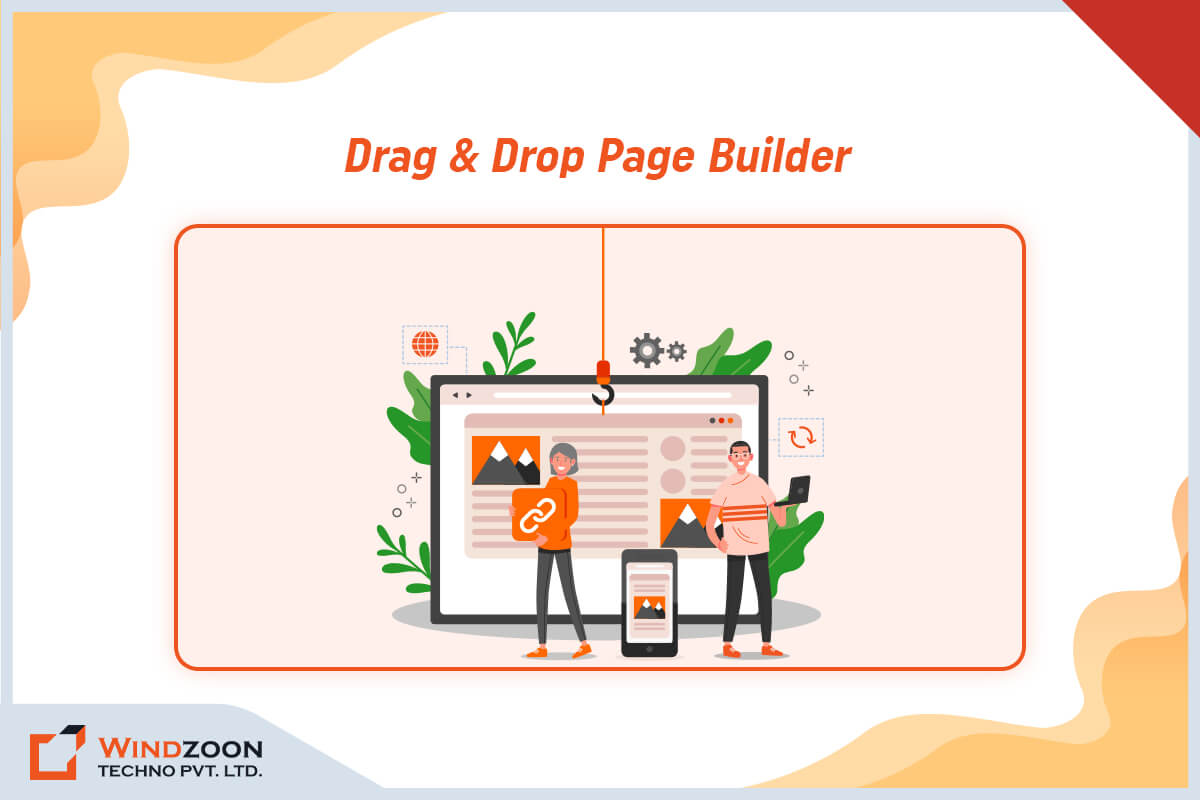
Page builders are one of the significant trends in the WordPress web development platform. They enable you to create a customized website solution that is tailored to your specific business needs. They make it possible to create a website even without prior technical or coding knowledge.

Page builders allow developers to quickly edit and customize the layout of your page. Furthermore, they provide developers with a live view of how that specific page appears on mobile devices and the front end. As a result, they can easily create a unique website using the drag-and-drop functionality of a page builder.

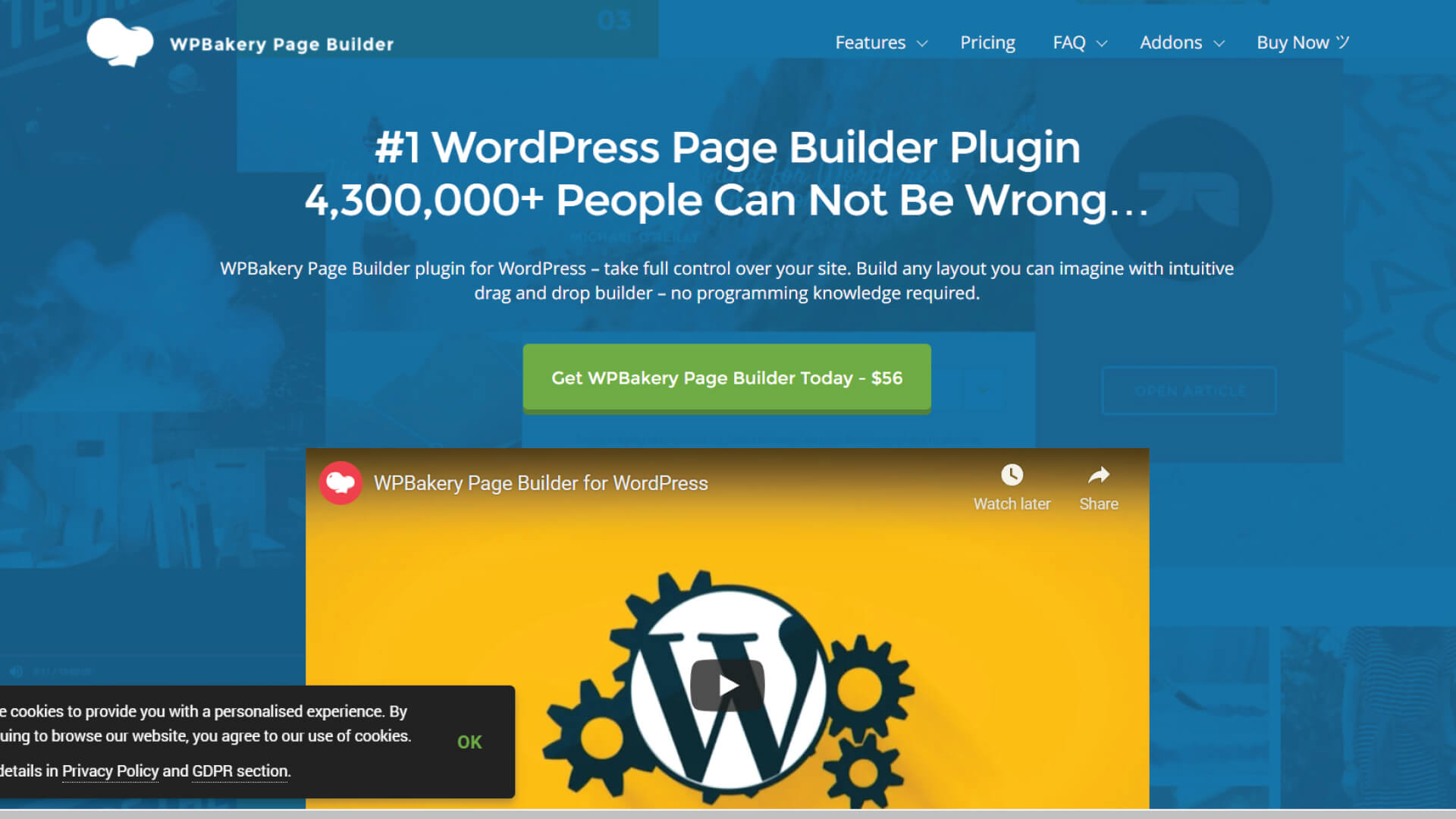
However, before using any page builder for your website, remember to check its compatibility, builder type, and responsiveness. The most recent drag-and-drop plugins for WordPress are Elementor, WPBakery, and Genesis.

If you are interested in learning more about WordPress plugins for Page Building then read our detailed article on the 10 Best Drag and Drop WordPress Page Builders Plugins Comparison.

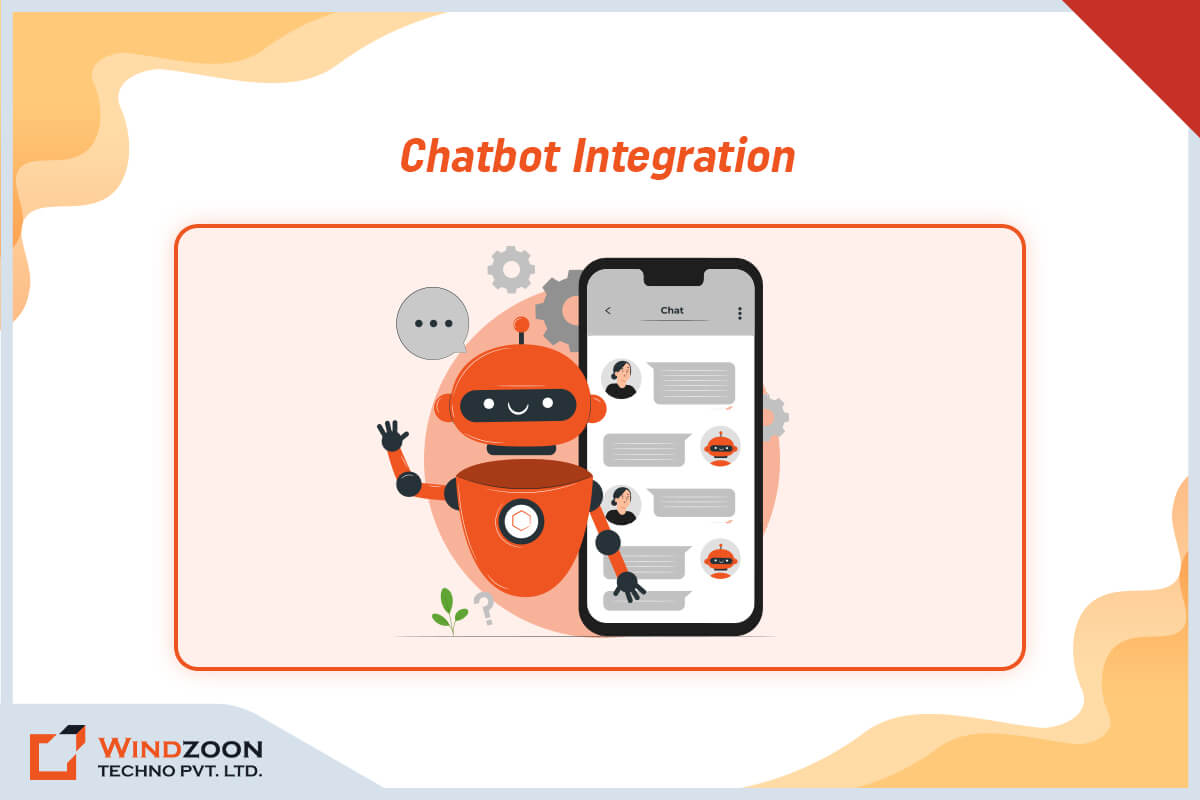
6. Chatbot Integration

chatbot-integration

Chatbot integration is one of the major WordPress trends that will assist you in effectively resolving customer queries. It facilitates communication between humans and machines. This enjoyable and quick method of answering questions will free up valuable time that you can devote to other business activities.

Businesses that invest in custom WordPress development can use chatbot integration to provide quick and efficient customer support. It also allows them to respond to customer inquiries more quickly.

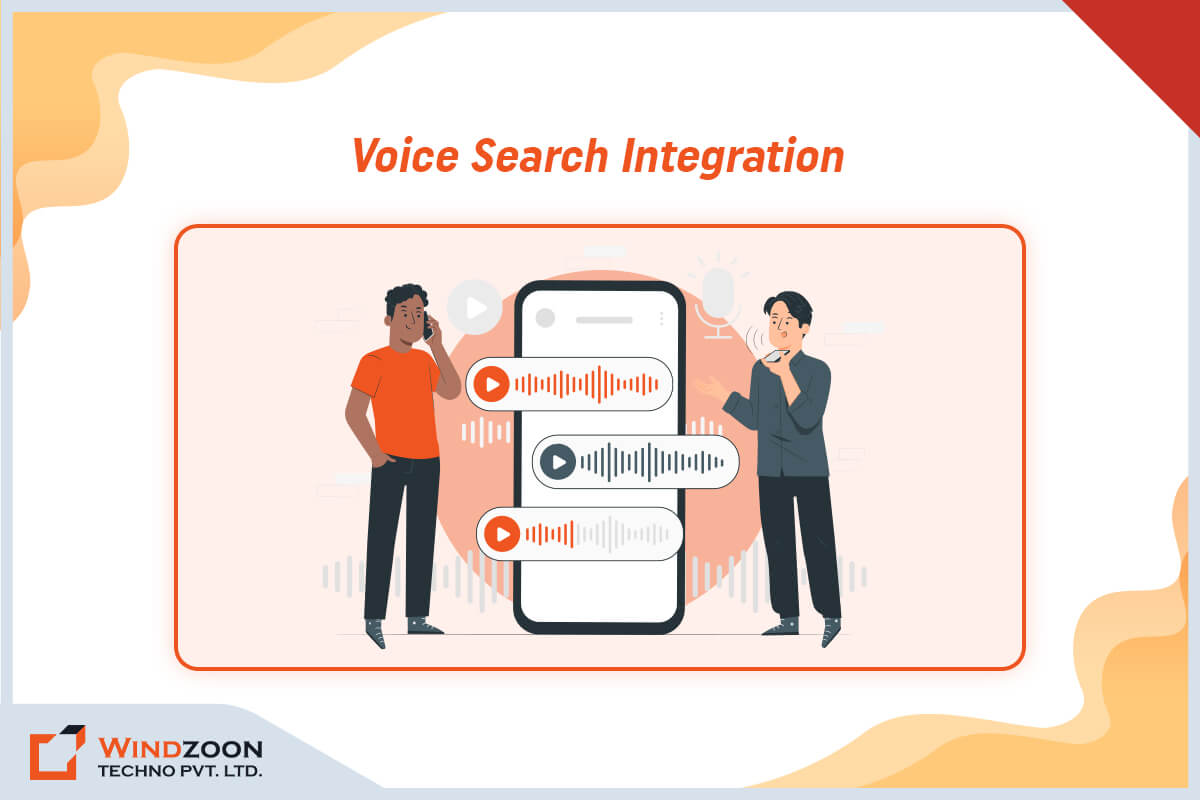
7. Voice Search Integration

voice-search-integration

Customers in the digital age seek convenient options to make website exploration easier. One of the fastest-growing WordPress web development trends is voice search optimization. Due to this, customers no longer have to type their queries because they can get results with simple voice commands.

Voice Search will be even more useful in an online store, where a site visitor can search for and explore products simply by using voice commands.

The popularity and success of voice search assistants such as Siri and Alexa encourage business owners to incorporate such a concept into their WordPress websites. And a WordPress developer can help you achieve your goal of incorporating such a significant trend into your website.

If you want to know how to optimize your website for voice search then read our detailed article on What is Voice Search? & How to Optimize it That Benefits Your Business?

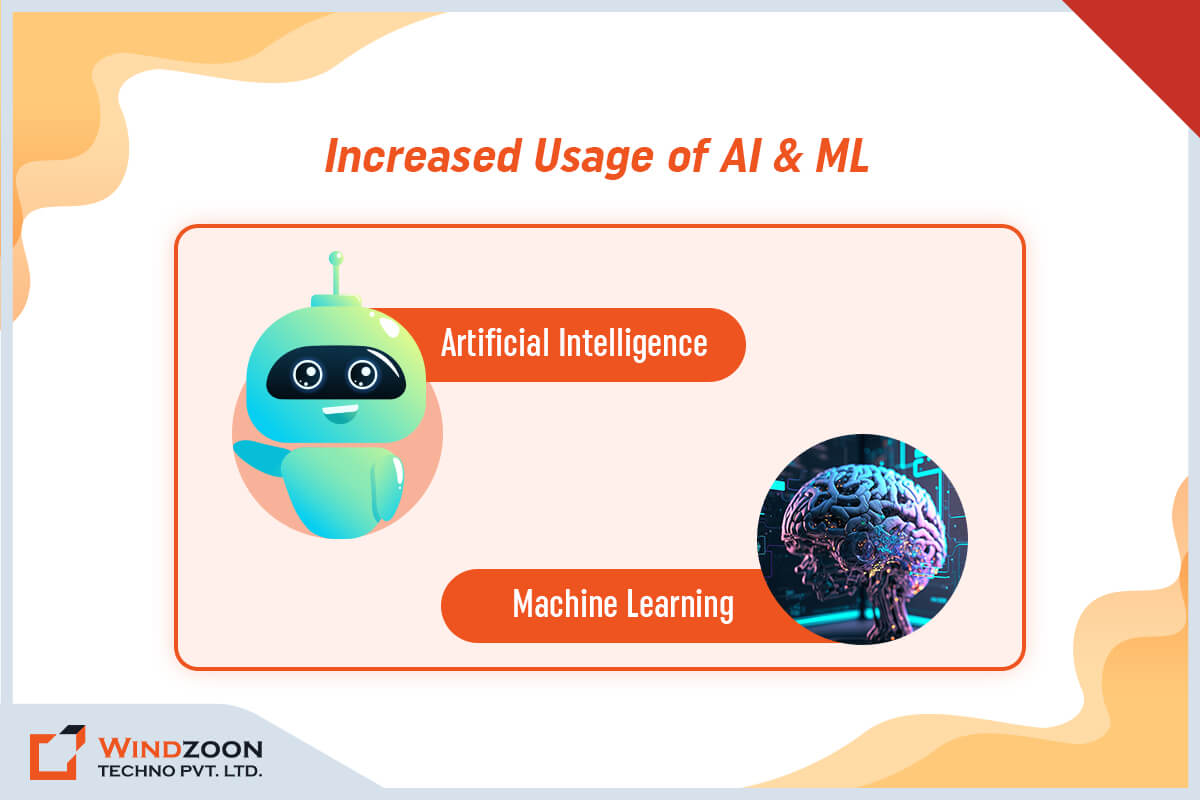
8. Increased Usage of AI & ML

increased-usage-of-ai-ml

Other major trends affecting WordPress development 2024 include artificial intelligence (AI) and machine learning (ML). The technologies are constantly evolving and beginning to be applied in a wide range of contexts.

The creation of content is one of the significant ways of applying AI in WordPress. Artificial intelligence-based WordPress plugins are now available that can assist you in improving the content on your website. A Jetpack plugin, for example, includes an Editorial Calendar feature that uses artificial intelligence to recommend post ideas.

AI and ML are also used for security in WordPress websites. Many machine-learning plugins are now available to scan your site for malware and other threats. The use of these plugins can add an extra layer of security to your WordPress Site.

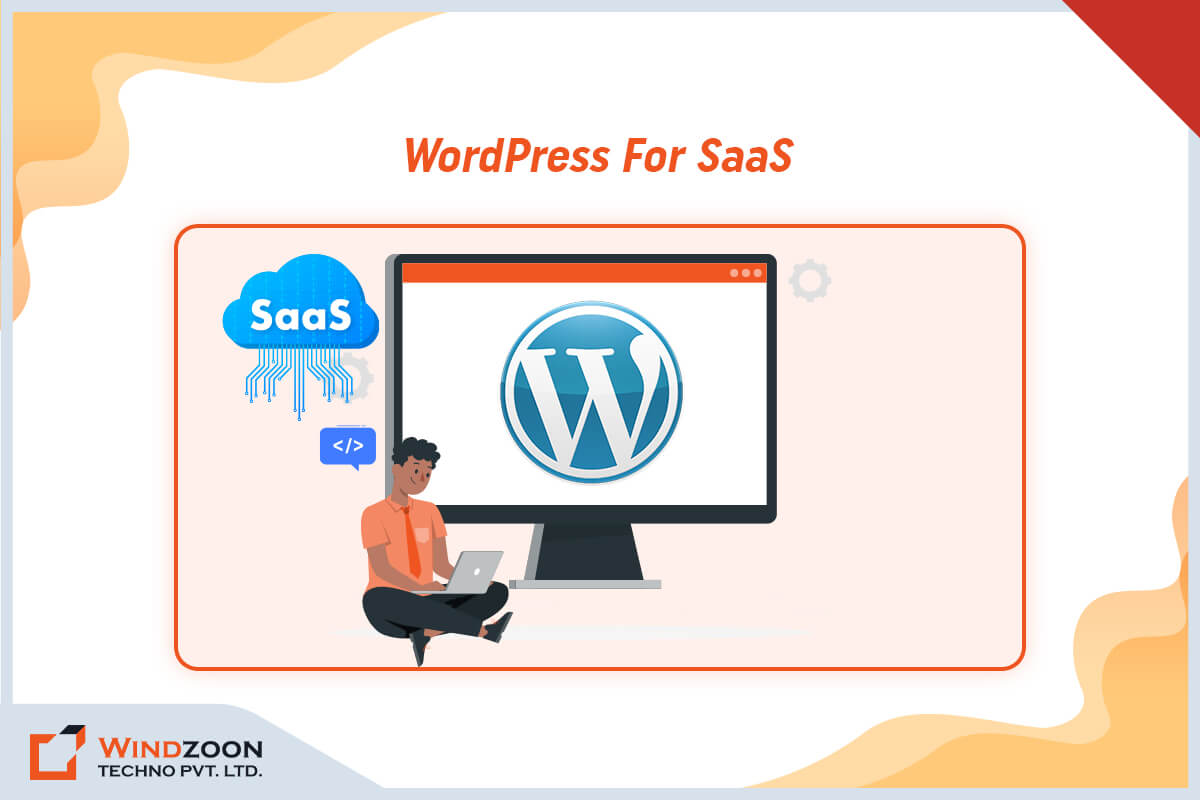
9. WordPress for SaaS

wordpress-for-saas

The use of WordPress to create fully functional SaaS websites is a growing market trend.

For both B2B and B2C clients, SaaS products can be used in a variety of ways, such as automating processes, improving business workflows, introducing new features, or substituting for pricey custom-coded solutions.

The use of WordPress and a suite of plugins will allow more entrepreneurs to create and launch interesting SaaS products at a lower cost.

10. WordPress for E-Commerce

wordpress-for-ecommerce

You must have noticed that the e-commerce market is expanding rapidly. To leverage the benefits of this market, businesses can create new eCommerce websites using the WordPress WooCommerce plugin. Furthermore, this WordPress plugin can convert an existing WordPress website to an eCommerce site with a few clicks.

According to Statista, it is the world’s most popular eCommerce platform, with a market share of 36.68%. These figures suggest that in the upcoming years, WordPress web development will increasingly incorporate WooCommerce.

This plugin stands out from the crowd due to its versatility and simplicity. The WooCommerce plugin is regularly updated with new features to meet the evolving needs of eCommerce businesses. However, to take maximum advantage of it hire WordPress developers for your project.

11. Multilingual Content

multilingual-content

A website caters to a worldwide audience, which increases the demand for multilingual content on websites. WordPress websites are anticipated to make extensive use of multilingual content in the upcoming years.

Although the core functionality of WordPress does not support multilingual or bilingual functionality, the WordPress community has developed plugins that enable developers to build multilingual WordPress websites.

Multilingual websites are user-friendly, they offer the same content in various languages depending on the visitor’s location. As most users prefer to visit websites in their native language, it increases user engagement for the website owner.

The multilingual features of a website help boost the reputation of the company by improving the user experience. It can also improve your website’s conversion and bounce rates.

12. Custom Post-Type Development

Custom Post type development, also known as “CPT,” enables any user to create a custom post regardless of the default WordPress post type. It is one of the essential features that is gaining popularity in the developer community.

It improves WordPress functionality by allowing developers to create custom post types and posts. Since CPT features require customized post layouts and product information, e-commerce websites are the ideal platform for their development.

Popular CPT plugins include Pods, ACF, and Meta Box. So, in the near future, CPT will be in charge of the content management aspects of WordPress site development.

What is the Future of WordPress Development?

The future of WordPress development looks promising, with a focus on enhancing user experience, security, and scalability.

Gutenberg, the block-based editor, will continue to evolve, making content creation more intuitive.

Artificial intelligence and automation will play a bigger role, simplifying tasks like customization and content recommendations.

Improved performance and mobile responsiveness will be priorities to cater to changing user expectations.

Additionally, there will be a strong emphasis on sustainability and eco-friendly practices in WordPress development.

Overall, WordPress will adapt to emerging technologies and user needs, ensuring its continued relevance and growth in the ever-evolving digital landscape.

Conclusion

We sincerely hope that our article on the most recent trends in WordPress website development has given you enough information. And if you’re planning to update your business website in 2023, these top WordPress trends are worth considering.

From AI advancements to the rise of chatbots, there are numerous new features and advancements that can take your site to the next level. By using these trends, you can ensure that your company’s website stays ahead of the curve and offers a first-rate experience to visitors.

You can also work with a WordPress Web Development Company to incorporate these trends and create a market-ready website.

Windzoon has more than ten years of experience creating WordPress website solutions. We have a team of talented WordPress developers who can develop any complex & custom website as per your needs.

Connect with us to get a quote and to learn more about our WordPress Development Packages.

Know Why WordPress is the Best for Online Store Development

Online shopping has grown in popularity after the COVID-induced lockdown. According to Statista, Global online retail sales reached almost $5 trillion in 2021; by 2025, this amount is predicted to reach $7 trillion.

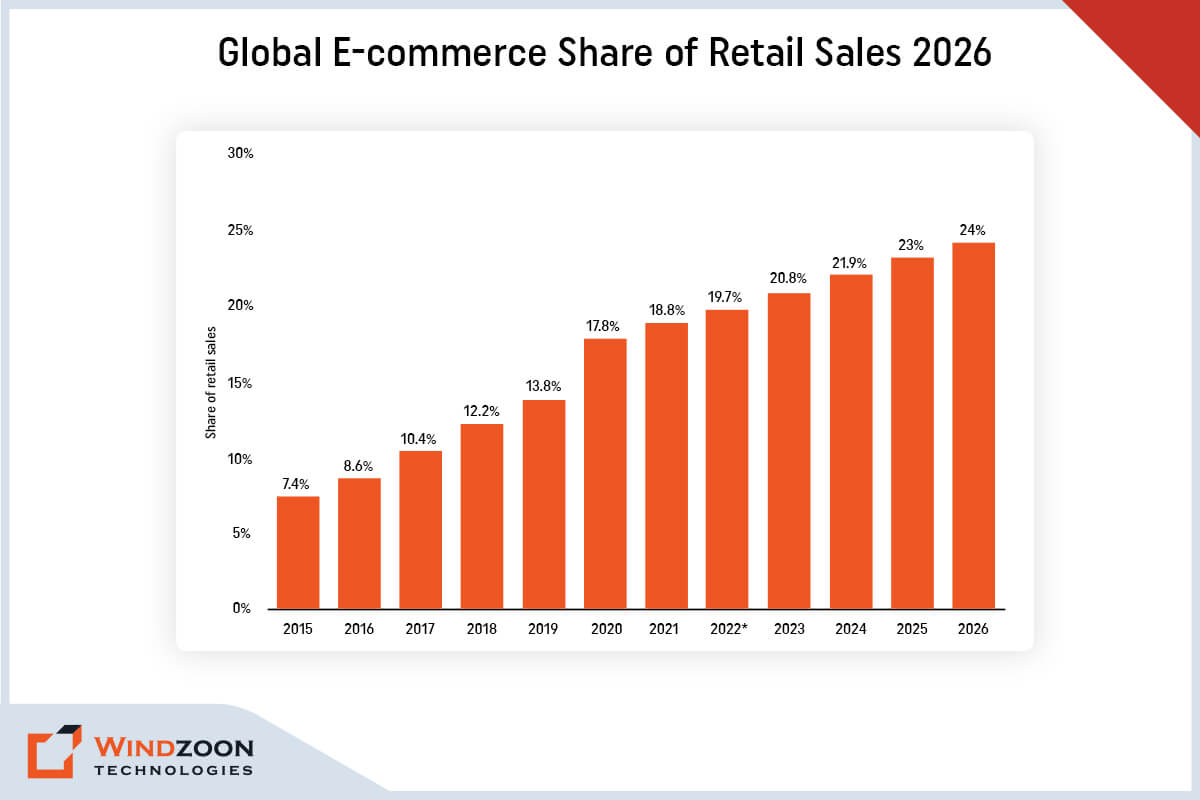
Global E-commerce Share of Retail Sales

According to this data, the majority of businesses now go beyond simply providing information on their company website. Now they want to create a website where users can directly buy goods and services online. It is convenient and accessible for customers as well as owners to shop in an online marketplace.

There are numerous platforms available for setting up an e-commerce store. But among them, WordPress is unquestionably the best platform. Although it is best known as a blogging platform, it has applications that extend far beyond the blogosphere.

With the help of plugins and themes, Custom WordPress Development Company can build the ideal e-commerce website using dynamic, adaptable, and powerful WordPress software.

In this article, we’ll go over the key benefits of using WordPress to build an e-commerce website. We’ll even talk about the essential plugins you should use to upgrade the functionality of your online store.

So, let’s move toward our first topic of discussion.

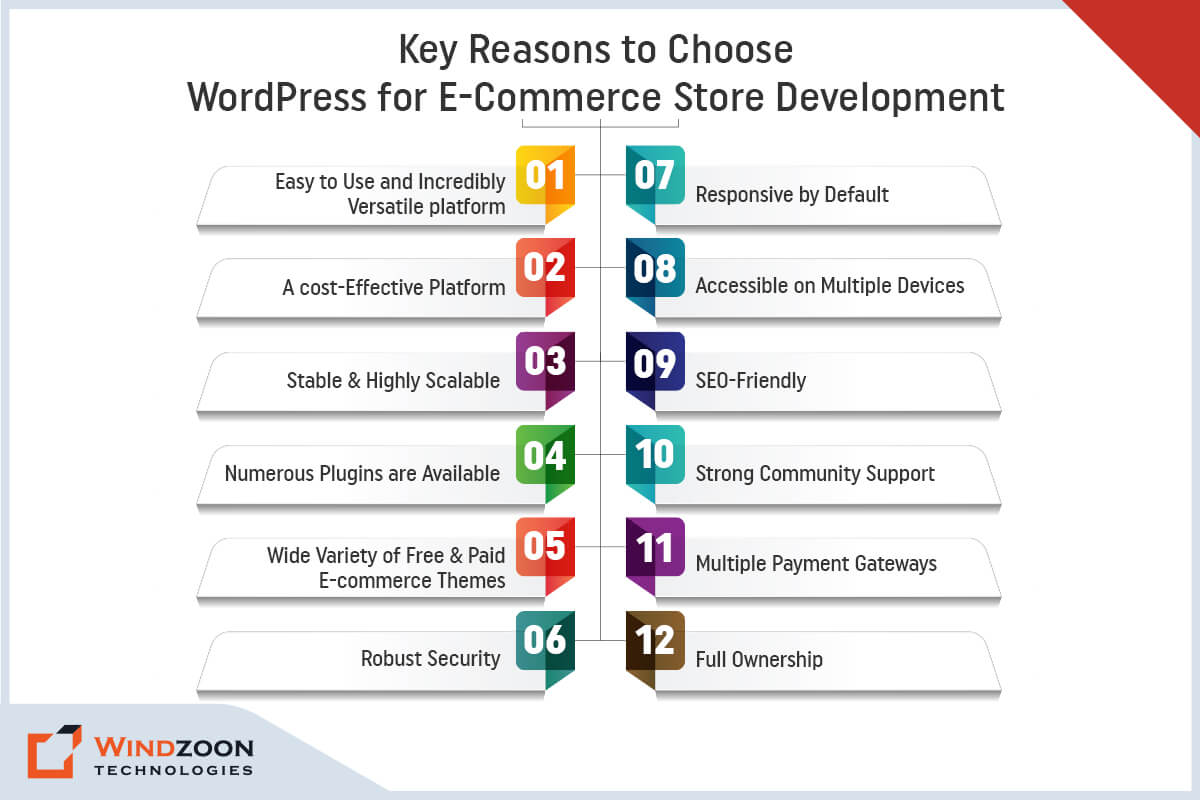
Key Reasons to Choose WordPress for E-Commerce Store Development

Reasons to Choose WordPress for E-Commerce Store Development

1. Easy to Use and Incredibly Versatile Platform

WordPress does not require a deep understanding of programming languages or web development. It offers a quick, ready-to-use solution for creating stunning, responsive websites. Furthermore, it ensures a simple and quick website setup with a single click. And do not need any specific knowledge to deal with servers or hosting.

So, it’s fair to say that using WordPress to build an eCommerce store is the most feasible and simplistic way to run an online business. A WordPress-powered eCommerce website allows you to effectively manage your content.

It means you won’t have to hire web developers whenever you need a minor change. You can easily do it on your own.

That’s why you can learn how to make an attractive WordPress website: 10 steps guide for beginners.

 2. A Cost-Effective Platform

Yes, WordPress is a completely free platform. It is an open-source platform that can be downloaded and installed for free. Additionally, anyone can add functionality to their website by using the code found in the WordPress Codex.

It is the primary reason why eCommerce companies choose this platform to create their websites. However, business owners can Hire WordPress developers to manage the source code.

3. Stable & Highly Scalable

WordPress has become extremely stable and reliable over the years due to constant updates and improvements. By scalable, we refer to WordPress’s capacity to change as your website expands. WordPress will continue to function flawlessly regardless of how much your site grows.

It shouldn’t have any trouble handling the load you put on it as long as you scale your hosting to handle the traffic on your website. WordPress is used by many well-known e-commerce sites, including Shop Catalog, Cola Gourmet, and Louise Kennedy.

4. Numerous Plugins are Available

You can use free WordPress plugins to add more functionality to your eCommerce website. They are small pieces of software that can be uploaded to WordPress to enhance its functionality.

Plugins are essential for an eCommerce site, and you’ll need more than one. Because various plugins aid in various functionalities such as inventory management, running an online store, customer interaction, and security.

WooCommerce is one such all-purpose eCommerce plugin for WordPress. About 20% of WordPress e-commerce websites use it, making it the most well-known eCommerce plugin available.

5. Wide Variety of Free & Paid E-commerce Themes

WordPress has a strong and active community. This thriving community frequently releases new themes and plugins with improved features and functionalities.

A theme is a software package that controls how your website is styled and presented to users. Additionally, it influences how simple it is for users to find information and make purchases.

Thankfully, hundreds, if not thousands, of free and paid e-commerce themes are available. Visit the official WordPress theme library to view the free themes. Or you can check out more feature-rich premium themes at ThemeForest & TemplateMonster.

6. Robust Security

One of the most critical aspects of any eCommerce website is its security. Because it contains the user’s personal and financial information, which needs to be protected.

WordPress has been around since 2003. Thus, the WordPress community has ensured that the software is extremely secure. Regular updates and security patches have elevated it to the status of one of the most secure programs for developing online stores.

7. Responsive by Default

Since smartphones account for more than half of all online purchases, developing a mobile-responsive eCommerce website is critical.

Websites that are not mobile-friendly couldn’t perform well on search engines. Hence, having a responsive e-commerce store is critical for ranking higher on SERPs and increasing web traffic.

WordPress websites are, by default, very mobile-friendly and responsive. And that’s why it is the best option for eCommerce website development.

8. Accessible on Multiple Devices

Another advantage of the WordPress CMS is that it is accessible via multiple web browsers. It enables you to log in from any internet device with an internet connection. And allow you to edit your e-commerce store anytime from anywhere by using the dashboard interface.

9. SEO-Friendly

WordPress’s codebase is based on sound SEO practices. It considers numerous search engine ranking factors.

So, using WordPress to build your e-commerce site can take your content marketing efforts to the next level. You can optimize every aspect of your website to rank high in search engines.

Of course, various factors affect how well you perform in searches, including the quality of your content and on- and off-page SEO efforts. But WordPress always makes it easier and never gets in the way of your efforts to improve your rankings.

10. Strong Community Support

WordPress’s extensive community support makes it one of the best platforms for e-commerce websites. The community has a large number of talented developers across the world.

Furthermore, the community offers excellent documentation and tutorials to help you better understand the WordPress framework and how to use it. Plus, it has qualified staff on hand to address your issues at any stage of the development process.

11. Multiple Payment Gateways

If you plan to build an online store, make sure it is adaptable enough to allow customers to select various payment methods.

With WordPress, you can provide this facility to your users. It will simplify things for customers visiting your store and improve their experience. As a result, there will be more traffic and revenue generation.

12. Full Ownership

One of the most significant benefits of combining WooCommerce with a self-hosted WordPress website is that your online store is entirely yours and belongs to you and your business alone.

Since everything is hosted on your own server, you can keep total control over how your shop runs and move it at any time to a different provider.

To move further let’s discuss how to hire the right WordPress development agency.

Now, we will go over the powerful WordPress plugins for e-commerce website development.

Top 5 WordPress E-commerce Plugins

Top WordPress E-commerce Plugins

1. WooCommerce

Best for: Merging content and commerce

Price: Free but optional add-ons begin at $6/month.

WooCommerce is the most popular choice for building an online store on the WordPress platform, with 20.4% of all websites using it. Additionally, it is the most popular e-commerce plugin, and many themes support it.

Features Consist Of:

  • Management of products and inventory
  • Management of orders
  • customer profiles
  • Effective control over shipping
  • Built-in site analytics
  • Coupon management

2. Easy Digital Downloads

Best for Selling downloads (courses) and other digital products.

Price: Freemium (paid plans begin at $99.50 per year)

If you want to sell digital goods like WordPress themes, e-books, courses, artwork, and other items, Easy Digital Downloads is the best e-commerce plugin for you.

Features Consist Of:

  • Customer management panel
  • Integrated download and transaction reporting
  • Options for adding functionality through extensions
  • Access to multiple payment gateways
  • A shopping cart system for purchasing several downloads at once
  • Comprehensive payment histories

3. MemberPress

Best for: WordPress sites that follow a membership business model

Price: Starts from $15 to $35 per month

A WordPress plugin called MemberPress allows you to build a paid membership website. Although it differs from the other eCommerce plugins on this list, it’s excellent for using a membership business model to sell digital content, courses, or downloadable.

Features Consist Of:

  • Automated system for billing and membership cancellation
  • Various additional features are available in the add-on library.
  • Rules for unrestricted access that control members’ access to content
  • Customized post type for the pricing page

4. BigCommerce for WordPress

Best for: BigCommerce integration with WordPress

Price: Free, but requires a BigCommerce account which starts at $29.95 per month.

BigCommerce is an eCommerce platform that is managed and provides a headless solution. It means that the BigCommerce platform will host the eCommerce infrastructure, keeping it separate from the core of WordPress.

Features Consist Of:

  • It is simple to embed content from BigCommerce into any WordPress post or page using any of the BigCommerce blocks.
  • It supports a variety of currencies and payment gateways
  • An effective eCommerce platform with a ton of cutting-edge features and tools

5. Ecwid eCommerce Shopping Cart

Best for: Selling on various social media channels

Price: Free of charge but requires an Ecwid account

Ecwid Shopping Cart is a robust and user-friendly shopping cart solution that enables you to sell products on your WordPress website. Plus, you can also conveniently sell your products on Facebook and Instagram because Ecwid automatically syncs your products, customers, orders, and inventory between your WordPress and social storefronts.

Features Consist Of:

  • Complete integration of Ecwid panel with WordPress
  • Integrated Google Ads configuration panel
  • Both the plugin and the eCommerce platform are free to use

Now, let’s see some examples of famous WordPress e-commerce websites.

Examples of Popular E-Commerce Stores Built Using WordPress

Popular E-Commerce Stores Built Using WordPress

  1. Shop Catalog
  2. Offerman Wood Shop
  3. Flwr
  4. Nalgene
  5. Louise Kennedy

Conclusion

You must now have a clear understanding of why WordPress is the best e-commerce solution. And why you should use WordPress CMS for your business website.

Developing an eCommerce site for your company is your first step into the enormous online marketplace. Thus, you’ll want an online store that is appealing and professional. As well as provides customers with what they want and functions as independently as possible.

However, to build that type of store, you will need the assistance of a professional WordPress development company.

At Windzoon, we have a team of WordPress developers with years of experience & expertise in providing cutting-edge & customized WordPress Development services. Visit wzadmin.windzoon.in/ to get a quote for our services or to learn more about our WordPress Packages.
How to Choose a WordPress Development Agency for Small Businesses: 8 Useful Tips

From budding entrepreneurs to big business titans, WordPress is widely acclaimed by all for its versatility and ease of use. As a leading content management system, WordPress powers around 43% of online websites, making it the best framework for website development. The platform remains a dominant and reliable choice for building effective websites, maintaining its relevance despite evolving technologies.

However, before you begin developing a custom WordPress website for your clients, the most common challenge you will face is deciding whether to hire an in-house developer, do it yourself (if you are an expert WordPress developer), or simply outsource it. This decision is especially important when considering the WordPress platform as the foundation for your website.

Well, seeing the current global scenario and the benefits it offers; hiring an Offshore Custom WordPress Development Agency is the best option to choose. But then again comes the question: how to choose a WordPress development agency for small businesses that fits your needs?

Continue reading to find out the answer to this question as well as learn more about how to hire an offshore development team.

Now, Let’s learn the benefits of outsourcing your WordPress development work.

5 Reasons to Outsource Your WordPress Development Work

Outsourcing your WordPress development work can be a strategic move for agencies looking to scale efficiently. By leveraging professional WordPress services, agencies can handle multiple clients at once, ensuring each project receives expert attention without overextending internal resources. This approach not only streamlines project management but also supports the agency’s growth by enabling them to take on more work and expand their client base with confidence.

1.4 Maintenance and Support

Ongoing website maintenance is a crucial part of comprehensive WordPress services. Outsourcing agencies often provide regular updates, security monitoring, and technical support to ensure your website remains secure and performs optimally. Additionally, many agencies offer web hosting solutions as part of their support packages, giving clients reliable hosting options that enhance website speed, security, and overall performance.

1. Access to Exceptional WordPress Expertise & Knowledge

In-depth programming knowledge is needed to create a custom WordPress theme. Through outsourcing, you’ll have access to a knowledgeable team that is familiar with every aspect of this platform. It comes in handy when creating custom themes for the WordPress site. Additionally, industry knowledge is crucial for delivering tailored WordPress solutions that align with market trends, customer expectations, and sector-specific requirements.

2. Assurance of High-Quality Work

Every year, WordPress updates its framework. When you work with a reputable agency, you can be confident in the quality of the coding. Because the developers stay up to date on the latest developments in this platform, including updates to the WordPress core, ensuring your website benefits from the most current and secure foundational code. As well as effectively implement those developments in your WordPress website.

3. Savings in Terms of Both Time and Money

A lot of time is wasted while looking for the right in-house developers. However, if you choose to outsource, the offshore developers will create the WordPress theme in the shortest amount of time possible. Effective project management by the agency ensures that your project is delivered on time and within budget, using structured processes and communication strategies to maximize efficiency.

It will help you save time and cut the cost of WordPress Web development by 40% to 50%. This is because the developers will work on an hourly, weekly, or monthly basis, depending on the engagement model you choose. Thus, you will only be charged for the number of hours they will spend on your project.

4. Maintenance and Support

Your WordPress website needs to be properly maintained following the successful development of custom themes. It is a continuous task that requires consistency. When you work with an outsourcing agency, you will receive prompt maintenance and support for your website’s upkeep performance. Ongoing support is essential for ensuring website security, regular updates, troubleshooting, and continuous performance improvements, helping your site stay competitive and secure.

5. It Lets You Concentrate On Your Company’s Core Operations

As was already mentioned, outsourcing will save you a ton of time. Delegating WordPress website development allows you to focus on other key business areas that require your attention and further improvement. As a result, your business operations will run more smoothly & effectively, while ensuring that website development is aligned with your overall business objectives.

Now, let’s get to know the questions you should ask before hiring any outsourcing agency.

Read More: Why Choose WordPress CMS for Your Website: Top 10 Reasons to Know

10 Questions to Ask Before Hiring an Offshore WordPress Developer/Agency

Questions to Ask Before Hiring an Offshore WordPress Developer/Agency

When considering hiring, it’s valuable to choose a development partner who can provide specialized services such as SEO services, customized solutions, WordPress migration, and custom plugin development to ensure your website’s success.

1. Experience: How many years of experience do you have in WordPress website development? When it comes to hiring expert WordPress developers, experience is everything. Inquire with your WordPress developer or agency about the number of years they have spent developing custom WordPress solutions.

2. SEO Support: Will you assist me with SEO (Search Engine Optimization) for my WordPress Website?

Although WordPress is the most SEO-friendly platform, it still requires the implementation of best SEO practices to rank your website higher in SERPs. Therefore, ask out what strategies your offshore developer plans to use to improve your site’s ranking, and whether they offer comprehensive SEO services as part of their offerings.

3. Speed Optimization: What steps will you take to speed up my WordPress site?

According to various reports, 53% of website visitors leave if it takes more than 3 seconds to load. Make sure the developer or agency is aware of how important it is to have a website that loads at lightning speed on all types of devices.

4. Coding Standards: Do you adhere to the WordPress Coding Standards?

Inquire whether the developer is familiar with The WordPress Coding Standards (WPCS) and is proficient enough to avoid coding errors and improve code readability.

5. Security: How would you make sure that my WordPress site is secure?

Currently, WordPress is the most popular open-source CMS on the market, making it a tempting target for hackers. So, to keep your WordPress site safe from hackers, ask your developer or company what plugins and security procedures they will be using. Also, inquire about how they intend to manage the WordPress site’s backup.

6. Scalability: Will you be able to convert my WordPress site into an eCommerce store in the future?

A WordPress website can be easily transformed into an enterprise-level website or an online store. Thus, ask your offshore developers/agency if they have experience scaling WordPress websites if that is something you plan to do in the future.

7. Client Reference/Portfolio: Are you able to provide client references and a portfolio?

When hiring someone for WordPress development, it’s reasonable to ask for their client references and portfolio. Review their previous projects and gather feedback from previous clients, including client testimonials, to assess the agency’s proven track record. This will help you evaluate their level of expertise, coding style, and the types of projects they’ve completed in the past.

8. After-Sales Support: Do you provide after-sales support and maintenance services?

Ask your offshore developer/agency if they will offer timely WordPress Support and Maintenance services once the development work is finished. Before making a final choice, be sure to make this clear as it may result in additional costs.

9. Pricing Models: What pricing models do you offer for WordPress Website Development?

Cost is the most essential factor to consider before making any decision. Hence, ask your offshore partner to provide information regarding their pricing model. And also inquire them about the possibility of any hidden costs.

10. Customization: Do you offer static or customized WordPress Development services?

Although WordPress provides thousands of free themes and plugins for website development, they may not always meet your exact needs. In such a case, you need to customize the specific theme or plugin to meet your requirements. Therefore, make sure the agency or developer has experience with customized solutions, theme customization, custom plugin development, and plugin development to address unique business needs before you outsource your WordPress project to them.

11. WordPress Migration and Existing Website: Do you offer WordPress migration services, and can you work with my existing website?

Ask if the agency provides WordPress migration as part of their services, including transferring or upgrading your website. Also, inquire about their ability to enhance, rebuild, or customize your existing website to meet your current and future requirements.

With this, we have come to the crux of this article and that is How to Hire WordPress Developers/ WordPress Website Development Company for your project.

8 Useful Tips for Choosing the Competent WordPress Development Agency

Useful Tips for Choosing the Competent WordPress Development Agency

Choosing a WordPress development agency is a crucial step for any business aiming to build a strong online presence. The best WordPress development agency stands out by offering a combination of technical expertise, a clear communication process, comprehensive services, and a proven track record of successful projects.

1. Look for Experience and Expertise

The best WordPress development agencies and best WordPress development companies employ experienced WordPress developers who have a deep understanding of the WordPress ecosystem. These professionals can handle complex projects, create custom plugins, and deliver custom development solutions tailored to your business needs.

2. Review Portfolios and Case Studies

When evaluating WordPress development companies and WordPress development agencies, carefully review their portfolios and case studies. This will help you assess their ability to deliver high-quality web design and technical aspects. Working with a full service agency can be especially beneficial, as they offer a wide range of services including digital marketing, SEO, and ongoing support.

3. Assess Technical Knowledge

A competent agency should demonstrate expertise in all technical aspects of WordPress development, including custom development and the creation of custom plugins to extend website functionality. Their technical knowledge should cover everything from website optimization to ongoing maintenance.

4. Evaluate the Communication Process

A clear and effective communication process is essential for a successful project. The best agencies provide timely feedback, keep you updated on progress, and use transparent methodologies to ensure your requirements are met throughout the project.

5. Consider Post-Sale Services

Ongoing client satisfaction is a hallmark of a reliable agency. Look for agencies that offer comprehensive post-launch support and remain committed to assisting you after your website goes live.

6. Flexibility and Problem-Solving

The ability to adapt and solve problems is key to delivering a successful project. Agencies with expertise in digital marketing and web design can contribute to your project’s long-term success and growth.

7. Understand the Cost

WordPress agencies vary in pricing, but the value they provide is often reflected in their expertise and range of services. Choosing the right partner ensures you get the most out of your investment.

8. Check Their Ability to Meet Deadlines

Experienced agencies are skilled at managing multiple clients and ensuring timely delivery of projects, which is critical for maintaining your business schedule.

1. Analyze the Testimonials & Client Reviews of The Agency

Nothing is more credible than the words of recommendation or review. Check out the testimonials section of the potential website development agency’s website. Or look up its online reviews on directories like Clutch and GoodFirm.

You could even request the client’s reference or request an online meeting to obtain unfiltered feedback (If you have any doubt). Most agencies would not deny such direct questions; if they are genuine, they will provide you with references from their clients.

2. An In-Depth Examination of The Agency’s Portfolio

After reading the reviews and testimonials, the next step is to thoroughly examine the portfolios of your preferred agencies.

It will give you a better idea of their work quality. Along with a clear understanding of their work strategy and development methodologies to complete the project for their client.

Thus, a Portfolio review will aid you to decide if they are suitable for your project or not.

3. Technical Knowledge and Experience

Every well-known Web Development Agency has a diverse team of WordPress developers that handles various projects based on their niche. But the best WordPress web development agency is one that stays current on WordPress tools and technology trends.

So, before working with any WordPress Website Development Agency, you should investigate their technical expertise.

You can evaluate their technical skills by asking for previous work samples. It will provide you with a sufficient overview of the agency’s WordPress knowledge and expertise.

4. A Complete Strategic Understanding Of The Project

It is a simple concept: if your ideology aligns with that of your preferred agency, you should consider moving forward; otherwise, you should not.

A dynamic and creative agency is always concerned with understanding its clients’ projects. It accomplishes all of this by developing a precise strategic approach to determining error-free project plans to meet the client’s objectives.

5. Flexibility and Problem-Solving Abilities

The most crucial factor to consider when hiring an offshore agency is its flexibility and problem-solving ability.

Your project is important to you regardless of how small or big it is. Thus, you must interact with your chosen development agency. And pay attention to how they converse with you; are they giving enough consideration to your requirements? What other ideas and initiatives are they expressing?

Such inquiries will help you decide whether this agency is a good fit for you!

6. Project Development and Service Cost

In most cases, businesses seek to cut costs by sacrificing work quality. Which later proves to be a regrettable choice.

Both the service cost and the project value are crucial aspects to consider. There may be several agencies you encounter that offer lower service costs than others. However, you must understand that it is not always about the price, but about the quality of service they provide.

7. Discuss Deadlines in Advance

Whether you have a short-term or long-term project, planning the timeline is critical. Many website development agencies failed to complete projects on time.

As a result, obtaining the appropriate timeline commitment should be a priority. The best way to get a sense of an Offshore agency’s performance is to read its customer reviews. Or you can ask them directly for the project delivery date.

8. Assistance With Post-Sale Services

After the WordPress website design & development process has been completed successfully. There are still possibilities to occur unexpected problems with website performance and other aspects.

In this situation, you have only one option, and that is to contact your hired agency. And discuss the problem and request its assistance. Thus, always search for an agency that provides prompt after-sales support for your project.

Use the tips listed below to collaborate productively with your chosen WordPress development service provider agency once you’ve hired them.

5 Essential Tips for Working With an Offshore WordPress Development Team

Tips for Working With an Offshore WordPress Development Team

1. Clearly Express Your Visions and Expectations

Inform your outsource partner in advance about your goals and expectations for the WordPress website. It will assist them in understanding what is expected of them and the requirements for the finished product.

2. Establish The Project’s Scope and Schedule in Advance

By determining the project’s scope and timeline in advance, you can build a good working relationship with your partner company. It will aid in the precise deliverable planning and aligning goals with expectations before the project begins.

3. Keep in Regular Contact With Your Developing Team

The foundation of the entire project is effective communication. If you want your offshore team to be successful, you should hold regular meetings, use shared documentation, and adopt presentation standards. The team needs to recognize that the client is simple to work with, as this will help to avoid any potential future conflicts.

4. Provide Quick Feedback or Suggestions

It takes two to tango when developing a project. Hence, ensure that you respond immediately to all of the outsourcing team’s queries, worries, and suggestions. It will increase efficiency and remove bottlenecks during the project’s development.

5. Connect Payment to Achievements

Tying payments to milestones with specific acceptance criteria will contain any features from being missed from your WordPress site. Divide a project into smaller tasks instead of assigning a massive amount of work at once to an offshore team. It will help them to complete your project quickly & effectively.

We hope this blog has answered all of your questions about hiring an offshore WordPress development agency.

And if you’re still doing WordPress web development in an old-fashioned way, it’s time to break free from convention and consult with the experts. Through this way, you’re not only choosing to keep up with the times; you’re also making moves to align with the industry’s best practices, which ensures long-term success.

And Windzoon is an excellent choice if you’re looking for a trustworthy WordPress Website Development Agency to handle your web development project. We’ve been providing WordPress Development Services for over ten years. To avail of our services or learn more about our WordPress Packages, visit wzadmin.windzoon.in/ and get a quote.

Complete Guide: How to Develop Advanced Headless WordPress Website with React

With its simplicity, flexibility, & usability, WordPress has become one of the most sought content management systems. It powers around ⅓ of the world’s websites. According to W3techs, WordPress has acquired a 58.7% market share. In contrast, Joomla with 6.6% & Drupal with 5.0% represents the second & third most popular CMSs, respectively.

Dominance of WordPress in the CMS market
The dominance of WordPress in the CMS market

WordPress has the most easy-to-use interface & rich plugin ecosystem. It makes it a common choice among non-technical & technical people for building feature-rich websites. Although it is a popular CMS, it is not the most-loved CMS among developers.

The reason is that WordPress is built as a monolithic platform with the tightly coupled front and back end. Besides, it doesn’t allow multichannel publishing of content. And this makes WordPress unwieldy for developers who want to build bespoke web app solutions without the constraints of its theme-based structure.

However, you can avoid this issue by decoupling WordPress’s front end from its back end. The concept of decoupling or headless CMS unlocks various developmental opportunities. It opens a new door for companies & developers to do Headless WordPress Development using new frameworks, tech stacks, & delivery channels.

After reading this, you might have these questions:

Well, read this whole article. And we promise you that you will get all the answers to your questions by its end.

What is Headless CMS?

In traditional CMS, you’ll have to deal with both the front end & the back end to create a website.

-The front end is the website’s display(presentation) part that visitors interact with. (Ex. a web page)

-The back end is the logical part of the website that contains storage & managing content. (Ex. files stored on servers like scripts & content databases) With the back end, developers can develop, organize, & manage the content before they publish it to the front end.

However, a headless CMS operates differently than a traditional CMS. As its name suggests, it removes the head(front end) from its body(back end). This means it decoupled front-end tools from the back-end management tools that are on the same installation.

Now come to the next question;

Why Should We Use Headless CMS?

Well, here are some reasons that explain why you should consider adopting headless CMS.

1. It gives freedom from maintaining ‘legacy’ software. And gives a chance to adopt any latest technology for web app development.

2. It will give you the ability to manage content on multiple channels.

3. It helps the developers to build web app solutions that provide improved & bespoke user experience.

4. It will allow you to manage your web app content from a single place/location.

5. It will allow your development team to prototype, test, & develop your web app solution efficiently.

6. It will make web app development easier by using microservices.

7. It will provide you with a web app solution with extra security from cyber attacks.

8. It will significantly speed up your time-to-market

9. It gives you the freedom to scale up your web app solution as high & fast as possible.

After learning about the reason behind choosing headless CMS for your project, let’s go further to the next question.

What is Headless WordPress CMS?

Though WordPress is a monolithic application, it is still one of the most capable Content Management Systems. And using WordPress as a headless CMS is the best solution for dynamic & tailored web app development. Know more about WordPress with our another blog on Why Choose WordPress CMS for Your Website: Top 10 Reasons to Know in 2023

However, what exactly is a headless WordPress?

Headless WordPress means a decoupled WordPress. Here, the back-end(management) part is removed from the front-end(display) part of the WordPress CMS.

You can create & manage the front-end part as a standalone with any front-end framework of your choice. And connect the newly developed front part with the back-end part through WordPress REST API.

Now, to get to know better about WordPress as headless cms, let’s understand its architecture.

The Architecture of Headless WordPress

Architecture of Headless WordPress
The architecture of Headless WordPress

The standard WordPress framework we use for web development has a coupled architecture. In that, you manage your website’s properties through the dashboard & control its appearance by using different themes & plugins.

Read More:- WordPress Website Development: Expectations Vs Reality

However, headless WordPress content management tools are still available for web development. But, the front-end features like themes & the block editor get removed from it. Instead, another front-end framework like ReactJS, Angular, VueJS, and NextJS will handle your web app’s appearance using WordPress REST API.

To get a little deeper into the topic, let’s learn what makes headless WordPress different from traditional WordPress.

Headless WordPress CMS Vs. Traditional WordPress CMS

Difference between Headless WordPress Vs. Traditional WordPress

Following are the main points of difference between traditional WordPress & headless WordPress.

[wpdatatable id=3 table_view=regular]

Now, let’s learn the advantages of choosing a headless WordPress for your next project.

Why Should We Use Headless WordPress?

Advantages of Headless WordPress

Advantages of Headless WordPress

1. Avoid losing visitors with superfast performance

Your web application’s performance is the significant reason behind its success on SERPs. It will get higher rankings on search engines if it shouldn’t take more than a few seconds to load. But if it takes more time to load, it will lose visitors.

However, with headless WordPress, you can avoid this problem. Here, the front end is removed from WordPress, which you can develop using modern front-end tools. It will enhance the user experience of your web application through its superfast performance.

2. Efficient web app management & customization with granular control

You can gain more control over your web application by using headless WordPress. With a headless approach, you can easily control design layout and content presentation. Plus, it also provides you control over how users interact with the front end of your web application.

Other than this, in headless WordPress, you can access your back-end content from a central location. And this makes a web application lightweight & easier to manage.

Besides, its REST API calls provide more freedom to make customized designs for the front end. Plus, there is also an advantage of using modern web tools & deploy them on the front-end development.

3. Open a door of expansion with increased scalability

With WordPress, the web application doesn’t have much chance to scale. The reason is that a developer is required to have complete control over all components & codes of WordPress.

However, decoupling WordPress makes it easy to scale up your web application. Because now, you can effortlessly identify which part of the web app needs more scaling. And you can scale that part in isolation.

4. Save your web app solution from hackers with its robust security

Data security is a vital aspect of any online service. With headless WordPress, you don’t need to take stress about your web application’s security.

The reason is the architecture of decoupled WordPress provides more security against hackers & DDoS attacks. It’s separate from your front end, which makes it difficult to hack your sensitive back-end data.

5. Faster development process with code reusability

When you use headless WordPress for web app development you can leverage APIs to communicate with your back-end. Therefore, once your content has been written & published in WordPress, it can be delivered to different front-ends.

Additionally, headless WordPress allows you to use modular frameworks. It will enable you to reuse code from other projects without involving changes on your backend.

6. Freedom to display content on any platform with Multichannel content publishing

The decoupled WordPress has an API-based system. It allows you to publish content on multiple platforms, like mobile, tablet, & computer.

Besides this, you can also display your API-based content through augmented/virtual reality & IoT devices. It will enhance the accessibility of your web application & gives you better reach among the younger audience.

Now that we have learned why we should go for Headless WordPress Development. Let’s know its drawbacks.

Why Headless WordPress isn’t the Best Option?

Though headless WordPress is a remarkable innovation with numerous benefits, it also contains a few drawbacks. Thus, consider them before making a decision on whether to use headless WordPress or not.

Disadvantages of Headless WordPress

Disadvantages of Headless WordPress

1. A compulsion to hire skilled developers

If you wish to utilize headless WordPress fully, you’ll need the services of a skilled team of developers. The reason is headless WordPress requires advanced frameworks for smooth functioning. And for that advanced coding knowledge is a fundamental requirement. Hence, a non-technical person would never help you with it. You need to Hire WordPress Developers for this job.

2. A tedious process of maintenance

Managing multiple web application instances would be more difficult with the front-end and back-end separated. And that makes the process of maintaining headless WordPress tedious & little expensive.

3. Doesn’t support some significant features of WordPress

Indeed, headless WordPress doesn’t support some significant features of WordPress. For example, famous WordPress features like WYSIWYG editor & live preview won’t work when you use a separate front-end.

4. Required to make a significant investment

Setting up a web application through headless WordPress requires significant investment. Because its implementation, management, & maintenance is complex & would need additional members on your team. And this would make headless WordPress web app development a little more costly than standard WordPress.

These disadvantages of headless WordPress made us understand when we shouldn’t use it. Now, let’s move forward with the next question.

Who Should use Headless WordPress?

Headless WordPress has many benefits & usages. And this makes it a suitable development platform for every type of business. We have named some of the business types below that can get benefited from using headless WordPress.

1. Enterprise business

2. E-Commerce business

3. Consultancy service provider business

4. Media companies

5. Startups

6. Small & Medium size businesses

7. Freelancers

After this, we’ll know about the types of business websites that you can build using headless WordPress.

Which Types of Business Websites We can Build with Headless WordPress?

With headless WordPress, you can build various types of websites and applications. This will give you the freedom to create a variety of web app solutions in terms of design, UX/UI, and animation.

1. Blogs

2. One-Page web solutions

3. E-Commerce websites

4. Brochure websites

5. Custom web applications

6. Native applications for iOS & Android

7. Documentation websites, etc.

Name of Some Famous Websites Built Using Headless WordPress

Inspiring Headless WordPress Examples

1. TechCrunch

2. The Guggenheim Museum

3. Frontity

4. usTwo

5. Beachbody on Demand

6. Facebook Brand Resource Center

7. Uber Brand Experience

8. Fairfax Media

9. Hillary Clinton

Now comes one of the important questions.

Who Should Avoid Using Headless WordPress?

Business enterprises can avoid using Headless WordPress in the following circumstances.

  • Do not want to invest a significant amount in the front-end development of their web app.
  • Do not desire to follow the tedious & costly process of managing & maintaining two sub-systems.
  • If they aren’t interested in cross-platform publishing.
  • If they want to use WordPress visual editor and WordPress themes.
  • If they don’t want to configure & optimize the API

We hope now you gain adequate knowledge regarding headless WordPress. So, let’s move further with how to connect Headless WordPress with react.

How to Connect ReactJS with Headless WordPress?

ReactJS is one of the famous open-source front-end JavaScript libraries. It is maintained by Meta & a vast community of developers. ReactJS helps in building robust, fast, & dynamic web applications. And combining headless WordPress react will provide you with multiple benefits.

Read More:- Master to Build an Amazing WordPress Website with 10 Simple Steps

Besides, building a web application using React is not so difficult once your WordPress is set up. However, to connect ReactJS(front-end) with WordPress(back-end), you need to install the following on your computer.

  • A text editor ( For example, Visual Studio Code)
  • ReactJS & NPM
  • And Git for version control

Once you set up the environment, follow these below-mentioned steps to build a web app using ReactJS.

  • First, open the command line. After that, run the code to build a project.
  • Once you complete that, install the Axios package for API calls & open the folder inside the text editor.
  • At last, launch the web application with the appropriate command. And you’ll be all set to build a custom web application.

Combining WordPress back-end(built using Gutenberg page builder) with ReactJS is the most logical option. As Gutenberg’s page builder plugin supports ReactJS and helps to build bespoke web apps with a better user experience. Know more about WordPress Page Builder Plugin by following our exclusive blog on 10 Best Drag and Drop WordPress Page Builders Plugins Comparison

However, if you find any difficulty setting up react headless WordPress, kindly Hire a Headless WordPress Developer.

Conclusion

We hope our article has provided all the answers to your questions. And now, you don’t have any doubts regarding headless WordPress CMS. Decoupling your web app’s front-end from its back-end elevates your web app’s speed, performance, & security.

However, as we have mentioned before, developing a web app with headless WordPress can be complicated & confusing. And if you are not a seasoned developer then building a web app using headless CMS on your own is difficult.

Fortunately, there are many experienced WordPress developers in the market who can help you to make your project succeed. And if you’re looking for a competent WordPress Development Company for your project, then connect with us.

At Windzoon, we have a talented team of WordPress & ReactJS developers who can build industry-specified custom web app solutions. To avail of our developers’ services or to know about our WordPress Web Development Packages, kindly visit wzadmin.windzoon.in/ to get a quote.

Why Choose WordPress CMS for Your Website: Top 10 Reasons to Know in 2022

Designing a website from scratch needs plenty of work, money investment, & time investment. Looking at the varying needs & requirements of firms, WordPress arrived in 2003 & transformed the web development surface.

WordPress is probably the simplest framework to go for developing a blogging, eCommerce, or any other niche business. As per W3Techs data, WordPress is used by 64.3% of all the websites whose content management system we know. As we all know the importance of having a responsive website. For building a website, it is very important to figure out what frameworks, plugins, or developers you require to consider. And for responsive work, you have to ensure that you understand what options you have.

There are many reasons why you must choose WordPress, and we are here going to cover them for you. And here, we will also talk about the advantages of WordPress. And why it is the best and most preferred CMS on the internet.

Keep scrolling down the blog to find out why you too must choose WordPress!

What is WordPress Development?

WordPress is an open-source framework.

Number of Websites Online

Number of Websites Online

As per Statista, In 2021, there are approx 1.88 billion websites present on the internet. According to BuiltWith Pty Ltd, there are presently 6 million sites that are built on WordPress. Even Though WordPress was initially built for blogging and publishing posts, currently entrepreneurs can adapt WordPress to develop websites for their businesses.

Technical stating, WordPress is a content management system that is licensed by General Public License. This effectively indicates that anyone can utilize or work on this framework for free.

From posting blogs to listing products, WordPress development is remarkably versatile. It concentrates prominently on flexibility & it is an outstanding solution for companies of each scale, from small companies to large enterprises. If you still find it difficult to develop a website on your own, then you can always rely on a custom WordPress development company for the best assistance!

Read More: Complete Guide: How to develop advanced Headless WordPress Website with React

Why is WordPress Development Important?

To comprehend what & how we can design websites on WordPress, first let’s understand its importance & mechanism of it.

There are 3 primary components of WordPress:

The core, themes, & plugins.

The core-

The core code comprises the default functionality that drives the WordPress CMS i.e content management system. This incorporates everything from the backend, to scheduling blogs, strengthening passwords, enabling the design, and so on.

Theme-

Whereas the core is liable for the backend work, themes are liable for the front end & how websites look. WordPress admin is used to publishing posts, pages, & other website content, but precisely how your page is displayed to the visitors.

Plugin-

The easiest way to describe plugins is that they cater additional functionality to your website. It can likely construct a page in the backend admin, where you can set up default alternatives.

With this beautiful mechanism, it caters to your website development initiative with amazing CMS facilities. This is why WordPress is important to build a highly customizable website of your preference.

What are the Benefits of WordPress Development?

To all the above-mentioned discussion, here are a few benefits of WordPress that make it the best alternative for your website.

– It has a wide range of themes that helps make a website design

– It is an easy content management framework

– It has an Application programming interfaces

– Adjustable and Flexible for all types of niches

– It is user-friendly & flexible for Beginners

– It designs websites that are Mobile Responsive

WordPress has gradually become one of the competent CMS for all blogging and non-blogging websites. These are a few of the many benefits of WordPress. This is why it is so popular & you must surely consider switching to WordPress soon!

Read More: PHP vs WordPress: Which is better for your business?

10 Reasons Why WordPress Development is Best Choice for Small Business

Reasons Why WordPress Development is Best Choice for Small Business

Reasons Why WordPress Development is Best Choice for Small Business

For over a decade, WordPress has been around in the world of Development. But, many people still do not trust this CMS. Amongst the millions of websites in the market, more than 35% of them are built on WordPress. Each day, moreover 500+ new websites developed on WordPress go live, & the numbers are growing day by day.

Read More: WordPress Website Development: Expectations Vs Reality

So if you are one of those who are contemplating choosing WordPress, then we have curated reasons why you must consider picking it!

1. WordPress is as Free as the Freedom

WordPress is a free framework.

This means everything is absolutely free to install, utilize and revise to meet your requirements. You can simply utilize it to develop a blog, eCommerce, or any website for that matter. As WordPress is free, you do not require a domain or web hosting to download it.

If you want a WordPress website with a professional setup, then consider us hiring WordPress developer.

2. WordPress is an Entirely Tailored Framework

Many people who use WordPress are not professionally trained & skilled to build a website that needs programming. This is why this framework is preferred by many as it doesn’t need any prior knowledge of developing a website. There are many inbuilt templates for every type of website (for the blog, business, or any online business).

Themes that are inbuilt in WordPress are effortless to customize with ample options. This framework also has options like changing color, uploading logo & images, revising the background, forming stunning sliders, & truly tailoring it without any code or program.

3. WordPress is Secure & Protected

Anyone who builds a website always keeps security in mind. This is why WordPress is loved by many. It is a remarkably secure and protected framework to run any website.

However, you can do a lot to develop a secure hack-free website. For details, you can also check a guide to WordPress security for beginners.

You can also download a free WordPress security plugin. It will surely ultimately protect your site.

4. WordPress has Easy to Navigate Interface

Another amazing characteristic that WordPress caters to is its user-friendly & spontaneous interface.

WordPress is a self-contained framework. It doesn’t need any HTML editing software, like Adobe and Dreamweaver. You can easily develop pages, post blogs, upload files & videos, etc. It is quite suitable for those with minimal knowledge of web development.

Apart from its user-friendly & amazing interface, you can easily handle the website from any desktop, anytime, anywhere you want. As WordPress is browser-based, it needs access to the internet.

5. WordPress Helps you Boost your Website with Different Plugins

WordPress’s integrating amazing & diverse plugins so you can make the most of your website. It delivers more functionality to your website by just installing them. Integrating websites can immensely benefit you to grow your business digitally. With this, you can get access to thousands of free plugins present on the framework.

Read More: 10 Best Drag and Drop WordPress Page Builders Plugins Comparison

6. WordPress Offers Huge Community Support

WordPress CMS has amazing community support globally. The community caters to the proper guidance & contributes to the growth of users. The community always helps to find answers to every query & resolve those issues.

Apart from the WordPress community, you can find numerous blogs, articles, & other resources that can handle your WordPress-related questions.

7. WordPress can be Utilized for All Kinds of Projects

It has always been a misconception that WordPress is only a blogging platform. But, that is technically inaccurate. WordPress CMS is preferable for all kinds of websites & projects.

You can potentially utilize WordPress to expand your business, design virtual classrooms, build an e-commerce site, integrate social media platforms, & any other you can imagine.

8. WordPress Allows you to Scale your Site

WordPress will amazingly complement your website, especially if the objective is to get massive traffic! This is why it is said that WordPress is synonymous with scalability.

Not only for development but if your website is already professionally optimized; you can even consider WordPress to control traffic spikes.

If you desire to illuminate your website, you can speak to our experts for a tailor-built website.

9. WordPress Helps you Optimize your Site for Search Engines

Search Engine Optimization makes sure that your site gets the adequate traffic it deserves from search engines.

There are ample amounts of tips & tricks to rank your website digitally.

While using WordPress, you eventually get access to numerous robust SEO plugins. These plugins will help you a lot in not missing out on anything!

10. WordPress has Lower Setup & Maintenance Costs

WordPress holds fewer setup, customization, & maintenance expenses when compared to other open-source CMS. There are no such additional hidden costs that make it costly to tweak after the development. WordPress can always be a swift win for enhancing your customer’s experience.

After going through all the reasons, you are still contemplating whether WordPress is the best CMS or not; you can speak to our techies. They can assist you to make an excellent choice!

Now, without more delay,

Let’s jump on the most frequently asked question: Is WordPress suitable for the professional website in 2022?

Is WordPress Suitable for the Professional Website in 2022?

WordPress is one of the best platforms to make a professional website. You can easily utilize WordPress to develop professional business sites, personal portfolio pages, blog pages, eCommerce stores, video pages, and a lot more.

A website is a representative & a resume of your Brand.

Doesn’t matter if you are a business tycoon or even a naive blogger, you must consider building a website to showcase your skills.

WordPress is perfect for professionals, as it needs absolutely no coding knowledge! All you have to do is, look for a professional theme, require a plugin & start creating your site. WordPress even offers drag & drop social media integration to your website.

Gathering all of the above-mentioned points, WordPress is surely the best framework to build a professional website in 2022!

Conclusion

WordPress is almost everyone’s favorite framework. It is used by more than 30% of content-based sites Globally. WordPress makes it super easy to develop a website, even if it’s a professional or a naive blogger!

Along with an array of attributes that WordPress holds, it is ultimately designed to build responsive, creative, & effortless websites.

If you are seeking to build a WordPress site, you must consider us as we cater to the amazing packages of WordPress development services. We will help you save time and enable you to access your dashboard too.

Connect to our techies at [email protected] to get a quote or know more about our services.

10 Best Drag and Drop WordPress Page Builders Plugins Comparison

Looking to build a website without worrying about any code?

Trying to determine a prominent WordPress page builder for your website? Well, we have got it sorted for you!

Now, WordPress page builders have made it feasible to build a professional & responsive WordPress page with no coding aptitudes required. In this piece of article, we’ll help you understand Top-notch WordPress Page Builders Plugins to build a website.

WordPress has become the most demanding content management system with its simplicity, flexibility, and usability.

The latest version of WordPress has been downloaded over 35.6 million times. As per sources around 64.1% of websites built with a content management system use WordPress. WordPress holds 42.9% of the total market share of web development on the internet. Meanwhile, 58.7% of websites build from WordPress among the 300+ content management systems which we monitor.

58.7% of websites build from WordPress among the 300+ CMSs'

58.7% of websites build from WordPress among the 300+ CMSs’

It is free of charge, user-friendly, and easy to use. With the help of WordPress Page Builder, a developer can easily create effective websites without having any exceptional programming skills.
WordPress Page Builder extensions come with so many exciting customization elements. However, the most striking fact about these page-building extensions is we can use these customizable building elements with just simple drag and drop. Turn your imaginary website into reality with the help of the best WordPress Development Service provider in India.

Striking features of WordPress Page Builders

  • Pre-built design modules contain many complex website features. That includes photos, graphs, image galleries, paragraphs, custom widgets, and carousels. Developers can use these customization features by drag and drop.
  • Single-click customization features with instant style selection. With these, developers can easily select and change elements like fonts, style, colors, slider size, and dropdown menus.
  • WordPress Page builders also provide some add-on features. That contains animation effects, content sizing, and repositioning.
  • WordPress Page Builder plugins offer developers a wide variety of templates. It speeds up the website-building process.
  • With WordPress Page Builder plugins, developers get the facility to customize modules. They can also save them to use in their next web designing project.

Read More: Top Trends for WordPress Development to watch

Benefits of Using WordPress Page Builder Plugins

  • Coding knowledge is not required to create a perfect website using WordPress Page Builders.
  • Website creation becomes faster with pre-built design modules and templates.
  • Developers use Page Builders to create website templates. They can even save and use these templates to build other websites in the future.
  • With WordPress Page Builder Plugins, developers can do quick website edits and style variations.
  • Customizable themes and a wide array of built-in website features are the additional benefits of Page Builder Plugins.

However, there are various types of WordPress Page Builder Plugins available for web development. But choosing the right plugin among the many available options can be challenging. In such cases, you can Hire WordPress Developers to create the perfect WordPress website ever.

This blog will help you to find an ideal WordPress Page Builder as per your need.

Top 10 WordPress Page Builder Plugins

Top 10 WordPress Page Builder Plugins

Top 10 awesome WordPress Page Builder Plugins

1) Elementar WordPress Page Builder Plugin

Elementar WordPress Page Builder Plugin

Elementar is one of the latest and most popular free WordPress Page Builders. However, it does have a paid pro version. The free version offers a variety of features like a drag & drop website editor, 30 templates, 40 widgets, and responsive editing. It is one of the most potent WordPress Page Builders with the super-fast interfaces you will ever find.

Top Features:

  • 90+ free widgets & 300+ templates
  • Live edits & instant page loads
  • The Premium version includes features like animations, shape dividers, gradient backgrounds, and headline effects
  • Multilingual Plugin
  • Custom CSS, motion effect, and 24/7 support in the premium plan
  • Website kits and builders for themes & forms
  • An open developer API, that can be extended and integrated into other systems

Price:

No charges for the regular version

The Pro version costs $49 for one site and goes up to $199 for unlimited sites

2) WP Bakery WordPress Page Builder Plugin

WP Bakery WordPress Page Builder Plugin

WP Bakery is a drag & drop WordPress Page Builder Plugin that is one of the pioneers and most robust plugins in the market. This Page Builder was once known as a Visual Composer before it got disassembled into a separate tool. It serves as a front-end & back-end Page Builder that creates responsive web pages with detailed and complicated layouts. It has various templates, a grid builder, and impressive flexibility. WP Bakery plugin is suitable for any WordPress theme.

Top Features:

  • Used with any WordPress theme
  • 250+ integration with important plugins like WooCommerce
  • Built-in skin builder & 100+ pre-designed templates
  • Supports third-party add-ons like Essential Grid and various contact forms
  • User-friendly & Mobile-ready page builder with a well-developed API
  • Advanced Grid Builder & more than 50 content elements

Price:

WPBakery Page Builder Plugin comes in premium plans that cost around $56/year to $245/ year.

3) Beaver Builder WordPress Page Builder Plugin

Beaver Builder WordPress Page Builder Plugin

Beaver Builder is a popular and premium WordPress Page Builder Plugin. It offers a robust and streamlined website-building process. It is a drag & drop page builder with various pre-built customizable templates. It enables developers to build websites quickly and smoothly. Developers can even save their designs and use them in their next projects. Beaver Builder can be used to make any website, from an e-commerce site to a blogging site.

Top Features:

  • Reliable and straightforward with live & front-end editing
  • A mobile-friendly builder that supports the WooCommerce
  • Reusable rows and modules with import/export capabilities
  • It supports the WPML translation plugin
  • Beaver Builder can create integrations with other WordPress plugins
  • Instead of creating shortcodes, Beaver Builder creates the straightforward HTML & CSS codes
  • Effective customer support
  • It also comes in a free version

Price:

Beaver Builder offers three different premium plans that cost $99/year, $199/year, and $399/year.

4) Visual Composer WordPress Page Builder Plugin

Visual Composer WordPress Page Builder Plugin

Visual Composer is one of the most capable and standard WordPress Page builders. It was developed by the creator of WP bakery and is fully equipped with advanced features for complete website building. With Visual Composer, developers can customize the look of their website. They can also modify the page elements, headers, footers, menus, and other visuals of their websites.

Top Features:

  • 50+ premium content elements, 100 pre-designed layouts, and 40+ grid design templates
  • 200+ exclusive third-party add-ons
  • Simple drag & drop editor, No use of coding
  • An advanced Visual Composer Hub with various extensions
  • Three in one solution for the front-end and tree view editor
  • Compatible with social media networks. It also provides filters like Instagram to create engaging images
  • It includes WPForms and is compatible with Yoast.
  • Developers can hide and display the elements as per their need
  • It also supports JavaScript and CSS editing.

Price:

Visual Composer provides the options of five different yearly premium plans for $49, $99, $149, $349, and $849.

5) Themify Builder WordPress Page Builder Plugin

Themify Builder WordPress Page Builder Plugin

Themify is one of the powerful and intuitive WordPress Page Builders that let you customize almost every aspect of your web page. Themify Builder is a free Page Builder plugin that has many built-in tools. Themify is a reliable, easy-to-use, and adaptable WordPress plugin. With the help of Pre-designed modules and themes, developers can easily create websites.

Top Features:

  • 40+ pre-designed modules
  • Import/export feature, copy and paste modules, draggable column widths, and undo/redo feature
  • It supports the creation of reusable custom CSS modules
  • 60+ animation effects, Themify add-ons for responsive styling
  • Capable for translation
  • Themify supports custom code and shortcodes

Price:

Themify Builder is free. But if you want to access Themify themes, you have to pay $89/year or a one-time payment of $249.

6) Divi Builder WordPress Page Builder Plugin

Divi Builder WordPress Page Builder Plugin

Divi Builder is a state-of-the-art, user-friendly drag & drop WordPress Page Builder Plugin. It has 50 readymade design elements with both front-end and back-end editing. Divi Builder also contains noteworthy features like a video slider and audio player module. It has a custom CSS control feature that customizes the site with the help of a code editor. Divi Builder cut down the editing timing with features like bulk editing, color manager, and copy & paste styles.

Top Features:

  • Instant and responsive visual editing
  • 40+ pre-designed modules and more than 110 designing themes
  • Around 800 readymade layout designs and 100+ full-website layout packs
  • Hover state styling to create hover state effects and convert modules into interactive elements
  • Developers can save and reuse the design modules
  • Unlimited use of undo and redo functions
  • Wireframe mode

Price:

You can access Divi Builder for $89/year or get lifetime access for $249.

7) Site-Origin WordPress Page Builder Plugin

Site-Origin WordPress Page Builder Plugin

Site-Origin Page Builder is a free and one of the popular WordPress Page Builders with around 2.5 million-plus downloads. It is also one of the oldest page builder plugins, but its seldom updates have kept it Cutting-edge. It is a lightweight drag & drop builder with CSS controls for customization and creating websites without using codes. It is an ideal Page Builder for both beginners and advanced developers.

Top Features:

  • Simple and responsive drag & drop plugin interface
  • Easy to understand, robust, and a sleek toolbar
  • It contains live back-end & front-end editing
  • This Page Builder can easily integrate with other tools and is compatible with most the WordPress themes
  • It offers free widgets bundle and a real-time preview with a history-browser feature
  • This page builder is multilingual and is compatible with various translation plugins

Price:

It is a Free WordPress Page Builder. However, its premium version will cost you $29/per year.

8) Brizy WordPress Page Builder Plugin

Brizy WordPress Page Builder Plugin

Brizy is one of the latest, modern, and feature-rich WordPress Page Builders. It has a modern, cutting-edge interface with various high-quality designs and templates. These features help developers to build excellent-looking websites. This Page Builder has a global styling feature. It is used to change elements across the entire website. Brizy has more than 25 widgets and pre-designed modules, pop-ups, and blocks for flawless website customization. It has an auto-save feature, and it also offers 500 plus blocks available in both light & dark modes.

Top Features:

  • 25 widgets, pre-designed modules, 500+ blocks, and pop-builder
  • It has one of the best-designed user interfaces in WordPress Page Builders
  • Auto-saving feature
  • Image-video filters, animated sliders, and visual contact forms
  • Global styling feature
  • Light & dark mode
  • Simply enjoyable front-end real-time editing
  • It contains more than 4000 vector icons to fit all types of projects

Price:

Brizy Page Builder is free for basic features. It is available for $149/year, $299/year, and $329/year for advanced features.

9) MotoPress Content Editor WordPress Page Builder Plugin

MotoPress Content Editor WordPress Page Builder Plugin

MotoPress Content Editor is a simple, affordable, multilingual drag & drop WordPress Page Builder. This page builder is compatible with any WordPress theme. It can also merge with the WordPress editor to deliver real-time front-end editing. MotoPress contains a visual editor, various pre-designed layouts, and a set of premium add-ons to make a simple yet elegant and competent website.

Top Features:

  • Simple, user-friendly, and reasonable premium WordPress Page Builder
  • A very convenient real-time front-end editing
  • Pre-designed modules, elements with style builder
  • Readymade drag & drop WordPress Page Building themes
  • Multilingual page builder compatible with multisite and WPML
  • A set of premium add-ons
  • Google Web Fonts

Price:

MotoPress Content Editor has three different paid plans for its premium version. The first is $39/year, the second is $69/year, and the third is $139/year.

10) Oxygen WordPress Page Builder Plugin

Oxygen WordPress Page Builder Plugin

Oxygen is one of the exceptional WordPress Page Builders. It has exciting features like visual site building, Woocommerce store support, search engine optimization(SEO) & website support. This page builder operates through a separate sandbox module that connects with WordPress. Oxygen has flexible layout control with custom-set icons and fonts. It is also compatible with Gutenberg WordPress Page Builder.

Top Features:

  • Fluid and intuitive user interface with drag & drop visual editing feature
  • Offers traditional coding facilities with Java, HTML, PHP, and CSS
  • A solid visual frontline builder with a custom header builder
  • Global Colors
  • It supports WooCommerce
  • Fully Compatible with Gutenberg Plugin
  • Oxygen has a dynamic data feature
  • It provides complete flexibility and control

Price:

Oxygen is available in four premium paid options, which are $129, $199, $279, and $349( for a one-time payment).

Conclusion

In this blog, we have mentioned the best WordPress Page Builder Plugins available in the market. And we genuinely hope that the information provided in this blog will assist you in choosing the right WordPress Page Builder according to your need.

However, with the ample amount of flexibility and customization WordPress offers, creating a website on it is a little overwhelming. Selecting an appropriate page builder tool will simplify your website-building process and save you time.

If you desire a flawlessly built WordPress website without getting involved in the construction process, then teaming with WindZoon Technologies will be the wise option. We are one of India’s best and most exceptional WordPress Development Company.

We have a fantastic team of experienced and talented WordPress developers who will turn your dream website into a reality. Contact us to get a quote or know more about our WordPress website packages.
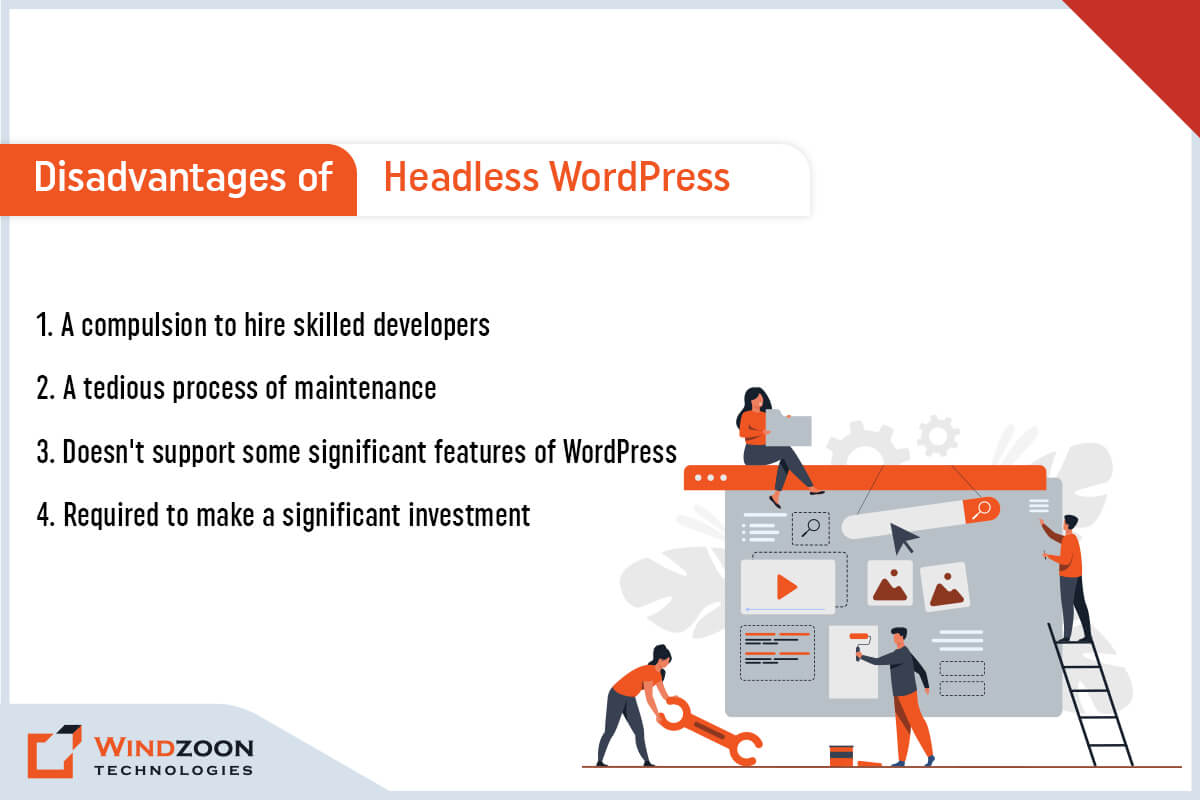
PHP vs WordPress: Which is better for your business?

There are lots of differences between PHP framework and WordPress CMS. That’s why Windzoon analyzes, which one is most suitable for your business website development.

In today’s time, there is constant innovation & modernization of technologies. One form to enhance your business is to engage in digital frameworks. You can now magnify your website functionality and operations with these frameworks.
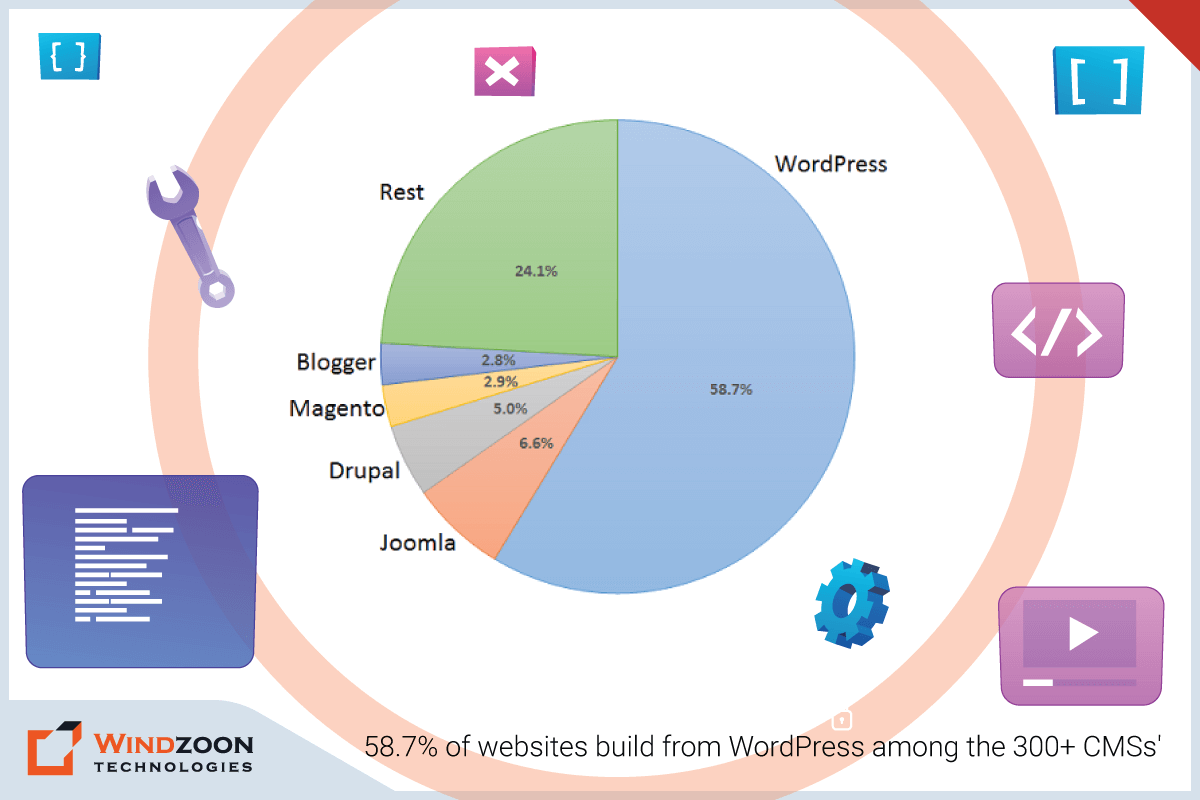
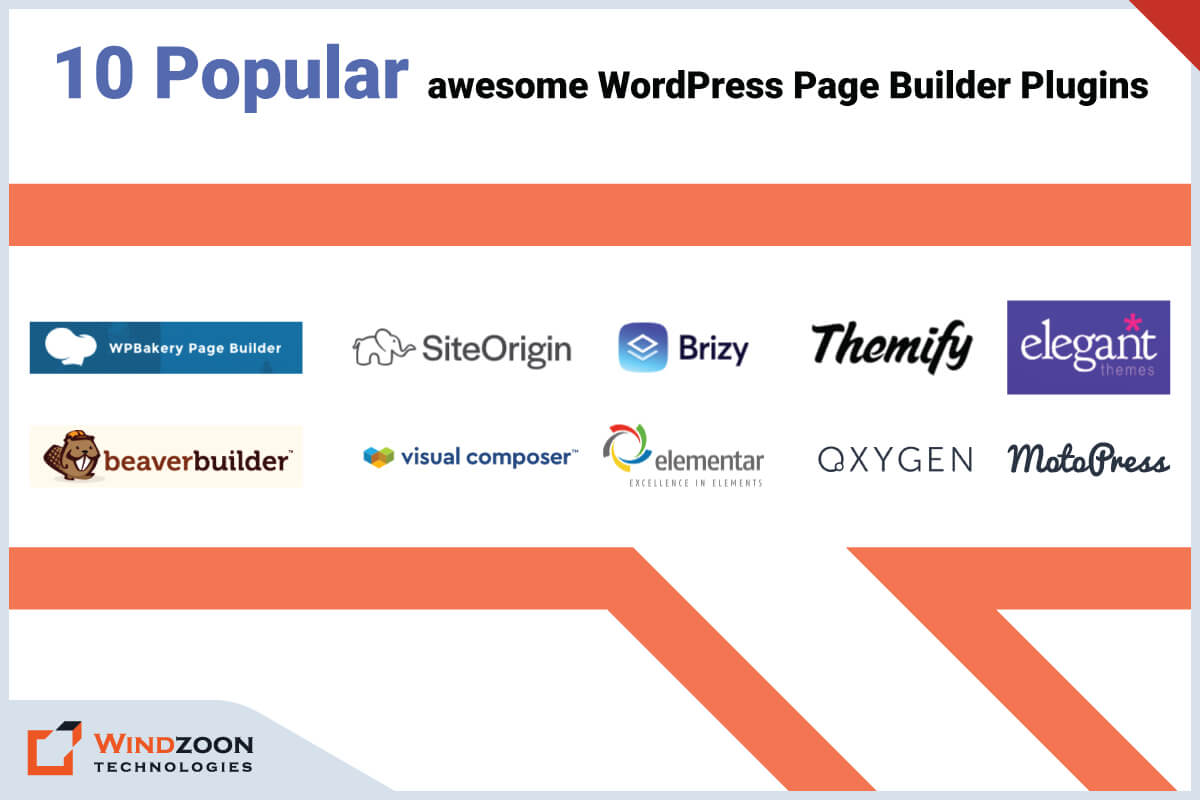
Every business desires to do its best when it comes to website development. They want an up-to-date website that can allure potential customers and assist them to be in the competition. Having a great website is essential for business success and competitiveness in the digital marketplace, as it helps businesses stand out, attract customers, and maintain a strong online presence.

If you want to develop your business website then there are two popular technologies which provide framework for website development. These are the options of current companies for their website development specifications – CMS and PHP frameworks. Most content management systems come with pre-designed themes, plugins, and tools that make website creation and management easier, especially for beginners.

Many entrepreneurs aspire to take their business to the digital platform. Many live in a dilemma whether they should use PHP or WordPress for the development of their websites. These two frameworks have their own pros and cons.

While the PHP framework has got its own benefits, CMS is nowhere less to offer its benefits to the companies for web development.

Some businesses prefer PHP, while some resort to WordPress CMS to develop websites. There are many WordPress & PHP development companies that assist with the best responsive website.

So, we will test WordPress & PHP, & analyze to understand which one is most suitable for your business. Let’s get started.

What is a PHP framework?

A PHP framework is a platform that creates a PHP web application. PHP frameworks are widely used to create websites and web applications, offering developers the flexibility to build custom solutions.

PHP Usage Statistics

A PHP framework provides code libraries for commonly used functions. These frameworks offer powerful functions and a flexible template that can be tailored to specific project needs. They provide the necessary elements and a bare bones foundation for building websites, but often require the expertise of PHP developers to fully realize a project’s potential. It is built on libraries and tools therefore the time required for development is less. It is useful to speed up and standardize the development process.

What is a WordPress CMS Framework?

WordPress is an open-source Content Management System (CMS). Content management systems like WordPress enable users to easily manage website content, design, and functionality.

WordPress Usage Statistics

This sort of platform is configured to assist you to design your website, everything within a user-friendly interface. WordPress serves a wide range of users, from beginners to professionals, by offering an attractive graphical user interface and various functionalities through themes and plugins. WordPress offers a streamlined website creation process, making creating websites accessible even for those with minimal technical knowledge. On WordPress, development of a website becomes easy through the plugins and themes, many out of which are free & easy to download. WordPress websites are popular for their ease of use and flexibility, allowing users to manage website content efficiently and customize their sites to suit their needs.

Difference between WordPress CMS vs PHP Framework

Now that we’ve understood the basics of WordPress CMS and PHP frameworks, let’s examine their fundamental differences. The key differences between content management systems like WordPress and PHP frameworks lie in their primary features, use cases, and the level of customization and control they offer. Having a clear idea of your website goals and requirements is crucial in selecting the chosen platform for development. Following are 8 crucial factors that illuminate the fundamental differences between these two frameworks.

1. Website Type

The type of website you’re developing should also control the platform you use. WordPress and PHP websites can meet the needs of most businesses by providing scalable and customizable solutions. It depends if you are building an eCommerce website or a personal blog. WordPress CMS is an excellent choice for newcomers looking to begin their own blog or website. However, PHP is a more preferred choice for complicated websites with various tools. When you have a clear, specialized requirement, a niche specific solution built with a PHP framework may be more suitable than a general-purpose CMS. PHP websites offer greater customization potential for businesses with unique needs.

2. Security

Security is often a primary concern for each website owner and it signifies a prominent distinction between PHP and WordPress CMS.

Failure to guard your website accurately can result in delicate data slipping into the wrong hands. It is essential to secure the site properly by implementing appropriate security measures and configurations. This makes deciding between a PHP framework and WordPress CMS.

Both PHP frameworks and WordPress offer security features that can be enhanced to improve security and protect sensitive data. On the surface, the WordPress CMS framework could be called more reliable, as basic safety & security can be developed into the platform itself. However, a PHP framework has a lower level of architecture compared to WordPress.

3. User Experience

User Experience (UX) is another fundamental concern for website owners, particularly those getting their website developed in-house. The user-friendliness of your preferred platform is going to play a huge part in your performance and the effectiveness of the ultimate outcome or product.

A PHP framework is outlined for developers striving with a low-level programming language, the User experience is normally pretty basic. Working with PHP frameworks typically requires more technical knowledge and strong coding skills, making them better suited for users with a programming background. On the other hand, WordPress is a framework that is easy to access even for a non technical person to develop a website. WordPress provides an attractive graphical user interface, making it accessible for users with low technical skills.

4. Search Engine Optimization (SEO)

Technically speaking, picking WordPress vs PHP framework shouldn’t directly determine your website’s SEO. The search engine looks for good, appropriate content when ranking results.

WordPress CMS has a tiny advantage here as it has diverse built-in features that can assist you to enhance your on-page and technical SEO. WordPress is considered SEO friendly due to its several built in features and the availability of seo plugins like Yoast SEO and Rank Math. It also automatically generates xml sitemaps to help search engines index your site more efficiently. Creating quality content and regularly updating your website content are essential for SEO optimization and attracting website visitors.

Many PHP frameworks come with robust features and tools to stimulate the construction of complex websites. Such added features usually affect the performance and speed of your site unfavorably.

5. Pocket-Friendly

Developing a website needs to have a portion-centric expense before it generates any profit. If you’re having a tight budget, then think of using WordPress as it is pocket-friendly if compared to the PHP framework.

The core construction of WordPress is free. Yet, it comes with added investments in case one requires to reach premium features. Users may also choose to purchase premium themes and premium plugins to enhance the appearance and functionality of their WordPress site.

Both platforms allow integration with other tools to extend website capabilities.

As for PHP, it is simply accessible because it is an open-source language. One can buy a license for PHP.

6. Upgrades

You’ll usually see that a CMS will accept continuous updates to combine distinct features, fix bugs, & enhance safety. WordPress, for example, is a constantly evolving technology, with frequent updates and bug fixes driven by user feedback and the ongoing need to improve security and functionality.

In distinction, a PHP framework is not normally updated consistently. This is because the efficiency for enhancing functionality and safety is in the hands of the developer operating directly with the language.

7. Flexibility

A WordPress CMS normally extends a lot of alternatives & options, and this is flexible when it comes to building a website. However, flexibility for those with precise requirements is often less than what a PHP framework gives. A PHP framework offers greater flexibility and customization options due to its low level architecture, making it ideal for custom development projects.

Both platforms support integration with many third party services, including marketing platforms and other third party services, to enhance website functionality.

In the case of Php Framework vs WordPress CMS, the CMS framework is more flexible than a PHP framework.

8. Customer Experience

WordPress gives a more extensive customer experience in contrast to PHP.

Each theme on WordPress functions to intensify customer experience. PHP offers integrity and compliance, but the genuine customer experience is based on how the developer performs the process. High performance solutions can be achieved with both platforms, depending on the implementation. Using a user friendly php framework, such as Cake PHP or CodeIgniter, can simplify the development of dynamic web pages and enhance the overall user experience.

Choose Best PHP Frameworks or WordPress CMS for your Business

Now, you must be thinking of building your website with the above-considered website development platforms.

Picking between WordPress and PHP is not that challenging. Everything depends on your business requirements which one to prefer.

WordPress is, however, more preferable for beginners and has a greater focus on user experience. A WordPress site offers ease of use and extensive customization options for most users, thanks to its flexible plugin and theme ecosystem.

PHP pros include flexibility and scalability, making PHP frameworks ideal for building complex web applications that require custom features and robust security.

You may also hire a PHP Development Company or hire a WordPress development company to achieve the best suitable website for your business.

Conclusion:

For more information & assistance on PHP & WordPress, you can get in touch with our experts, who will be more than happy to assist you.