WordPress Website Development Cost: Top 7 Factors to Consider

In the twenty-first century, websites have replaced business cards & storefronts as the primary form of advertising. Every blogger, business, and nonprofit organization wants to have their website. You’ll also need one if you want to reach out to a broad audience.

WordPress can be helpful in this situation. Most businesses (and people) use this free website builder. However, the word “free” doesn’t convey the whole picture.

So, what exactly does it cost to launch a WordPress website? As a well-known custom WordPress development company, we’ll outline everything you need to know in this blog post regarding the costs of establishing a WordPress website.

No matter your site’s complexity, the fundamental procedures are the same. So, before we go to that procedure, let’s first understand some basics of WordPress website building.

Why Choose WordPress for Website Development?

WordPress is a popular content management system (CMS) that powers many websites online. Here are some reasons why WordPress is a good choice for website development:

Easy to Use: WordPress is user-friendly and easy to learn, even for beginners. You don’t need any programming skills to create a website using WordPress.

Customizable: WordPress allows you to customize the look and feel of your website by using themes, templates, and plugins. You can choose from thousands of free premium themes and plugins to make your website unique.

SEO Friendly: WordPress is designed to be SEO-friendly, which helps your website rank higher in search engine results. You can optimize your website for search engines using plugins like Yoast SEO.

Mobile Responsive: WordPress themes are mobile responsive, meaning your website will look great on all devices, including desktops, tablets, and smartphones.

Large Community: WordPress has many developers, designers, and users who constantly create new themes, plugins, and tools to improve the platform. This means you can always find support and resources when needed.

Security: WordPress is constantly updated to address security vulnerabilities, and you can use security plugins to protect your website from attacks further.

WordPress is a flexible and powerful platform suitable for a wide range of websites, from personal blogs to large e-commerce sites.

After this, we will understand the various aspects of creating a WordPress website.

WordPress Website Creation: What is Required?

1. An Idea

Every WordPress website is born from an idea, whether for a business or a personal blog. So, before you start working on your website, you need to understand every little aspect of your website clearly. For example, what will its purpose be, how should it look, and what features should it have, etc?

2. Domain Name

Your domain name serves as the address for your website; choose one that properly reflects your brand.

3. Web Hosting

Choose between a shared and managed host depending on your requirements and financial situation.

4. WordPress Theme

Although you can continue with the standard WordPress theme, a distinctive theme will make your site stand out.

5. WordPress Plugins (optional)

Plugins are not mandatory. However, they greatly enhance the WordPress site-building process. Browse the plugin directory for the ones that will work for you.

Now, we will understand the truth behind the free WordPress website.

Is it Free to Build a WordPress Website?

Both yes and no. Here, build is the essential word. Let us elaborate.

WordPress.org is a content management system that is both free and open source (CMS). Thus, WordPress is a simple yet effective platform for building websites and blogs. All you have to do to create a decent website on your web browser is download the WordPress latest version.

So starting a WordPress website is accessible in that sense. No enrollment fees, subscription fees, or pricey courses are necessary to comprehend the software.

But once your website is up and running, you’ll undoubtedly want to share it with everyone. And that’s where WordPress expenses start to mount.

Here comes the main question and that is:

How Much Does It Cost to Create a WordPress Website?
How Much Does It Cost to Build a WordPress Website

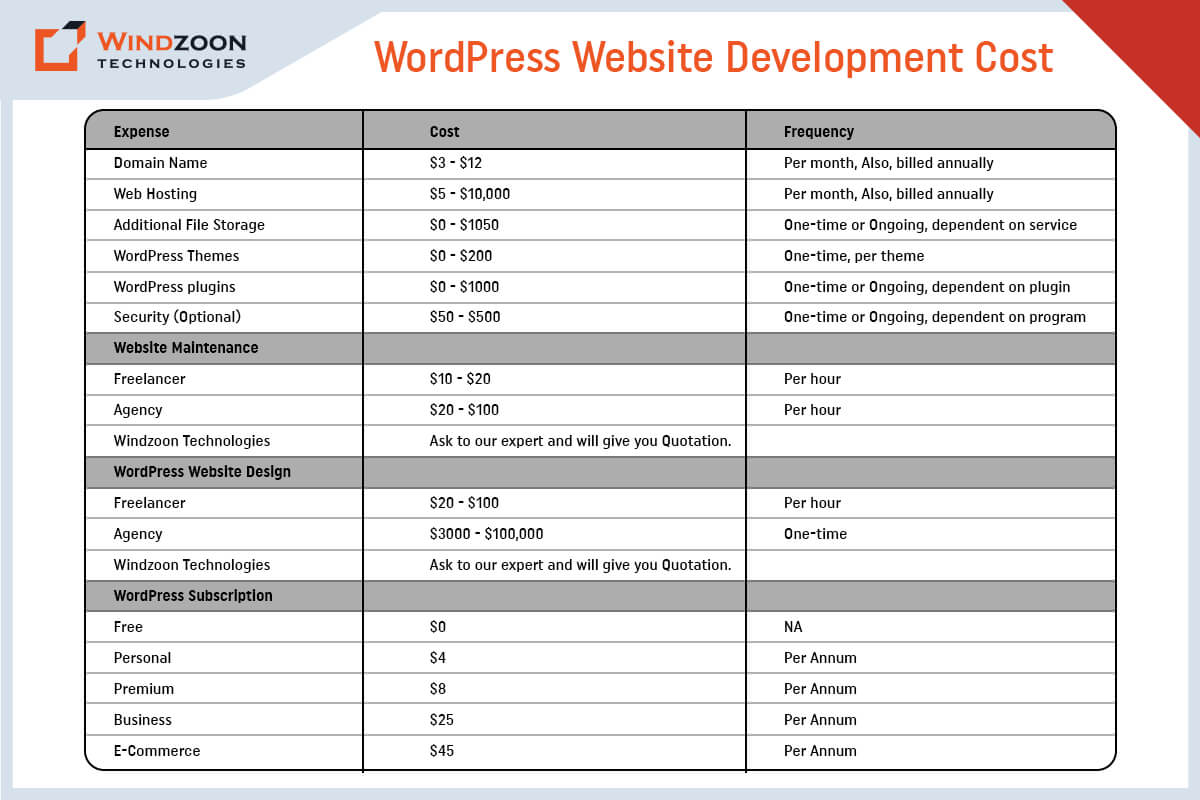
Every business has unique design and development needs, so the price of a WordPress website varies. However, the typical up-front price for a WordPress website is between $100 to $115,000. For WordPress websites, annual maintenance charges range from $75 to $15,000 PA.

[wpdatatable id=10]

Now, we will see what factors affect WordPress website development costs.

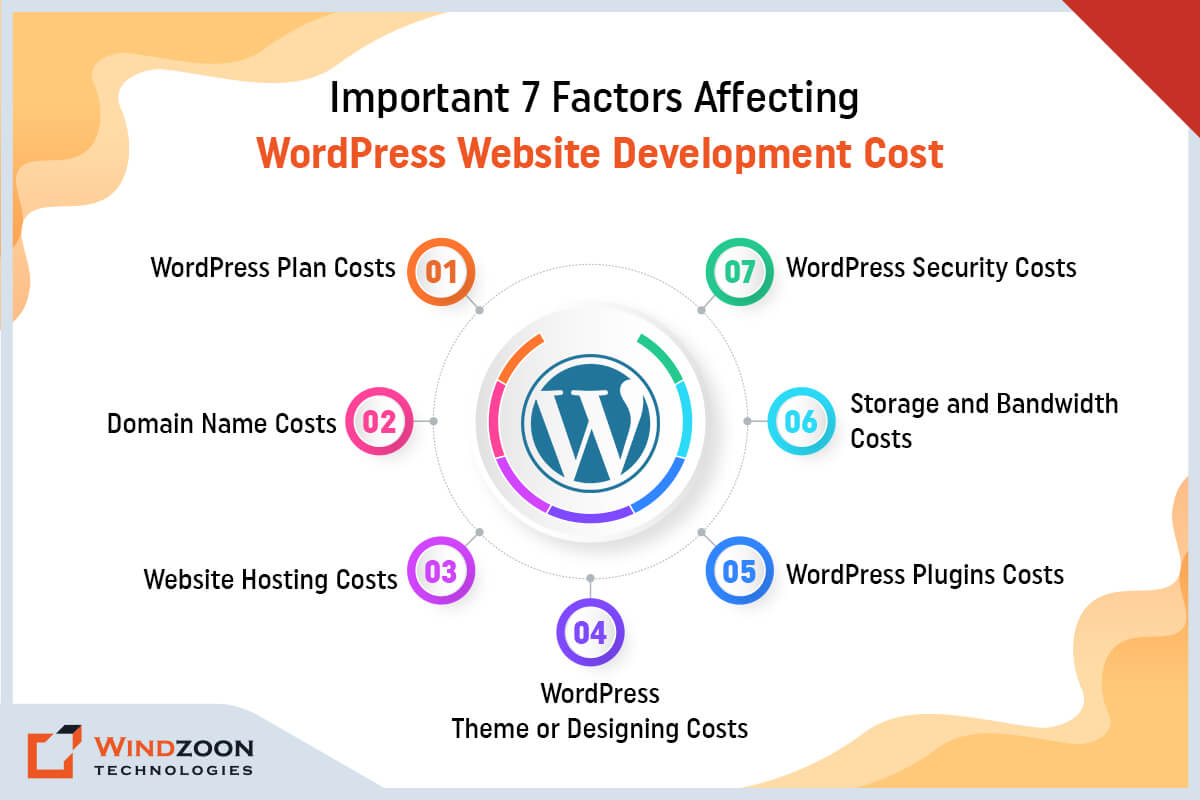
Important 7 Factors Affecting WordPress Website Development Cost
Factors Affect WordPress Website Development Cost

Creating and maintaining a WordPress website does not have to be costly, but there are unavoidable WordPress costs connected with website ownership. Let’s examine the factors affecting the cost of WordPress development.

1. WordPress Plan Costs

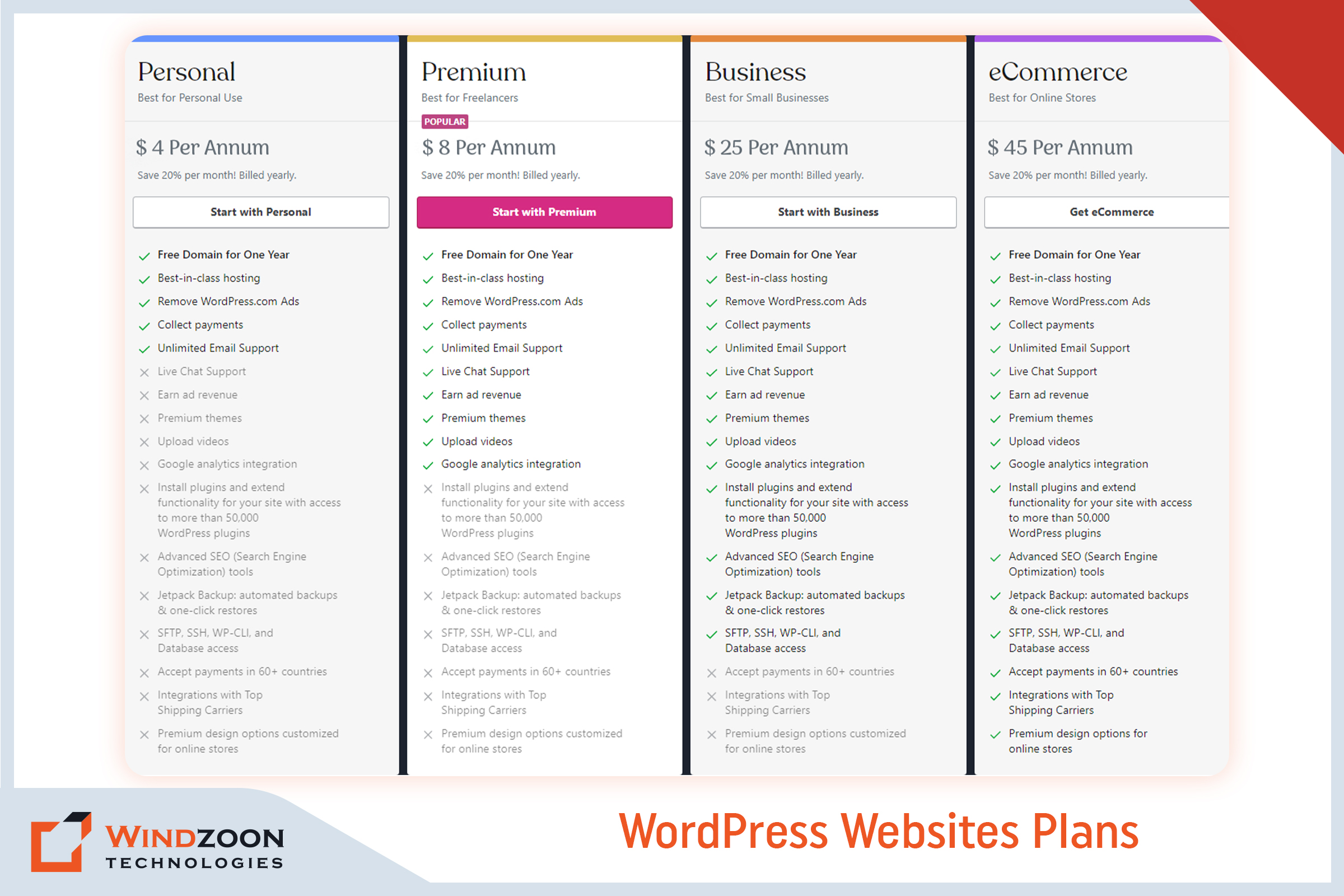
Picking a WordPress plan is the first significant expense you’ll face in calculating the price of a WordPress website. You can pick from the following types of plans:
WordPress Website Plans

The three main WordPress Websites plans are as follows:-

  • WordPress Free – $ 0
  • WordPress Personal – $ 4 Per Annum
  • WordPress Premium – $ 8 Per Annum
  • WordPress Business – $ 25 Per Annum
  • WordPress eCommerce – $ 45 Per Annum

Analyzing the price to create a WordPress website requires caution. The ‘Free’ plan is theoretically free but requires some back-end effort. For example, you must purchase a domain (more on this in the next section).

2. Domain Name Costs

Simply put, your domain name serves as the location of your website (think: [xyz].com or [abc].org). Consider using sites like GoDaddy and Bluehost to purchase a domain name. A domain name typically costs between $3 and $12 per month. If you choose the free plan, you must pay for the domain name. With the WordPress Pro plan, the domain name is complimentary for a year.

3. Website Hosting Costs

Web hosting is the main cost associated with your website. Your website must be housed on a server to be accessible online. Hosting providers rent out server space to websites and usually provide data maintenance and storage services.

There are two main types of web hosting: shared hosting and managed to host.

1. Shared Hosting:

With shared hosting, dozens or even hundreds of other websites share a single server with your website. Plans for shared hosting can start at less than $5 per month. However, there are drawbacks to using shared servers, such as increased security risks and slower website loading times.

2. Managed Hosting

Managed hosting typically includes a dedicated server, which implies your website will be hosted independently. These plans are more expensive, but they often come with better security, faster load times, round-the-clock customer service, and other benefits. You will also get facilitated with automatic backups and upgrades. Plan prices for managed WordPress hosting often start at around $30 per month.

4. WordPress Theme or Designing Costs

WordPress website prices must include costs for web hosting and a domain name. Customization costs after that are mainly up to you (though highly recommended). Themes are an approach to adding your personality to your WordPress website.

A WordPress theme is a downloadable template that affects how your site appears and feels. Your theme can determine everything from the backgrounds and colors to the general layout.

If budget is an issue, there are plenty of free themes. However, you might consider purchasing a premium theme if you want additional features and a more professional look. The average price of paid themes ranges from $20 to $1,000. You can also upgrade your WordPress theme or hire WordPress developers to tweak it later.

5. WordPress Plugins Costs

Plugins allow you to improve your WordPress website further. Like an installable program, a WordPress plugin expands the functionality of your website.

A plethora of free plugins enables a completely personalized WordPress experience. You can choose premium versions, just like themes, to add another degree of refinement to your site. Paid plugins are available as one-time purchases or monthly subscriptions, and their prices range from $10 to over $500. Additionally, some plugin updates may incur extra costs depending on the plugin.

For some instances of what plugins do, start exploring prominent paid and free options, such as

All-in-One SEO – It assists you in increasing the value of your SEO through XML sitemaps, social media integration, and on-page analysis.

WooCommerce – Creates an online store from your WordPress website.

UpdraftPlus – Produces complete backups of your website.

Page Builders Plugins: Build and customize your page layouts in WordPress.

6. Storage and Bandwidth Costs

Another cost consideration is your website’s storage and bandwidth. It typically ranges from $0 to $650 for one-time or continuing services. Given that each website is unique, it is impossible to determine the price.

For instance, a WordPress blogger won’t use as much storage space. Conversely, an eCommerce site will require more storage as it uploads its product catalog.

When you create a WordPress website or hire a website development company, you must include this cost in your budget. Hosting your WordPress site will cost extra if it has many images, videos, products, or other materials.

7. WordPress Security Costs

Your website’s security is one of its most crucial components. You want visitors to feel secure browsing or shopping on your website. You must add security to your page to entice visitors to stay on your website.

You should obtain an SSL certificate, a widely used solution for protecting websites. It keeps the user’s internet connections safe. Although you can sometimes pay a one-time fee for security, many security systems demand a monthly fee.

Usually, a simple protection plan will cost between $50 and $500 per year. But you can easily spend up to hundreds yearly on more sophisticated security features.

With this, we have come to the last important question which is:

How to Avoid Overspending While Developing A WordPress Website?

The best advice for small business owners is to start with what they can manage and afford. You don’t have to install every possible feature immediately, and you can start modestly before selecting what features to add later. When you’re just starting, you should use the free themes and plugins available and only consider investing in custom programs if you have the budget.

Outsourcing is another strategy to prevent overspending on your website’s development. There are numerous options to outsource web development, which all boils down to picking the best choice for your goals and budget.

Working with a WordPress developer is the best option; you don’t have to spend a fortune to start. The top developers would advise you to start by concentrating on the most crucial aspects of your website before scaling it as your traffic and sales increase.

Now, we will understand the process of building a WordPress website.

How to Build a WordPress Website?

In another blog, we discussed the entire process of creating a WordPress website. So, let’s confine ourselves to a quick summary here. Start your WordPress journey by following these instructions.

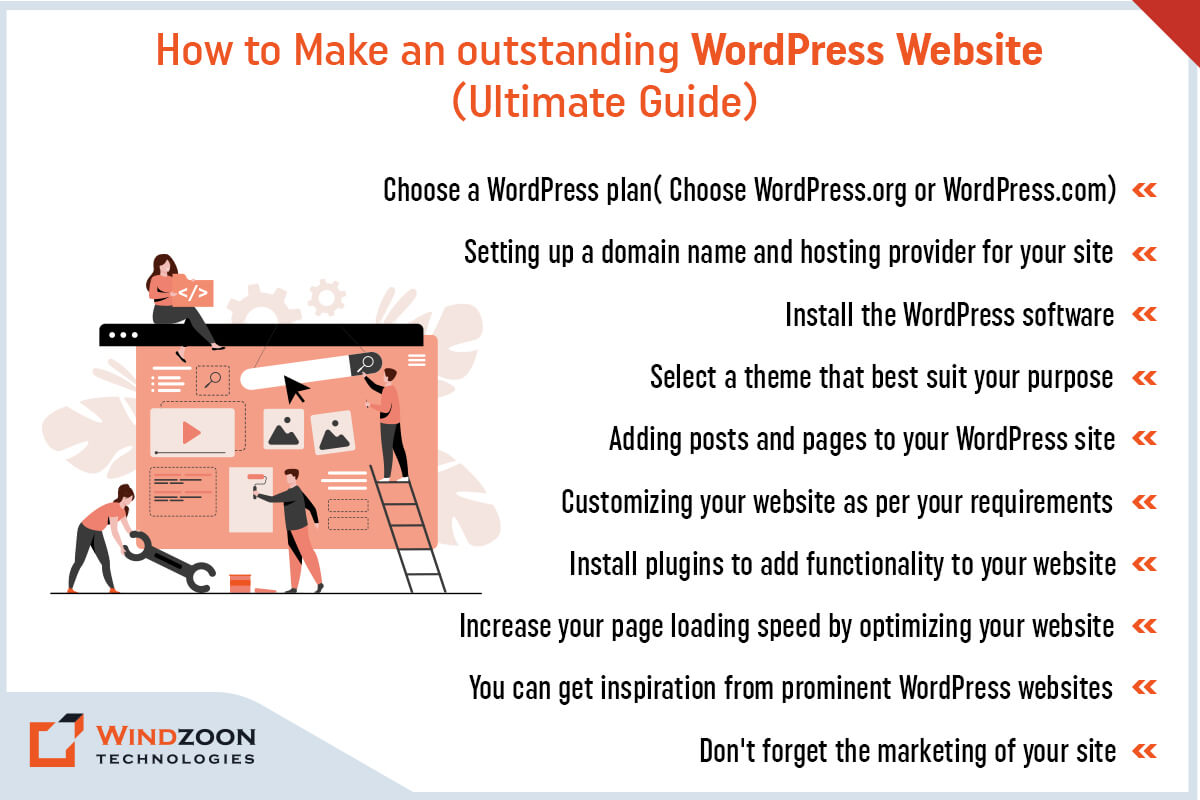
10 Steps to build a beautiful WordPress website

  1. Choose a WordPress plan( Choose WordPress.org or WordPress.com)
  2. Setting up a domain name and hosting provider for your site
  3. Install the WordPress software
  4. Select a theme that best suits your purpose
  5. Adding posts and pages to your WordPress site
  6. Customizing your website as per your requirements
  7. Install plugins to add functionality to your website
  8. Increase your page loading speed by optimizing your website
  9. You can get inspiration from prominent WordPress websites
  10. Don’t forget the marketing of your site

Conclusion

Developing a WordPress website can be a gratifying and satisfying experience, but only if the cost of doing so does not burden your project and business goals. This is why it’s crucial to work with a skilled WordPress developer. It could completely alter the course of your website:

One of the benefits is that it can make your website an appealing platform for your products & services.

Two, it can assist you in maintaining your website up to date.

Three, it can assist in keeping costs low without compromising the website’s quality.

Consider working with Windzoon Technologies if you’re uncertain of where to start. We have more than 10+ years of expertise in providing WordPress development services for various business concepts. Hire WordPress Developers from us and relax knowing your project development is in good hands.

Please contact us if you would like to obtain a quote or to learn more about our WordPress website development packages.
Enterprise WordPress Development: 9 Tips for Successful Growth

Enterprise businesses require a reliable and scalable web presence more than most organizations do to stay competitive. To that end, many large businesses have historically looked to pricey web solutions requiring exclusive support contracts as a quality assurance measure. Enterprise platforms are often selected because they allow for tailoring development and marketing strategies specifically to the needs of large organizations.

But is it necessary that only expensive web solutions will provide a quality guarantee while others won’t? Because this isn’t the case, especially with regard to WordPress.

The fact that WordPress has been around for more than ten years and now powers 43.0% of the web makes it clear that even the biggest companies need to pay attention to it.

Currently, WordPress powers many Fortune 500 businesses, including Xerox, Sony, Tesoro, The Walt Disney Company, Best Buy, and many more. Your business deserves a custom WordPress solution that is tailored to meet its unique needs and expectations. You can also join this league by working with a reliable Custom WordPress Development Company

In this article, we’ll discuss the unique requirements of larger organizations and examine the many benefits of using WordPress for enterprise businesses.

What is an Enterprise?

“Enterprise” is obviously a generic term, but when applied to a specific type of business, it generally refers to a large, usually multinational organization. These organizations typically consist of separate organizational parts with separate budgets and goals.

Although there are many different definitions of what an enterprise business is. But when it comes to web technology, most enterprise websites need to be able to handle a lot of traffic, especially if they are media or e-commerce sites. It is also crucial that website development is aligned with the organization’s business objectives to ensure the site effectively supports overall goals.

Now, let’s move toward our next question, that is:

6 Must-have Features in Every Enterprise CMS Website

6 Must-have Features in Every Enterprise CMS Website

Based on our experience as the preferred WordPress Website Development Company, we have identified a few key criteria for any CMS to serve as an enterprise-grade solution. High code quality is essential for ensuring reliability, security, and standards compliance in enterprise environments. Additionally, custom websites tailored to enterprise needs are crucial for providing the flexibility and scalability required for business growth. They are listed below:

1. Easy Administration

An enterprise needs a CMS that provides a variety of user-friendly and effective administrative tools in a single software package. Site administrators must be able to manage notifications, add assets, track scheduled content, and adjust plugins without switching between different programs.

2. Workflow Controls

Enterprises require a CMS with efficient workflow controls. As they are one of the most useful components of a good CMS. In essence, they offer your marketing team a planned environment for content creation. For ex.: Writers produce the content for your website, and editors edit it before sending it to the company’s legal department for a final review. Every team member has a profile with the proper permissions to speed up workflow. Managing access permissions is crucial to ensure efficient and secure workflow, especially in enterprise environments where multiple users and roles are involved.

3. Multi-Platform Capabilities

Enterprises are bound to grow their customer base over time. Having a flexible website solution from the start will allow them to launch various mobile applications, web applications, and websites as they grow. For enterprises managing multiple websites, leveraging multisite functionality enables centralized control and streamlined management from a single platform, making it easier to scale and customize as needed. To meet any of these requirements, a CMS must be capable of supporting multiple platforms.

4. Headless Content Management

Enterprises are under increasing pressure to support omnichannel digital experiences across a wide range of devices. As a result, they require a headless CMS that can store frontend agnostic content and allow marketing teams to optimize and deliver it on whatever devices or channels their audience requires.

5. Detailed Analytics

Any online marketing campaign’s success depends on how much the marketing team is aware of its target market and potential customers. Enterprises are well aware of this fact. As a result, they need a CMS that either has popular analytics tools built in or can integrate the necessary plug-ins.

6. Robust security

Serious security lapses have catastrophic effects on businesses of all sizes. Therefore, enterprises need a CMS platform that prioritizes security and can be quickly updated to fix vulnerabilities as they appear. Implementing advanced security measures, such as two-factor authentication, is essential to protect sensitive enterprise data from evolving cyber threats. Anything less is simply unacceptable.

After learning about the enterprise’s expectations from the CMS, let’s see what exactly WordPress CMS is.

What is the WordPress CMS?

WordPress has long been recognized as a blogging platform. Or a system that offers small business owners and aspiring entrepreneurs incredible flexibility. Although it still offers small businesses reliable solutions, WordPress has grown to be much more.

WordPress for big enterprises includes a slew of features tailored to enterprises of all sizes. It is built using web technologies, which are extremely scalable. Professional WordPress web design services can deliver scalable and secure solutions for large organizations, ensuring the platform meets enterprise-level demands. With WordPress, businesses can also create a custom theme that reflects their unique branding and functional requirements, providing a tailored and brand-consistent online experience. WordPress is one of the most popular content management systems (CMS), so there are a lot of WordPress service providers to choose from

Thanks to the abundance of plugins available, it shouldn’t be difficult to customize the default enterprise WordPress platform to deliver the precise experience you need.

Now, Let’s learn about some of the myths related to WordPress for Enterprise Website Development.

What are the Common WordPress Misconceptions for Enterprise Website Development?

Common WordPress Enterprise Development Misconceptions

While WordPress is an excellent platform for many reasons, many people have misconceptions about its limitations and capabilities. Successful enterprise WordPress projects require technical expertise to ensure security, scalability, and reliability. Here are a few examples of common WordPress enterprise development misconceptions:

1. WordPress is not a True CMS and is Only for Blogs

As previously stated, WordPress powers nearly 42% of all websites, implying that it is capable of much more than just blogging.

2. WordPress is not Very Secure

Although there may be some risks associated with third-party plugins, the core system is actually very secure. Besides, WordPress has also recently begun to invest in rapid security releases, which are managed by a team of 50 experts. Regular security updates are essential to protect enterprise websites from emerging threats and ensure ongoing website security.

3. At the Enterprise Level, Open-source is not Trustworthy

This is untrue because large websites like Facebook and Google also rely on open-source software to power their technology.

4. WordPress Leaves you on your own and Provides no Support

It is not true. Due to its sizable open-source community, developers and contributors are constantly producing fresh plugins, themes, and features in addition to responding to user inquiries and fixing bugs as they appear. For enterprise WordPress sites, ongoing support is available to ensure continuous website maintenance, security updates, performance optimization, and feature enhancements, keeping your site secure, fast, and up-to-date after launch.

With this, we have come to the main topic of our discussion and that is:

9 Benefits of WordPress for Enterprise Website Development

Compared to other content management systems, WordPress is easier to use, cost-effective, and more flexible when it comes to customizing enterprise-level websites. Some of the exceptional benefits of WordPress are as follows:

1. Robust Security

Of course, an enterprise CMS needs to be completely secure. It guarantees the security of both user and organizational data. To achieve this, robust security measures are implemented, including vulnerability assessments, regular updates, and industry-leading security practices to protect against emerging threats.

WordPress meets and even exceeds these requirements. WordPress provides regular updates and security releases to protect users from common hacks. You can further secure your site by utilizing security plugins, as well.

While WordPress handles some minor core updates automatically, major updates and server updates frequently require manual intervention. An enterprise company can lessen its technical workload and risk of error by selecting a managed WordPress host rather than a generic host.

2. Third-Party Tools

With WordPress, you have access to a wide range of third-party tools that are compatible with your setup. This includes the ability to integrate marketing automation tools, which can enhance website functionality and support enterprise marketing strategies. As a result, your enterprise business can quickly add features and update the website without having to spend money on pricey custom solutions. There are lots of free tools and paid plugins with extra support available for enterprise businesses!

3. Substantial Flexibility and Scalability

The most crucial factors for businesses in general, or for enterprises in particular, are flexibility and the ability to grow over time. WordPress provides that with the aid of thousands of highly customizable themes and more than 54,000 plugins.

WordPress enables scalable solutions that can handle high-traffic websites and complex enterprise requirements, making it ideal for organizations with growth ambitions. Additionally, innovative solutions can be implemented to address unique business challenges, ensuring your website remains competitive and adaptable.

With respect to other CMS, this is a sizable number—possibly the largest. There’s a good chance that everything you need for your website is already available. And even if it isn’t, you can speak with a qualified WordPress website development company to create a unique solution that is completely tailored to your needs.

4. Media Management

Media management is an important aspect to consider when designing an enterprise website. For instance, whatever solution you choose must make it simple to manage organizational documents, visual media like photos and videos, and even audio.

Fortunately, WordPress allows you to upload (and manage) almost any type of media. However, managing media is not limited to the back end. Using WordPress’ built-in functionality, you can also display it conveniently on the front end in places like pages and posts.

5. Industry Support and Integration

Beyond user support, many major industry players are capitalizing on WordPress’ popularity. These companies, which include software providers and marketing services, provide integrations and support that benefit many users. In addition, collaborating with hosting partners such as WP Engine and Pantheon ensures high performance and security for enterprise WordPress sites. Enterprise-grade hosting solutions also offer scalability and dedicated support, making them ideal for large-scale or high-traffic WordPress websites.

Plugins are the most popular method of industry support and integration, and they are an inherent feature of WordPress. These specific pieces of software work to enhance WordPress’ functionality.

In fact, these plugins are specifically designed for WordPress by companies like MailChimp, Constant Contact, Buffer, and even Google Analytics. It allows you to easily integrate these companies’ services into your website, which improves UX and site flexibility.

6. Multisite Management

Operating an enterprise website entails managing multiple subdomains or microsites and restricting access to a select group of team members.

A user role in WordPress called “Super Admins” gives users the ability to build networks and control user permissions across numerous sites. Utilizing a multisite network with WordPress multisite allows you to efficiently manage multiple websites from a single WordPress installation, providing centralized content management and streamlined workflow across all sites. With this, you can safeguard your website and its contents, especially sensitive data, from unauthorized access. We have worked with many enterprise clients to implement and manage complex WordPress multisite environments, ensuring scalable and secure solutions for large organizations.

7. Multilingual

Large corporations must have a website that customers from all over the world can access. WordPress supports more than 100 languages, which means you can effectively communicate with a global audience.

8. Headless Functioning Capabilities

Headless is a new trend in enterprise website development. It’s a method of separating the back end of the CMS from the front end. By doing this, you can create a unique user interface based on a framework, such as JavaScript, and link it to the back end (WordPress) using an API.

As a result, you get the best of both worlds: remarkable content management and a more responsive front end.

The REST API in WordPress allows it to support this approach out of the box. Not only that, but the API can populate almost any other object with content, including mobile apps.

As a result, headless can transform WordPress from a basic website to an omnichannel publishing tool. If you are interested in this headless concept and want to know more about it, then read our Complete Guide on Headless WordPress Development.

9. SEO Friendly

Another technical benefit of WordPress is its SEO-friendliness. WordPress naturally works well in this area, though you might need to install a plugin to make managing on-page SEO a little simpler (the Yoast SEO plugin and All-In-One SEO Pack are two popular options that come to mind). WordPress sites can be optimized for search engines by using proper site structure, clean code, and SEO plugins, which help improve visibility and ranking in search engine results. It is a key selling point for enterprise sites with potentially enormous amounts of content.

Now, let’s get to know about some easy steps to develop a WordPress website for an enterprise.

How To Develop Enterprise Websites With WordPress?

Here are the six steps you must follow to make WordPress enterprise-ready.

  • Step 1: Select a Reputable WordPress Host, such as WordPress VIP, to ensure high-security, enterprise-grade managed hosting.
  • Step 2: Configure Plugins for Advanced SEO and leverage plugin development for custom features and feature enhancements.
  • Step 3: Add multilingual support to your enterprise WordPress site and integrate an online store for seamless e-commerce functionality.
  • Step 4: Add performance-enhancing plugins and implement performance optimization strategies to optimize WordPress for speed, scalability, and reliability.
  • Step 5: Strengthen the security of your enterprise WordPress site with custom themes, custom WordPress solutions, and tailored enterprise solutions.
  • Step 6: Improve the publication process by assessing your existing tech stack to develop a customized implementation plan and ensure minimal downtime during data migration.

WordPress is an excellent CMS for large organizations and complex solutions. It is expandable, secure, and provides practical and simple solutions to complex needs. However, these features would never suffice for enterprise websites without comprehensive WordPress enterprise solutions and enterprise WordPress development services.

Enterprises require continuous website monitoring, proactive maintenance, and ongoing maintenance, which are essential services for enterprise sites. Performance monitoring and performance optimization are critical for maintaining WordPress performance, security, and scalability. Specialized enterprise WordPress development agencies have senior developers and designers with extensive experience in project management, data migration, and delivering enterprise solutions for enterprise clients. They also provide feature enhancements, plugin development, and custom features to extend website functionality, as well as custom themes to align with enterprise branding.

Maintaining a strong digital presence is vital for enterprise clients, and working with a WordPress VIP Gold Partner ensures access to the highest level of expertise and support within the WordPress VIP ecosystem. Our experience with enterprise clients includes developing custom WordPress solutions, integrating online stores, and optimizing WordPress websites for high performance and scalability. We deliver enterprise WordPress development services tailored to your unique business needs.

If your company requires WordPress Development services, partnering with Windzoon Technologies is a wise decision. We are one of the best and most remarkable WordPress Development Companies in India, recognized as a WordPress VIP Gold Partner.

Hire WordPress Developersfrom us who are experienced in creating complex and industry-specific enterprise websites. Visit us at wzadmin.windzoon.in/ to or to learn more about our WordPress website packages

Complete Guide: How to Develop Advanced Headless WordPress Website with React

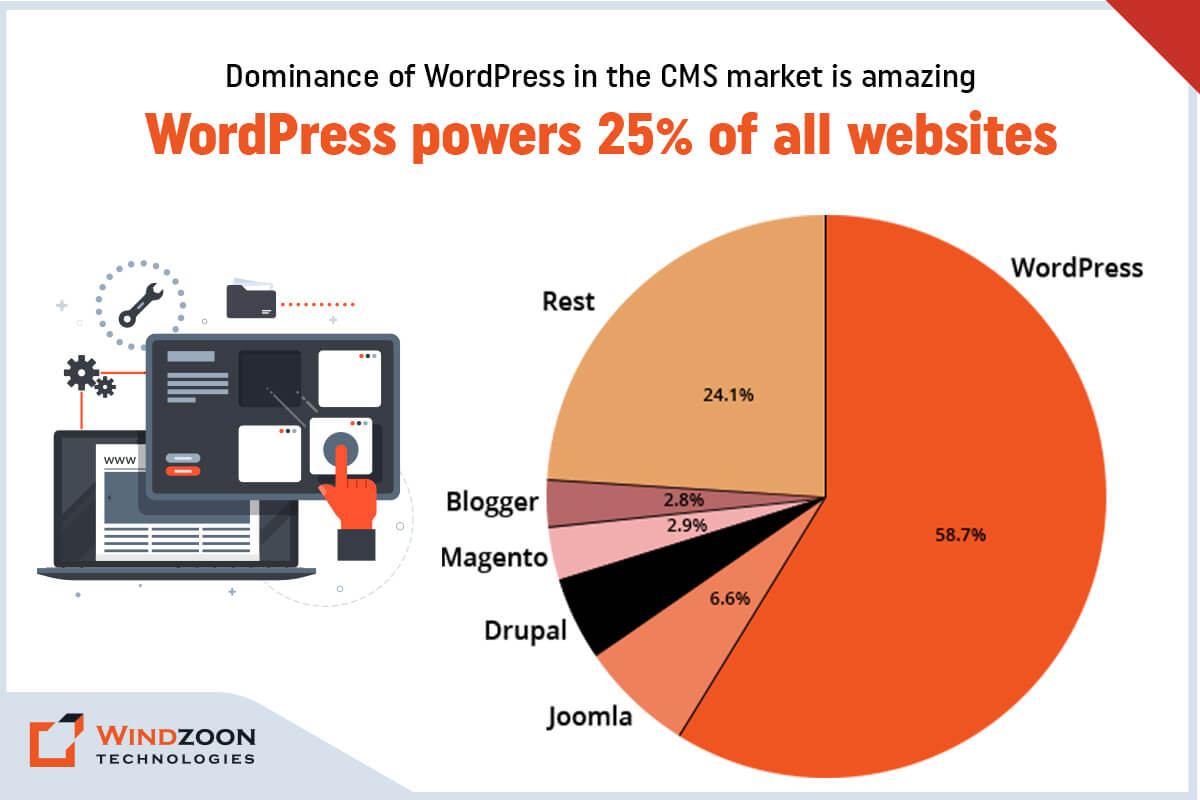
With its simplicity, flexibility, & usability, WordPress has become one of the most sought content management systems. It powers around ⅓ of the world’s websites. According to W3techs, WordPress has acquired a 58.7% market share. In contrast, Joomla with 6.6% & Drupal with 5.0% represents the second & third most popular CMSs, respectively.

Dominance of WordPress in the CMS market
The dominance of WordPress in the CMS market

WordPress has the most easy-to-use interface & rich plugin ecosystem. It makes it a common choice among non-technical & technical people for building feature-rich websites. Although it is a popular CMS, it is not the most-loved CMS among developers.

The reason is that WordPress is built as a monolithic platform with the tightly coupled front and back end. Besides, it doesn’t allow multichannel publishing of content. And this makes WordPress unwieldy for developers who want to build bespoke web app solutions without the constraints of its theme-based structure.

However, you can avoid this issue by decoupling WordPress’s front end from its back end. The concept of decoupling or headless CMS unlocks various developmental opportunities. It opens a new door for companies & developers to do Headless WordPress Development using new frameworks, tech stacks, & delivery channels.

After reading this, you might have these questions:

Well, read this whole article. And we promise you that you will get all the answers to your questions by its end.

What is Headless CMS?

In traditional CMS, you’ll have to deal with both the front end & the back end to create a website.

-The front end is the website’s display(presentation) part that visitors interact with. (Ex. a web page)

-The back end is the logical part of the website that contains storage & managing content. (Ex. files stored on servers like scripts & content databases) With the back end, developers can develop, organize, & manage the content before they publish it to the front end.

However, a headless CMS operates differently than a traditional CMS. As its name suggests, it removes the head(front end) from its body(back end). This means it decoupled front-end tools from the back-end management tools that are on the same installation.

Now come to the next question;

Why Should We Use Headless CMS?

Well, here are some reasons that explain why you should consider adopting headless CMS.

1. It gives freedom from maintaining ‘legacy’ software. And gives a chance to adopt any latest technology for web app development.

2. It will give you the ability to manage content on multiple channels.

3. It helps the developers to build web app solutions that provide improved & bespoke user experience.

4. It will allow you to manage your web app content from a single place/location.

5. It will allow your development team to prototype, test, & develop your web app solution efficiently.

6. It will make web app development easier by using microservices.

7. It will provide you with a web app solution with extra security from cyber attacks.

8. It will significantly speed up your time-to-market

9. It gives you the freedom to scale up your web app solution as high & fast as possible.

After learning about the reason behind choosing headless CMS for your project, let’s go further to the next question.

What is Headless WordPress CMS?

Though WordPress is a monolithic application, it is still one of the most capable Content Management Systems. And using WordPress as a headless CMS is the best solution for dynamic & tailored web app development. Know more about WordPress with our another blog on Why Choose WordPress CMS for Your Website: Top 10 Reasons to Know in 2023

However, what exactly is a headless WordPress?

Headless WordPress means a decoupled WordPress. Here, the back-end(management) part is removed from the front-end(display) part of the WordPress CMS.

You can create & manage the front-end part as a standalone with any front-end framework of your choice. And connect the newly developed front part with the back-end part through WordPress REST API.

Now, to get to know better about WordPress as headless cms, let’s understand its architecture.

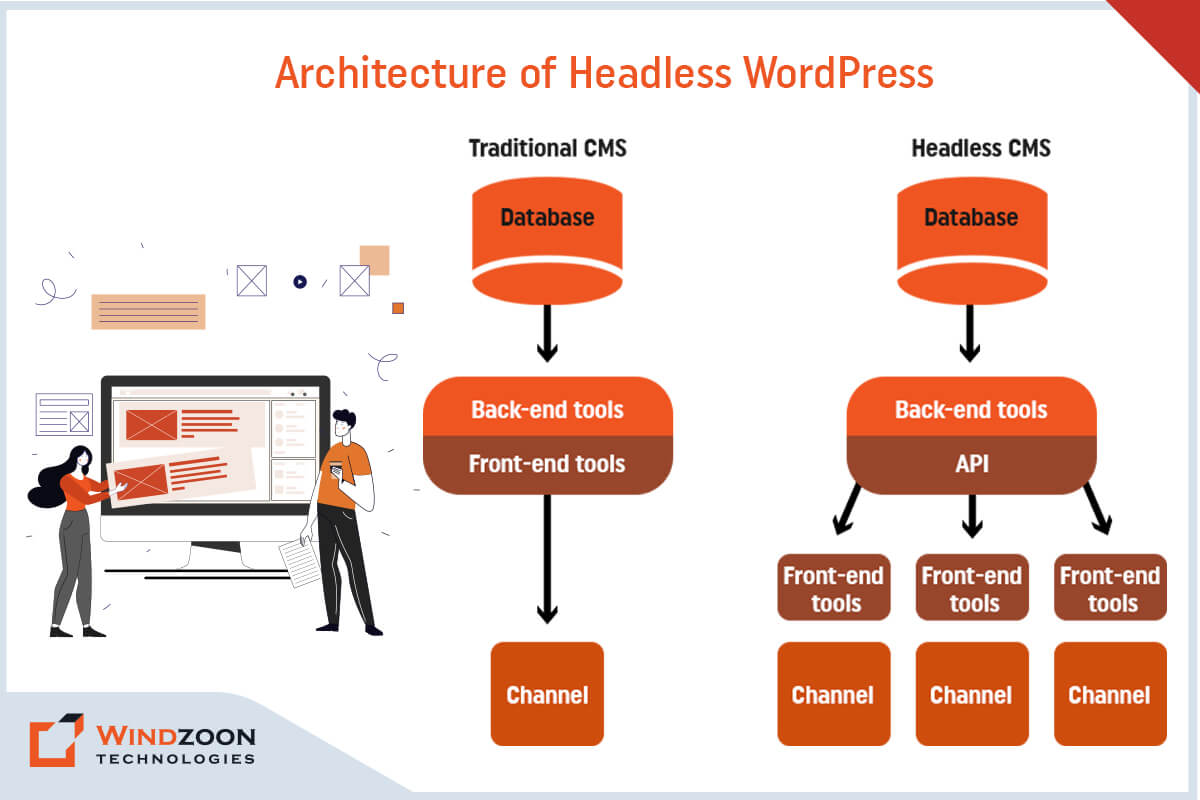
The Architecture of Headless WordPress

Architecture of Headless WordPress
The architecture of Headless WordPress

The standard WordPress framework we use for web development has a coupled architecture. In that, you manage your website’s properties through the dashboard & control its appearance by using different themes & plugins.

Read More:- WordPress Website Development: Expectations Vs Reality

However, headless WordPress content management tools are still available for web development. But, the front-end features like themes & the block editor get removed from it. Instead, another front-end framework like ReactJS, Angular, VueJS, and NextJS will handle your web app’s appearance using WordPress REST API.

To get a little deeper into the topic, let’s learn what makes headless WordPress different from traditional WordPress.

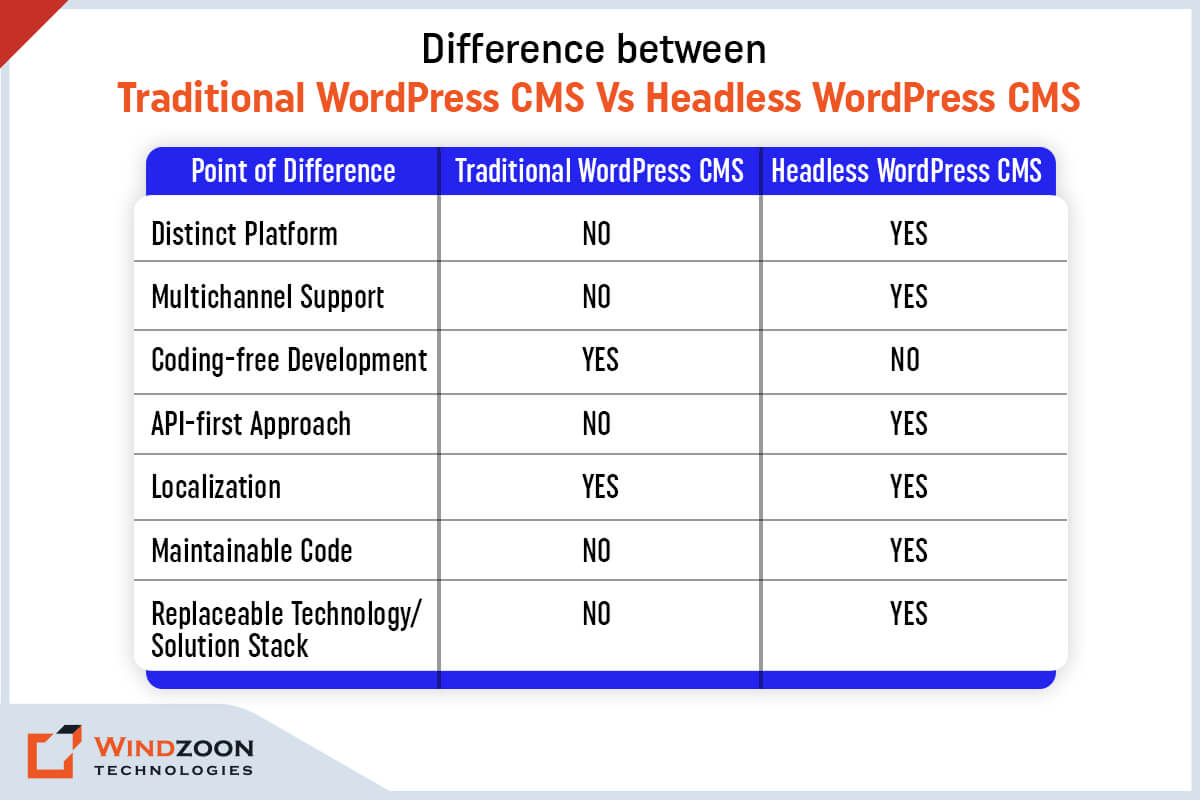
Headless WordPress CMS Vs. Traditional WordPress CMS

Difference between Headless WordPress Vs. Traditional WordPress

Following are the main points of difference between traditional WordPress & headless WordPress.

[wpdatatable id=3 table_view=regular]

Now, let’s learn the advantages of choosing a headless WordPress for your next project.

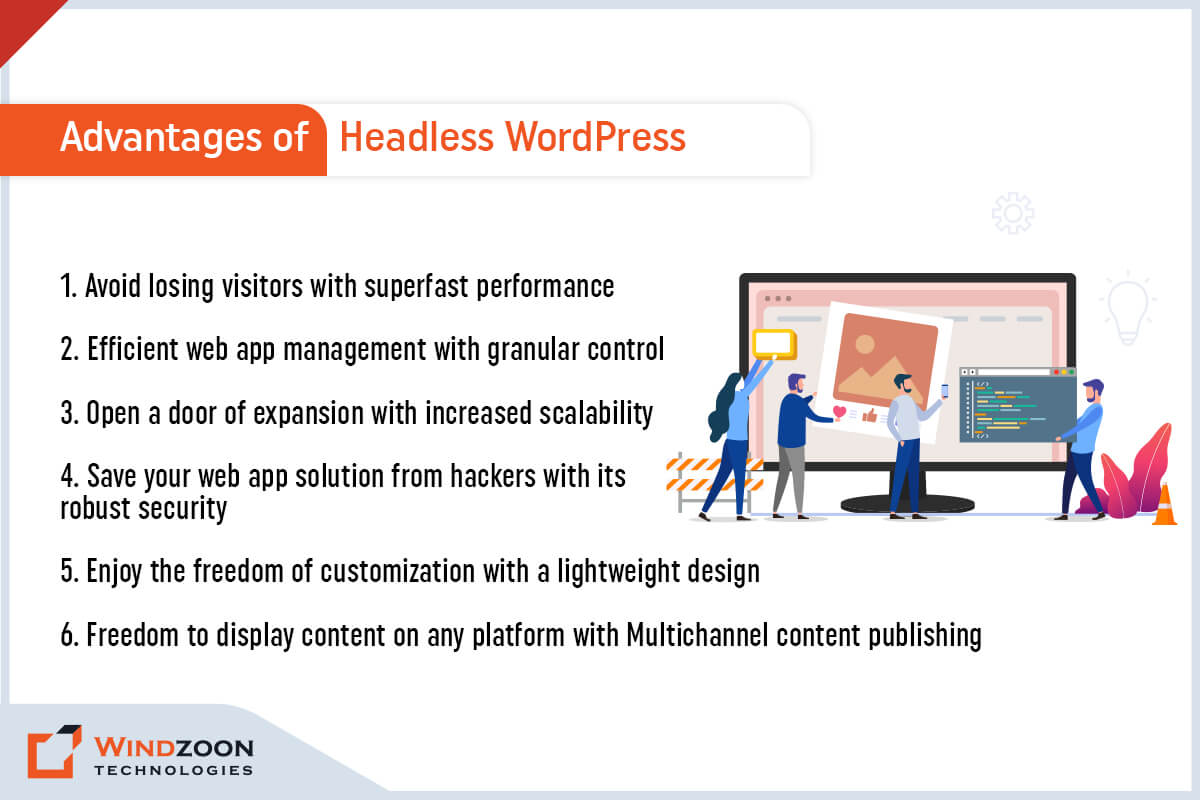
Why Should We Use Headless WordPress?

Advantages of Headless WordPress

Advantages of Headless WordPress

1. Avoid losing visitors with superfast performance

Your web application’s performance is the significant reason behind its success on SERPs. It will get higher rankings on search engines if it shouldn’t take more than a few seconds to load. But if it takes more time to load, it will lose visitors.

However, with headless WordPress, you can avoid this problem. Here, the front end is removed from WordPress, which you can develop using modern front-end tools. It will enhance the user experience of your web application through its superfast performance.

2. Efficient web app management & customization with granular control

You can gain more control over your web application by using headless WordPress. With a headless approach, you can easily control design layout and content presentation. Plus, it also provides you control over how users interact with the front end of your web application.

Other than this, in headless WordPress, you can access your back-end content from a central location. And this makes a web application lightweight & easier to manage.

Besides, its REST API calls provide more freedom to make customized designs for the front end. Plus, there is also an advantage of using modern web tools & deploy them on the front-end development.

3. Open a door of expansion with increased scalability

With WordPress, the web application doesn’t have much chance to scale. The reason is that a developer is required to have complete control over all components & codes of WordPress.

However, decoupling WordPress makes it easy to scale up your web application. Because now, you can effortlessly identify which part of the web app needs more scaling. And you can scale that part in isolation.

4. Save your web app solution from hackers with its robust security

Data security is a vital aspect of any online service. With headless WordPress, you don’t need to take stress about your web application’s security.

The reason is the architecture of decoupled WordPress provides more security against hackers & DDoS attacks. It’s separate from your front end, which makes it difficult to hack your sensitive back-end data.

5. Faster development process with code reusability

When you use headless WordPress for web app development you can leverage APIs to communicate with your back-end. Therefore, once your content has been written & published in WordPress, it can be delivered to different front-ends.

Additionally, headless WordPress allows you to use modular frameworks. It will enable you to reuse code from other projects without involving changes on your backend.

6. Freedom to display content on any platform with Multichannel content publishing

The decoupled WordPress has an API-based system. It allows you to publish content on multiple platforms, like mobile, tablet, & computer.

Besides this, you can also display your API-based content through augmented/virtual reality & IoT devices. It will enhance the accessibility of your web application & gives you better reach among the younger audience.

Now that we have learned why we should go for Headless WordPress Development. Let’s know its drawbacks.

Why Headless WordPress isn’t the Best Option?

Though headless WordPress is a remarkable innovation with numerous benefits, it also contains a few drawbacks. Thus, consider them before making a decision on whether to use headless WordPress or not.

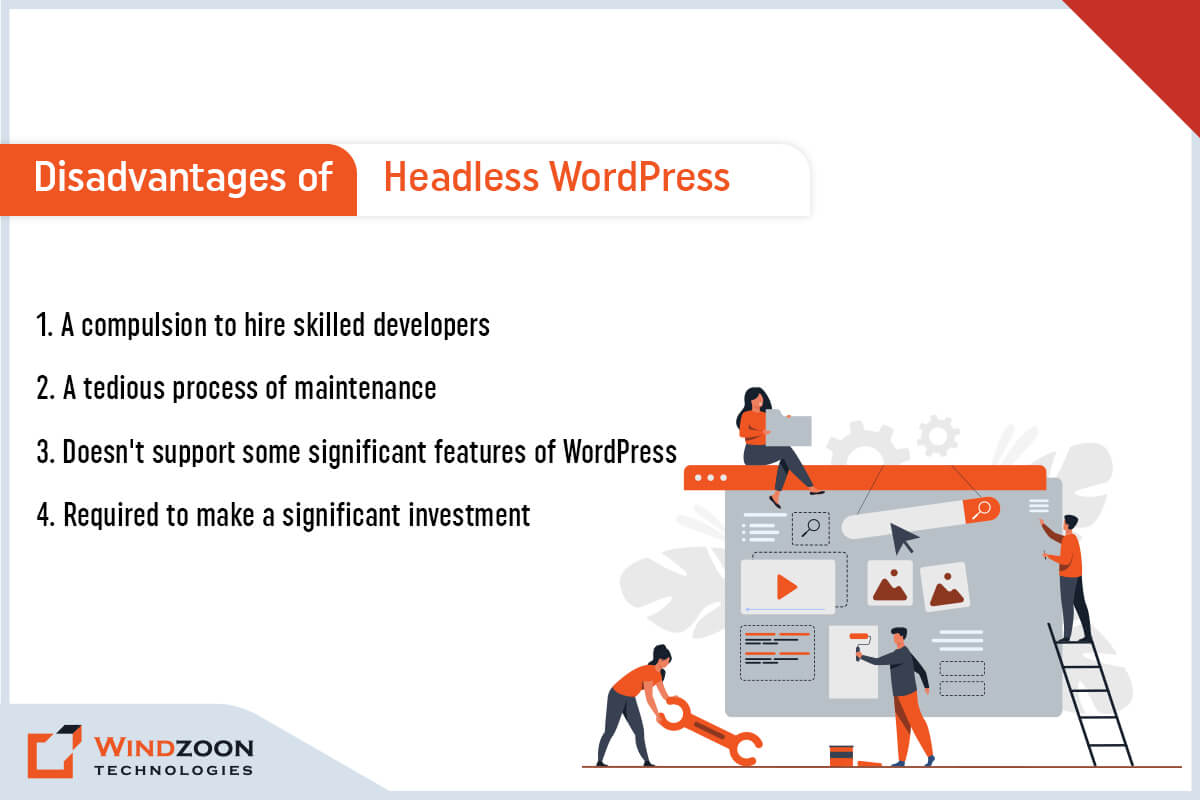
Disadvantages of Headless WordPress

Disadvantages of Headless WordPress

1. A compulsion to hire skilled developers

If you wish to utilize headless WordPress fully, you’ll need the services of a skilled team of developers. The reason is headless WordPress requires advanced frameworks for smooth functioning. And for that advanced coding knowledge is a fundamental requirement. Hence, a non-technical person would never help you with it. You need to Hire WordPress Developers for this job.

2. A tedious process of maintenance

Managing multiple web application instances would be more difficult with the front-end and back-end separated. And that makes the process of maintaining headless WordPress tedious & little expensive.

3. Doesn’t support some significant features of WordPress

Indeed, headless WordPress doesn’t support some significant features of WordPress. For example, famous WordPress features like WYSIWYG editor & live preview won’t work when you use a separate front-end.

4. Required to make a significant investment

Setting up a web application through headless WordPress requires significant investment. Because its implementation, management, & maintenance is complex & would need additional members on your team. And this would make headless WordPress web app development a little more costly than standard WordPress.

These disadvantages of headless WordPress made us understand when we shouldn’t use it. Now, let’s move forward with the next question.

Who Should use Headless WordPress?

Headless WordPress has many benefits & usages. And this makes it a suitable development platform for every type of business. We have named some of the business types below that can get benefited from using headless WordPress.

1. Enterprise business

2. E-Commerce business

3. Consultancy service provider business

4. Media companies

5. Startups

6. Small & Medium size businesses

7. Freelancers

After this, we’ll know about the types of business websites that you can build using headless WordPress.

Which Types of Business Websites We can Build with Headless WordPress?

With headless WordPress, you can build various types of websites and applications. This will give you the freedom to create a variety of web app solutions in terms of design, UX/UI, and animation.

1. Blogs

2. One-Page web solutions

3. E-Commerce websites

4. Brochure websites

5. Custom web applications

6. Native applications for iOS & Android

7. Documentation websites, etc.

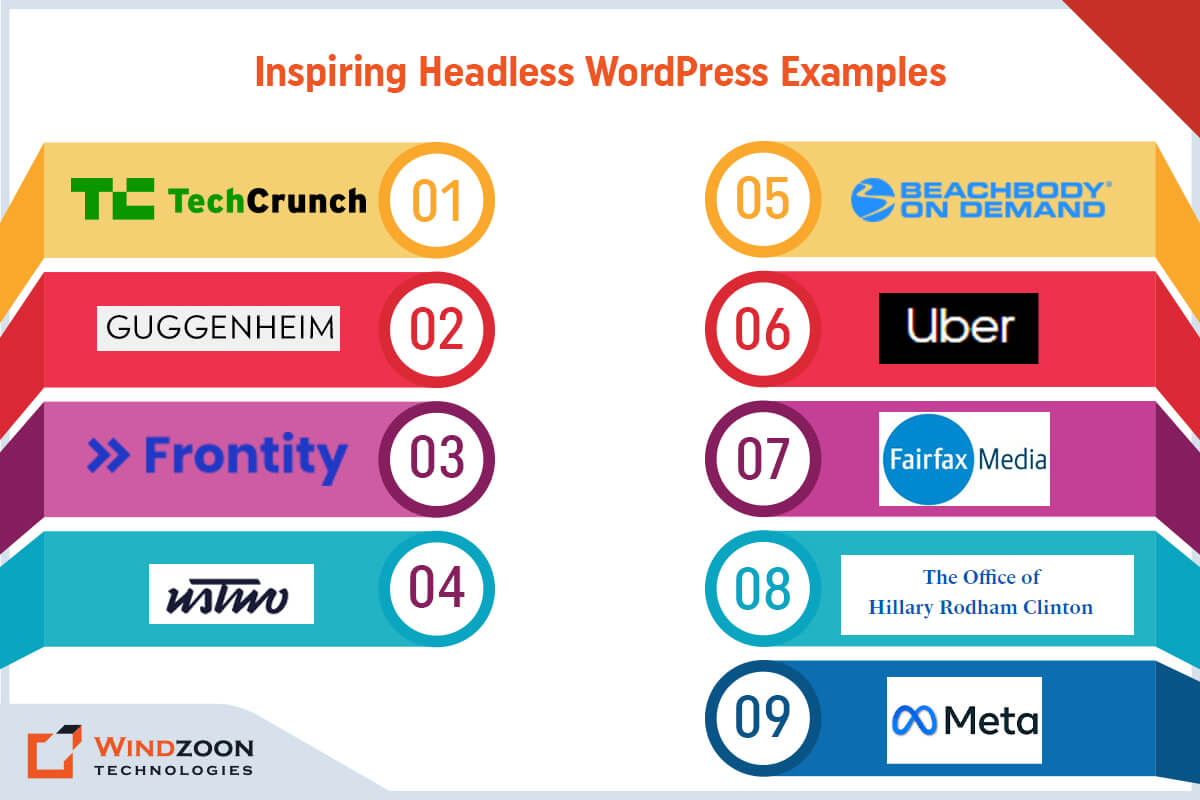
Name of Some Famous Websites Built Using Headless WordPress

Inspiring Headless WordPress Examples

1. TechCrunch

2. The Guggenheim Museum

3. Frontity

4. usTwo

5. Beachbody on Demand

6. Facebook Brand Resource Center

7. Uber Brand Experience

8. Fairfax Media

9. Hillary Clinton

Now comes one of the important questions.

Who Should Avoid Using Headless WordPress?

Business enterprises can avoid using Headless WordPress in the following circumstances.

  • Do not want to invest a significant amount in the front-end development of their web app.
  • Do not desire to follow the tedious & costly process of managing & maintaining two sub-systems.
  • If they aren’t interested in cross-platform publishing.
  • If they want to use WordPress visual editor and WordPress themes.
  • If they don’t want to configure & optimize the API

We hope now you gain adequate knowledge regarding headless WordPress. So, let’s move further with how to connect Headless WordPress with react.

How to Connect ReactJS with Headless WordPress?

ReactJS is one of the famous open-source front-end JavaScript libraries. It is maintained by Meta & a vast community of developers. ReactJS helps in building robust, fast, & dynamic web applications. And combining headless WordPress react will provide you with multiple benefits.

Read More:- Master to Build an Amazing WordPress Website with 10 Simple Steps

Besides, building a web application using React is not so difficult once your WordPress is set up. However, to connect ReactJS(front-end) with WordPress(back-end), you need to install the following on your computer.

  • A text editor ( For example, Visual Studio Code)
  • ReactJS & NPM
  • And Git for version control

Once you set up the environment, follow these below-mentioned steps to build a web app using ReactJS.

  • First, open the command line. After that, run the code to build a project.
  • Once you complete that, install the Axios package for API calls & open the folder inside the text editor.
  • At last, launch the web application with the appropriate command. And you’ll be all set to build a custom web application.

Combining WordPress back-end(built using Gutenberg page builder) with ReactJS is the most logical option. As Gutenberg’s page builder plugin supports ReactJS and helps to build bespoke web apps with a better user experience. Know more about WordPress Page Builder Plugin by following our exclusive blog on 10 Best Drag and Drop WordPress Page Builders Plugins Comparison

However, if you find any difficulty setting up react headless WordPress, kindly Hire a Headless WordPress Developer.

Conclusion

We hope our article has provided all the answers to your questions. And now, you don’t have any doubts regarding headless WordPress CMS. Decoupling your web app’s front-end from its back-end elevates your web app’s speed, performance, & security.

However, as we have mentioned before, developing a web app with headless WordPress can be complicated & confusing. And if you are not a seasoned developer then building a web app using headless CMS on your own is difficult.

Fortunately, there are many experienced WordPress developers in the market who can help you to make your project succeed. And if you’re looking for a competent WordPress Development Company for your project, then connect with us.

At Windzoon, we have a talented team of WordPress & ReactJS developers who can build industry-specified custom web app solutions. To avail of our developers’ services or to know about our WordPress Web Development Packages, kindly visit wzadmin.windzoon.in/ to get a quote.

Master to Build an Amazing WordPress Website with 10 Simple Steps

With the rise of the internet, websites started to dominate the digital world. They become a crucial factor in the growth of various businesses.

Businesses need a website that can attract their targeted audience. It helps them to convert their visitors into potential customers. However, the task of converting visitors into customers is not as easy as it may seams.

To attract visitors, one would need to require a website that is as appealing as engaging. And the creation of this type of website is a challenging task. However, the task of website building becomes more daunting if you have to build a website on your own.

And if you are not a seasoned developer, then it’s possible you even consider it an impossible task. Well, don’t get overwhelmed; we have good news for you.

There is software named WordPress that doesn’t require any coding knowledge. It is so easy to use that anyone can build an alluring & professional-looking website with its help. However, to get the most from WordPress, join hands with a prominent WordPress development service provider. Now let’s go further to know more about WordPress.

What is WordPress?

WordPress is one of the prominent & robust Content Management Systems (CMS). Despite being open-source, it is unmatched in terms of flexibility & ease of use.

WordPress has an avant-garde plugin architecture & template system. It helps to build small blogging websites to complex portal & enterprise websites.

According to W3techs.com, around 64.1% of websites are built with WordPress Content Management System. It is 43.0% of all websites on the internet.

Some major corporations have used WordPress to build their websites, including Sony, Time Inc., BBC America, and Facebook Newsroom.

You can also build websites like these big enterprises by taking the assistance of our WordPress development guide. In this guide, you will learn about the following things:

Now let’s begin with our guide…

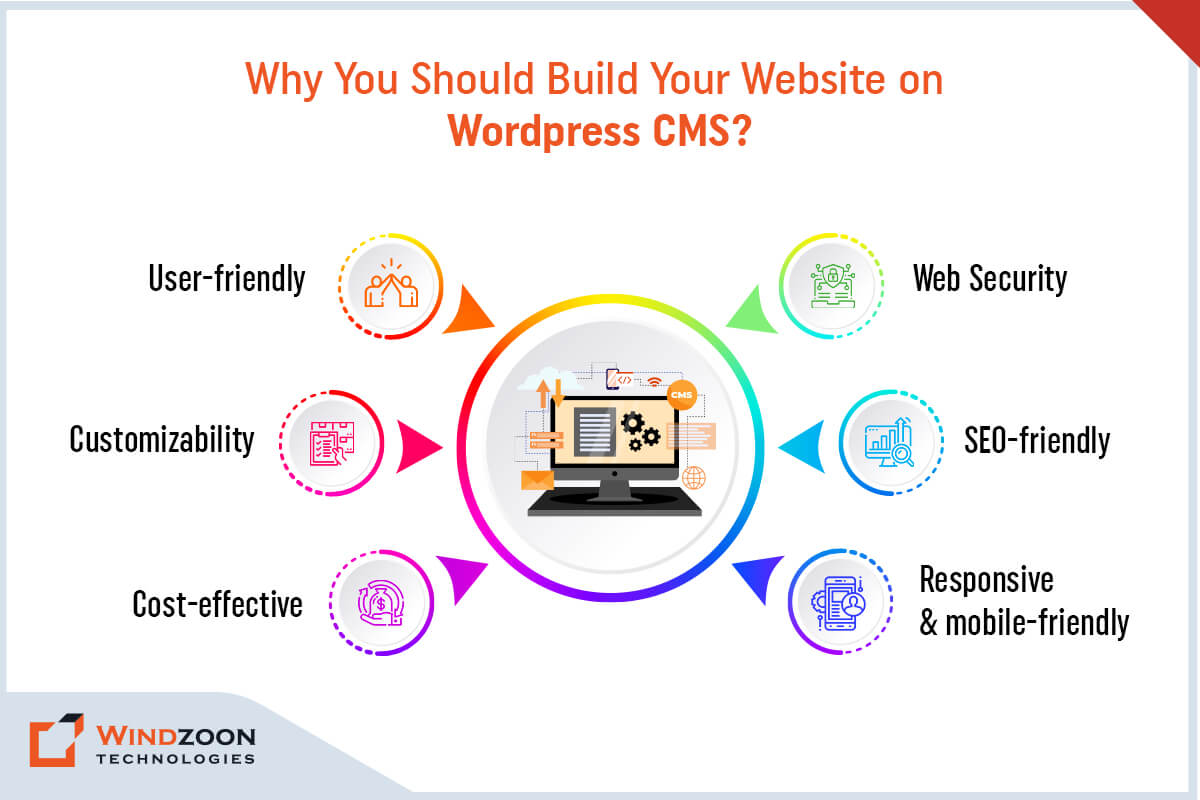
Why You Should Build Your Website on WordPress CMS?

Why You Should Build Your Website on WordPress CMS?

We understand your anticipation about choosing WordPress. It is natural to feel uncertain or to have questions regarding the capabilities of WordPress. But don’t worry, we are here to answer your every question.

It would be best if you chose WordPress for Website development due to its simplicity, flexibility, & usability. Plus, it is one of the most sought content management systems. Besides, its extensive content management ability, numerous plugins, & extensions help to build scalable WordPress web solutions.

Get Quote Now

We have mentioned some significant reasons to consider WordPress for website development. However, you can learn more with our separate blog on Reasons to Choose WordPress for Website Development.

– User-friendly

WordPress is the most simple & easy to use platform for websites and content management. Therefore, even a non-technical person can manage WordPress web solutions with ease.

– Web Security

With WordPress, you don’t have to worry about your website’s safety & security, as it is quickly taken care of by being one of the most secure & robust CMS.

– Customizability

WordPress provides an excellent customization facility for its themes. It allows developers to add or edit functions in WordPress web solutions easily.

– SEO-friendly

WordPress has tremendous SEO potential due to its SEO-centric features & plugins. It will help your website to rank higher on search engine result pages.

– Cost-effective

WordPress is an open-source platform that doesn’t require any paid license.

– Responsive & mobile-friendly

WordPress has fantastic adaptability. It is suitable for every screen size and renders flawlessly on desktops, smartphones, & tablets.

How much does a WordPress Website Cost?

Having read about the reasons to choose WordPress, you are probably wondering how much WordPress websites cost. Well, the answer is that it depends on your needs & expectation for your website. Generally, a standard personal website can cost as low as $100. At the same time, the cost range of a business website comes between $100 pa to as high as $30k pa.

How to Build a Website in WordPress?

Now finally, we have come to the main topic of the blog. There isn’t any doubt regarding the simplicity of building a website with the help of WordPress. However, where to start is the main topic of concern for beginners. Well, follow these below-mentioned steps & get free from the worry over where to start.

10 Steps to Build a Beautiful WordPress Website

Here we discuss the what are the 10 steps to create a website in WordPress. Let’s look at all the steps:

Steps to Build WordPress Website

1. Choose a WordPress Plan( Choose WordPress.org or WordPress.com)

The first step in creating a website is to select an appropriate WordPress plan. You’ll have two options for that, one is WordPress.org & another is WordPress.com.

If you choose WordPress.org, then you only have one free plan option. Plus, it compels you to buy your domain, hosting provider, plugins, & themes for your WordPress site.

If you choose WordPress.com, you’ll have five different plans as an option. And the significant difference between these plans is the monthly fees, site customization features, & access to marketing tools.

2. Setting up a Domain Name and Hosting Provider for Your Site

After selecting a WordPress plan, your next step is setting up a domain name & hosting provider for your site. Now, before we go further, let’s learn about a domain name & hosting provider.

For better understanding, assume the domain name as your home address. A home address helps people to locate your house. Just like that, a domain name allows visitors to find your website online. Ex. www.xyz.com ( assume your site’s name in place of XYZ)

Now, think of your hosting provider as your house. Your house gives you a place to stay. In the same way, a hosting provider gives your site a place to reside on a server. WP Engine, Kinsta, & GoDaddy are examples of some of the best hosting providers.

Now the question comes of how to pick a domain & hosting provider for your website.

Before we answer your question, understand this information. A WordPress.org plan compels you to create your own domain & find a third-party hosting provider for your website. In WordPress.com, you will get the option of having a custom domain as per your chosen plan. However, it takes care of the hosting on your behalf.

Selecting the right hosting provider is necessary for the success of your WordPress website. Your hosting provider significantly impacts your site in terms of speed, security, & reliability.

There are so many hosting providers available in the market. You can choose any hosting provider you like. However, your selected hosting provider must fulfill the following requirement to achieve greater site performance.

1. It should have PHP version 7.4 or greater

2. Its MySQL version should be 5.6 or more. And if it uses the MariaDB, then its version must be 10.1 or higher

3. Last but not least, it must provide the HTTPS support

As for the domain name, your work would get easier If you already have a domain name. You can use WordPress.com to transfer or map your existing/purchased domain in your WordPress site. But assume that you don’t have any domain name, and to create it follow this procedure.

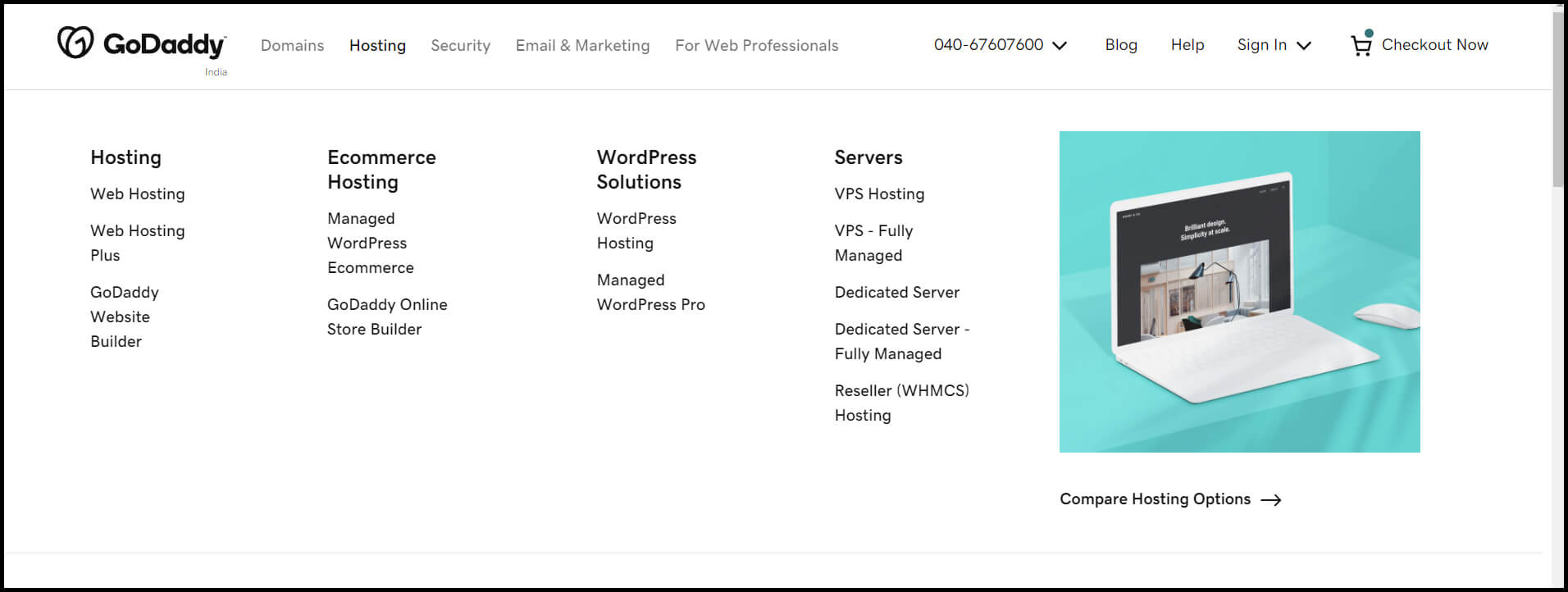
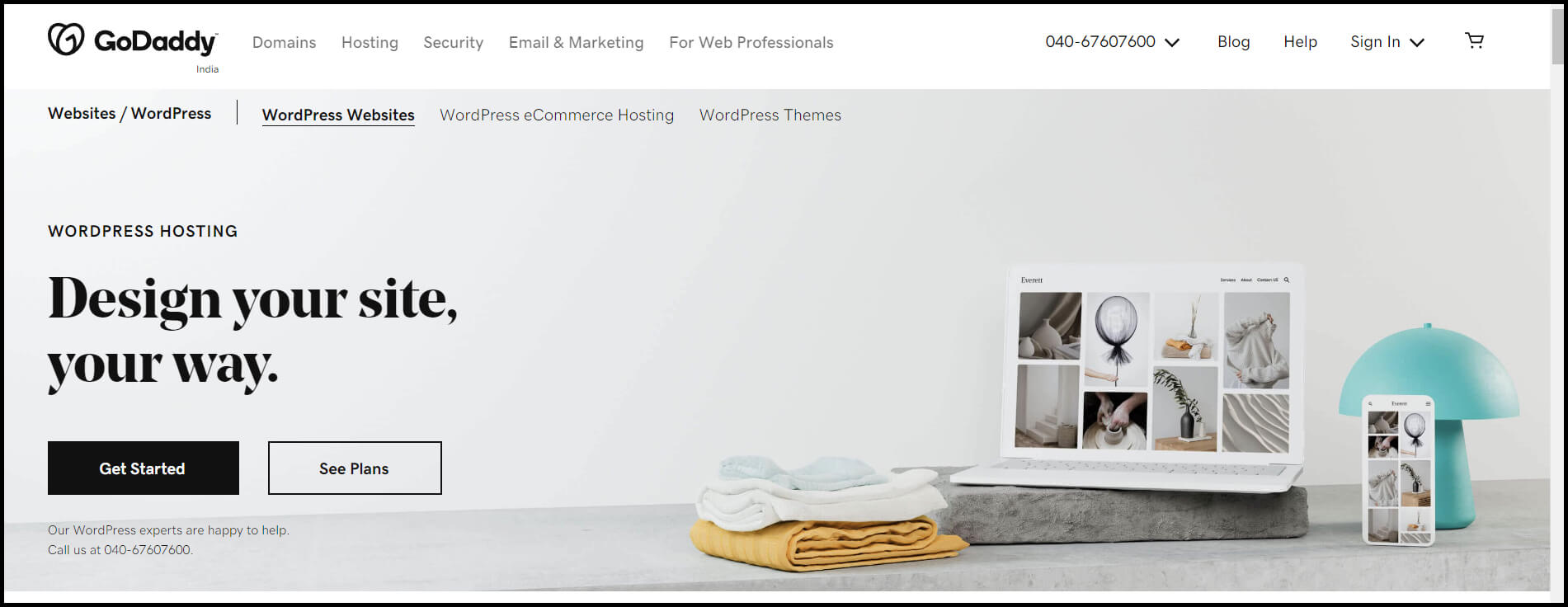
For this guide, we have chosen GoDaddy to create a domain. So first, head to GoDaddy’s website and click on the hosting option. After that, select the WordPress hosting option.

Setting up a domain name

It will take you to a new separate WordPress hosting page. From there, click on Get Started.

Setting up a domain name

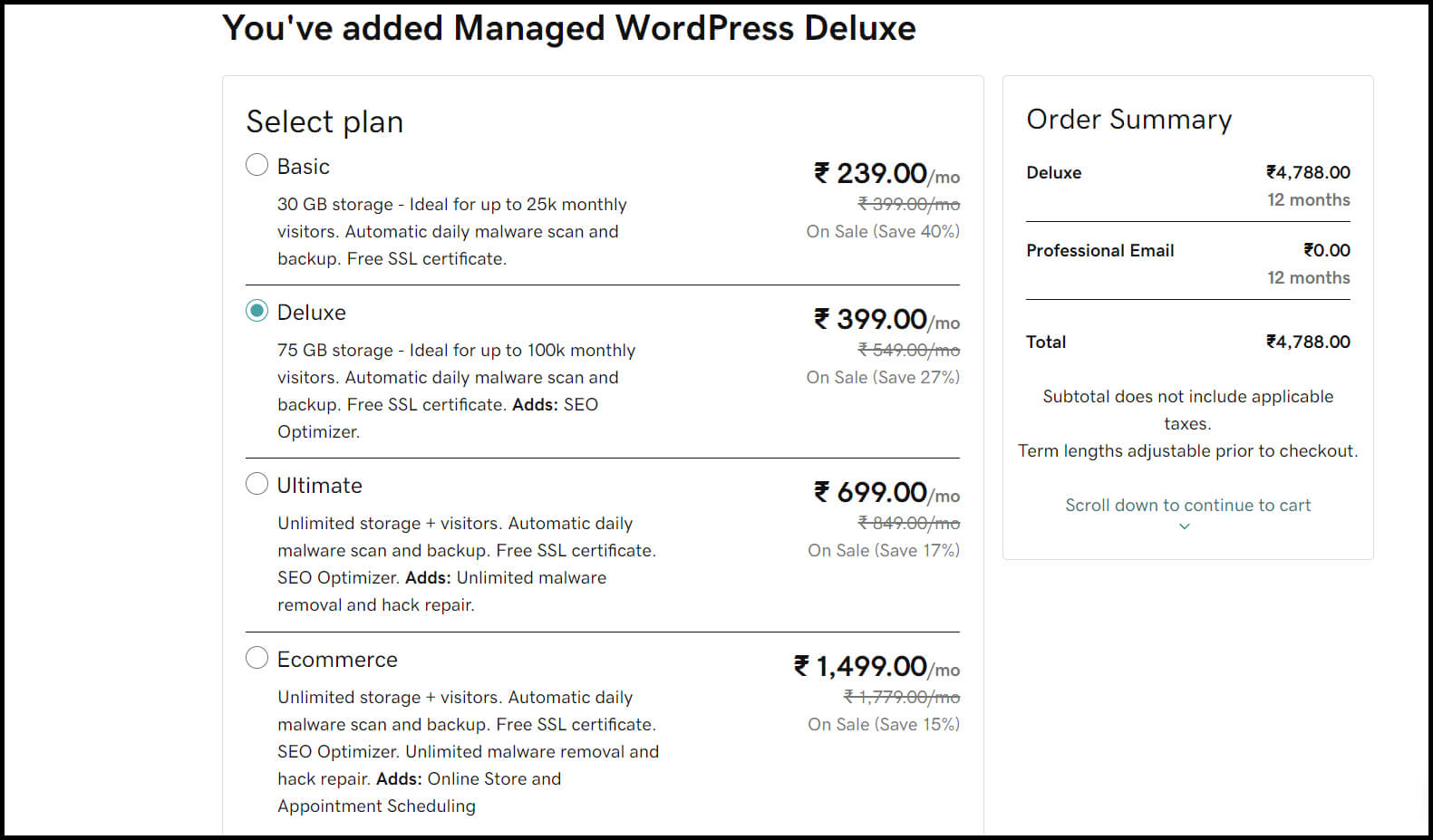
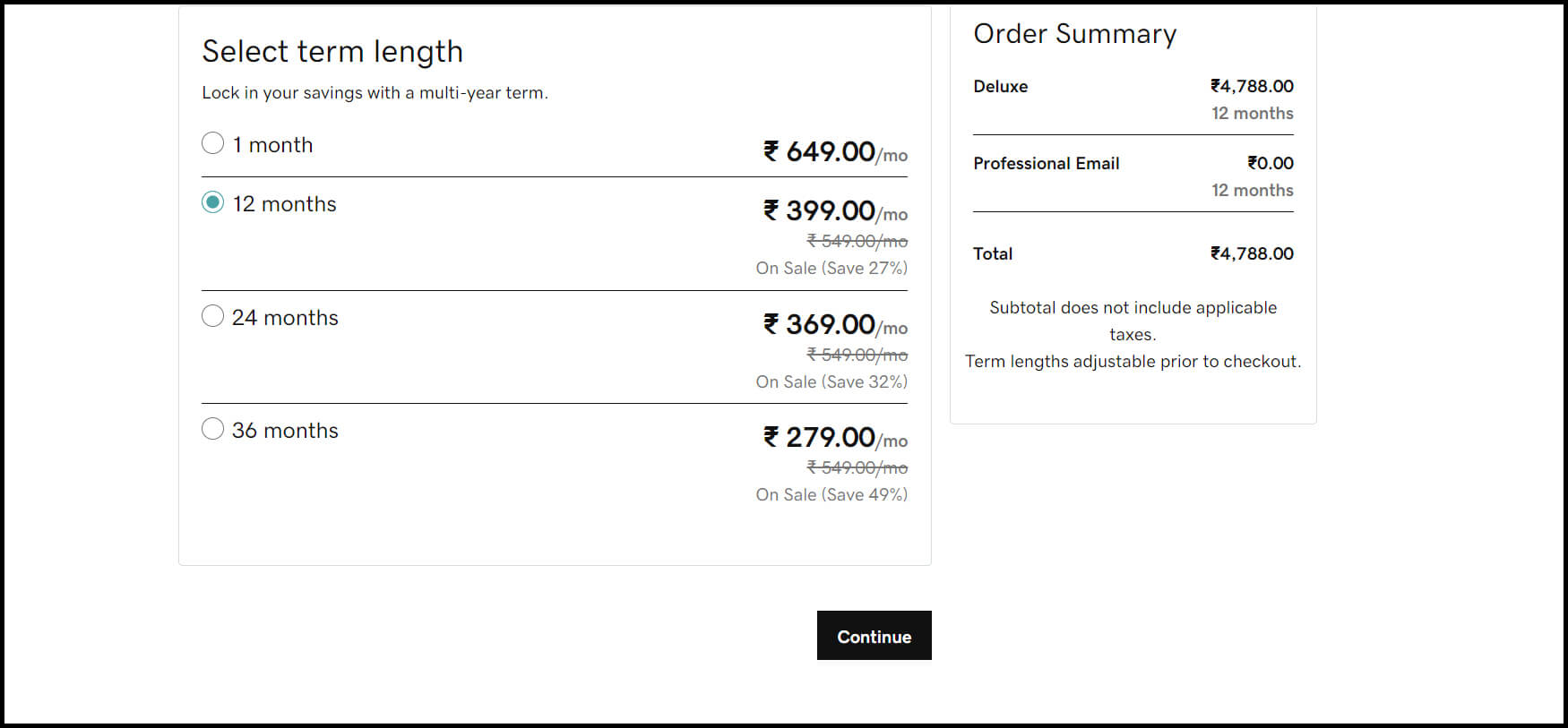
From here, you’ll be taken to GoDaddy’s pricing page to choose any one package from the four available options. Choose the package and its time duration you find most appropriate for your purpose & click on the continue button.

Setting up a domain name

Setting up a domain name

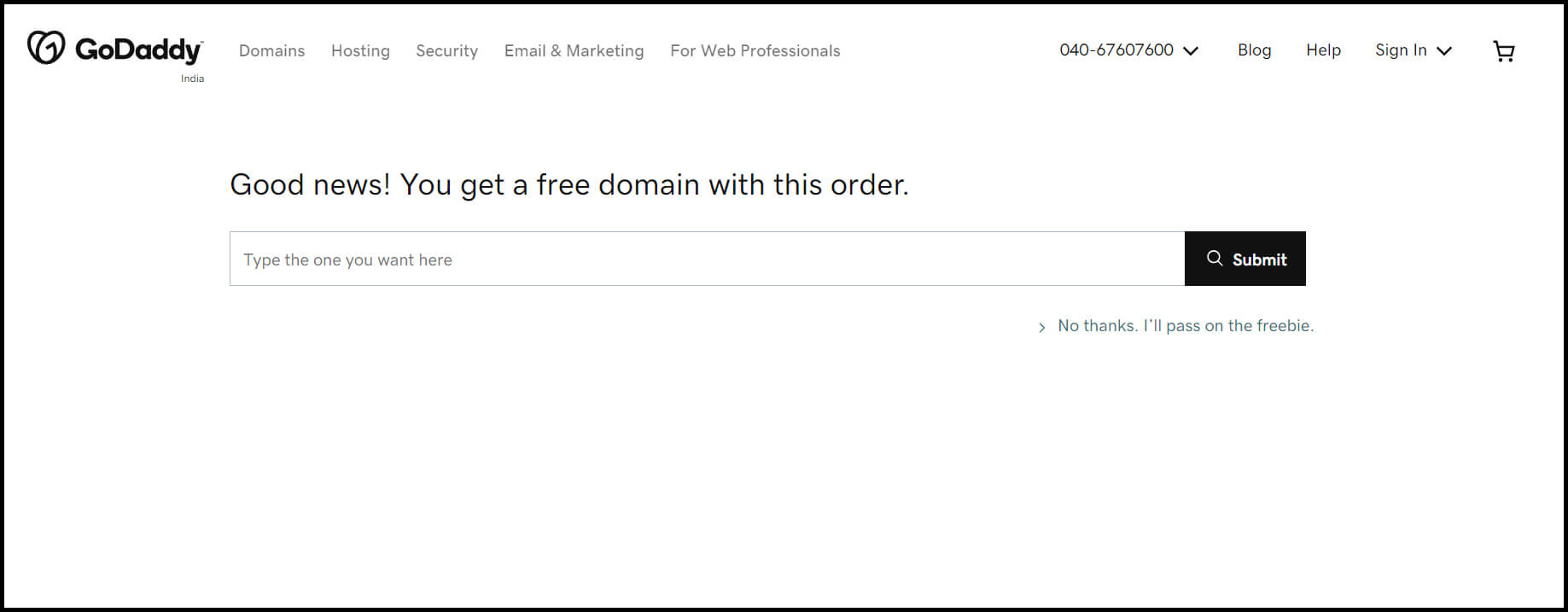
It will take you to another page where you can sign up with your domain name. On this page, you will find a rectangle box. In that box, you can write the appropriate domain name for your site & click on submit button.

Setting up a domain name

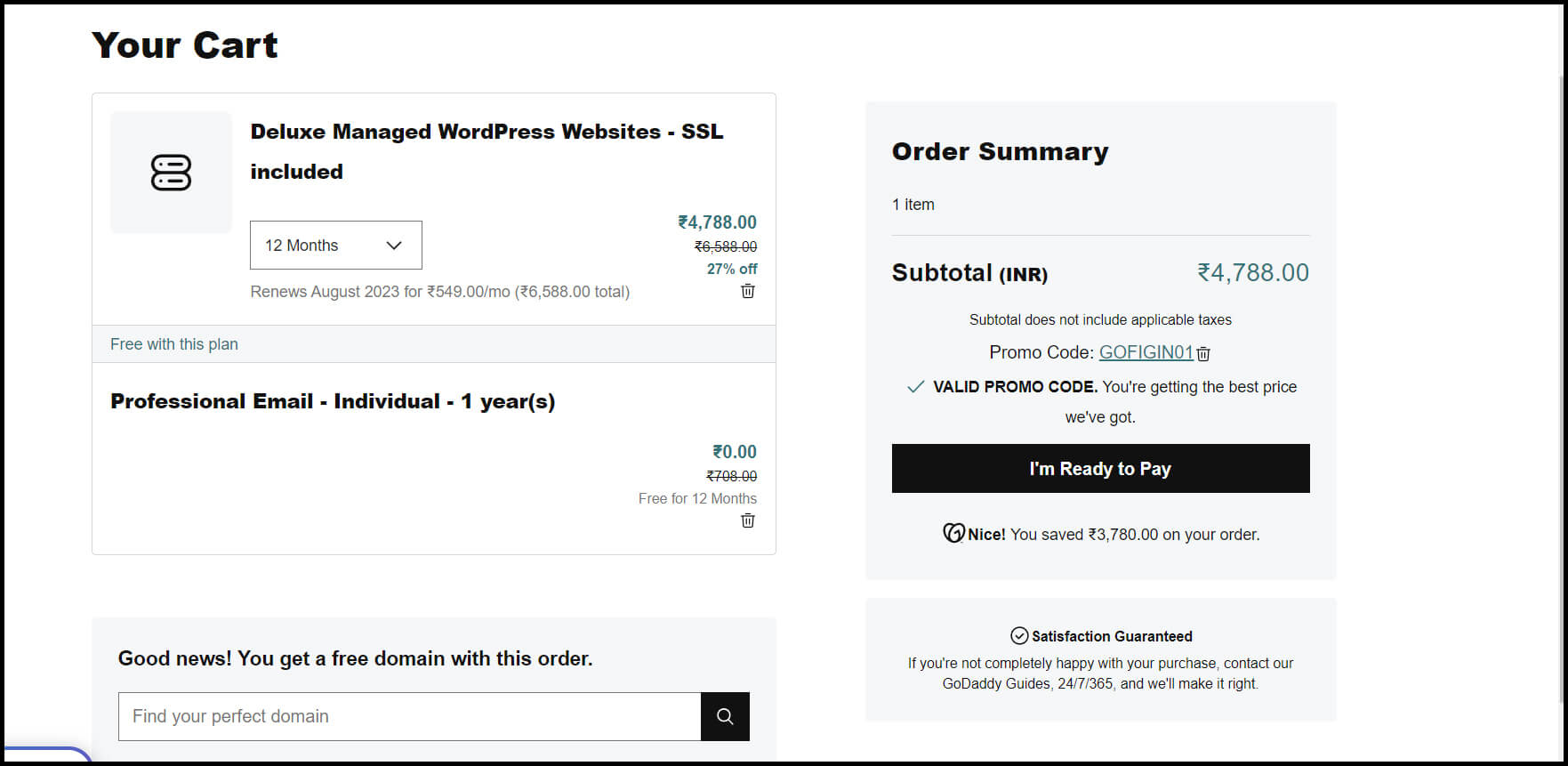
After selecting a domain name, you will be brought to another page to complete the purchasing process.

Setting up a domain name

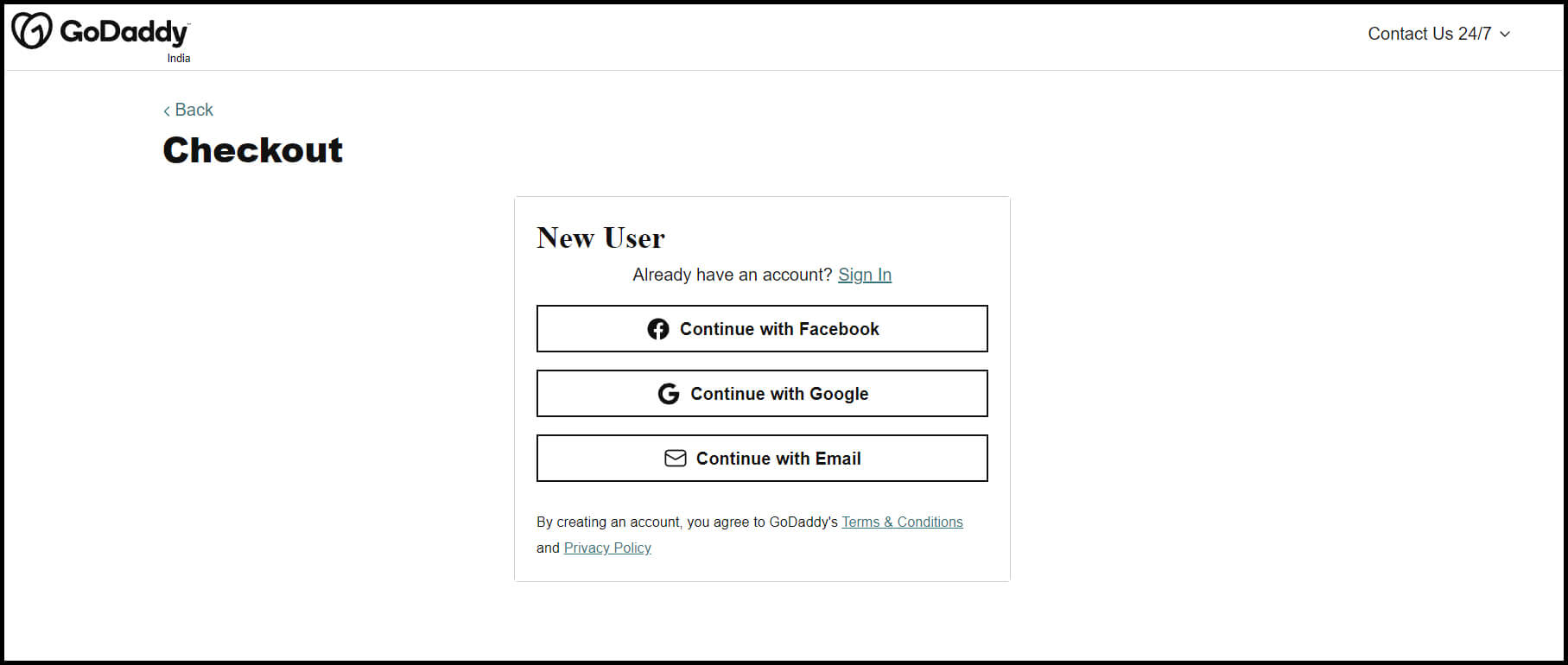
Once you click on, I’m ready to pay you will be brought to another page. Here, you have to sign in to create your account.

Setting up a domain name

Once your account gets confirmed, you can complete the payment for your domain & hosting purchase. Now, you have complete access to your hosting dashboard. Hence, you can start the process of installing the WordPress CMS.

3. Install the WordPress Software

In the last step, we have learned how to get hosting & domain name for your WordPress site. Now it’s time to learn how to install WordPress to connect your new domain to your website. And this time also, we will use GoDaddy as an example for this guide.

To start this process, first, log into your GoDaddy account. After that, click on Web Hosting and then the Manage option. It will take you to a new screen where you can find your account details. Scroll down that page to options & settings. Here, you will see an area that showcases Popular Apps. From these apps, find WordPress and click on it to begin the installation process.

Once the WordPress installation gets complete, you’ll need to answer some of the questions. These questions are about:

1. Which domain do you want to use?

2. In which directory do you want to install WordPress?

3. Your domain information.

After about 24 hours, you will receive an email from GoDaddy. It indicates that your website got installed on your hosting account.

4. Select a Theme that Best Suit Your Purpose

Now that you have your domain set up & WordPress installed, you can start customizing your website. For that purpose, you can utilize numerous WordPress themes & templates. Each WordPress theme has a pack of layouts, formatting styles, colors, fonts, & many other visual options.

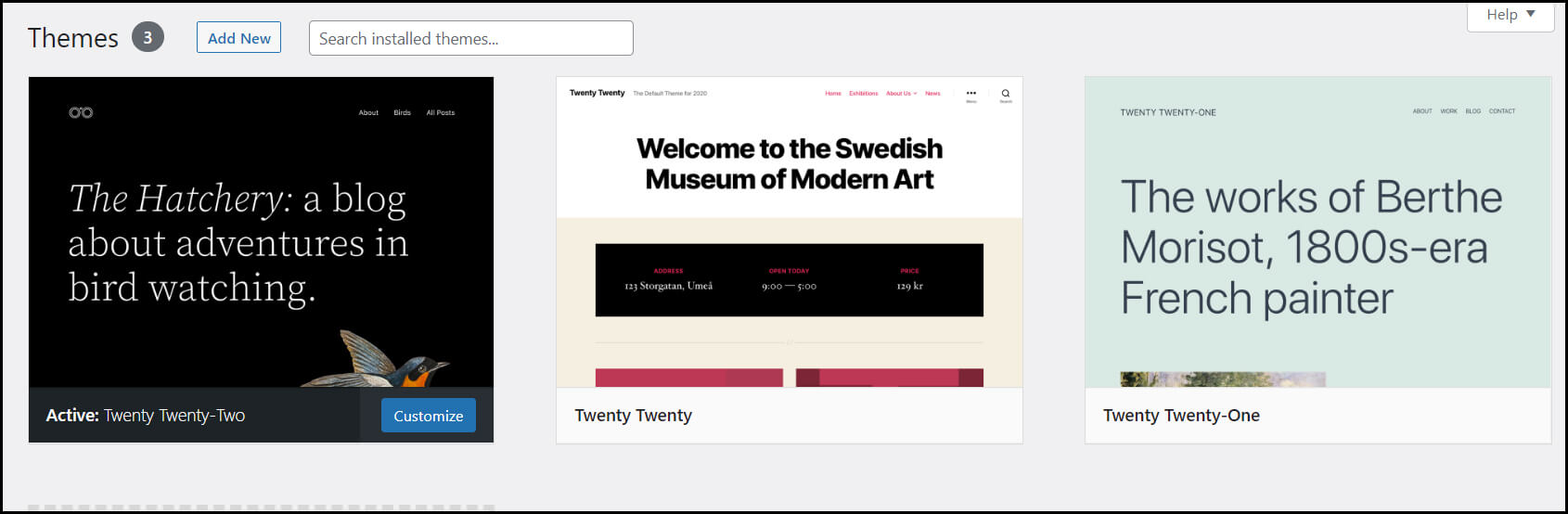
You can choose any free or paid theme available on WordPress that is most suitable for your website. And for that, you have to head to your admin dashboard. From there, click on Appearance and then on Themes.

Select theme for your website

It will take you to another screen where you can browse available themes. Once you find the perfect theme from your browsing, install it to start the customization of your site. After installing the theme you choose, you can customize it by clicking on the Customize Link.

You can find this Customize Link option under the Appearance menu. It will provide you with the Theme Customizer. The Theme Customizer will allow you to change your theme settings with the live preview of your site.

Now, we will learn how to add content to your WordPress website.

Hire WordPress Developer Now

5. Adding Posts and Pages to Your WordPress Site

Content holds so much importance in developing any website. It defines your purpose, your goals, & visions behind creating this particular website.

In WordPress, you can get two default content types; posts and pages.

Posts are a significant part of the blogging functionality. It appears in reverse-chronological order(the latest items will display first) on either pages or in a dedicated blog section.

While pages are static, they won’t change unless you edit them to make changes. About page, the home page, and the service page are examples of different pages.

You can add posts and pages to your website by following these simple instructions:

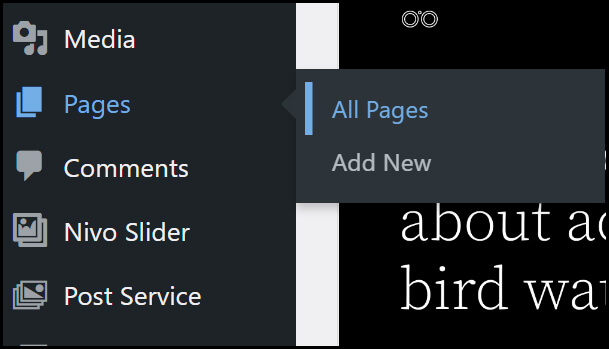
First, we will learn to add pages to the website. For that, go to the admin dashboard, then head over to Pages. In the Pages option, you will find the Add New option. Click on it, and you will come to the page editor screen.

Adding Pages to your WordPress site

On that screen, you will see a box/space where you have to write down the title for your page. You can then add appropriate content in the tax editor below. Here, you can write text, add links or images, embed video, audio, etc.

Once you are done adding content to your page, click on the Publish button. It will make your created pages live on your site. Repeat this process if you want to add more pages to your website. Read more about WordPress Page Builder Plugins by following our blog: 10 best drag & drop WordPress Page Builder Plugins Comparison.

Just like pages, you can add posts to your website. For example, we will explain to add blog posts to your site.

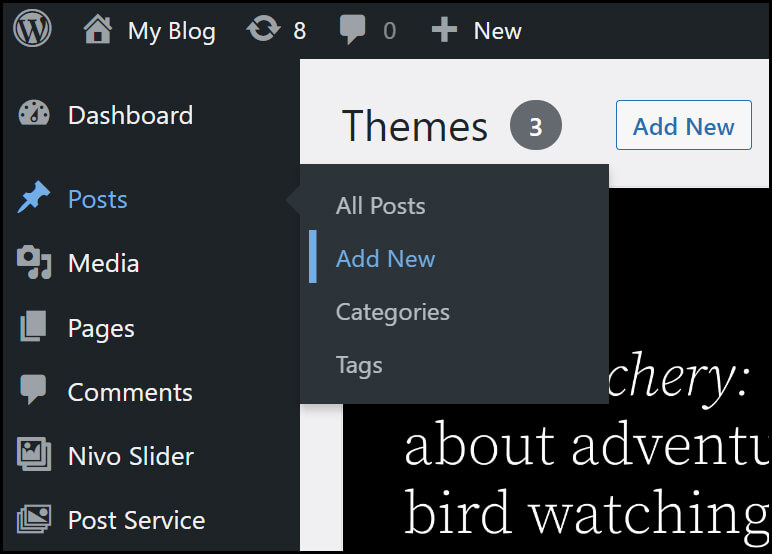
For that, head over to the admin dashboard & then go to Posts. You can see the Add New option in the Posts option; click on it. It will take you to a new screen that looks the same as you have seen while adding pages.

Adding Posts to your WordPress site

Here, you can add the post title as well as the content in the visual post editor. After adding content to your post, click the Publish button to make it live on your site.

6. Customizing Your Website as per Your Requirements

After creating content for your WordPress site, you need to provide more focus on its customization. It will provide your site with good looks and functionality to attract users to it.

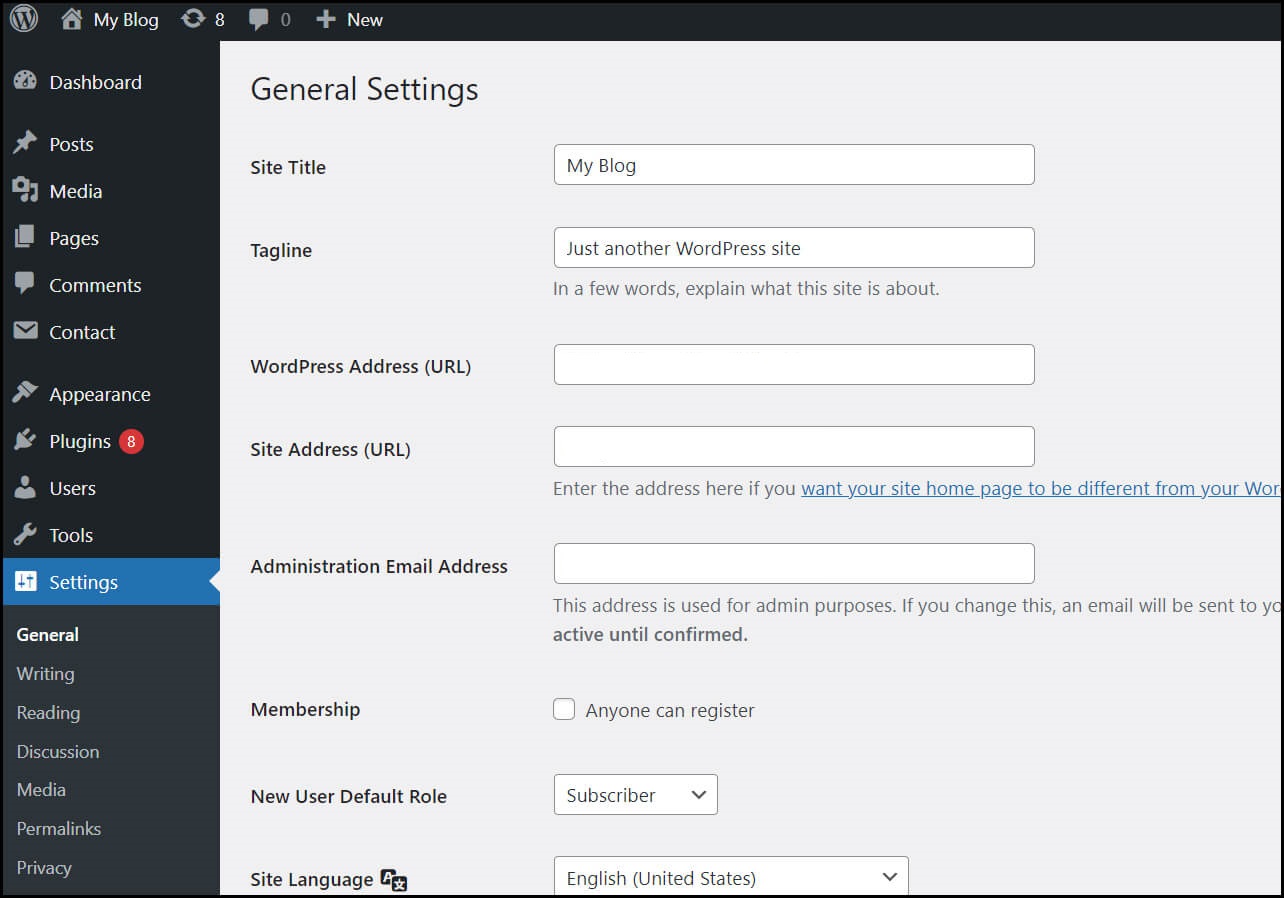
You can start the customization process by setting up your site title. For that, go to your admin dashboard and select Settings> General. Here, you can fill in the details like your website title & tagline. Besides, you can also add some other basic site details like your site URL, email address, time zone, etc.

Customize Your Website

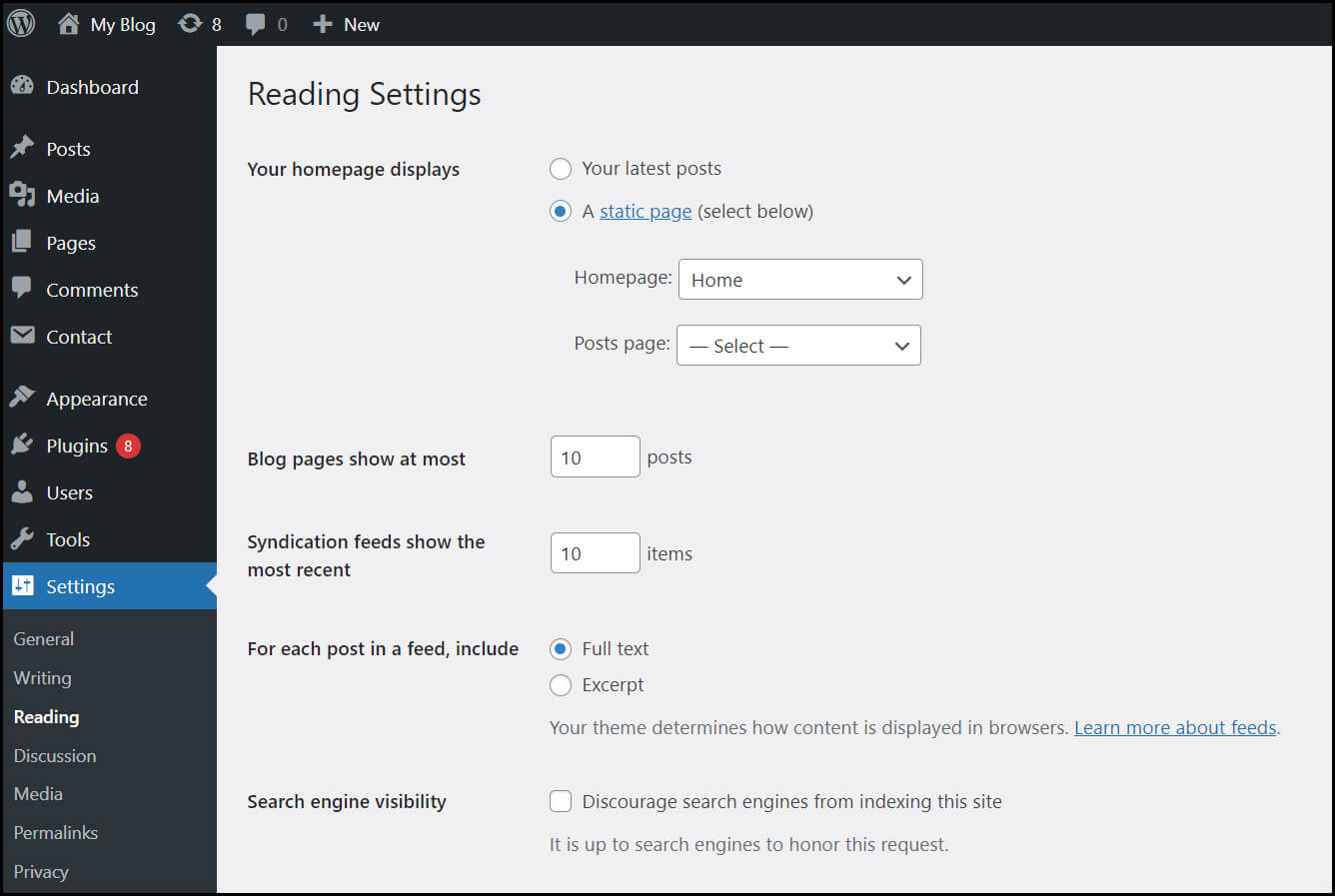
After that, you can set up your Reading section. For that, go to the admin dashboard, click on the Setting option, then click on the Reading page. Here, you will find the Front page displays option. Among these options, click on the static front page & then select the pages you have created earlier.

Customize Your Website

After completing it, don’t forget to click the Save Changes button to store your changes. Now, WordPress will use the page titled your home page as your site’s front page and blog page to showcase your blog posts.

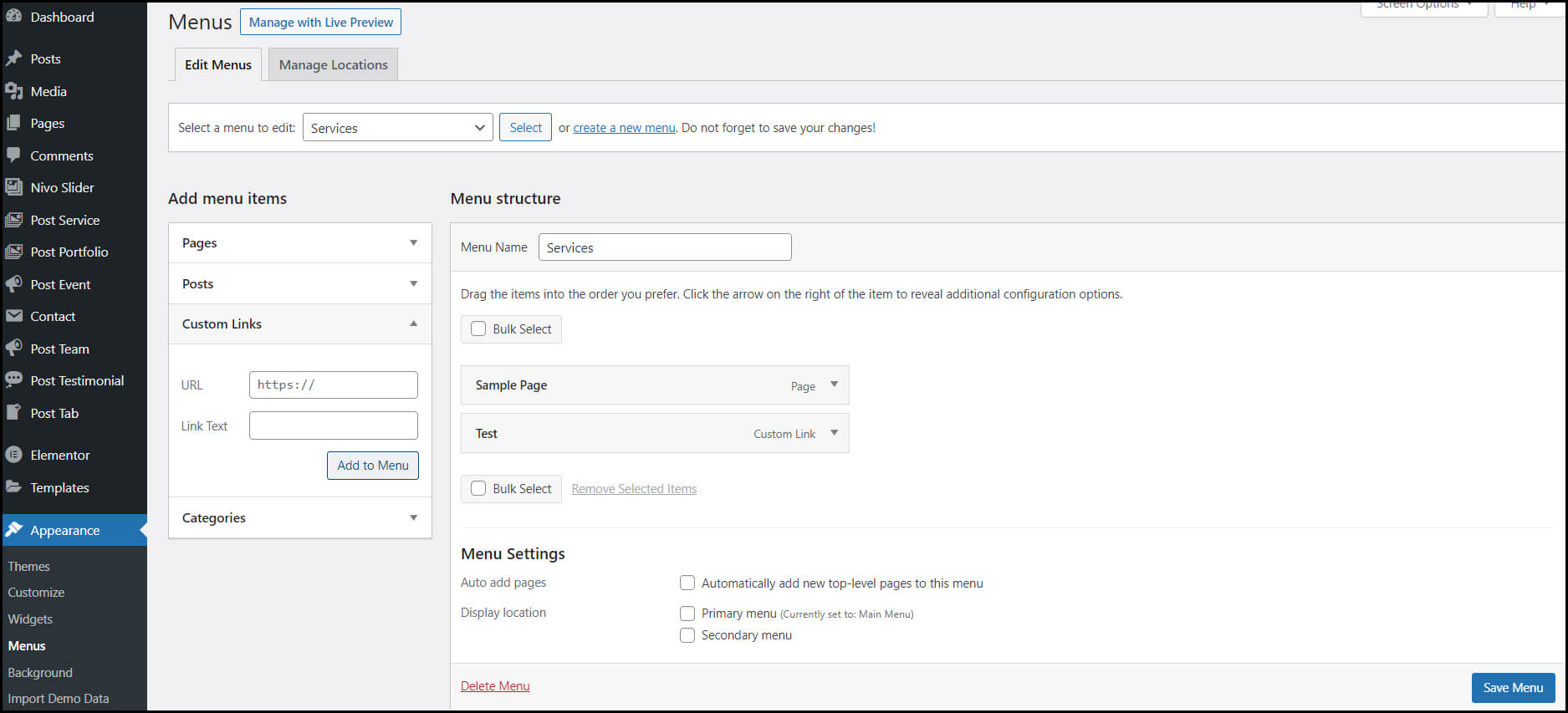
Apart from this, you can customize your navigation bar too. It will facilitate your site visitors with easy access to the information available on your site. To add a navigation bar to your site, click Appearance> Menus.

Customize Your Website

On the Menu page, you can determine the look of your navigation bar. Plus, you can add the title & the order of the pages you want to showcase on the navigation bar.

All these customization options are just a fraction of what you can do in the dashboard. You can find even more options if you properly explore it.

7. Install Plugins to Add Functionality to Your Website

In WordPress websites, plugins work the same as the apps on our smartphones. They allow you to add features & functionality to your WordPress site. There are around 55,000 plugins available on WordPress.

Yoast SEO, Google Analytics, Wordfence Security, UpdraftPlus, Weglot, & WPForms are some of the examples of famous plugins. They are for various functions & needs.

However, it would be best if you didn’t use too many plugins on your site. It will slow down your website speed & damage its performance on Search engine ranking pages.

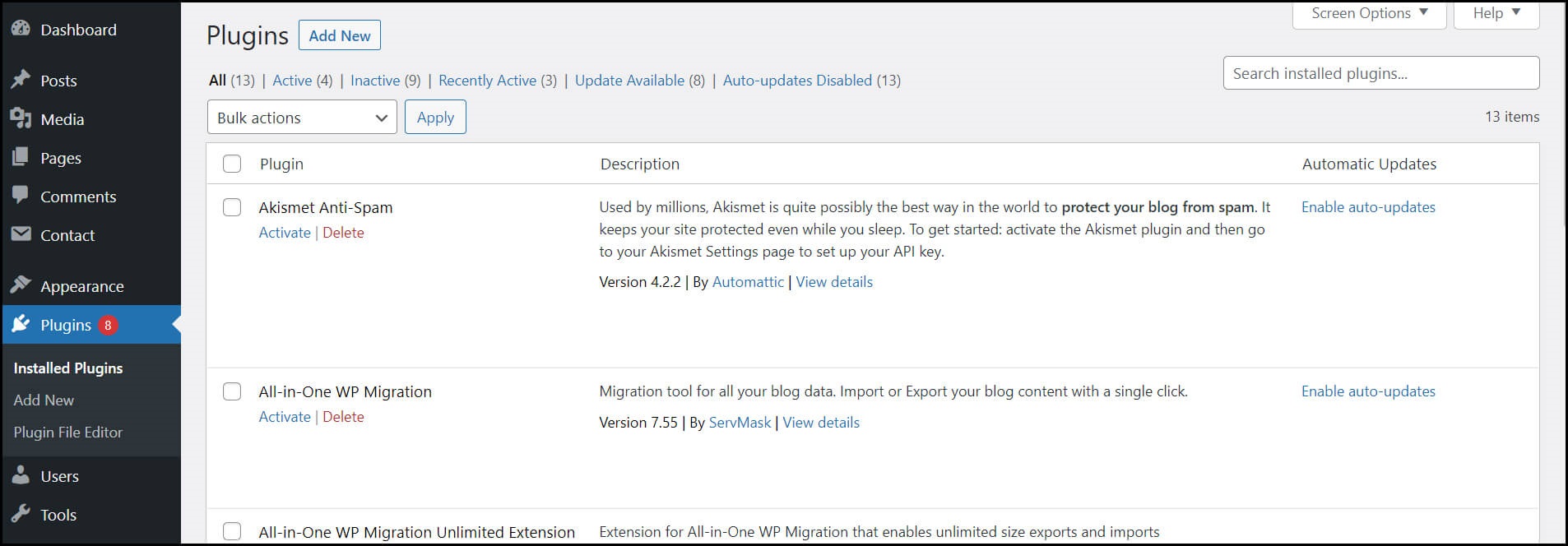
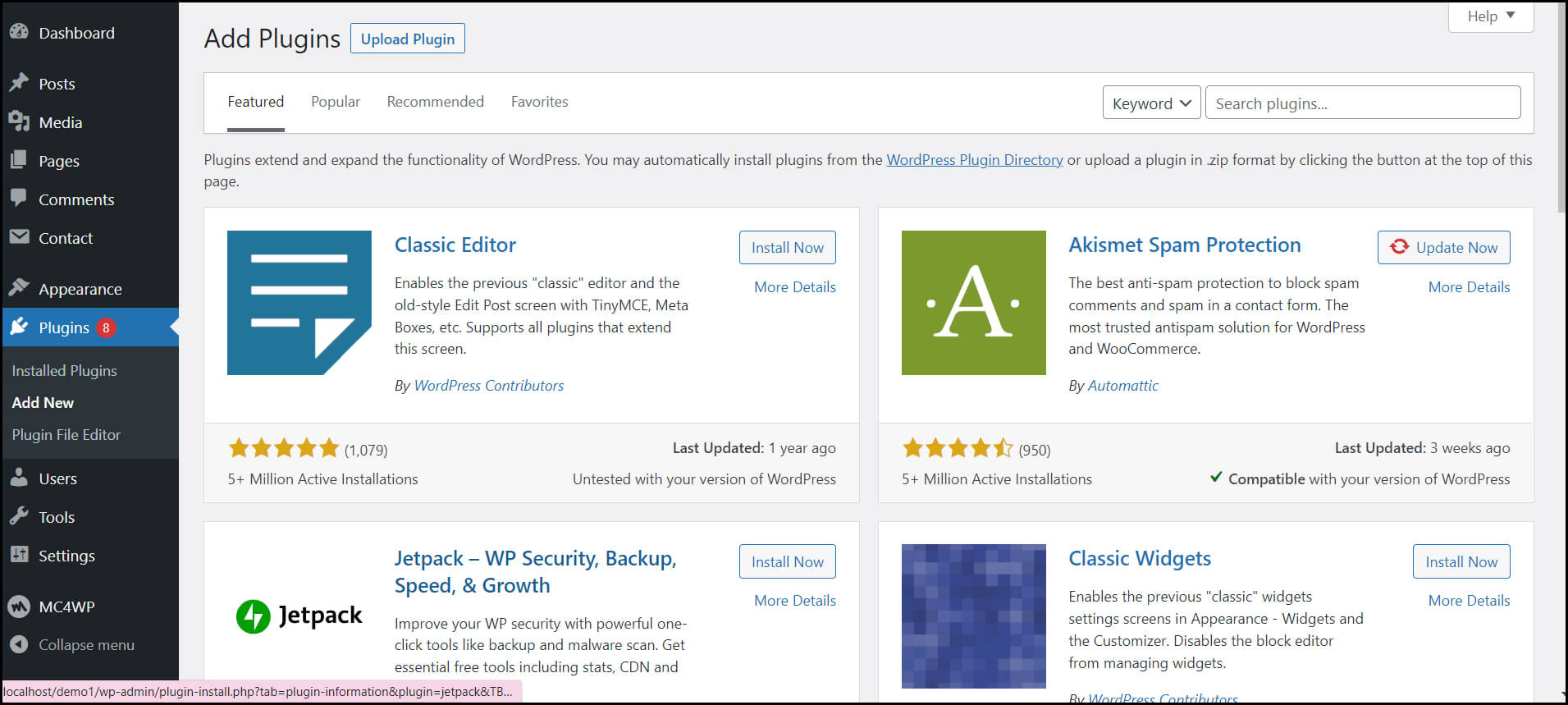
Install Plugins

Install Plugins

You can easily install the plugins from your WordPress dashboard by clicking on the Plugins page. Here, you can click on Add New & write down the name of the plugin you want in the search field. After that, click the Install and Activate button to complete the process.

8. Increase Your Page Loading Speed by Optimizing Your Website

The success of any WordPress website lies in its page loading speed & user experience. It can be frustrating for your visitors if your site’s page takes a long time to load. They can even drive back to your competitor if you don’t improve your site performance.

And to improve your site performance, you have to enable browser caching. It is a process of storing your website data in your visitor’s browser for a temporary period. As a result, your content does not need to be sent from the web server to the browser. Thus, it can significantly increase your website speed.

However, to enable caching for your website, install & activate a caching plugin on your website. You can do this process by following the previous step.

9. You can Get Inspiration from Prominent WordPress Websites

WordPress provides so many customization options. So, it is okay to feel overwhelmed during WordPress website development.

However, you can take inspiration from well-known WordPress sites to overcome this situation. It will give you a better understanding & clarity for site development.

Hence, it helps you in making your site more attractive & engaging.

10. Don’t Forget the Marketing of Your Site

The last & most important step in WordPress website development is proper marketing of your site. For that, you have to utilize SEO, SMO, & other marketing techniques. These techniques will increase traffic to your site. Plus, they also improve your website ranking on Search Engine Result Pages(SERPs).

If you still feel like developing a WordPress site is difficult, you can Hire WordPress Developers from us for this task. But then again, you’ll have this question in your mind:

How to Hire Competent WordPress Developers for Your Project?

Hiring professional developers for your WordPress project development can be a smart move. When you don’t have any developmental knowledge or don’t want to hire in-house WordPress developers. Help from dedicated WordPress developers will save you time, money & delivers you quality work. Follow these below-mentioned steps while hiring WordPress developers.

  • Consider your project needs
  • Carefully consider the cost involved
  • Check the website of the WordPress development service provider company
  • Look at their portfolios & case studies
  • Consider online reviews & testimonials
  • Schedule an interview with them
  • Don’t forget the paperwork

Read More: The Expectation V/S Reality of WordPress Web Development

Conclusion

In the prevailing time, a high-functional & user-friendly WordPress website is the reason behind the success of a business. A website is a medium that connects businesses with their potential customers. It increases the revenue of a business by increasing its conversion rate.

However, to attract customers, a business would need an engaging website. And building a user-friendly website is a challenging task. But with the help of WordPress software, you can fulfill this task. It is the most versatile & easy to use software for building bespoke websites.

Nevertheless, if you aren’t capable or willing to build your website yourself, you can hire a Custom WordPress Development Company for this task. At Windzoon, we have everything you’ll need for your project. Hire WordPress Developers from us, and get relaxed by leaving your project development worries to us

Contact us to get a quote or know more about our wordpress website packages.