Top 11 Famous Mobile Apps Developed with React Native

People have acclimated to new technologies and lived advanced lifestyles throughout the past decade. Our desires and demands have evolved as a result of all these technologies becoming more and more ingrained in our daily lives.

Even in the development of mobile apps, these demands are having a big impact. And to fulfill these demands, there are many mobile app development frameworks in the market. But among all of the React Native is the best platform for building cutting-edge mobile apps. Because. it is used by 38% of the developer community worldwide in 2021.

Cross-platform Mobile Frameworks Used by Software Developers

With this high demand, React native is filling in gaps in the present app development needs. And enables the React Native App Development Company to provide a greatly enhanced user experience for their product. Besides, being cross-platform, all apps created using React Native also take less time to create.

So, in this article, we will examine the most popular apps made with react native technology as well as the benefits of the technology. If you want to create your own react native app, this article can be a useful resource for you.

But first of all, we’ll see the benefits of using React Native as a primary app development technology.

Benefits of Building Apps Using React Native

React Native is a popular framework for building mobile apps that allow developers to use the same codebase for both iOS and Android platforms. Some benefits of using React Native include:

  1. Cross-platform compatibility: React Native allows developers to write code once and run it on both iOS and Android, saving time and resources.
  2. Faster development: React Native uses a virtual DOM, which allows for faster updates and rendering, resulting in faster development times.
  3. Strong developer community: React Native has a large and active community of developers, which means there is a wealth of resources and support available.
  4. Native-like performance: React Native apps can access native modules and APIs, giving them a performance similar to that of native apps.
  5. Reusable code: React Native’s reusable components make it easy to reuse code across different parts of the app, making development more efficient.
  6. Hot Reloading: Hot Reloading feature allows you to see the changes you made in the code immediately without losing the current state of the app.

To avail of these benefits and get the most out of the framework, hire React Native developers to help you assist in your next app-building project. Now, let’s move forward to know the top 11 apps built with React Native.

Top 11 Most Famous Applications Built Using React Native Framework
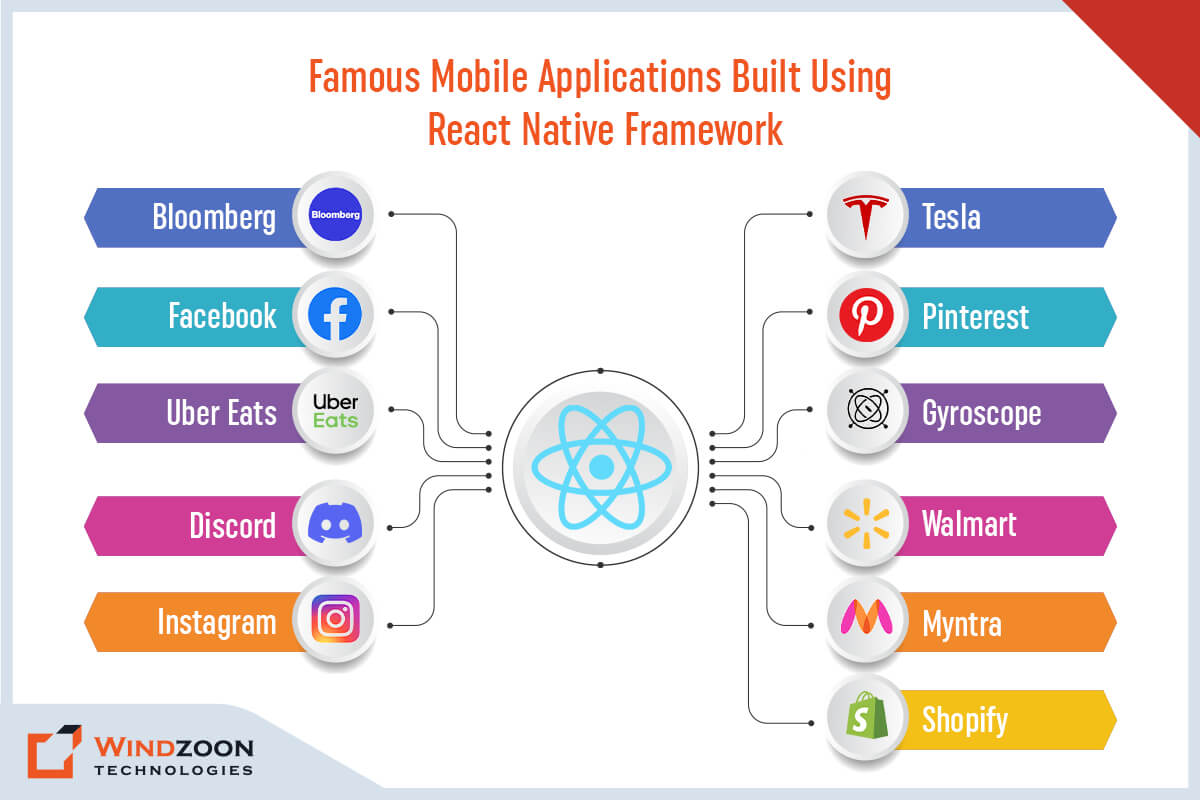
Mobile Applications Built Using React Native Framework

1. Bloomberg

Bloomberg is an international business and financial news website. Prior to deploying React Native, the company’s development team experienced delays because it took a long time to create and update apps for both Android and iOS.

Bloomberg’s developers used React Native to streamline and speed up the creation and upgrading of apps. The company was able to easily rebuild its new consumer mobile app for iOS and Android using React Native.

Furthermore, Bloomberg was able to incorporate automated code refreshes, ensuring that users always receive the most recent updates when they open the app.

2. Facebook

React Native was created by Facebook, which also used it to create its app. In all honesty, it would be worrying if they didn’t use the framework for their own applications.

React Native was used exclusively in the development of Facebook Ads Manager, an easy-to-use tool for managing adverts for both individuals’ and businesses’ products.

Although it is cross-platform, it accommodates various date formats, time zones, currencies, and ad formats. It offers a wonderful user experience thanks to its clear layout, straightforward navigation, and intuitive UX. Even the animations and transitions are first-rate.

3. Uber Eats

What began as a way for willing consumers to get from point A to point B without paying the usually high charges of a yellow cab quickly advanced into a novel manner of moving food from point A to point B.

Or to put it another way, Uber Eats is a delivery service like Seamless or DoorDash. React Native is only responsible for the existence of a minor portion of the UberEats app, specifically their dashboard.

However, it significantly improves the UI/UX for consumers. The application needed a dashboard for a restaurant with features like sound and push notifications. Since their team has hands-on expertise with React, building the app with React Native was an excellent idea.

4. Discord

Discord is a well-known example of Voice over Internet Protocol (VoIP) in the workplace. VoIP is simply internet-based digital communication. Discord allows friends and more frequently entire communities to connect over the internet via voice, text, or video.

It is completely free and is largely used by gamers. The Discord app for iOS and Android now shares 98% of its code thanks to React Native, which is a fantastic illustration of how React Native can aid in cross-platform app development.

5. Instagram

Unlike Facebook, Instagram’s core mode of operation is digital photographs, with the occasional short video.

In 2016, Instagram began seriously considering moving to Reactive Native. Though integrating React Native with current technology was difficult at first, they are now able to introduce features more rapidly and easily manage both iOS & Android app versions.

React Native has simplified Instagram’s maintenance routine and integrated features such as push notifications, an appealing user interface, faster shipment, increased developer speed, and more. In addition to having a greatly streamlined view and user experience as a result of this technology, Instagram also allows for code sharing between iOS and Android devices.

6. Tesla

There is no need to introduce the well-known electric vehicle company, Tesla. To create its mobile application for both Android and iOS, the company used React Native.

The main functions of the app are monitoring the charging process, checking the cooling and heating of the car, locking or unlocking, diagnosing, finding your car, or tracking its location, and others. The company was able to produce a native-like appearance for its Android and iOS apps thanks to React Native features.

7. Pinterest

Another well-known example of a React Native-built app is Pinterest, a website where you can find ideas for all aspects of your life. Pinterest has incredible ideas on a variety of themes, from home decor to health advice and business inspiration.

Pinterest has chosen React Native to share code between its iOS and Android apps.

It took about ten days to implement React Native on iOS. The team was able to implement the same for Android in just two days, with 100% identical UI code between both platforms. This allowed the business to cut setup time by nearly a week.

8. Gyroscope

Gyroscope is a remarkable app that helps users achieve their health-related goals, such as weight loss, improving general health, getting a good night’s sleep, and enhancing productivity.

With the aid of React Native, Gyroscope is even able to provide suggestions for further courses of action, such as nutrition regimens, exercise routines, rest schedules, etc. There is a smooth interaction with HealthKit to track steps, heart rate, meditation exercises, and other activities to display the client’s whole well-being profile.

With faster development speed, there is a complete report that exhibits vital information on a daily/weekly/monthly basis. Further,  React Native makes it simple to integrate various applications and devices.

9. Walmart

A Fortune 500 juggernaut requires no introduction. The Walmart app, in particular its online system, has a lot to offer. However, React Native plays a key role in providing Walmart with a lot of its benefits.

The majority of the Walmart app’s code is interchangeable between the iOS and Android versions. As a result, development expenses and efforts have decreased.

With the support of React Native, their mobile app has provided clients with a more adaptable experience. App performance has improved, and a native-like experience is now available with the secure payment option Walmart Pay.

10. Myntra

Myntra is a well-known brand in the world of fashion and online shopping, notably in India, for clothing and lifestyle products. It provides the best user experience, safe and reliable shopping deals, and anything else a customer may want.

React Native has significantly aided Myntra in showcasing a gorgeous catalog of products, placing orders, exhibiting profiles, an appealing user experience and design, and so on.

The application uses React Native extensively on the majority of its iOS and Android interfaces. Myntra has been leveraging this technology to revamp its applications since React Native started to facilitate bulk scaling.

11. Shopify

Shopify, one of the major eCommerce platforms, powers some of the world’s most recognized brands, like Taylor Swift, Kylie Cosmetics, and Allbirds.

Shopify started experimenting with React Native technology with three distinct teams deployed for three apps: Compass, Arrive, and Point of Sale. They discovered several wonderful things about this framework from the experiment.

They predicted that iOS and Android would only share 80% of their code, while the actual results were 99% (Compass) and 95%. (Arrive).

Conclusion

React-Native is the greatest solution to build cross-platform apps if you’re thinking about marketing your company through mobile applications.

React-Native apps are robust, effective, and cutting-edge that let businesses reach out to new clients from all around the world through mobile platforms. Plus, They are quick, efficient, and reasonably simple to master for JavaScript developers.

Thus, hire a premium React Native App Development Service provider if you want to design an app utilizing React Native framework.

Windzoon has a team of highly competent developers who specialize in designing industry-specific bespoke mobile apps with React Native.

To learn more about our exceptional App Development Services and to request a quote.

Top 16 Graphic Design Tips for Novice Designers to Know

Learn Graphic Designing: 16 Useful Tips for Beginners and Non-Designers

Whether in life or in design, it is only via mistakes that you can learn. It is necessary to be bad in order to become good. And in order to become good at design, the designer must occasionally advance their abilities.

Although graphic design is a highly advanced and difficult skill to acquire on your own, it’s not impossible. You do not need a graphic design degree to learn how to develop professional, aesthetically appealing graphics for your brand, business, or client. Inspiration can come from many sources, such as color palettes, mood boards, or even everyday objects, and is key to developing as a designer.

In truth, there are many self-taught professional graphic designers in the market! All you need to become a competent designer is creativity, practice, and graphic design tips from professionals.

However, as a leading web design firm in India & the USA, we have chosen to share 16 tips with you that are based on our extensive design expertise. These pointers can help you become a better graphic designer and prevent errors. So continue reading to learn graphic design like an expert. Don’t wait to start creating your own designs—even if you are not a professional graphic designer, you can quickly begin producing impressive visuals with the right guidance.

16 Most Essential Graphic Designing Tips Every Designer Should Know

1. Start With the Basics

Before diving into complex design software, it’s essential to understand the basic principles of design and design fundamentals such as composition, color theory, and typography. These concepts will form the foundation of your work as a graphic designer.

It’s important to understand the elements of design such as line, shape, form, texture, and color, and how they can be used to create visual interest and communicate a message.

Additionally, understanding the principles of design such as balance, contrast, emphasis, movement, pattern, proportion, and unity will help guide your design decisions and create cohesive and effective designs.

2. Learn Design Software

Once you have a grasp of the basics, it’s time to learn the software tools of the trade. Adobe Photoshop, Illustrator, and InDesign are industry-standard programs that every graphic designer should be proficient in. You can also use Adobe Color to select and evaluate color palettes, ensuring your designs have strong contrast and meet accessibility standards.

These software programs are powerful tools that allow you to create and edit digital images, illustrations, and layouts. It’s important to take the time to learn how to use these programs effectively, so you can create high-quality designs. Watching video tutorials can also help you learn these tools more quickly and efficiently.

3. Develop Your Unique Design Style

As you gain more experience, it’s important to develop a unique style that sets you apart from other designers. Try out several methods, and don’t be scared to try anything new. Experimenting with different styles, including various typography and alignment styles, can help you discover what suits you best.

By developing your own style, you’ll be able to create designs that are unique and reflect your personal aesthetic. Your design style should be consistent and recognizable, making you stand out and helping you to build a strong brand. Exploring various styles can also help you refine and evolve your personal aesthetic over time.

4. Understand The Design Process

It’s important to understand the process of taking a project from concept to completion. This includes researching the client’s needs, sketching out ideas, creating mock-ups, and finalizing the design.

Understanding the design process will help you to work efficiently and effectively, and to deliver high-quality designs that meet the client’s needs. Gaining a solid grasp of the design process is also essential for navigating the ever-changing design world.

5. Get In-depth Knowledge Of Typography

As a graphic designer, you will be working with type on a daily basis. It’s important to understand the basics of typography, including typefaces, kerning, and line spacing.

Typography is an important aspect of design that can greatly influence the readability and overall effectiveness of a design. Understanding how to use typography effectively will help you to create designs that are easy to read and understand. Selecting the right font family and limiting the number of fonts used in a project are key to maintaining a cohesive and visually appealing design.

6. Know The Color Wheel

A color is a powerful tool in graphic design, and it’s essential to understand how to use it effectively. Choosing a cohesive color palette is crucial for creating harmony, consistency, and visual appeal in your projects.

A color wheel is a useful tool for understanding color relationships and choosing harmonious color schemes.

Understanding color theory will help you to use color effectively in your designs, and create designs that are visually pleasing and communicate a specific message. Using contrasting colors can create visual interest, draw attention, and ensure accessibility in your designs. Selecting brand colors that align with your identity enhances recognition and helps maintain a consistent visual focus.

When choosing color schemes, consider color blindness to ensure your designs are accessible to everyone.

7. Practice Composition

Composition is the arrangement of elements on a page, including various design elements and graphic elements, and it’s a crucial part of graphic design. Practice arranging elements such as text, images, and shapes in pleasing ways. Make sure to align text with other elements to achieve balance and harmony in your layout.

The composition can greatly influence the overall effectiveness of a design, so it’s important to take the time to practice and master this skill.

8. Learn to Use Negative Space

Negative space, also known as white space, is an important aspect of design that is often overlooked by beginners. It refers to the empty areas of a design, such as the background or background image, and it can be used to create balance, hierarchy, and emphasis in a design.

Understanding how to use negative space effectively will help you to create designs that are clean, uncluttered, and easy to read.

9. Understand the Importance of Hierarchy

In graphic design, hierarchy refers to the way in which elements are organized and prioritized on a page, creating a clear visual hierarchy. Understanding how to use hierarchy will help you create designs that are easy to read and understand. By using hierarchy effectively, you can guide the viewer’s eye through the design and direct the viewer’s eyes to the focal point of your composition, making it easier for viewers to understand the most important information.

10. Learn to Use Vector Graphics

Vector graphics are a type of digital image that can be scaled without losing quality. Understanding how to create and edit vector graphics will be useful for creating logos, icons, and illustrations. Vector graphics are ideal for creating designs that need to be resized without losing quality, such as logos and icons. By making your own designs, you ensure that your graphics are uniquely designed for your project, reflecting your personal or brand identity.

11. Learn to Use Raster Graphics

Raster graphics, also known as bitmap images, are made up of pixels and are best suited for photographs and other detailed images. Understanding how to work with raster graphics will help you create designs that incorporate photographic elements. Raster graphics can be edited using software such as Adobe Photoshop and GIMP. They are especially useful for adding realistic visuals to your designs, helping to enhance the overall aesthetic and maintain visual harmony.

12. Get Feedback

One of the best ways to improve as a designer is to get feedback on your work. Share your designs with other designers, and be open to constructive criticism.

Feedback can provide valuable insights and help you to identify areas for improvement. Discussing your work with others can also help you better understand complex topics in graphic design, as different opinions can clarify difficult concepts. Additionally, feedback can help you to understand how your designs are perceived by others and make any necessary adjustments.

13. Stay Up-to-Date

The design industry is constantly changing, and it’s important to stay up-to-date with the latest trends and techniques. Follow design blogs, attend industry events, and read design books to stay informed. Staying current with branding trends is essential for maintaining a strong brand identity, ensuring visual consistency across all graphic design materials and digital assets. By staying current, you’ll be able to create designs that are relevant and appealing to your clients

14. Build a Portfolio

Your portfolio is your calling card as a designer, and it’s important to build a strong one. Include a variety of your best work, and make sure it’s well-organized and easy to navigate. Be sure to include an example of your graphic designs to demonstrate your range and abilities.

Your portfolio should showcase your skills, abilities, and design style, and it should be tailored to your target audience. It’s also important to keep your portfolio up-to-date by regularly adding new projects.

15. Build Your Network

Building connections in the design community is crucial for finding new opportunities and staying on top of industry trends. Networking also helps you stay connected within the design world, allowing you to adapt to its dynamic nature and remain informed about current practices. Attend design events, join design groups, and connect with other designers on social media. Networking can help you to find new clients, learn from other designers, and stay informed about the latest industry trends.

16. Be Aware of the Legal Issues

As a graphic designer, it’s important to be aware of the legal issues that can arise in your work. This includes copyright, trademark, and intellectual property laws.

Understanding the legal issues will help you protect your work and avoid any potential legal issues. This includes understanding the legal requirements for using stock images and fonts, as well as understanding the rights and responsibilities of a graphic designer.

It is important to protect yourself and your client from any legal issues by obtaining necessary permissions, licenses, and releases when using any copyrighted materials. This understanding becomes even more crucial if you pursue a full time job as a graphic designer, as professional roles often require strict adherence to legal standards.

Graphic designing is a field that requires a lot of skill, knowledge, and creativity. These 16 essential tips are a great starting point for beginners in graphic designing, but it’s important to remember that learning never stops. Stay current, keep experimenting, and always be willing to take feedback and learn from others.

If you are looking for a design agency that has expert designers with skills more than we have mentioned above then Windzoon is the right choice.

Hire web designers from us to design or redesign your websites & applications. They will help you in turning your vision & imagination into reality by providing unique custom web design services.

Contact us to leverage our services or to .

WordPress Website Development Cost: Top 7 Factors to Consider

In the twenty-first century, websites have replaced business cards & storefronts as the primary form of advertising. Every blogger, business, and nonprofit organization wants to have their website. You’ll also need one if you want to reach out to a broad audience.

WordPress can be helpful in this situation. Most businesses (and people) use this free website builder. However, the word “free” doesn’t convey the whole picture.

So, what exactly does it cost to launch a WordPress website? As a well-known custom WordPress development company, we’ll outline everything you need to know in this blog post regarding the costs of establishing a WordPress website.

No matter your site’s complexity, the fundamental procedures are the same. So, before we go to that procedure, let’s first understand some basics of WordPress website building.

Why Choose WordPress for Website Development?

WordPress is a popular content management system (CMS) that powers many websites online. Here are some reasons why WordPress is a good choice for website development:

Easy to Use: WordPress is user-friendly and easy to learn, even for beginners. You don’t need any programming skills to create a website using WordPress.

Customizable: WordPress allows you to customize the look and feel of your website by using themes, templates, and plugins. You can choose from thousands of free premium themes and plugins to make your website unique.

SEO Friendly: WordPress is designed to be SEO-friendly, which helps your website rank higher in search engine results. You can optimize your website for search engines using plugins like Yoast SEO.

Mobile Responsive: WordPress themes are mobile responsive, meaning your website will look great on all devices, including desktops, tablets, and smartphones.

Large Community: WordPress has many developers, designers, and users who constantly create new themes, plugins, and tools to improve the platform. This means you can always find support and resources when needed.

Security: WordPress is constantly updated to address security vulnerabilities, and you can use security plugins to protect your website from attacks further.

WordPress is a flexible and powerful platform suitable for a wide range of websites, from personal blogs to large e-commerce sites.

After this, we will understand the various aspects of creating a WordPress website.

WordPress Website Creation: What is Required?

1. An Idea

Every WordPress website is born from an idea, whether for a business or a personal blog. So, before you start working on your website, you need to understand every little aspect of your website clearly. For example, what will its purpose be, how should it look, and what features should it have, etc?

2. Domain Name

Your domain name serves as the address for your website; choose one that properly reflects your brand.

3. Web Hosting

Choose between a shared and managed host depending on your requirements and financial situation.

4. WordPress Theme

Although you can continue with the standard WordPress theme, a distinctive theme will make your site stand out.

5. WordPress Plugins (optional)

Plugins are not mandatory. However, they greatly enhance the WordPress site-building process. Browse the plugin directory for the ones that will work for you.

Now, we will understand the truth behind the free WordPress website.

Is it Free to Build a WordPress Website?

Both yes and no. Here, build is the essential word. Let us elaborate.

WordPress.org is a content management system that is both free and open source (CMS). Thus, WordPress is a simple yet effective platform for building websites and blogs. All you have to do to create a decent website on your web browser is download the WordPress latest version.

So starting a WordPress website is accessible in that sense. No enrollment fees, subscription fees, or pricey courses are necessary to comprehend the software.

But once your website is up and running, you’ll undoubtedly want to share it with everyone. And that’s where WordPress expenses start to mount.

Here comes the main question and that is:

How Much Does It Cost to Create a WordPress Website?

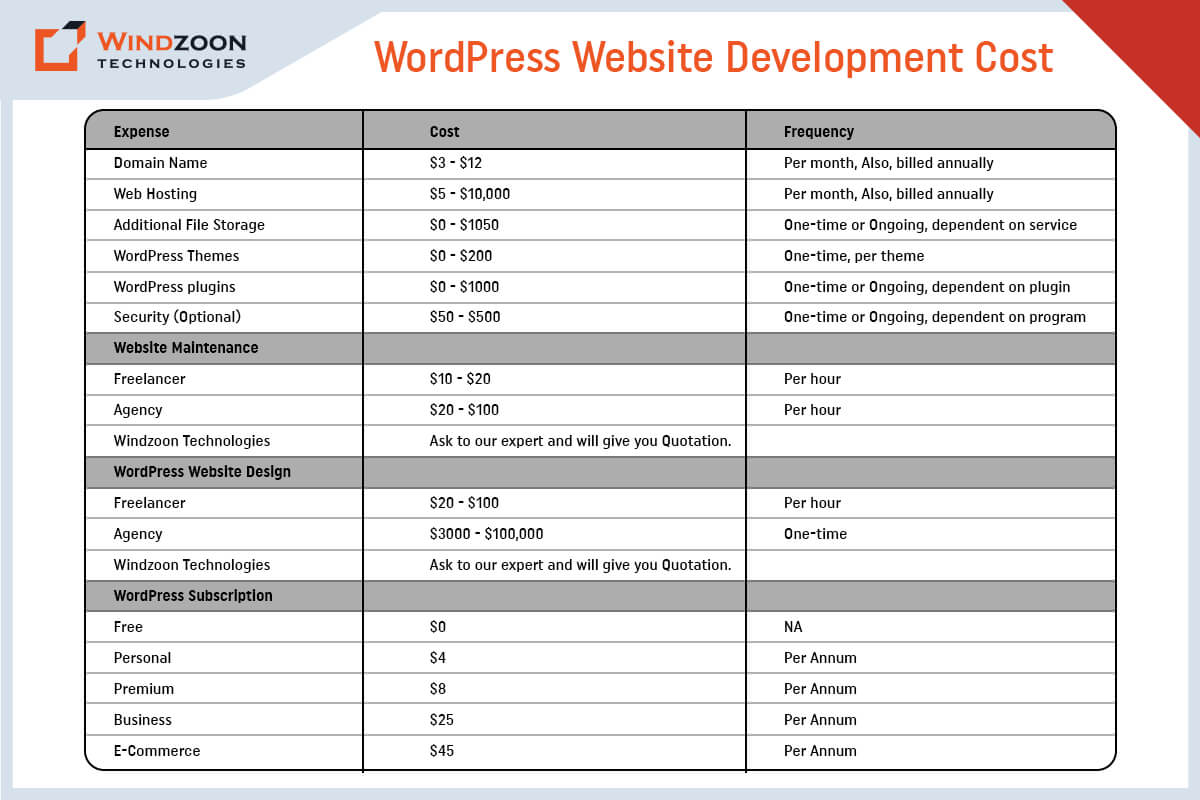
How Much Does It Cost to Build a WordPress Website

Every business has unique design and development needs, so the price of a WordPress website varies. However, the typical up-front price for a WordPress website is between $100 to $115,000. For WordPress websites, annual maintenance charges range from $75 to $15,000 PA.

[wpdatatable id=10]

Now, we will see what factors affect WordPress website development costs.

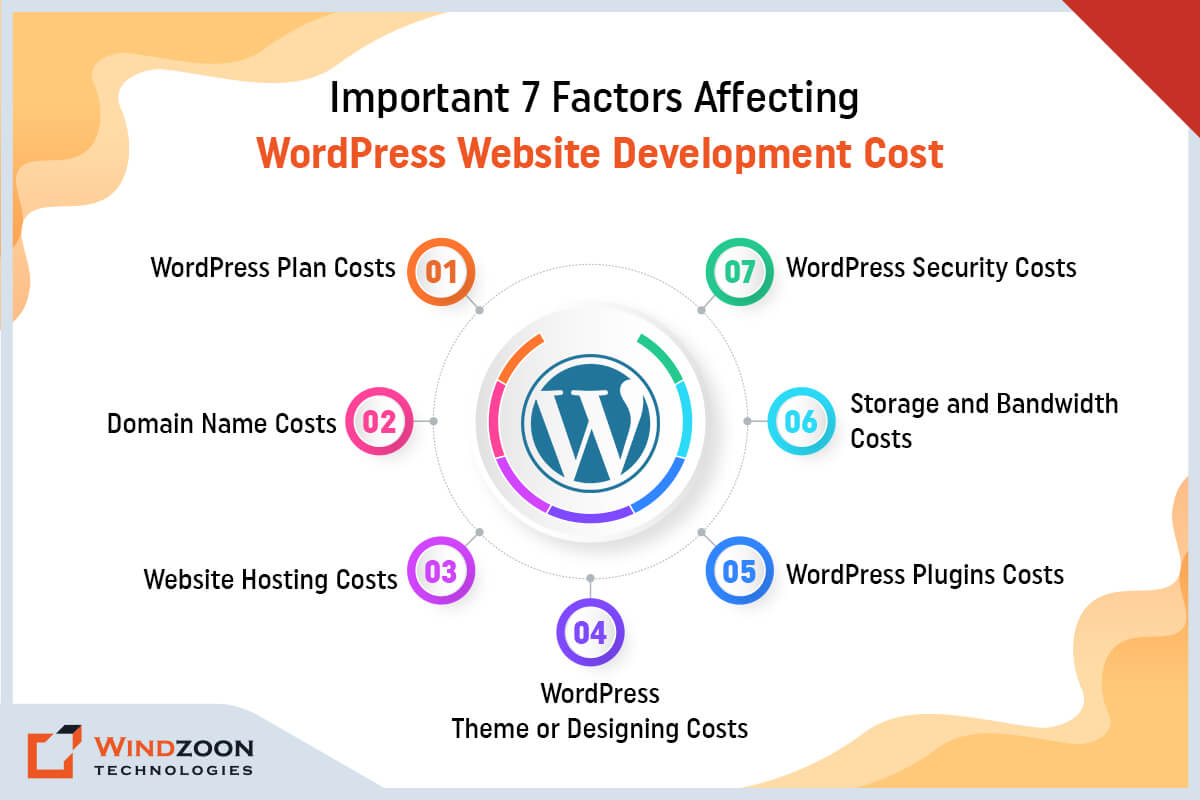
Important 7 Factors Affecting WordPress Website Development Cost

Factors Affect WordPress Website Development Cost

Creating and maintaining a WordPress website does not have to be costly, but there are unavoidable WordPress costs connected with website ownership. Let’s examine the factors affecting the cost of WordPress development.

1. WordPress Plan Costs

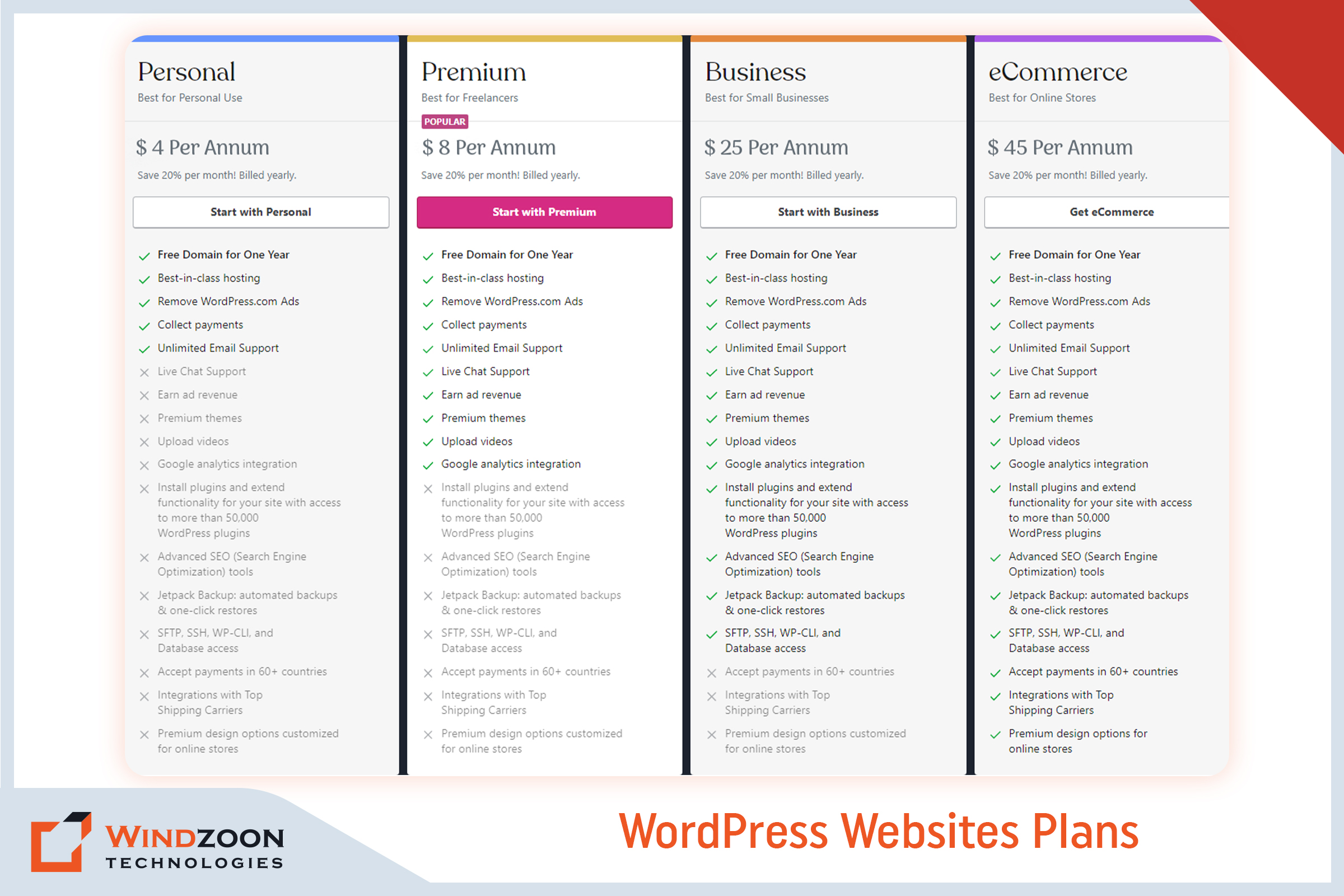
Picking a WordPress plan is the first significant expense you’ll face in calculating the price of a WordPress website. You can pick from the following types of plans:

WordPress Website Plans

The three main WordPress Websites plans are as follows:-

  • WordPress Free – $ 0
  • WordPress Personal – $ 4 Per Annum
  • WordPress Premium – $ 8 Per Annum
  • WordPress Business – $ 25 Per Annum
  • WordPress eCommerce – $ 45 Per Annum

Analyzing the price to create a WordPress website requires caution. The ‘Free’ plan is theoretically free but requires some back-end effort. For example, you must purchase a domain (more on this in the next section).

2. Domain Name Costs

Simply put, your domain name serves as the location of your website (think: [xyz].com or [abc].org). Consider using sites like GoDaddy and Bluehost to purchase a domain name. A domain name typically costs between $3 and $12 per month. If you choose the free plan, you must pay for the domain name. With the WordPress Pro plan, the domain name is complimentary for a year.

3. Website Hosting Costs

Web hosting is the main cost associated with your website. Your website must be housed on a server to be accessible online. Hosting providers rent out server space to websites and usually provide data maintenance and storage services.

There are two main types of web hosting: shared hosting and managed to host.

1. Shared Hosting:

With shared hosting, dozens or even hundreds of other websites share a single server with your website. Plans for shared hosting can start at less than $5 per month. However, there are drawbacks to using shared servers, such as increased security risks and slower website loading times.

2. Managed Hosting

Managed hosting typically includes a dedicated server, which implies your website will be hosted independently. These plans are more expensive, but they often come with better security, faster load times, round-the-clock customer service, and other benefits. You will also get facilitated with automatic backups and upgrades. Plan prices for managed WordPress hosting often start at around $30 per month.

4. WordPress Theme or Designing Costs

WordPress website prices must include costs for web hosting and a domain name. Customization costs after that are mainly up to you (though highly recommended). Themes are an approach to adding your personality to your WordPress website.

A WordPress theme is a downloadable template that affects how your site appears and feels. Your theme can determine everything from the backgrounds and colors to the general layout.

If budget is an issue, there are plenty of free themes. However, you might consider purchasing a premium theme if you want additional features and a more professional look. The average price of paid themes ranges from $20 to $1,000. You can also upgrade your WordPress theme or hire WordPress developers to tweak it later.

5. WordPress Plugins Costs

Plugins allow you to improve your WordPress website further. Like an installable program, a WordPress plugin expands the functionality of your website.

A plethora of free plugins enables a completely personalized WordPress experience. You can choose premium versions, just like themes, to add another degree of refinement to your site. Paid plugins are available as one-time purchases or monthly subscriptions, and their prices range from $10 to over $500. Additionally, some plugin updates may incur extra costs depending on the plugin.

For some instances of what plugins do, start exploring prominent paid and free options, such as

All-in-One SEO – It assists you in increasing the value of your SEO through XML sitemaps, social media integration, and on-page analysis.

WooCommerce – Creates an online store from your WordPress website.

UpdraftPlus – Produces complete backups of your website.

Page Builders Plugins: Build and customize your page layouts in WordPress.

6. Storage and Bandwidth Costs

Another cost consideration is your website’s storage and bandwidth. It typically ranges from $0 to $650 for one-time or continuing services. Given that each website is unique, it is impossible to determine the price.

For instance, a WordPress blogger won’t use as much storage space. Conversely, an eCommerce site will require more storage as it uploads its product catalog.

When you create a WordPress website or hire a website development company, you must include this cost in your budget. Hosting your WordPress site will cost extra if it has many images, videos, products, or other materials.

7. WordPress Security Costs

Your website’s security is one of its most crucial components. You want visitors to feel secure browsing or shopping on your website. You must add security to your page to entice visitors to stay on your website.

You should obtain an SSL certificate, a widely used solution for protecting websites. It keeps the user’s internet connections safe. Although you can sometimes pay a one-time fee for security, many security systems demand a monthly fee.

Usually, a simple protection plan will cost between $50 and $500 per year. But you can easily spend up to hundreds yearly on more sophisticated security features.

With this, we have come to the last important question which is:

How to Avoid Overspending While Developing A WordPress Website?

The best advice for small business owners is to start with what they can manage and afford. You don’t have to install every possible feature immediately, and you can start modestly before selecting what features to add later. When you’re just starting, you should use the free themes and plugins available and only consider investing in custom programs if you have the budget.

Outsourcing is another strategy to prevent overspending on your website’s development. There are numerous options to outsource web development, which all boils down to picking the best choice for your goals and budget.

Working with a WordPress developer is the best option; you don’t have to spend a fortune to start. The top developers would advise you to start by concentrating on the most crucial aspects of your website before scaling it as your traffic and sales increase.

Now, we will understand the process of building a WordPress website.

How to Build a WordPress Website?

In another blog, we discussed the entire process of creating a WordPress website. So, let’s confine ourselves to a quick summary here. Start your WordPress journey by following these instructions.

10 Steps to build a beautiful WordPress website

  1. Choose a WordPress plan( Choose WordPress.org or WordPress.com)
  2. Setting up a domain name and hosting provider for your site
  3. Install the WordPress software
  4. Select a theme that best suits your purpose
  5. Adding posts and pages to your WordPress site
  6. Customizing your website as per your requirements
  7. Install plugins to add functionality to your website
  8. Increase your page loading speed by optimizing your website
  9. You can get inspiration from prominent WordPress websites
  10. Don’t forget the marketing of your site

Conclusion

Developing a WordPress website can be a gratifying and satisfying experience, but only if the cost of doing so does not burden your project and business goals. This is why it’s crucial to work with a skilled WordPress developer. It could completely alter the course of your website:

One of the benefits is that it can make your website an appealing platform for your products & services.

Two, it can assist you in maintaining your website up to date.

Three, it can assist in keeping costs low without compromising the website’s quality.

Consider working with Windzoon Technologies if you’re uncertain of where to start. We have more than 10+ years of expertise in providing WordPress development services for various business concepts. Hire WordPress Developers from us and relax knowing your project development is in good hands.

Please contact us if you would like to obtain a quote or to learn more about our WordPress website development packages.

A Step-by-Step Guide to Become Web Developer from Scratch

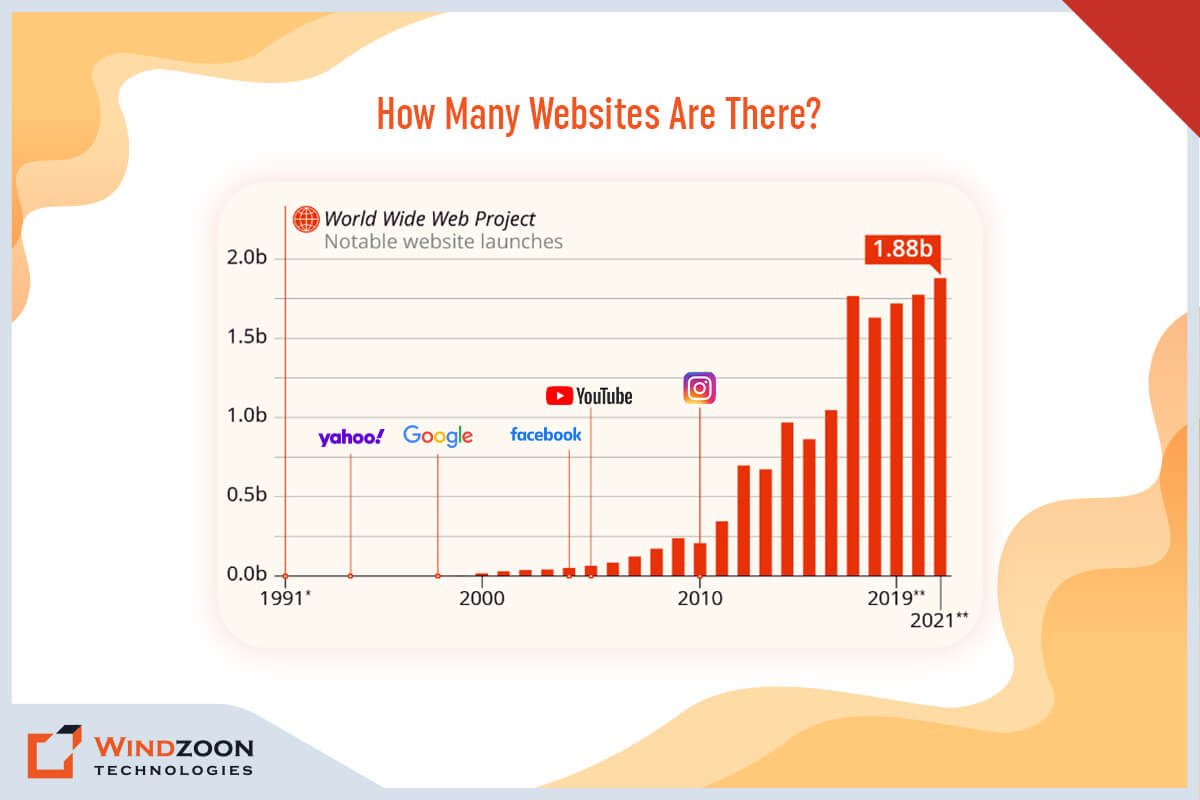
In older times, teachers & libraries are the primary means to get answers to our different problems. But in the modern world, websites are becoming their prime competitor in terms of offering solutions to our various queries. Currently, more than 1.88 billion websites are running in this world. They not only solve our queries but also fulfill our various requirements like clothing, food, grocery, medicines, etc.

Howmany website are there?

But have you ever wondered who is behind building these wonderful websites? Its web development framework & web developers. Web developers build various types of websites with the help of web development frameworks. But what is the process to become a web developer?

Well, you will find its answer in this comprehensive guide. As a respectable web development services provider, we have offered detailed information about the process of becoming a web developer. Also, explain whether or not becoming a web developer is profitable. To find out all the answers, keep reading this blog post.

So, first of all, we will learn about some basics of web development.

What Is Web Development?

Web development is the process of designing, developing, and maintaining websites and applications. The discipline covers a wide range of activities, from coding to technical design to monitoring the effectiveness of an internet-based website or application. Web development includes both front-end and back-end components:

Front-end development includes the user interface (UI) as well as the overall appearance and feel of the website or application.

While back-end development focuses on the servers, databases, logic, APIs, and other back-end components that power a website.

Now, we will understand what it means to be a web developer.

What Exactly Is a Web Developer?

A Web developer is a programmer who creates websites and apps for the World Wide Web or distributed networks. These programs often use HTTP to transmit data from a Web server to a client browser, and they frequently use associated programming languages like HTML/CSS, C#, Ruby, and PHP, to name a few.

A Web developer is mainly concerned with the back end or programming part of developing a website or Web application, as opposed to a Web designer, who only works with the looks of a website or application. However, many experts possess both sets of abilities.

Next, we will learn about the different types of web developers.

Types of Web Developers

1. Back-end Developers

Back-end web developers design the website’s structure, write the code and check that the code is functional. Their duties may also involve maintaining access points for individuals who need to control a website’s content.

2. Front-end Developers

Front-end web developers concentrate on the website’s visual components, or the pages that users see and engage with (also known as the user interface). They use HTML and JavaScript to build real page layouts, add graphics, and beautify the website.

3. Full-stack Developers

Full-stack developers are in charge of both front-end and back-end programming.

These developers have the ability to build a whole website and may work for businesses that lack the resources to hire a big website team.

Know how to become a full-stack developer with our comprehensive guide.

4. Webmasters

Webmasters are basically the managers of websites. Their main duty is to maintain the website’s updates and ensure that all the links and applications on every page are functional.

After this comes the important question, that is:

Why Become a Web Developer?

The size of the global web development market, estimated at USD 56000.0 million in 2021, is anticipated to grow at a CAGR of 8.03% over the course of the forecast period and reach USD 89013.17 million by 2027. Additionally, it is anticipated that overall employment for web developers will increase by 23% between 2021 and 2031, which is substantially faster than the average for all occupations.

Now, we will see the key roles & responsibilities of a web developer.

What Are the Primary Roles & Responsibilities of a Web Developer?

Here are some of the key roles and responsibilities of a web developer:

  • Design, create, and maintain websites and web apps.
  • Write clean, maintainable, and efficient code.
  • Collaborate with designers, project managers, and stakeholders to understand project requirements.
  • Test and debug websites and web applications to ensure they are error-free and perform optimally.
  • Ensure websites are optimized for search engines, mobile devices, and browsers.
  • Stay up-to-date with the latest web development trends, technologies, and best practices.
  • Write and maintain documentation for projects.
  • Troubleshoot and resolve technical problems as they emerge.
  • Participate in code reviews, and help create best practices and coding standards.
  • Continuously improve technical skills and stay up-to-date with the latest advancements in web development.
  • Participate in team meetings and communicate effectively with team members, stakeholders, and clients.

With this, we have come to the main topic of our blog.

How to Become a Web Developer from Scratch with 14 Easy Steps

Here is a step-by-step guide for becoming a web developer:

1. Acquire Basic Knowledge

You must have a solid understanding of web development fundamentals before you can begin creating websites. It includes getting knowledge of HTML, CSS, and JavaScript.

HTML (Hypertext Markup Language) is utilized to build the framework of a web page. A web page is styled and formatted using CSS (Cascading Style Sheets). JavaScript, on the other hand, is used to provide interactivity to a web page.

2. Select a Development Environment

You require a development environment before you can begin coding. You have the option of using online platforms or desktop software.

Online platforms like CodePen and JSFiddle are simple and don’t need to be installed, although they can only offer a few functionalities. Advanced functionalities are available in desktop software like Visual Studio Code or Sublime Text, but the setup is necessary.

3. Build Projects

You can begin developing projects as soon as you have a fundamental understanding of HTML, CSS, and JavaScript. Begin with modest projects like a landing page or a personal portfolio and work your way up to more complicated tasks.

It will provide you with hands-on web development experience and aid in developing your skills.

4. Learn a Framework or a Library

You’ll need to master a framework or a library to create more complicated and dynamic websites. Several well-known frameworks and libraries exist, such as Angular, React, and Vue.js. Select the one that most closely matches your needs, then begin learning.

5. Learn a Back-end Language

To build dynamic websites, you must also be familiar with a back-end language like PHP, Ruby, or Python. Using these languages, you may build dynamic content for your website and communicate with databases.

6. Obtain a Certification

Earning a certification might help potential employers validate your skill set. There are a variety of generic and vendor-specific choices available, such as:

  • Adobe Certified Expert (ACE)
  • Microsoft Certified Solutions Associate (MCSD)
  • Amazon Web Services (AWS) Certified Developer
  • Zend Certified PHP Developer

7. Network With Other Web Developers

Building a network with other web developers can help you stay up-to-date with the latest trends and techniques in web development. It can also help you find job opportunities and collaborate on projects.

8. Get Hands-on Experience

Practical experience working on actual projects is crucial if you want to become a great web developer. You can begin your career by freelancing, working on personal projects, or interning with a web development company.

9. Learn the SEO Fundamentals

If a website is not SEO-friendly, it is useless. The term “SEO” refers to the process of raising a website’s position within a search engine. It is one of the most crucial abilities a web developer should have to create SEO-optimized web app solutions.

10. Stay Organized And Track Your Progress

Staying organized and tracking your progress is important as you work on projects. This will help you identify areas for improvement and keep you motivated to continue learning and growing as a web developer.

11. Specialize in a Specific Area of Web Development

There are various areas of web development where you can specialize, including front-end development, back-end development, mobile development, and e-commerce development. Specializing in a certain field can assist you in becoming an expert in that field and increasing your earning potential.

12. Build a Portfolio

Showing off your work is crucial as you develop projects and gain experience. Make a portfolio website that displays your skills and the projects you have worked on. It will assist you in obtaining your first job as a web developer.

13. Contribute to Open-Source Projects

Open-source project participation is a fantastic approach to developing your skills and portfolio. It also helps you build a reputation in the web development community and can lead to job opportunities.

14. Keep Learning

Technology is continually evolving, and new tools and techniques are constantly being produced. Continuous learning and skill development are essential if you want to stay current and relevant.

Becoming a web developer necessitates a combination of technical and creative abilities. Technical knowledge can be acquired through online training, tutorials, and practical application.

However, the creative part of web development cannot be taught and requires a good eye for design and an awareness of user experience.

Conclusion

Web development is a difficult yet rewarding profession. Anyone with hard work and devotion may become a web developer. Start by becoming familiar with the fundamentals, choosing a programming environment, and creating projects. After that, study a framework or library, a back-end language, create a portfolio and continue to learn and develop your skills.

And if you want to hire web developers with exceptional talents and experience, you should contact any renowned web development company.

Windzoon is a well-known web development company with a decade of web development experience in India and the USA. Our team of expert web designers is capable of building websites and applications of any size and complexity.

Contact us to take advantage of our first-rate services and to get a quote.

Know The Best 15 Mobile App Design Practices Of 2023

We all live in a world where smartphones & mobile apps are ruling the world. We use them to communicate, watch TV, create memories, pay bills, stay updated on the latest news, operate businesses, and so on.

Right now, the mobile app design and development market is booming. However, there is a lot of rivalry and rising user expectations. Users nowadays expect a product that works well and has an appealing interface and a positive user experience.

Because 90% of users have reported stopping using an app owing to poor performance, and 86% deleted or uninstalled at least one mobile app due to performance issues. If you don’t want your mobile app to count in this category, hire a mobile app development company that specializes in creating unique mobile apps.

Average Time Period for Deletion of Mobile Apps Worldwide

Because according to a 2018 study, mobile apps are uninstalled 5.8 days after they were last used. So, how do you prevent yours from ending up in the digital trash? You can do this by following the below-mentioned best mobile app design practices in 2023.

Top 15 Mobile App Design Practices You Should Be Aware Of In 2023

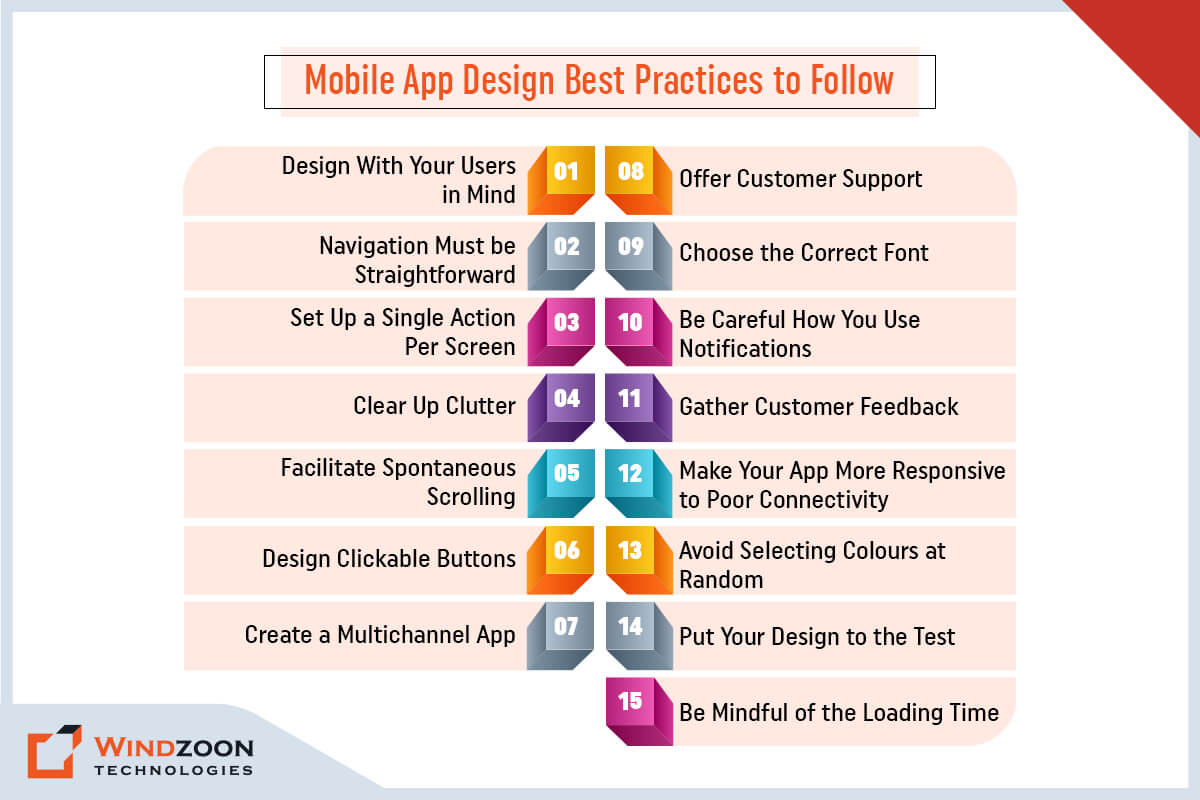
Mobile App Design Best Practices to Follow

1. Design With Your Users in Mind

Best practices for mobile app design start with accessibility. To create a design that works for everyone, you must consider every conceivable use case. Users can hold their smartphones in either their left or right hand or even both hands.

The best app designs offer a simple layout with easy access to the most crucial interface elements regardless of how users hold their smartphones.

Place buttons and other components carefully away from the screen’s top and bottom corners. Because these are the most difficult spots to reach, making it challenging for users to use the app.

If your users cannot find your unique content and features, then they are useless. It would be beneficial if you designed appealing and simple navigation.

Use simple items to locate so that consumers can move between screens or back without difficulty. Make sure to plan the navigation menu to take up as little screen space as possible.

Read More: Mobile App Development Trends You Should Consider

3. Set Up a Single Action Per Screen

The smartphone screen is much smaller than the desktop screen, which causes many challenges for UX designers. Users become overwhelmed when adding a few more items to the screen.

The best course of action is to break the procedure down into manageable steps and give each one its own screen.

For instance, if you are creating an app for cab booking, you can divide the process into the sign-up process, choosing a location, choosing appropriate rides, and so on. To make the procedure more user-friendly, each action should be separated onto its own screen.

4. Clear Up Clutter

In the world of mobile UI/UX design, minimalism is always a trending option. It is not difficult to construct a simple approach. You should avoid overcrowding displays with content and interface elements since customers look for usefulness and ease of use. Strike a balance between exceptional functionality and a simple design for better results.

It is not required to present every piece of information on the interface. Organize your content so that it gives the user a clear overview of the features that are offered. And keep the screen as clear and clutter-free as possible.

5. Facilitate Spontaneous Scrolling

Use a horizontal scroll to browse a product catalog or display facts on a large visual area that wouldn’t fit on the screen. Give a visual cue and indicate the scrolling direction if additional content is available.

6. Design Clickable Buttons

One of the most aggravating things that can happen when using an app is tapping a button and missing it. It is impossible for users to interact with an app when the touch controls are too small. The desire to conserve space may drive UX designers to reduce the size of the buttons. However, it will have a negative impact on the user experience.

If you wish to stick to the best app design guidelines, make buttons 44 x 44 pt or 48 x 48 dp. Still, each operating system has its own suggestions, so be sure to read them.

7. Create a Multichannel App

Designers must design a multichannel app to make that transition smooth for users who frequently toggle between apps and desktops. For instance, customers who shop for clothing online may first add items to their carts on their phones before completing the transaction on computers. Regardless of the device, ensure the same goods are saved in their cart.

8. Offer Customer Support

Make careful to respond to user concerns whenever they arise. Use various techniques to help them navigate your app, such as chatbots and live chats, in-app native FAQs, and click-to-call client support buttons.

9. Choose the Correct Font

Choosing the appropriate font is just as important as developing the visual elements of your device solution. Picking the wrong fonts might damage your design. Therefore, choose a font that reads well in various sizes and weights.

Apple and Google, two titans of technology, advise keeping the font size at 12 points. It enables people to read the information on the screen without having to zoom in. Additionally, it enables them to keep their sight distance for their device at a comfortable level.

10. Be Careful How You Use Notifications

Notifications are one of the most effective methods for retaining users, as they provide timely reminders to return to an app and interact with content. However, it is critical to consider the frequency and timing of your push alerts and the content they provide. Receiving too many pings or unpredictable bursts may cause consumers to disable notifications entirely.

Thus, keep notifications contextual when you display them. Add easy-to-access granular notification settings so consumers can adjust notifications to their needs.

11. Gather Customer Feedback

As a designer, your primary goal is to give users a positive UX. Additionally, you can get user feedback on your ideas to confirm their authenticity. Genuine feedback will assist you in determining what works and what does not.

All this information will assist you in determining what changes to make. Using analytics in your app will provide you with all of the data you need to improve the user experience.

12. Make Your App More Responsive to Poor Connectivity

Any app not designed to handle the most crucial tasks while connected to a slow network is mediocre. For instance, if users are booking tickets or making e-commerce purchases, ensure that their actions are preserved and subsequently executed as soon as the connection is restored.

If your app needs connectivity at all times, tell users they must have a connection to move forward rather than just showing them an unending spinner or nothing. Users that worry about being doubly charged will eventually lose faith in your app.

13. Avoid Selecting Colours at Random

Your app’s design features, including the colour aspects, must serve a function. Avoid using colours that are overly vivid, contrasted, or challenging to read. The colours shouldn’t be too intense to damage someone’s eyes.

Use typical colour associations for your buttons, as we previously covered, keeping things simple. For instance, buttons that indicate “yes” or “continue” should be green, whereas “no” and “exit” buttons should be red.

Reversing typical colour associations will only confuse the user. And you will see a decline in your conversion rates as a result.

Read More: Top Mobile App Development Frameworks to Build Apps

14. Put Your Design to the Test

You must test your app regularly to ensure that the design and functionality work as intended.

Even though you may believe it’s fantastic, you must acknowledge that your opinion is prejudiced because you were the one who created it.

You must obtain other people’s opinions. From our experience, it is advisable to outsource testing to any professional mobile app development services provider linked with app design, development, and testing. In this manner, the criticism comes from a wholly unbiased viewpoint.

Or you can test the design with beta testers or focus groups. Check the feedback you receive. Concentrate on any design-related errors or defects. Make modifications when difficulties arise.

15. Be Mindful of the Loading Time

Speed is likely the main factor behind customers uninstalling your app out of the many other factors. According to surveys, 63% of users would stop using an app if the loading time was longer than five seconds.

Undoubtedly, that is a very minimum period.

A workable solution here is to employ design strategies to offer the perception of speed or, at the absolute least, mask any delays.

The simplest strategy is to use an interesting loading screen. The notion is that users should have something interesting or informative to look at while waiting.

Conclusion

It’s difficult to create a fantastic on-demand application. However, that doesn’t imply that succeeding is impossible. If you’re building a complex application, it’s critical to have the top mobile app design practices in mind and to be able to discuss with professionals all the issues.

And Windzoon is an excellent choice if you’re seeking a professional to help you with your app design project. Hire mobile app developers and designers from us with more than ten years of experience providing a wide range of app development and design services.

To use our services or learn more about us, get a quote.

17 Useful Laravel Developer Technical and Soft Skills to Know for Hiring

Life is constantly changing. You can either choose to cooperate with it, adapt to it, and learn how to take advantage of it, or you can fight it and risk being run over by it.

One such change that has fundamentally altered the history of web app development is the emergence of websites and applications. There are many frameworks for web app development, including HTML, PHP, JavaScript, Python, etc.

But out of all of these frameworks, the Laravel PHP framework has completely revolutionized the web development industry. It is a framework that enables developers to create robust, dynamic websites and applications easily.

And Laravel Developers are the architects of this digital revolution. They are the ones who bring life to the code, turning ideas into reality. But what exactly does a Laravel Developer do?

As a seasoned Laravel development company, we will dive deep into the world of Laravel and help you explore the role of these experts in creating stunning web applications. Get ready to be inspired and discover the magic behind the code!

First of all, we will understand some basics about a Laravel developer.

What is a Laravel Developer?

A Laravel Developer is a web developer who specializes in building web applications using the Laravel PHP framework. Laravel is a free, open-source PHP web framework designed for building modern, robust, and scalable web applications. That’s why we choose the Laravel framework for building secure web applications.

Here is a detailed explanation of the roles and responsibilities of a Laravel developer, as well as the technical and soft skills required for the job:

Technical Skills of a Laravel Developer

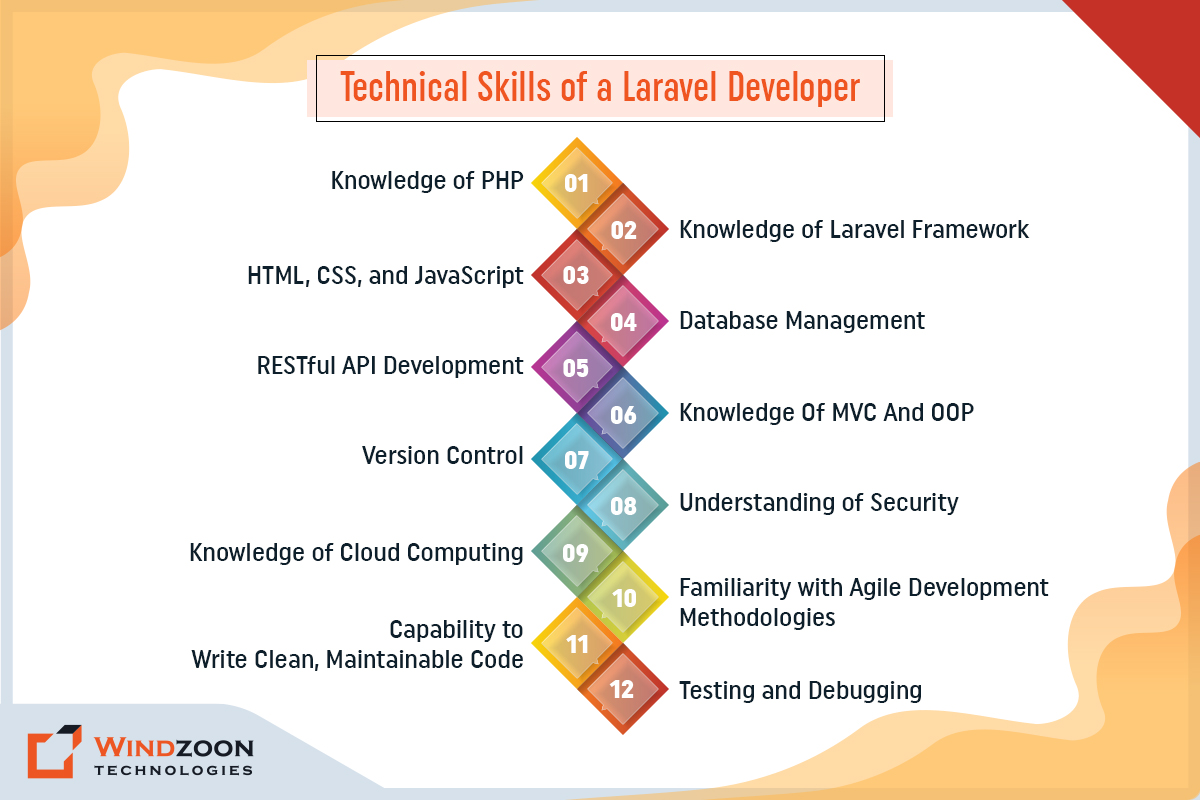
Technical Skills of Laravel Developer

1. Strong Knowledge of PHP

Laravel is built on PHP, so a Laravel developer must understand PHP well. And also have some experience working with other PHP frameworks.

A Laravel developer should have knowledge of every detail of PHP, including OOP concepts, data types, functions, error handling, and security. They should also be familiar with various PHP extensions and libraries, such as Composer.

2. Knowledge of Laravel Framework

A Laravel developer should understand the Laravel framework well, including its components, routing, controllers, views, models, migrations, and middleware. They should also be familiar with Laravel’s security features, such as password hashing, encryption, and authentication.

3. HTML, CSS, and JavaScript

A Laravel developer should understand HTML, CSS, and JavaScript well, including how to create responsive and user-friendly web pages. They should also be familiar with front-end JavaScript frameworks, such as Vue.js or React and be able to integrate these frameworks into a Laravel application.

4. Database Management

Laravel developers must be familiar with database management systems such as MySQL, PostgreSQL, and MongoDB. And be able to design and implement database schemas, write complex SQL queries, and optimize database performance. They should also be familiar with Laravel’s Eloquent ORM and be able to write efficient database queries.

5. RESTful API Development

A Laravel developer should have experience with RESTful API development and be familiar with API authentication and authorization methods. They should also be able to write clean and maintainable API code and be familiar with API testing tools, such as Postman.

6. Knowledge Of MVC And OOP

MVC architecture is the foundation of Laravel. It is a technique frequently used to connect user interfaces to underlying data models. Since MVC and Laravel are used together to structure web apps, a Laravel developer has to have a firm understanding of MVC. And that is really advantageous for maintenance.

Like most frameworks, Laravel follows the Object-oriented programming (OOP) methodology. It is the foundation of all Laravel techniques. Therefore, it’s crucial to have a firm understanding of the principles of object-oriented approaches.

7. Version Control

A Laravel developer should have experience with version control systems, such as Git. And be familiar with branching, merging, and resolving conflicts.

They should also be able to use version control to manage code changes and collaborate with other developers. And be able to write clear and descriptive commit messages.

8. Understanding of Security Best Practices

Laravel developers must have a good understanding of security best practices and be able to implement security measures such as authentication, authorization, and encryption to protect sensitive data and prevent hacking attacks.

9. Knowledge of Cloud Computing

Cloud computing technology is trending right now. The major players in the tech sector, including IBM, Google, and Microsoft, are making significant investments in and emphasizing cloud computing.

As a result, other businesses and startups quickly adopt cloud computing services, including SaaS, PaaS, and IaaS. Why? Mainly because it saves a significant amount of time and money.

Therefore, a Laravel developer must have a solid understanding of cloud computing. He should be able to work with Google Cloud Platform, Microsoft Azure, or Amazon Web Service (AWS).

10. Familiarity with Agile Development Methodologies

Laravel developers should have experience working in an agile development environment and be familiar with agile methodologies such as Scrum and Kanban.

11. Capability to Write Clean, Maintainable Code

Laravel developers must be able to write clean, well-documented, and maintainable code that is easy to understand and modify.

12. Testing and Debugging

A Laravel developer should have experience with testing and debugging their code, including unit testing, integration testing, and functional testing. They should also be familiar with testing tools, such as PHPUnit, and be able to write efficient and effective tests.

Soft Skills of a Laravel Developer

Soft Skills of a Laravel Developer

1. Communication

A Laravel developer should have excellent communication skills, including the ability to clearly and effectively communicate technical information to non-technical stakeholders. They should be able to explain complex technical concepts in simple terms and provide regular updates on project progress.

2. Problem-Solving

A Laravel developer should have strong problem-solving skills, including identifying and resolving complex technical issues. They should be able to think creatively and find innovative solutions to challenging problems.

3. Teamwork

A Laravel developer should be able to work effectively in a team environment, including collaborating with other developers, designers, and stakeholders. They should be able to contribute to the development process and provide constructive feedback to their team members.

4. Time Management

A Laravel developer should have strong time management skills, prioritize tasks, meet deadlines, and manage multiple projects simultaneously. They should be able to balance their workload and ensure that projects are delivered on time and within budget.

5. Continuous Learning

A Laravel developer should have a passion for continuous learning and be able to stay up-to-date with the latest web development technologies and trends.

He should also be familiar with best practices and conventions in the Laravel community. This includes regularly reading documentation, participating in online forums, and attending meetups and conferences.

By continuously improving their skills and knowledge, Laravel developers can deliver high-quality, innovative solutions for their clients.

After this, we will learn about the roles & responsibilities of a Laravel developer.

What Are Laravel Developers Roles and Responsibilities?

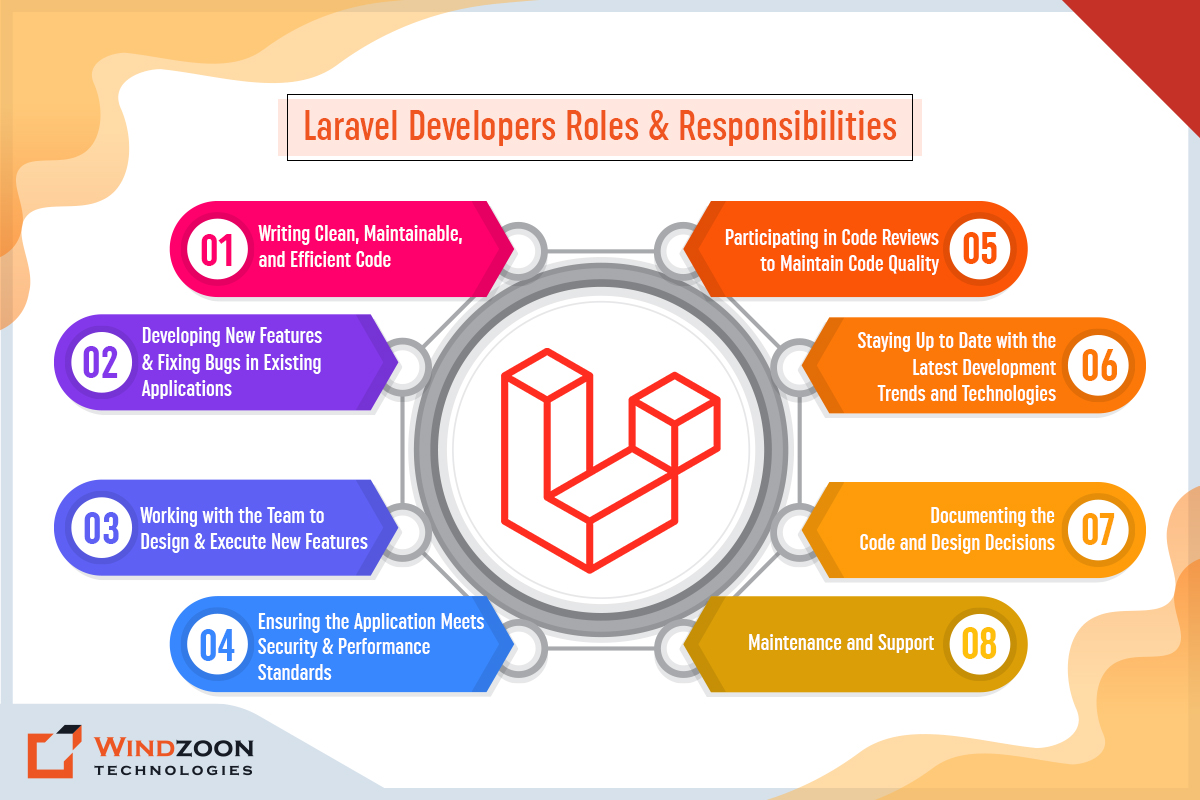
Laravel Developers Roles and Responsibilities

A Laravel developer is responsible for developing and maintaining web applications using the Laravel framework. The following are the key responsibilities of a Laravel developer:

1. Writing Clean, Maintainable, and Efficient Code

The Laravel developer is responsible for writing easy to read and understand code and follows best practices for performance and security.

2. Developing New Features and Fixing Bugs in Existing Applications

The Laravel developer is responsible for adding new functionality & fixing bugs. It also includes testing and debugging their code, including writing unit tests, integration tests, and functional tests. They should also be able to identify and resolve bugs and performance issues promptly and efficiently.

3. Working with the Team to Design and Execute New Features

A Laravel developer is responsible for collaborating with other developers, designers, and stakeholders to add new features and ensure the successful delivery of a web application. They should also be able to share their knowledge and learn from others.

4. Ensuring the Application Meets Security and Performance Standards

The Laravel developer is responsible for ensuring that the application meets all security and performance standards and implementing measures to prevent security breaches and performance issues.

5. Participating in Code Reviews to Maintain Code Quality

The Laravel developer participates in code reviews to ensure that the code is of high quality and to identify any areas for improvement.

6. Staying Up to Date with the Latest Development Trends and Technologies

The Laravel developer is responsible for staying up-to-date with the latest development trends and technologies and incorporating these into the application as appropriate.

7. Documenting the Code and Design Decisions

The Laravel developer is responsible for documenting the code and design decisions. It includes writing clear and concise comments and creating technical documentation for clients and stakeholders.

8. Maintenance and Support

A Laravel developer is responsible for maintaining and supporting existing web applications, including fixing bugs and implementing new features. They should also be able to provide technical support to clients and stakeholders and be able to resolve technical issues in a timely and efficient manner.

Conclusion

A Laravel developer is responsible for designing, developing, and maintaining web applications using the Laravel framework. They should have a strong understanding of PHP, HTML, CSS, and JavaScript and experience with database management, API development, and testing and debugging.

Additionally, a Laravel developer should have strong communication, problem-solving, teamwork, and time management skills and be able to work effectively in a team environment.

If you want to Hire Laravel developers with such skills, you should connect with any reputed Laravel development company.

Windzoon has a team of talented Laravel developers skilled at creating websites and applications of any kind and complexity. Utilize our Laravel development services to put our developers’ abilities to work, creating outstanding online solutions with the highest accuracy.

To benefit from our excellent services and to request a quote, get in touch with us.

Why Choose React Native for Mobile App Development?

As 230 billion mobile apps were downloaded annually in 2021, and customers spent $170 billion. In today’s tech-savvy world, having a mobile app is a strategic move for businesses to survive.

These figures show how successful and important the mobile app development sector has grown. However, creating a mobile app is a challenging task. Getting your app ready for launch takes great time and effort. But today, the procedure is much simpler thanks to technological developments and breakthroughs in the app development framework.

One of these technological breakthroughs is the creation of frameworks such as React Native. As a result, many companies worldwide have chosen to employ this framework for their app development initiatives. You may join them using React Native as your front-end development framework and working with a React Native App Development Company.

So, in this blog, we’ll look at what React Native is, how it functions, and why adopting it for your mobile app development project is a good idea.

Let’s begin with our first topic:

What is React Native?

React Native is a well-known open-source framework for building a mobile application that was first introduced in 2015. Facebook developed it. It leverages JavaScript to build cross-platform mobile applications with real native features. This entails developing natively rendered mobile apps for iOS and Android with a single codebase.

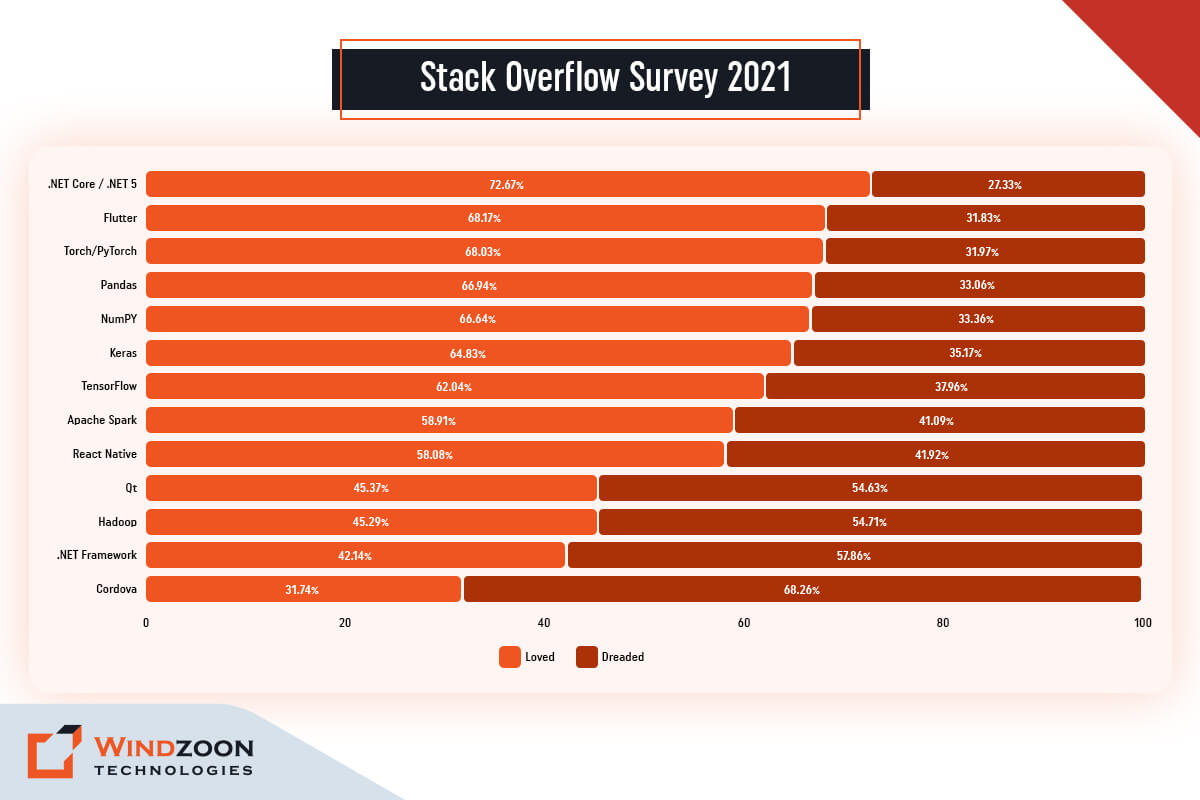
React Native is one of the most widely used frameworks for creating apps because of its capabilities. As per the Stack Overflow Survey 2021, 58.08% of developers enjoyed working on React Native in 2020 and expect to continue doing so in the future.

Stack Overflow Survey

Afterwards, we will discuss the following topic:

How Does React Native Operate?

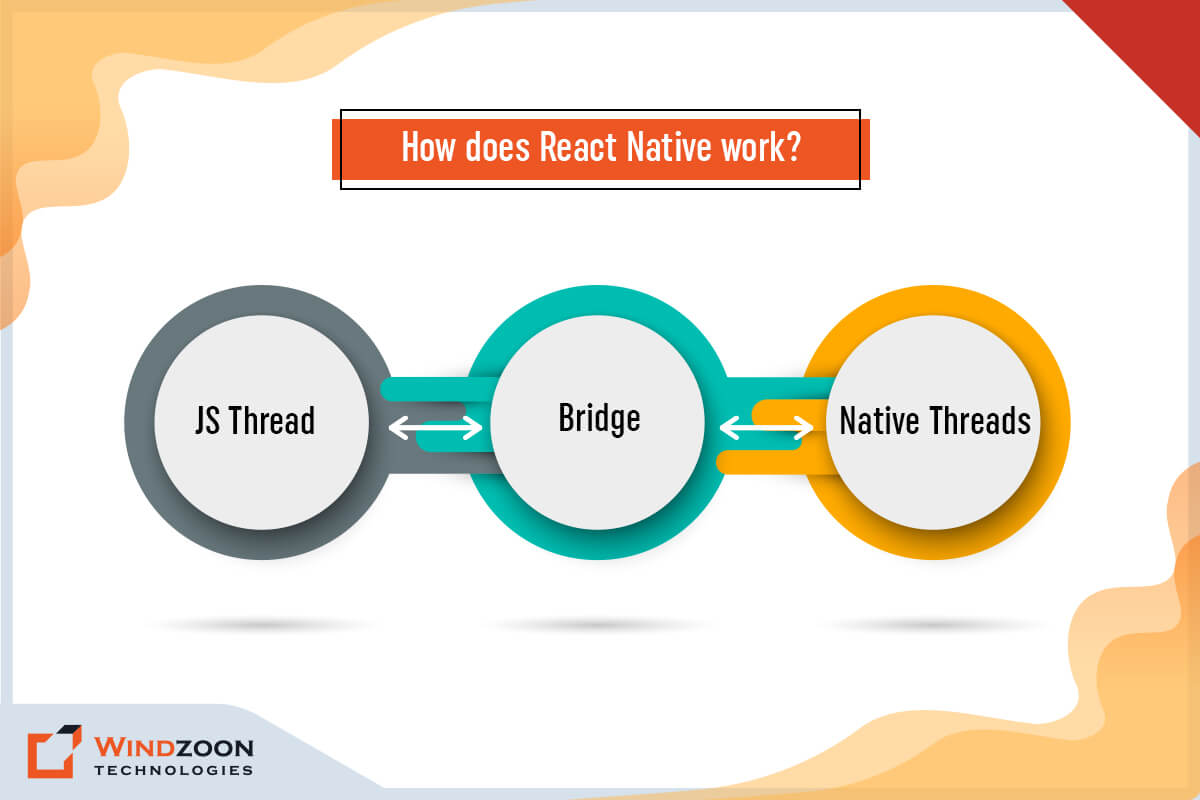
How does React Native work?

React Native is written in JavaScript and JXL, a specific markup language similar to XML. It deals with both the JavaScript and Native realms. And both of these realms can communicate and exchange information.

They connect via a “bridge,” which is undoubtedly the heart of the React Native architecture, the component that provides so much flexibility.

The bridge is a concept that allows for bidirectional and asynchronous communication between these two realms. What matters here is that they are written in completely different technologies, yet they can still communicate via a bridge.

Read more about React Native and how it differs from ReactJS from our insightful article on ReactJS vs React Native.

Now, we have finally come to our main topic of discussion:

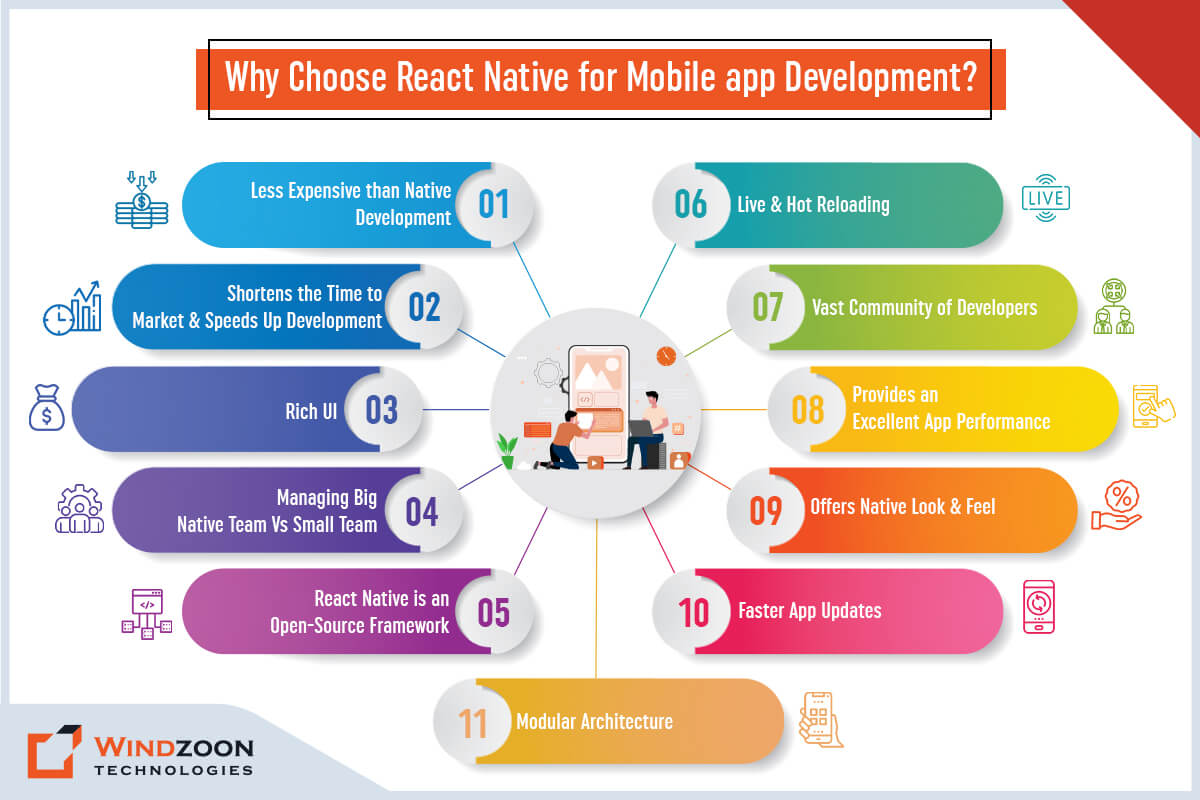
Top 11 Reasons to Use React Native For Mobile App Development

Why Choose React Native for Mobile App Development?

1. Less Expensive than Native Development

Following a native approach necessitates developing two apps from scratch for iOS and Android. However, if you use React Native, you only need to create an application in JavaScript once. Because React Native requires only a single code and provides code reusability for app development. Thus, you don’t need two developer teams and save twice as much money on building and maintenance.

2. Shortens the Time to Market and Speeds Up Development

React Native’s quick development time is one of its most attractive benefits. Developers can utilize the framework’s various ready-made components to hasten the process. And it will cut their development time by roughly 40% compared to creating an identical app for Android and iOS.

3. Rich UI

React Native allows you to develop distinctive, eye-catching UIs using pre-built declarative components like Picker, Button, Slider, Switch, and more. You may also create your own components using TouchableNativeFeedback and TouchableOpacity. There are various iOS and Android-specific components available to make it run efficiently on Android and iOS mobile devices.

4. Managing Big Native Team Vs Small Team

When it comes to native app development, a business needs two teams, one for iOS and one for Android. Having two teams might cause communication breakdowns and impede the development process.

Due to the native iOS and Android teams’ different processes and workflows, it is obvious that the two projects are becoming inconsistent. It may result in problems with the app’s appearance, functions, and capabilities.

React Native, on the other hand, necessitates using a JavaScript developer skilled in writing code for both platforms. If you’re creating an app with many native features, you’ll need a native developer. Still, the team would be smaller and more manageable in most cases.

5. An Open-Source Framework

Since React Native is open-source, developers are allowed to use its frameworks and libraries without paying any cost. It also operates under the MIT license, a software license that grants the developers legal security and only imposes minor restrictions on how the software may be reused.

6. Live and Hot Reloading

React Native’s live reload capability enables you to interact with real-time updates. You can make changes to the code while the app is loading, and the changes will be displayed in the app with an automatic refresh. Another method for accelerating compilation is to reload a particular section of change.

Another key advantage of react-native is hot reloading. Live and hot reloading differ slightly from one another. Live reloading refreshes the entire application, whereas hot reloading merely updates a file that has been altered or modified while preserving the application’s initial state.

7. Vast Community of Developers

Since React Native is an open-source framework, react developers have free access to all pertinent material. Additionally, it enables people to donate anytime they choose freely.

One of the main benefits of using React is that engineers are readily available to assist novices in navigating forum discussions. They can even review the source code or active React projects for beginners and offer helpful criticism. All in all, it offers the development community a truly remarkable and collaborative experience.

8. Provides an Excellent App Performance

The performance of React Native apps is remarkably similar to that of native apps created on the corresponding iOS or Android platforms. Additionally, they are quick due to the programming language’s mobile device optimization.

Instead of the central processing unit (CPU), React Native apps employ the graphics processing unit (GPU). They are, therefore, far quicker than cross-platform hybrid technology. To Know more about React Native app performance, read our comprehensive guide on React Native Performance Optimization.

9. Offers Native Look and Feel

The moniker “React Native” was invented since apps built on this platform work exactly like native apps. Aside from that, developers cannot dispute that the popularity of React Native is due to its keyboard behaviour, scroll accelerations, usability, and animations.

Furthermore, native widgets that improve efficiency are included in React Native’s user interface. When React Native and JavaScript are utilized, even the most complex apps operate without noticeable hitches. As a result, utilizing React Native to build apps is always a smart move because it produces products that are more stable.

10. Faster App Updates

Previously, app upgrades took much longer to publish since developers had to repeat the development process for each app separately. React Native has simplified that procedure. Both apps may be updated simultaneously, and the procedure is considerably simpler and faster.

Developers offer changes and updates for your users using over-the-air (OTA) upgrades, which are deployed even while consumers use the app. After then, when the user opens the app again, the update will be accessible.

It is no longer necessary to update the software manually and get it approved by Apple or Android, which saves a lot of time.

11. Modular Architecture

The modular and user-friendly interface of React Native makes it incredibly simple for other developers to jump into and build on someone else’s project.

This enhances flexibility within a development team and facilitates the production of web application updates and upgrades. Additionally, testers will spend less time decoding programming logic and creating relevant test cases.

Any client and CFO would welcome hearing that there will be huge time savings. This is particularly true when the advantage is transferred from the web to mobile and vice versa.

Now, we will see the popular apps built with React Native

10 Popular Apps Built Using React Native

The 10 apps in the following list either recently switched to React Native or were created with React Native.

  • Meta (Facebook, Facebook Ads Manager, Oculus)
  • Microsoft ( MS Office, MS Outlook, MS Teams, Skype)
  • Shopify
  • Wix
  • TencentQQ
  • App for PlayStation
  • Shopping & Groceries at Walmart
  • Pinterest
  • Tesla
  • PUMA

Conclusion

React Native is a valuable framework widely popular in the global developer community for expediting development, lowering overall software development costs, and leveraging well-known technologies such as JavaScript.

With its ability to reuse modules and scripts, and other important features like hot reloading, reliability, and a large support community, React Native is the top choice for developing mobile apps.

If you want to build a platform with React Native, you can collaborate with any well-known app development company.

At Windzoon, we have a team of highly skilled developers who specialize in developing industry-specified bespoke mobile apps. Contact us to request a quote.

8 Benefits of SSL Certificate for Your Website or Blog in 2023

There are no secrets better kept than the secrets that everybody guesses.

-George Bernard Shaw

The aforementioned quote is absolutely appropriate for data protection & privacy, given that there were over a million phishing attempts and more than 53 million people were impacted by cyberattacks.

It has turned the need for online security & data privacy to be as essential to life as breathing and eating. Now, it is no longer an option; it shouldn’t be the price we pay to access the Internet.

We shouldn’t demand that our clients choose between security and privacy. Instead, we must provide them with the best of both worlds, and you can do this by getting an SSL certificate for your website. An SSL certificate is necessary for a website that manages sensitive data, such as financial or medical records. According to a study, by the end of 2026, the SSL certificate authority market, which is expanding at a CAGR of 12.3%, is anticipated to be worth $226 million.

So, if your firm has an e-commerce website or collects sensitive client data, learning more about obtaining an SSL certificate may be beneficial.

As the Best SEO Company in India & USA, we describe what an SSL is, why SSL technology is necessary for a website, and present a list of professional uses for an SSL certificate in this post.

The first topic we will discuss in this blog post is:

What is an SSL?

A Secure Sockets Layer (SSL) is a website protocol that establishes a secure connection between a web browser and a web server. This link encrypts the data contained within a webpage. It means that if someone tried to access, hack, or intercept the data on the browser, they would instead see a jumble of numbers, letters, and characters, making it challenging to decipher the information.

Now, we will learn about the SSL certificate

What Exactly is an SSL Certificate?

Users can install an SSL certificate as a data file on web servers for security reasons. When users install SSL certificates on their servers, security protocols are activated, allowing a secure connection between a server and a website.

SSL certificates are generally required when websites request personal information from users, such as payment information or email addresses. eCommerce stores, retail establishments, and subscription services are examples of businesses that frequently use customer information and typically have SSL certificates for their websites.

After this, we will understand the different types of SSL certificates.

Popular Types of SSL Certificates

The following are the SSL certificate types:

1. Single-Domain SSL Certificate

This certificate is valid for a single domain only; it is not valid for any subdomains.

2. Wildcard SSL Certificate

This certificate applies to a single domain and all of its subdomains.

3. Unified Communications SSL Certificate

This certificate protects a user’s many domains under a single certificate. At one time, this can cover up to 100 domains.

4. DV (Domain Validation) Certificate

This certificate gives a lower level of encryption and covers numerous domains but does not protect subdomains.

5. SSL Certificate with Organization Validation (OV)

This certificate often costs the least and offers a reasonable level of encryption.

6. SSL Certificate with Extended Validation (EV)

Since it provides the highest level of security, this certificate is frequently chosen by websites dealing with sensitive data.

Now, we will know about the people who use SSL certificates.

Who Utilizes SSL Certificates?

Anyone who runs a website ought to use SSL certificates. The following list of industries that utilize SSL certificates:

  • IT
  • eCommerce
  • Marketing
  • Banking
  • Education
  • Financial
  • Health
  • Insurance

These industries use SSL certificates to protect their clients’ information, whether it is private, banking- or finance-related, personal, related to a medical condition, school performance, or anything else. They validate their SSL certificates based on the organization’s requirements and trustworthiness.

With this, we have come to the main topic of discussion, which is:

Top 8 Reasons Why SSL Certificates Are Important for Your Website

Here are a few factors supporting the significance of SSL Certificate for websites:

1. Safeguards Sensitive User Data

Using an SSL certificate offers security to both you and website visitors. The SSL shields sensitive data from outside access when users enter personal information on a website.

When configuring the SSL, you can specify who has access to sensitive information, allowing those users to see secure data.

2. Increases Your Website’s Security Against Hackers

SSL certificates are especially essential if your website contains usernames, passwords, credit card information, or personal information, as this is often what hackers look for. Your data is less vulnerable to hacking if you utilize an SSL certificate.

Because if someone tries to hack your website, the SSL certificate converts the data into a format that is difficult to understand and practically impossible to interpret.

3. Provides SEO Benefits

Many browsers promote SSL-enabled websites so that consumers can visit sites with good security features. Installing SSL certificates may improve your website’s search engine optimization (SEO) if you want it to become more popular.

It can improve your website’s SERP ranking along with the volume of visitors it receives. Websites without an SSL certificate are deemed “not secure” by some browsers. It may discourage users from visiting your website.

4. Meets PCI DSS Requirements

Any website allowing customers to make online payments must adhere to the Payment Card Industry (PCI) Data Security Standard. You must complete these procedures to be qualified to accept credit/debit card payments online.

Obtaining an SSL certificate to secure your website is one of the steps of this procedure. Thus, receiving an SSL gets you closer to meeting PCI DSS criteria for your website.

5. Builds Credibility and Trust Among Users

Gaining the trust of your website visitors is a big advantage of SSL certificates. You will see a security padlock for your website in the browser’s address bar.

It will show users that the connection is secure and that you respect their privacy. And this will significantly improve your website’s reputation and reliability in the eyes of its visitors.

6. Demands Security Identification

An SSL certificate has decreased the number of fraudulent purchases and cybercrime cases. It confirms the user’s identification before allowing them to input any data. It further validates the third party before providing the website user’s personal information.

For instance, if a user makes a payment through your website and you deposit the money into a bank account, the SSL mandates the bank to identify itself to verify that the money is sent to the correct facility.

7. Assist You in Identifying Potential Risks

If your website has SSL, you might be alerted when a hack or security threat occurs. Normally, when hackers attempt to infiltrate your website, you will be warned immediately.

It will assist you with taking the necessary security precautions, such as verifying that the website’s data is still secure and updating any passwords or login details. Additionally, you can report any instances of possible hacking to a cybercrime cell. So that you can easily determine whether or not hackers gained access to the website’s data.

8. Guards Against Google Warning

Since 2018, Google has chosen to identify websites that do not have an SSL Certificate installed on their website.

If somebody disobeys this guideline, all widely used web browsers will penalise them by displaying a warning message that reads “Not Secure” in the URL bar. It’s expected that websites might soon be prohibited from loading in browsers if they don’t have SSL certification.

Therefore, SSL is essential for all websites, from personal blogs to shopping portals. And failure to comply with it may result in a loss of visitors, which is something no website owner wants to experience.

Now, we will understand the process of obtaining an SSL certificate for your website.

How Can You Obtain an SSL Certificate for Your Website?

It’s crucial to obtain the proper certificate from the proper provider or CA (An organization that issues the certificate and associated keys) when trying to purchase an SSL certificate for a website. A flawed or badly configured SSL certificate is no better than having none.

Fortunately, obtaining an SSL certificate is not too difficult. The procedure generally proceeds as follows:

  1. Select a Certificate Authority.
  2. Purchase and validate your SSL certificate.
  3. Obtain your SSL certificate files.
  4. Install your certificate.
  5. Verify its accuracy and functionality.

You can purchase an SSL certificate from:

  • Comodo: Top-Rated SSL Certificate Provider
  • com: The Best for Quick Turnaround
  • DigiCert: For the Excellent Customer Service
  • Sectigo: The Best for E-Commerce Businesses
  • AlphaSSL: Ideal for Single-Site Value
  • Entrust: Suitable for Managing Multiple Websites
  • GlobalSign: Best for Emerging Businesses

Before selecting an SSL certificate, you should identify the certificate you require. For example, if you intend to host content on numerous platforms (on distinct domains/subdomains), you may want multiple SSL certificates.

A regular SSL certificate will normally protect your web content. However, for businesses in a regulated sector, such as finance or insurance, it might be worthwhile to speak with an experienced local SEO agency.

It helps you ensure that you choose the right SSL certificate for your site and adhere to the rules and regulations established for your sector.

Conclusion

Data security is becoming more important than ever. And the whole purpose of SSL certificates is to protect data. Regardless of how big or little your company’s website is, as the owner, it is your duty to protect the visitor’s data.

Therefore, without underestimating the potential traffic volume to your website, it is now necessary to encrypt the data and prevent your site from being flagged as “not safe.” And any qualified digital marketing agency would be happy to help you in this attempt.

Windzoon is a well-known Digital Marketing Company that helps businesses select the best SSL certificates for their websites. Get a quote if you would like to enjoy the benefits of our result-driven digital marketing services.