Flutter vs Swift App Development: A Detailed Comparison for Users

Since the launch of the first iPhone in 2007, Apple has never looked back. With its robust and premium quality devices, Apple is ruling the smartphone market. This rise of the Apple phone has significantly boosted the popularity and development of iOS applications.

Developing iOS applications has become crucial for businesses aiming to reach a wider audience through mobile apps. The choice of app framework plays a significant role in determining the efficiency and success of the development process.

According to Statista, there are approximately 2 million iOS apps in the Apple App Store. From them, users have downloaded around 8.1 billion apps. Considering these ground-breaking findings, it would be a shame to miss out on joining this expanding industry. Currently, there are two significant technologies to build iOS apps: Swift and Flutter. So, let’s see which technology can assist you better in your iOS app development endeavour. Swift or Flutter?

Well, both app frameworks have a dedicated client base and have been proving their worth for a long time. Swift is a high level programming language designed for Apple platforms, while Flutter offers a cross-platform solution for mobile apps. Hence, contrasting the worlds of Flutter app development and Swift app development is a complex equation.

As a leading Flutter app development company, we will use our extensive app development experience in this post to compare the two widely used iOS programming languages, Swift and Flutter. Plus, explain their subtle differences in detail. You can use this to decide which one to pick and why for your iOS development objectives. We will also discuss how to compare Flutter with Swift to help you choose the best option for your mobile apps.

The Need for Comparison

Choosing the right framework is pivotal in the ever-evolving landscape of iOS app development. Hence, the need for a thorough comparison between Flutter and Swift arises. As developers, understanding the strengths and limitations of each platform empowers us to make informed decisions.

While Flutter’s cross-platform capabilities promise efficiency and code-sharing, Swift’s native integration ensures a seamless user experience. By delving into this comparative analysis, we equip ourselves with the knowledge required to embark on successful app development journeys tailored to our unique project requirements.

When comparing Flutter and Swift, it is essential to consider all the points to ensure the chosen technology aligns with the needs of the target audience.

What is Swift?

In 2014, Apple Inc. created the programming language Swift. Designed as a native language for the Apple ecosystem, Swift is tailored for building high-performance applications on Apple devices such as iPhone, iPad, Mac, and more. It was created to be compatible with Apple’s operating systems and frameworks, including iOS, macOS, watchOS, and tvOS. Furthermore, its most recent stable release, 5.3.1, was released on November 13, 2020.

Before it is executed, Swift code is compiled into machine-readable code. It is recognized for being unambiguous, readable, and easy to use. Because of this, it is a strong language for creating native iOS applications. Swift can also interoperate with existing Objective C code, allowing developers to integrate new features or migrate legacy codebases within the Apple ecosystem seamlessly.

Additionally, a wide range of libraries and frameworks that are already present in the system makes it simple to carry out routine activities like working with user interfaces, networking, and data storage.

Swift is versatile and can be used to develop not only mobile apps but also desktop apps and native iOS applications, making it suitable for a variety of projects within the Apple ecosystem.

This can be especially useful for applications that need to manage big amounts of data or real-time data processing.

Key features and advantages of Swift

1. Performance

The fundamental advantage of adopting Swift to design apps is that the performance is fantastic, and the code is simple to read and write. This makes development easier and provides speedier coding because you do not have to worry about several levels of memory management or complex objects, as in Objective-C. Besides, it offers developers more flexibility than any other iOS programming language in history.

2. Safety

Both novice and professional mobile app developers can quickly grasp the script without having to master new syntaxes, making learning easier for newcomers. It drastically increases productivity by slashing development time by many hours.

3. Robust Tools

In terms of Swift tooling support, Apple offers a variety of tools for developers. Because of this, learning Swift and using it as their programming language is made simpler for developers. Examples of the tools are compilers and static code analyzers.

4. Versatility

Swift is less restricted than other programming languages when it comes to the libraries and frameworks you can utilize to create your project. It implies that you have a variety of options when selecting a framework that significantly raises the calibre of the development procedure.

5. Built-in Native Error Handling

Swift comes with built-in try/catch/throw syntax support for handling errors. As a result, writing code that manages errors and averts unexpected crashes is made simpler.

6. Open Source

Swift is backed by a diverse set of open-source libraries and frameworks that allow you to customize and develop your app. It improves your app development abilities and lets you reuse features across the globe.

7. Debugging

Swift provides robust debugging tools, like interactive debugging with Xcode and LLDB, that make it simple to find and repair programming errors.

Drawbacks of Swift

  1. Comparatively fresh language: Swift is a relatively new language. As a result, certain of its resources and capabilities are less robust than those of other programming languages.
  2. Poor cross-platform compatibility: Even though Linux, Windows, and other Apple platforms are supported by Swift, native iOS programming is where it shines.
  3. Focus on native platforms: Swift is primarily designed for native platforms like iOS, macOS, watchOS, and tvOS. This focus can limit flexibility in your tech stack, especially if you need to integrate with cross-platform or non-Apple technologies.
  4. Regular updates: Swift is a more recent language that receives regular upgrades. Finding the appropriate tools to assist with particular activities may be difficult as a result.
  5. IDE assistance: The official Apple IDE, Xcode, has issues with syntax highlighting, autocomplete, refactoring, and building, among other support features.

Top Companies Who Use Swift

Following are a few examples of well-known apps created with Swift:

  • Airbnb
  • Lyft
  • LinkedIn
  • Slack
  • Uber
  • Zomato

What is Flutter?

Flutter is an open source ui framework and a ui toolkit developed by Google that enables developers to create natively built desktop, web, and mobile applications from a single codebase. It was created by Google and launched for the first time in May 2017.

Flutter allows developers to build apps and create applications for multiple platforms, including android app development, using a single codebase.

Using the Dart programming language, Flutter offers a wealth of pre-built widgets and tools that simplify the process of designing stunning and responsive user interfaces. By employing the same codebase to develop apps for both iOS and Android platforms, flutter developers can help you save on both development time and costs.

Flutter’s simplicity, adaptability, and quick development cycles have helped it become more popular recently. It is regarded as one of the top 4 frameworks for developing mobile applications. Over 24000 Flutter apps have received over 11 billion downloads.

Flutter supports various IDEs such as Android Studio, Visual Studio Code, and IntelliJ IDEA, making it accessible for developers with different preferences.

To learn more about Flutter app development kindly follow our detailed blog on Flutter App Development: Everything You Need to Know.

Key features and advantages of Flutter

1. Rapid Interface Development

Every development project requires the creation of a mobile app interface. This is exactly what Flutter iOS excels at. In comparison to native development, it offers a quicker method of UI creation and scales across several form factors. Since the framework functions flawlessly on both Android and iOS, it has grown in popularity over the past few years.

2. Hot Reloading

A hot reloading feature is an example of fluid development as opposed to conventional techniques that need manual procedures for any change you make to the code. It eliminates guesswork and enables code changes without requiring a rebuild of your program.

3. Cross-Platform Development

The fact that Flutter does not require any platform-specific code means that virtually any app can be created utilizing this framework. It is one of the main causes that led Google to select this framework, and other organizations are now doing the same.

4. Tooling Support

With its own set of tools, IDE, and compiler, Flutter for iOS makes it simple for developers to work with Flutter code. The tooling support consists of tools like the flutter editor, and simulator, among others.

5. Debugging

Compared to native development tools, the Flutter iOS app’s debugging tools are simple to use and efficient. This is due to the fact that hot reloading helps Flutter developers and gives them the opportunity to immediately see how their work is going on actual devices.

6. Widget Library

The rich collection of pre-built widgets offered by Flutter’s widget library enables developers to design user interfaces that are both attractive and functional. The widget library’s extensive customization and extensibility make it simple for developers to produce personalized and distinctive apps. A couple of examples are the Cupertino bundle and Material Design.

7. Open-Source

As an open-source framework, Flutter is available for free, and a significant and active community of developers actively contribute to its development. As a result, it is a dynamic and ever-changing framework.

8. Native Performance

Since Flutter apps are natively compiled, they can operate at native rates on both the iOS and Android operating systems. It is simple to integrate APIs and third-party interfaces for app development. As a result, users experience great performance and seamless interactions.

Drawbacks of Flutter

  1. A Quite New and Untested Platform: Despite being a popular framework among cross-platform developers, Flutter is still a relatively new framework. It suggests that there aren’t many learning resources available. As well as there aren’t many plugins or packages either. Therefore, to implement specific functions, developers may need to use bespoke scripts. The development of specialized tools, increased functionality, and community expansion will take some time for Flutter.
  2. Limited Third-Party Libraries: Although the number of packages and plugins for Flutter is rising, the framework is still relatively young, and there aren’t as many third-party libraries available for it as there are for more well-known frameworks like React Native.
  3. Limited Corporate Acceptance: Although Flutter is still relatively young and hasn’t been adopted by large organizations as much as other frameworks, it has acquired a lot of traction in the development community.
  4. Poor iOS Support: Flutter is a Google product, hence, iOS support is far less effective than Android support. Even most SDK features that function properly on Android behave terribly on iOS.

Top Companies Who Use Flutter

Following are a few examples of well-known apps created with Flutter:

  • Google Ads
  • Tencent
  • Stadia
  • BMW
  • Xianyu by Alibaba
  • Dream11
  • Reflectly

Key Difference Between Flutter and Swift

difference-flutter-vs-swift

[wpdatatable id=20 table_view=regular]

Detailed Comparison: Flutter vs. Swift

1. Integration and Development

Swift and Flutter are both convincing choices for integration and development.

On the one hand, Flutter features a plethora of plugins and packages that may be integrated into apps. Additionally, it enables the integration of third-party services like Google Maps and Firebase.

Swift also contains a ton of frameworks and system APIs that make it easier to create effective iOS applications. Additionally, Swift and the Xcode IDE provide many innovative features and tools for creating iOS applications.

2. Accessibility

It means making your application’s UI/UX more accessible to individuals with disabilities. This aspect must be taken into account when creating an iOS application because it helps to ensure that the app is usable by everyone. The accessibility function in the UIKit framework is included by default in Swift. However, the UIAccessibility protocol requires developers to supply the appropriate accessibility information for each UI element.

Contrarily, Flutter lacks the built-in accessibility functionality. However, according to the documentation, you may use XCode’s Accessibility Inspector tool to examine the iOS apps. It also has an outstanding issue with adding accessibility identifiers for testing, which has been ongoing since 2018. We can therefore conclude that Swift is more accessible than Flutter.

3. Onboarding Process

In terms of the onboarding procedure, Flutter provides simple onboarding along with detailed instructions. It includes a straightforward and comprehensive step-by-step manual for configuring the development environment on Windows, Mac, or Linux.

Additionally, Flutter offers a wealth of materials to aid developers in becoming proficient with the framework. Videos, tutorials, and example apps are among the resources that Flutter provides. Furthermore, Flutter offers a large and active community that is accessible for assistance at every stage of the app development process.

Swift, on the other hand, requires the Xcode IDE and has a more challenging onboarding process because understanding the syntax is equally difficult. Xcode, on the other hand, includes a plethora of tools and resources for learning and developing apps, such as a code editor, simulator, and debugging tools. Plus, Swift has also a very big and active community, available to help during your iOS app development process.

4. Performance

Being a native framework, Swift is more effective and aids in producing apps that are quick, slick, and reliable. Swift has a comprehensive set of system APIs and produces code that is well-optimized, both of which can improve the performance of applications.

Additionally, Swift offers sophisticated memory management features like automated reference counting to guarantee efficient memory usage. Swift is also your most practical alternative in terms of performance when it comes to apps that include tasks requiring a lot of computation power.

But if you desire a framework that has cross-platform functionality then Flutter is your best option. As it offers better cost-efficiency than Swift in terms of iOS app development. Also, Flutter utilizes a layered architecture. It minimizes the expense of platform-specific APIs, which results in better efficiency.

Furthermore, Flutter utilizes Dart Garbage Collector; it consists of Ahead of Time (AOT). This enables quick communication with the device. Also, the Flutter animation package allows smooth, intuitive UIs and many Flutter animation widget features pre-set effects, but they can be customized to your particular requirements. Hence, if you don’t have so many expectations from your iOS app then choosing Flutter is the viable option. As it performs as equally as native Swift.

5. Development Cost

If you choose native app development with the Swift coding language, the cost of iOS application development would be higher. This is due to the fact that employing iOS developers who are native coders may come at a higher cost than recruiting Android developers.

However, if you hire Flutter app developers, you may create your own team using a variety of recruiting models at relatively reasonable costs. Also, these developers will work with you to create apps for Android or cross-platform apps (apps that operate on both iOS and Android). Eventually, the cost of developing an app will fall dramatically. Without a doubt, when choosing between Flutter and Swift in this category, Flutter won.

6. Development Time

With a single command on the Flutter apk, Flutter provides the total time it took to construct an app. However, when it comes to speed, particularly for clean builds, developing an iOS app with Flutter could take a little longer than developing a native iOS app. However, Flutter picked up the pace after the initial clean development phase.

On the other hand, Swift native iOS app development time can be estimated using the Xcode command line. Here, the time is displayed once you finish building your app and execute the build command via the product menu. Thus, we can say that when it comes to time to market, Swift wins on this metric. In contrast, Flutter will be a better option if you need to create apps for both platforms.

7. Learning Curve

Flutter has a very basic and quick Learning Curve, especially when you are already acquainted with object-oriented programming languages such as Kotlin or Java. Additionally, its extensive and thorough documentation makes it even simpler to learn. However, mastering the Flutter framework still demands practice.

In contrast, Swift offers a more complicated learning environment than Flutter. It can be difficult to learn for developers who are unfamiliar with iOS application development or functional programming. As it has a more complicated development environment than Flutter and requires greater effort to grasp. Additionally, Swift contains an extensive and complex standard library, which is another challenge to conquer.

8. Application Size

It’s time to assess the product’s size and complexity after the identical application has been developed in both Flutter and Swift. As previously said, the native Xcode and Flutter platforms each have advantages and disadvantages.

However, if we assume the same product on both platforms, a native iOS app was 25 MB in size, compared to the locally generated program, which had a file size of more than 50MB (despite the fact that it has some components and other integrated icons).

In terms of complexity, both applications could work seamlessly and without errors; nonetheless, a seasoned iPhone user may be able to differentiate between a native and non-native iOS application.

9. Stability

Despite the fact that both of these technologies are still developing and in their infancy, there are no stability issues. In order to boost performance, Flutter has a committed team of developers at Google. As a result, Flutter has outstanding stability and dependability. It entails automated testing tools for detecting and resolving vulnerabilities before they impact users. Swift, however, places a priority on security and reliability. Swift developers at Apple work diligently to avoid any errors or crashes. This results in an amazing user experience.

10. Documentation

Flutter comes with extensive documentation that includes explanations and examples to make it simple to learn. Developers may experiment with new widgets and observe changes in real time thanks to its well-written documentation.

Additionally, Swift provides a wealth of documentation that addresses syntax, types, classes, functions, and other topics. Its online documentation, Swift Playground, allows users to generate and test code in real-time. Thus, we may conclude that both Swift and Flutter have extensive documentation.

Which is best? Flutter or Swift?

In conclusion, there is no “one size fits all” approach when comparing the two tech giants Swift and Flutter. There are various things that could affect app development for iOS devices. They are as follows: the availability of tools, project deadlines, qualified personnel, budgets, timeframes, API levels, seamless integration, and the availability of flexibility, speed, and performance.

if you go for Swift then it provides native performance, a solid type system, and potent development tools like Xcode. On the other hand, Flutter offers cross-platform development, quick reload, rich widgets, and speedier development. Whichever solution you decide on will ultimately depend on your priorities and the requirements of your app.

As a well-known iOS App development company, we provide extensive Flutter app development services for creating cutting-edge, highly useful applications to transform your business operations.

Hire Flutter Developers from us, who are capable of converting your specifications into a logical, business-ready application with a beautiful and high-quality user experience.

Please contact us to for our iOS app development services.

Front End Development Outsourcing: A Guide with 6 Tips to Pick an Expert

Staying ahead of the competition in today’s fast-paced digital landscape necessitates a strong online presence. For that, businesses need to develop websites or applications as per their requirements. This is especially important for businesses seeking to improve their digital presence and reach a wider audience. Because every successful website or application must have flawless front-end development at its foundation.

However, not many businesses have the resources or skills in-house to handle this critical component of their digital ventures. This is when outsourcing front-end development becomes an appealing alternative. Working with an outsourced team can provide cost effective solutions and comprehensive services, allowing you to access a full range of web development expertise without the overhead of building an in-house team.

According to Statista, the outsourcing business generated $92.5 billion in revenue in 2019, and the demand is constantly rising. This growth is driven by the expertise of outsourcing companies in web development, offering industry-specific solutions and award-winning services. Outsourcing allows companies to access global talent and gain immediate access to skilled professionals, streamlining the process of building high-quality digital products. Because there are many benefits to outsourcing front-end development to a reputable Web app development company. However, in order to assess whether outsourcing coincides with your business goals, you must first comprehend both the pros and cons.

In this blog post, we will discuss the pros and cons of outsourcing front-end development. And will provide you with in-depth information on this subject that will help you make an informed decision for your business.

What is front-end development?

The portion of a website or application that users directly access and interact with is referred to as the front end, also known as front end web development or frontend development. It serves as the “face” of the digital experience.

Front-end development, or frontend development, entails bringing that face to life by turning designs into a user interface on the client side of the application, making it useful and user-friendly.

To create the structure, layout, and interactivity of a website, front-end developers use programming languages like HTML, CSS, and JavaScript. These programming languages are used to create and position static and interactive elements on web pages. Developers meticulously develop the visual and interactive elements, like fonts, colors, images, carousels, and animations, using CSS to position static content for consistency and to enhance user experience.

Besides, they also make sure that the website operates without a hitch across all platforms and browsers, changing its design and functionality to deliver a consistent user experience.

In a nutshell, front-end development involves creating the magic that users encounter and engage with whenever they visit a website or application.

Popular Front-end Frameworks Available in the Market

1. ReactJS

Despite being primarily a JavaScript toolkit for creating user interfaces, React is frequently referred to be a front-end framework. React was created in 2011 by Facebook developer Jordan Walke. After becoming an open-source framework in 2013, React began to gain popularity.

React is widely used for custom JavaScript development, enabling developers to build interactive and dynamic user interfaces. It is commonly chosen to create single web page applications that leverage client side routing, allowing seamless navigation without full page reloads.

Developers who work with React use JavaScript and declarative code. A distinct JSX feature allows them to use HTML to update the DOM (Document Object Model) and build a Virtual DOM, resulting in increased efficiency.

Another feature of React is the usage of reusable components organized in a tree-like structure, as well as one-way data binding, which limits data flow between components and views to only one direction.

2. Angular

A complex front-end framework, Angular was created by Google. It is an open-source framework for developing TypeScript-based web applications.

Angular is ideal for building large-scale web apps and supports client side routing, enabling seamless navigation without full page reloads. Angular developers write robust front end code to manage complex interfaces and ensure smooth user experiences.

Three essential components of Angular are two-way data binding, dependency injection, and a modular architecture that lets you divide your application up into reusable parts.

Building complex enterprise-level applications like large-scale e-commerce platforms, banking, and healthcare systems is a good fit for Angular.

3. VueJS

Developed by Evan You, Vue.js is a progressive front-end framework. It is a simple and lightweight JavaScript library that may be used to create user interfaces.

Vue’s fundamental characteristics are reactive and composable data bindings, a virtual DOM, and a component-based architecture. Vue makes it easy to add interactive elements to user interfaces, enhancing user engagement and experience.

Vue’s fundamental characteristics are reactive and composable data bindings, a virtual DOM, and a component-based architecture.

Vue can be used to create small to medium-sized applications, such as blogs, forums, and personal web pages. It is also well-suited for developing web apps with custom JavaScript development, allowing for tailored solutions that leverage Vue’s flexibility and efficiency.

4. jQuery

“jQuery” is a renowned front-end library created by John Resig. It is a lightweight and fast JavaScript package for streamlining HTML document traversal and manipulation, event handling, and animation. jQuery helps developers create interactive elements and efficiently manage both static and interactive elements on web pages.

jQuery is appropriate for enhancing existing websites with interactivity and animation as well as developing small-scale applications.

5. EmberJS

Yehuda Katz created the frontend framework known as EmberJS. It is a strong and independent JavaScript framework for creating large-scale online applications.

Two-way data binding, a component-based architecture, and a potent CLI for generating code and managing dependencies are some of Ember’s standout features.

Ember is suitable for creating complicated applications that need great scalability, such as corporate apps and enterprise-level systems. It is often chosen for scalable solutions and high quality projects that require close collaboration between front-end and back end developers, ensuring seamless integration and robust performance.

Benefits of outsourcing front-end development

1. Help you save cost

Outsourcing front-end development offers cost effective solutions compared to relying solely on in house resources. Instead of hiring and training a front-end development staff internally, you can save money by cooperating with a group or organization outside your company.

This eliminates the need for ongoing training expenditures, infrastructure costs, and salary and benefit costs associated with maintaining in house resources. It is especially helpful for small and medium-sized businesses with limited resources since you may save money and make better use of what you already have.

2. Enables you to cut down on time

It can take a while to recruit and hire individual front-end engineers or to assemble a competent front-end development team from scratch.

You can avoid this time-consuming recruitment procedure by outsourcing. This approach provides immediate access to a group of professionals who are already adept at front-end development.

Outsourced teams can quickly adapt to changing project needs and accelerate delivery, helping you meet tight deadlines and speed up time-to-market.

It saves you the time and effort needed for recruiting, screening, interviews, and onboarding of new employees. You can get started on projects quickly and efficiently to fulfil deadlines.

3. Allows you to focus on your core business objectives

Outsourcing front-end development frees up internal resources, allowing your in house team to focus on core business functions and core business activities instead of technical tasks.

You can focus on strategic planning, marketing, customer relations, and other areas crucial to the success of your company rather than dividing your attention and efforts among numerous duties.

Outsourcing allows you to harness the experience of front-end development professionals while redirecting your focus to activities that have a direct influence on your business’s success.

Outsourcing can be a simple solution if you need to rebuild or rework an existing front end. Renovating your current front end is a task best left to seasoned front-end development teams or agencies.

They are able to assess your needs, make suggestions for improvement, and carry out the redevelopment process without incident. Experienced teams consistently deliver high quality projects that deliver exceptional user experiences and boost user engagement. By contracting out this work, you can make sure that your front end is efficiently updated and adheres to the most recent standards for both user experience and design.

5. Provide you with extreme adaptability

You have more project scalability options when you outsource front-end development. Outsourcing provides scalable solutions that can easily complement your existing team and integrate with other team members as needed. This allows you to modify your resources accordingly, whether you need to expand your front-end staff for a short-term project or scale it down during quieter seasons.

The external personnel can quickly adjust to your project requirements, allowing you to scale up or down as required. With this scalability, you can maximize efficiency and productivity by having the appropriate knowledge and resources available at any step of your project.

Things to consider before outsourcing front-end development services

1. Back-end integration

Before outsourcing your front-end development, make certain that the external team or agency is capable of interacting with your existing back-end systems.

They ought to be well-versed in the back-end technologies, APIs, databases, and any other elements that communicate with the front end.

To achieve seamless integration and compatibility between the front-end and back-end systems, your internal team and the external developers must work together effectively. This collaboration should include close coordination with your back end development team, integration of third party services to enhance website functionality, and ensuring compatibility with your chosen content management system.

2. Synchronize and organize

To successfully outsource front-end web app development services, it’s crucial to establish efficient project management and communication procedures. Make sure you have a clear mechanism in place for exchanging comments, design assets, and project needs.

Incorporating user research and leveraging deep knowledge of workflows help teams gain access to best practices for coordination, ensuring that both user needs and project goals are met effectively.

Set up recurring conferences or check-ins to keep everyone in the loop and informed of the project’s advancement. To avoid confusion or overlapping duties, be sure to define roles and responsibilities.

Clarity, transparency, and efficiency will be preserved throughout the development process with the aid of workflow organization and coordination between your internal team and the external developers.

3. Time zone differences

When outsourcing front-end development, time zone differences may be a concern. Especially if you’re working with a team based in another part of the world. It’s crucial to assess how time zones affect project communication and development.

Adjust meeting schedules or use asynchronous communication techniques to strike a balance that enables productive collaboration. Consider the availability of important stakeholders and the probable requirement for overlap in working hours.

Timezone variations can be overcome and good coordination is ensured with the use of clear communication channels and project management technologies, which is essential for delivering a seamless user experience.

Cooperation Models For Outsourcing Front-end Development

1. Staff Augmentation Model

In this collaborative approach, you add external front-end developers to your current internal staff. These outsourced developers work alongside your existing team and collaborate with other team members to ensure seamless integration and efficient project execution. You can use the outsourced developers’ skills while maintaining complete control over your project and tasks.

This strategy is appropriate when you have specific short-term needs or require more expertise for a particular project. It gives you the freedom to scale your team up or down in accordance with your needs.

The outsourced developers blend easily into your current team and work closely with them to complete the tasks given to them.

2. Project-Based Model

In the project-based model, the whole front-end development project is contracted out to a third-party group or organization. The contracted team manages the entire development process from beginning to end as you specify the project’s scope, needs, and deadlines.

This approach is best suited for well-defined projects with precise objectives and set deliverables. It is convenient because the outsourced staff handles project management and execution, freeing you up to concentrate on other areas of your organization. By leveraging this model, you can better ensure desired outcomes and project success, as the team is focused on meeting your specific goals and delivering quality results.

3. Dedicated Team Model

In the dedicated team approach, you establish a sustained collaboration with an outside front-end development team. This group functions as an extension of your organization and only handles your projects.

You have complete control over team management, project prioritization, and work assignments. In addition, this model allows adaptability, scalability, and ongoing collaboration. Outsourced teams can help you reach a broader audience by providing the flexibility to scale resources and expertise as needed, ensuring your product is accessible across multiple platforms and user segments.

Hence, it is ideal for companies with complex, lengthy projects that call for devoted personnel and close collaboration. It also works well for companies that need continuing front-end development support.

Which Model is Best for You?

The partnership model you choose is determined by your specific demands, project requirements, and company objectives.

The staff augmentation strategy could be a good choice if you need specialized knowledge or have a short-term project.

The project-based approach can offer simplicity and targeted execution for projects that are well-defined and have defined deliverables.

The dedicated team model can be the ideal option if you need ongoing cooperation, committed resources, and total control over project management.

When choosing the cooperation model, take into account elements like project complexity, budget, timeframe, and the degree of control and involvement you want.

Additionally, make certain that the outsourcing partner you choose has a proven track record in delivering a unique online presence, along with the necessary knowledge and efficient communication routes to support your preferred strategy.

How to ensure successful outsourcing of front-end development

1. Choose the best front-end development firms

Take your time researching and locating the best front-end development businesses or agencies. Seek out businesses with a good standing, a proven track record of success, deep knowledge in front-end development, and relevant front-end development knowledge.

Ask for references and look through their portfolios and customer testimonials. It’s crucial to pick a business that complies with your project’s specifications and has the essential expertise to produce high-quality solutions.

So, while choosing a candidate, take into account qualities like communication prowess, responsiveness, and cultural fit.

2. Tell them about your development strategy

Clearly convey your development strategy to the front-end development firm you’ve chosen. Give specific details about the aims, goals, features, and design specifications of your project.

If you have any wireframes, mockups, or prototypes, share them with the development team so they can better grasp your vision. Providing user research, such as insights from Hotjar, Google Analytics, or user interviews, allows the team to gain access to valuable data that can inform development decisions and improve the final product. The more details you give the developers, the simpler it will be for them to tailor their work to meet your requirements.

3. Get them to give you a thorough estimate

Request a detailed quotation from the front-end development company. This estimate should detail the scope of work, deadlines, milestones, pricing structure, and clearly define the project scope. Additionally, request regular progress reports during development to monitor project advancement and maintain quality control. As it’s critical to have a thorough awareness of the project’s budget and schedule.

Go over the estimate in detail and talk through any queries or worries you may have. A thorough estimate makes sure that everyone is on the same page about the project’s goals and financial constraints.

4. Sign the contract with your preferred company

When you are completely content with the estimate and terms, it is time to sign a formal contract with the front-end development company.

The contract should include key details such as project deliverables, timeframes, payment conditions, intellectual property rights, confidentiality, and dispute resolution processes. It is also important to include clauses for intellectual property protection and specify the use of third party services, especially if integrating external solutions or tools is anticipated during development.

Make sure the conditions and obligations specified in the contract are understood by both parties. This action establishes a legal framework and safeguards the interests of both parties.

5. Maintain consistent communication with your outsourcing partner

For an outsourcing relationship to be successful, effective communication is essential. Create a method for ongoing communication with the front-end development team. Plan frequent check-ins, meetings, or video conferences to update project status, answer questions, and collect feedback.

To ensure seamless communication, make use of collaborative tools such as Slack or Zoom, along with project management platforms. These tools help bridge communication gaps, improve team coordination, and support transparency by making it easy to track work and share files. Maintaining open lines of communication will allow you to make sure that everyone is on the same page and deal with any problems as soon as they arise.

6. Rework the back-end integration with your outsourcing team

Work closely with the front-end development company to ensure that the front-end and back-end systems integrate well. Collaborate with back end developers to facilitate the integration of third party services and ensure compatibility with your content management system. Share any pertinent details or materials concerning your back-end system’s APIs, databases, and third-party integrations.

To make sure the integrated systems are flawlessly functional and satisfy your needs, evaluate and test them frequently. Resolve any issues or concerns that arise during the integration process as soon as possible, and work with the development team to identify effective solutions.

Cost of Outsourcing Front-end Development

Of course, the main goal of outsourcing front-end development is not to reduce costs or raise prices. Nevertheless, as your development partner’s location changes, so do the project development costs. For instance, it might fluctuate widely, from $15 per hour to $175 per hour.

Outsourcing, especially to nearshore providers, offers cost effective solutions and scalable solutions that can be tailored to fit different budgets and project sizes. This flexibility allows you to access high-quality development services without overspending, whether you have a small or large project.

The kind and duration of your project are two more key factors that affect pricing. In comparison to a straightforward, uncomplicated undertaking, a complex project will cost more. As a result, you are unable to determine the upfront costs of outsourcing front-end development for your project.

However, we have divided the top outsourcing nations into six categories based on their varying development costs.

8. Conclusion

Outsourcing front-end development offers numerous advantages, especially for enhancing your digital presence and increasing user engagement. While outsourcing front-end development has many advantages, there are drawbacks as well. On the plus side, it allows you to concentrate on your primary company objectives while saving money and time. It offers tremendous versatility and enables the seamless reconstruction of existing front ends.

However, it’s crucial to carefully choose the best outsourcing partner, maintain excellent communication, and take into account aspects like back-end integration and time zone differences.

As striking the correct balance and building solid teamwork will contribute to a positive outsourcing experience. And if you’re looking for a reliable outsourcing partner, Windzoon is the ideal option.

Our team of skilled front-end developers can create the front end of your app or website based on your needs. So, get in touch with us to request a quote to hire web app developers from us.

Know The Best 15 Mobile App Design Practices Of 2023

We all live in a world where smartphones & mobile apps are ruling the world. We use them to communicate, watch TV, create memories, pay bills, stay updated on the latest news, operate businesses, and so on.

Right now, the mobile app design and development market is booming. However, there is a lot of rivalry and rising user expectations. Users nowadays expect a product that works well and has an appealing interface and a positive user experience.

Because 90% of users have reported stopping using an app owing to poor performance, and 86% deleted or uninstalled at least one mobile app due to performance issues. If you don’t want your mobile app to count in this category, hire a mobile app development company that specializes in creating unique mobile apps.

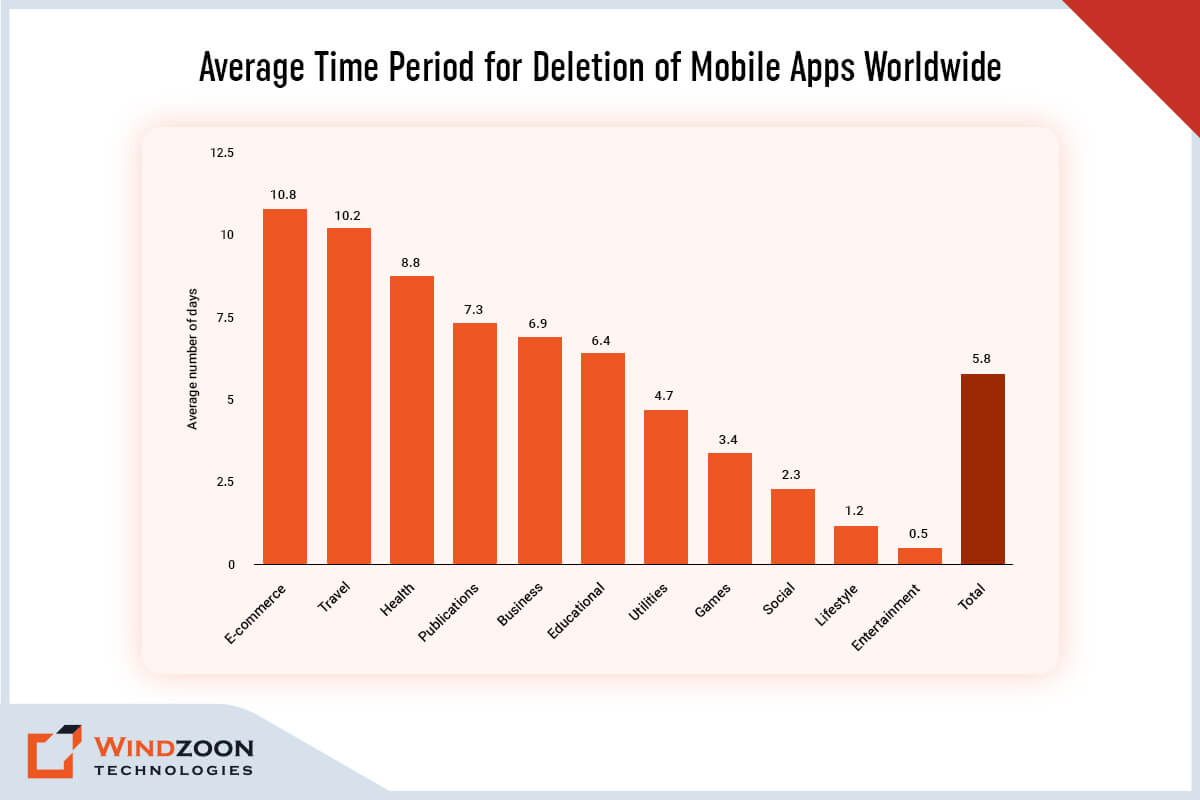
Average Time Period for Deletion of Mobile Apps Worldwide

Because according to a 2018 study, mobile apps are uninstalled 5.8 days after they were last used. So, how do you prevent yours from ending up in the digital trash? You can do this by following the below-mentioned best mobile app design practices in 2023.

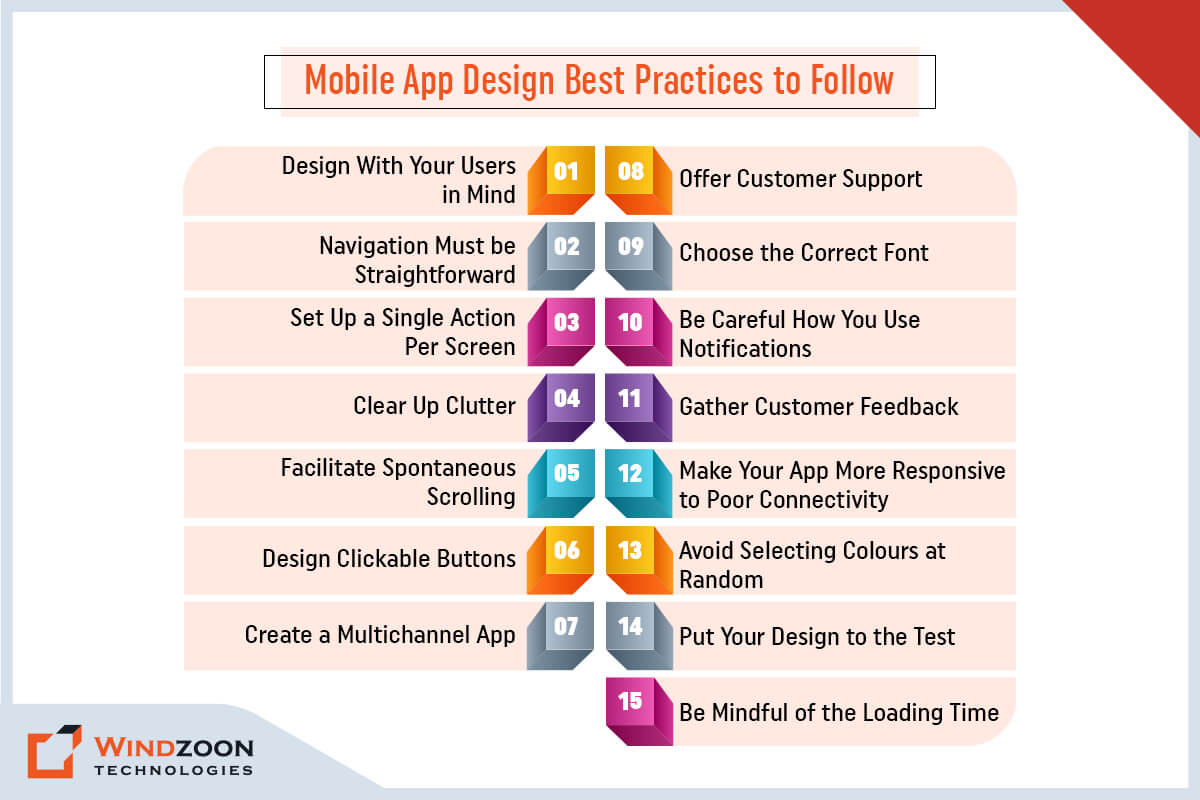
Top 15 Mobile App Design Practices You Should Be Aware Of In 2023

Mobile App Design Best Practices to Follow

1. Design With Your Users in Mind

Best practices for mobile app design start with accessibility. To create a design that works for everyone, you must consider every conceivable use case. Users can hold their smartphones in either their left or right hand or even both hands.

The best app designs offer a simple layout with easy access to the most crucial interface elements regardless of how users hold their smartphones.

Place buttons and other components carefully away from the screen’s top and bottom corners. Because these are the most difficult spots to reach, making it challenging for users to use the app.

If your users cannot find your unique content and features, then they are useless. It would be beneficial if you designed appealing and simple navigation.

Use simple items to locate so that consumers can move between screens or back without difficulty. Make sure to plan the navigation menu to take up as little screen space as possible.

Read More: Mobile App Development Trends You Should Consider

3. Set Up a Single Action Per Screen

The smartphone screen is much smaller than the desktop screen, which causes many challenges for UX designers. Users become overwhelmed when adding a few more items to the screen.

The best course of action is to break the procedure down into manageable steps and give each one its own screen.

For instance, if you are creating an app for cab booking, you can divide the process into the sign-up process, choosing a location, choosing appropriate rides, and so on. To make the procedure more user-friendly, each action should be separated onto its own screen.

4. Clear Up Clutter

In the world of mobile UI/UX design, minimalism is always a trending option. It is not difficult to construct a simple approach. You should avoid overcrowding displays with content and interface elements since customers look for usefulness and ease of use. Strike a balance between exceptional functionality and a simple design for better results.

It is not required to present every piece of information on the interface. Organize your content so that it gives the user a clear overview of the features that are offered. And keep the screen as clear and clutter-free as possible.

5. Facilitate Spontaneous Scrolling

Use a horizontal scroll to browse a product catalog or display facts on a large visual area that wouldn’t fit on the screen. Give a visual cue and indicate the scrolling direction if additional content is available.

6. Design Clickable Buttons

One of the most aggravating things that can happen when using an app is tapping a button and missing it. It is impossible for users to interact with an app when the touch controls are too small. The desire to conserve space may drive UX designers to reduce the size of the buttons. However, it will have a negative impact on the user experience.

If you wish to stick to the best app design guidelines, make buttons 44 x 44 pt or 48 x 48 dp. Still, each operating system has its own suggestions, so be sure to read them.

7. Create a Multichannel App

Designers must design a multichannel app to make that transition smooth for users who frequently toggle between apps and desktops. For instance, customers who shop for clothing online may first add items to their carts on their phones before completing the transaction on computers. Regardless of the device, ensure the same goods are saved in their cart.

8. Offer Customer Support

Make careful to respond to user concerns whenever they arise. Use various techniques to help them navigate your app, such as chatbots and live chats, in-app native FAQs, and click-to-call client support buttons.

9. Choose the Correct Font

Choosing the appropriate font is just as important as developing the visual elements of your device solution. Picking the wrong fonts might damage your design. Therefore, choose a font that reads well in various sizes and weights.

Apple and Google, two titans of technology, advise keeping the font size at 12 points. It enables people to read the information on the screen without having to zoom in. Additionally, it enables them to keep their sight distance for their device at a comfortable level.

10. Be Careful How You Use Notifications

Notifications are one of the most effective methods for retaining users, as they provide timely reminders to return to an app and interact with content. However, it is critical to consider the frequency and timing of your push alerts and the content they provide. Receiving too many pings or unpredictable bursts may cause consumers to disable notifications entirely.

Thus, keep notifications contextual when you display them. Add easy-to-access granular notification settings so consumers can adjust notifications to their needs.

11. Gather Customer Feedback

As a designer, your primary goal is to give users a positive UX. Additionally, you can get user feedback on your ideas to confirm their authenticity. Genuine feedback will assist you in determining what works and what does not.

All this information will assist you in determining what changes to make. Using analytics in your app will provide you with all of the data you need to improve the user experience.

12. Make Your App More Responsive to Poor Connectivity

Any app not designed to handle the most crucial tasks while connected to a slow network is mediocre. For instance, if users are booking tickets or making e-commerce purchases, ensure that their actions are preserved and subsequently executed as soon as the connection is restored.

If your app needs connectivity at all times, tell users they must have a connection to move forward rather than just showing them an unending spinner or nothing. Users that worry about being doubly charged will eventually lose faith in your app.

13. Avoid Selecting Colours at Random

Your app’s design features, including the colour aspects, must serve a function. Avoid using colours that are overly vivid, contrasted, or challenging to read. The colours shouldn’t be too intense to damage someone’s eyes.

Use typical colour associations for your buttons, as we previously covered, keeping things simple. For instance, buttons that indicate “yes” or “continue” should be green, whereas “no” and “exit” buttons should be red.

Reversing typical colour associations will only confuse the user. And you will see a decline in your conversion rates as a result.

Read More: Top Mobile App Development Frameworks to Build Apps

14. Put Your Design to the Test

You must test your app regularly to ensure that the design and functionality work as intended.

Even though you may believe it’s fantastic, you must acknowledge that your opinion is prejudiced because you were the one who created it.

You must obtain other people’s opinions. From our experience, it is advisable to outsource testing to any professional mobile app development services provider linked with app design, development, and testing. In this manner, the criticism comes from a wholly unbiased viewpoint.

Or you can test the design with beta testers or focus groups. Check the feedback you receive. Concentrate on any design-related errors or defects. Make modifications when difficulties arise.

15. Be Mindful of the Loading Time

Speed is likely the main factor behind customers uninstalling your app out of the many other factors. According to surveys, 63% of users would stop using an app if the loading time was longer than five seconds.

Undoubtedly, that is a very minimum period.

A workable solution here is to employ design strategies to offer the perception of speed or, at the absolute least, mask any delays.

The simplest strategy is to use an interesting loading screen. The notion is that users should have something interesting or informative to look at while waiting.

Conclusion

It’s difficult to create a fantastic on-demand application. However, that doesn’t imply that succeeding is impossible. If you’re building a complex application, it’s critical to have the top mobile app design practices in mind and to be able to discuss with professionals all the issues.

And Windzoon is an excellent choice if you’re seeking a professional to help you with your app design project. Hire mobile app developers and designers from us with more than ten years of experience providing a wide range of app development and design services.

To use our services or learn more about us, get a quote.

8 Top Mobile App Development Frameworks to Build Top Apps in 2023

Who would have predicted two decades ago that we would be able to manage most of our daily activities with just a palm-sized smartphone? Most likely not. But it turns out true. Our lives have become incredibly easy and convenient thanks to various smartphone apps and the internet.

However, this growing reliance on applications has considerably expanded the market for app development. While there are many frameworks and libraries available for creating mobile apps. You need a framework that will enable you to deploy fresh concepts and keep up with the competitors in this rapidly shifting ecosystem.

As a renowned mobile app development services provider, we have suggested some leading mobile app development frameworks in this blog. These frameworks will elevate your app design and development experience to the next level in 2023.

However, before we get to know about these frameworks, let’s learn some basic information about the mobile framework.

What Exactly Is a Mobile Development Framework?

Mobile app development frameworks are software libraries or sets meant to aid in the creation of mobile apps for certain contexts. You can think of them as the skeletons supporting the various connecting components of mobile development.

Frameworks for mobile development are crucial because they enable developers to avoid starting from scratch, which speeds up project development. Additionally, frameworks lessen the need for complicated programming languages.

Frameworks for developing mobile applications include React Native, Swiftic, Java, HTML, and many others. These frameworks are divided into three categories: Native, Web, and Hybrid. Each sort of mobile app framework has specific uses and situations in which it excels.

Different Mobile App Development Frameworks

Frameworks for creating mobile applications can be divided into three categories:

1. Native Apps

These frameworks are used to create native mobile applications for particular platforms. Typically, they are created to meet the requirements of a particular operating system (OS), such as Windows, iOS, or Android.

2. Web Apps

It is a framework that makes it easier to develop slick web applications for web API, web servers, and web service interfaces. It is referred to as a framework or platform for creating various web applications.

3. Cross-Platform Apps

Cross-platform mobile apps can be created using several frameworks that are specifically designed for developing hybrid apps. It is equipped with both native and web development framework capabilities.

Before learn about the top mobile app development framework, you can also read 14 mobile app development trends you should consider in 2023

Now, Let’s learn about the top mobile app development framework to use in 2023

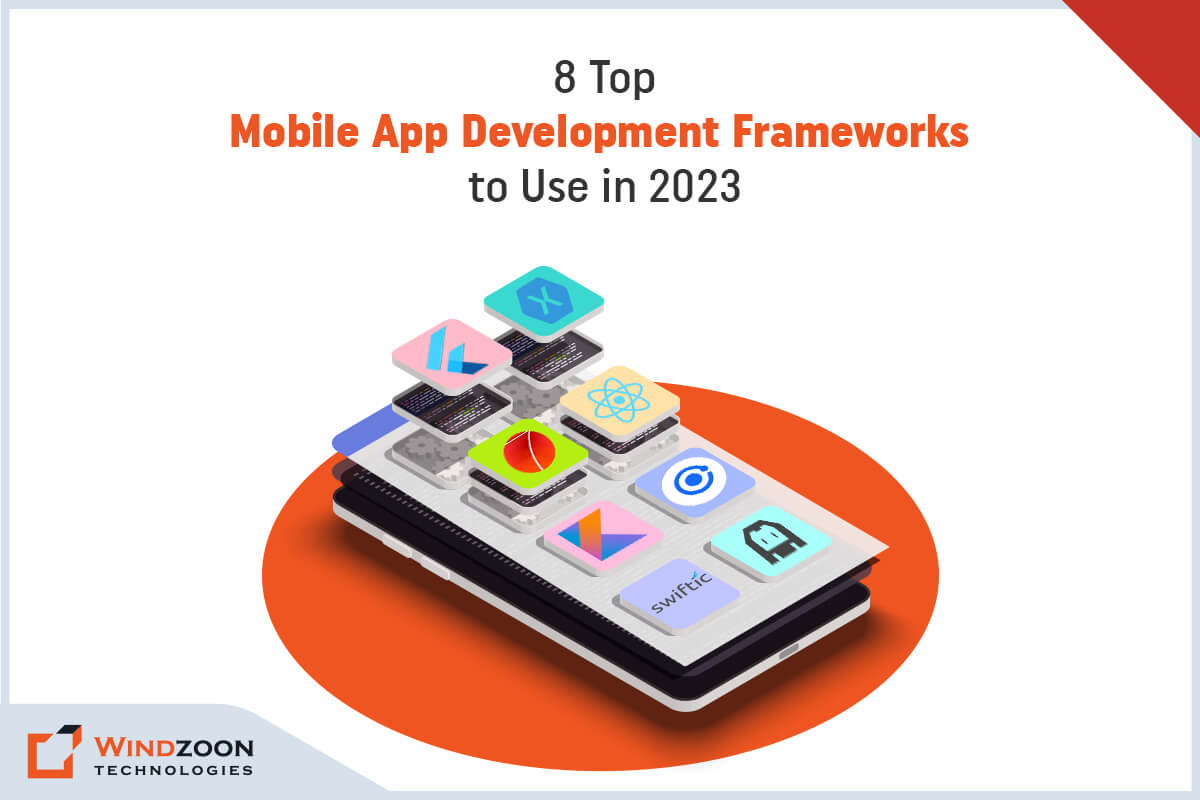
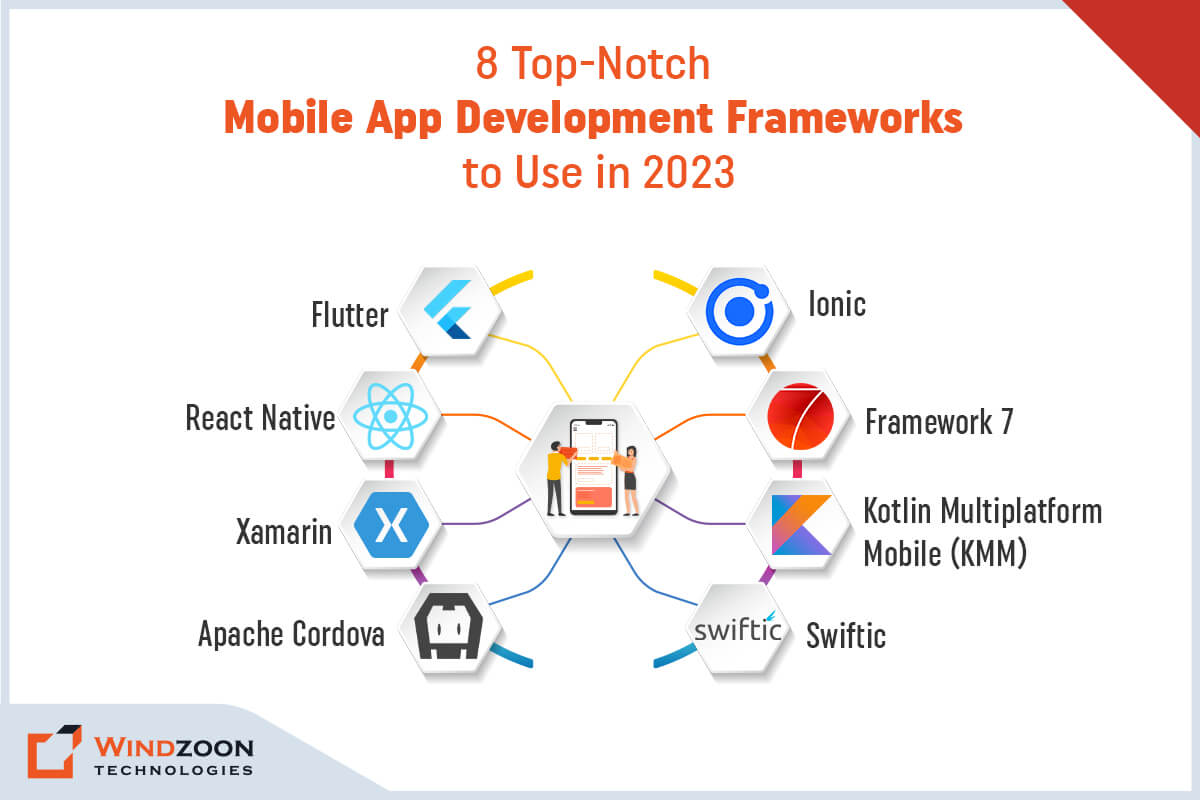
8 Top-Notch Mobile App Development Frameworks to Use in 2023

Top-Notch Mobile App Development Frameworks

Top-Notch Mobile App Development Frameworks

1. Flutter Framework

Flutter is Google’s UI toolkit that enables the creation of aesthetically pleasing, native-like applications for various operating systems and devices using a single codebase. This open-source mobile app SDK makes use of widgets to create responsive mobile applications. Additionally, it has the 2D graphics engine Skia, which enables developers to generate a fully native feel as the client requested.

Key Features of Flutter Framework

  • Hot reloading
  • Google Firebase assistance
  • Flexible User Interface
  • Integrated material design
  • Integrated Cupertino (iOS-style) widgets
  • Rich motion APIs
  • It supports both Android and iOS
  • Powerful widget support

Apps Created Using Flutter Framework

  • Google Ads
  • Cryptograph
  • Reflectly
  • Alibaba’s Xianyu

2. React Native Framework

In 2018, Facebook released React Native, a JavaScript-based app development framework. This framework is in high demand among app developers worldwide, with around 42% of mobile app programmers using it on a regular basis. The platform’s popularity can be attributed to the fact that it enables developers to build mobile apps with a native appearance and feel for both iOS and Android devices. However, to get the most out of this framework it is advisable to take help from a competent react native app development company to build an application.

Key Features of React Native Framework

  • Live reloading to view the most recent code modifications
  • It works with both iOS and Android.
  • Reusable components
  • capable of working with external plugins
  • A single code base for all platforms
  • Component-based GUI creation for front-end apps
  • Declarative API for Predictive User Interface
  • NPM for installation

Apps Created Using React Native Framework

  • Tesla
  • Skype
  • Airbnb
  • Amazon Prime

3. Xamarin Framework

Microsoft’s Xamaerin is a cross-platform, open-source mobile application framework. This framework enables the creation of world-class mobile applications using programming languages like C# and Net. A large community that supports the framework works with the developers to develop environments with diverse components, APIs, backends, and other features by using various tools, programming languages, and libraries.

Key Features of Xamarin Framework

  • A single codebase
  • Android SDK manager
  • Application Loader
  • Google emulator manager
  • Storyboard files
  • Diagnostic tools
  • compatible with a multitude of devices
  • Flexible backend architecture

Apps Created Using Xamarin Framework 

  • The World Bank
  • UPS mobile app
  • Alaska Airlines
  • Azure mobile app

4. Apache Cordova Framework

Apache Cordova, formerly known as PhoneGap, is a well-known technology platform that developers use to create mobile apps. It is an open-source framework for creating apps that makes use of HTML5, CSS3, and JavaScript. This framework basically serves as a container that successfully aligns online applications with native mobile functionality.

Key Feature of Apache Cordova Framework

  • Rapid prototyping deployment
  • Integrates WebView with native app components
  • Utilize device-level APIs.
  • A single source of code
  • Command Line Interface (CLI)
  • Plugins that integrate smartphone hardware features
  • Third-party app management tools

Apps Created Using Apache Cordova Framework

  • Localeur
  • Untappd
  • SparkChess

5. Ionic Framework

Ionic is another app framework that has garnered popularity among the developer community. It is an open-source, AngularJS-based platform that enables the development of powerful web, native, and hybrid apps using CSS, JavaScript, and HTML. Ionic apps can be successfully published across different app stores and deployed on all available devices using Cordova or Capacitor.

Key Features of Ionic Framework

  • Lazy Loading
  • Ion-Ripple Effect
  • Attractive UI components
  • Live reloading in the emulator or browser
  • Ion-Searchbar
  • Shorter time to development
  • Strong and stable development environment
  • Complete control over the creation of apps
  • An active developer community

Apps Created Using Ionic Framework

  • Firstly
  • ChefSteps
  • DieselOn
  • Market Watch
  • McLaren Automotive
  • GE Transportation

6. Framework 7

Framework7 is one of the popular open-source frameworks that are simple to learn and utilize. It enables you to create web, desktop, and mobile applications with a native appearance and feel. Additionally, it is a crucial prototyping tool for displaying functional app prototypes as quickly as possible. Framework7 has a fantastic collection of pre-built UI components and widgets, including dialogue boxes, pop-up windows, action sheets, list views, tabs, side panels, layout grids, and many more.

Key Features of Framework 7

  • Integrated grid layout, the FastClick library, and the Helper libraries
  • Page animation with high-performance
  • Easy-to-use JS API and adaptable router API
  • Pre-styled components and widgets
  • Simple and well-known jQuery syntax
  • It can be used with React, Angular, and other frameworks.
  • Default UI components
  • Enables support for Svelte, React, and Vue.js

Apps Created Using Framework 7

  • My Shopper
  • AvtarGen
  • GoDial
  • PricePoint
  • Rabbit Mail

7. Kotlin Multiplatform Mobile (KMM)

It is an SDK that makes it simple to create cross-platform mobile apps. With this cross-platform technology, which is based on a single code base, you can create high-end apps that are prepared to run on both iOS and Android devices. This implies that you only need to develop platform-specific code for specific use situations, such as the implementation of a native UI.

Key Features of Kotlin Framework

  • High performance
  • Kotlin Multiplatform Mobile Plugin for Android Studio
  • Integration of Cocoapods
  • Xcode 13 will be used to launch an iOS device.
  • Debug type evaluation in Kotlin/Native
  • Modern tools and language
  • A very active community

Apps Created Using Kotlin Multiplatform Mobile

  • VMware
  • Space by Jetbrains
  • PlanGrid

8. Swiftic Framework

Swiftic was created as a user-friendly framework for mobile app development. And it doesn’t need any special code to use its key functions. In fact, Swiftic allows novice developers to create iOS apps quickly and easily without having to write a lot of code. Swiftic can even compete with the top and finest framework for developing mobile apps on this list when it comes to the user interface.

Key Features of Swiftic Framework

  • Remarkable user experience
  • Support for third-party integration
  • Extensive analytics
  • Supports in application promotion and publication
  • Helps in creating mobile web stores
  • Insightful push notifications
  • Beginner-friendly and user-friendly
  • Does not require in-depth expertise in coding or app development

Apps Created Using Swiftic Framework

  • Royal Bagel Co.
  • Lakeside Fitness
  • Remix Coffee Co.
  • The Gentlemen’s Barber
  • Spa Café

Conclusion

Among all of the choices available on the market, picking the best mobile app development framework is a crucial step. However, you can simplify it by being aware of your final objectives and what you hope to achieve with your selection. We anticipate that after reading this post, you’ll be better able to decide which mobile app development framework is appropriate for your endeavor.

If you select an appropriate mobile development framework, your business can succeed. However, if you are unsure of which framework will work best for your company, you can enlist the help of a specialist to verify your hypothesis.

Windzoon is a fantastic option if you’re looking for a specialist to assist you with your app development project. Hire mobile app developers and designers from us who have over ten years of expertise delivering a wide range of app development and design services.

Visit wzadmin.windzoon.in/ to request a quote or to discover more about us.