Know Why WordPress is the Best for Online Store Development

Online shopping has grown in popularity after the COVID-induced lockdown. According to Statista, Global online retail sales reached almost $5 trillion in 2021; by 2025, this amount is predicted to reach $7 trillion.
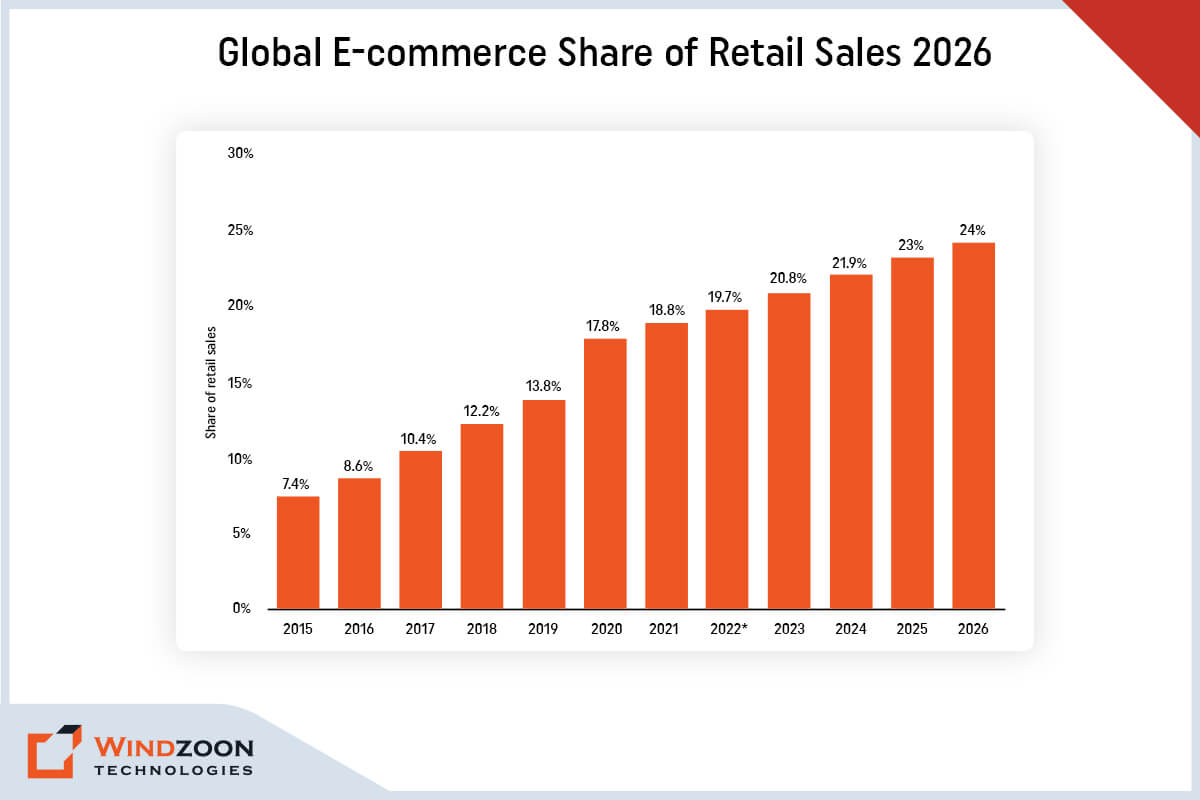
Global E-commerce Share of Retail Sales

According to this data, the majority of businesses now go beyond simply providing information on their company website. Now they want to create a website where users can directly buy goods and services online. It is convenient and accessible for customers as well as owners to shop in an online marketplace.

There are numerous platforms available for setting up an e-commerce store. But among them, WordPress is unquestionably the best platform. Although it is best known as a blogging platform, it has applications that extend far beyond the blogosphere.

With the help of plugins and themes, Custom WordPress Development Company can build the ideal e-commerce website using dynamic, adaptable, and powerful WordPress software.

In this article, we’ll go over the key benefits of using WordPress to build an e-commerce website. We’ll even talk about the essential plugins you should use to upgrade the functionality of your online store.

So, let’s move toward our first topic of discussion.

Key Reasons to Choose WordPress for E-Commerce Store Development
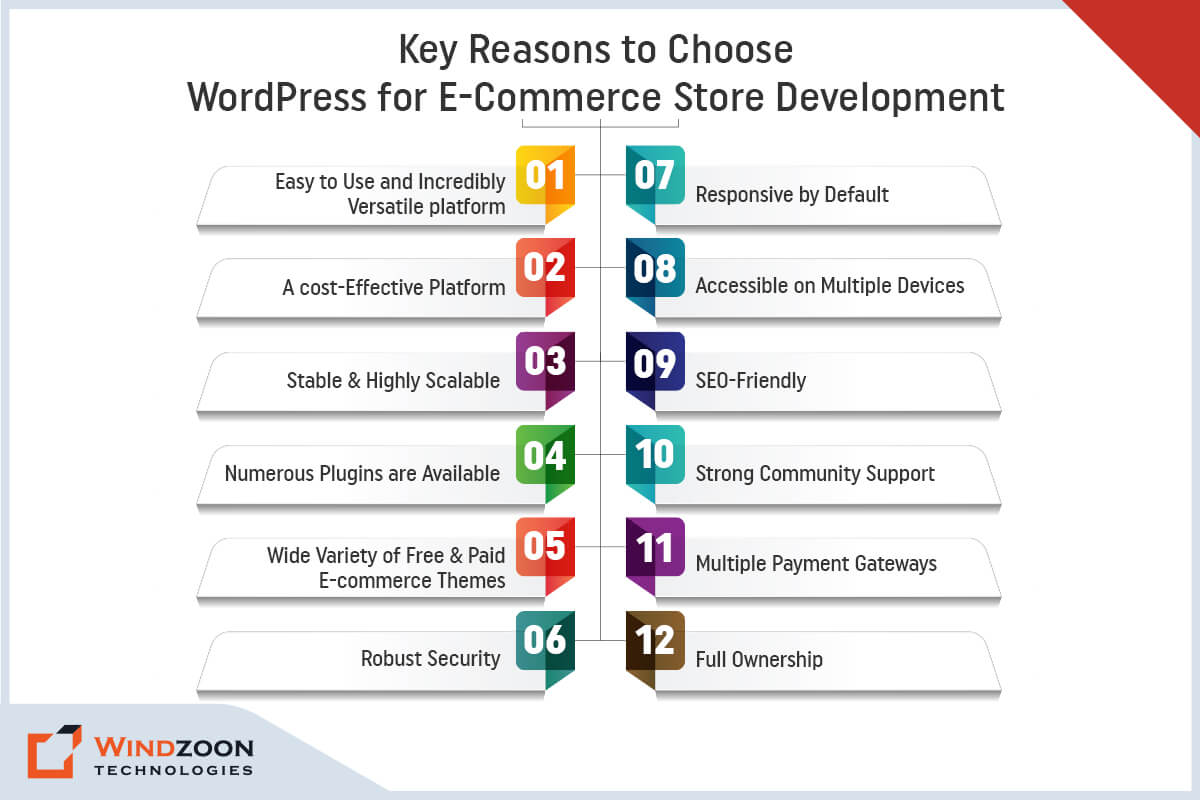
Reasons to Choose WordPress for E-Commerce Store Development

1. Easy to Use and Incredibly Versatile Platform

WordPress does not require a deep understanding of programming languages or web development. It offers a quick, ready-to-use solution for creating stunning, responsive websites. Furthermore, it ensures a simple and quick website setup with a single click. And do not need any specific knowledge to deal with servers or hosting.

So, it’s fair to say that using WordPress to build an eCommerce store is the most feasible and simplistic way to run an online business. A WordPress-powered eCommerce website allows you to effectively manage your content.

It means you won’t have to hire web developers whenever you need a minor change. You can easily do it on your own.

That’s why you can learn how to make an attractive WordPress website: 10 steps guide for beginners.

 2. A Cost-Effective Platform

Yes, WordPress is a completely free platform. It is an open-source platform that can be downloaded and installed for free. Additionally, anyone can add functionality to their website by using the code found in the WordPress Codex.

It is the primary reason why eCommerce companies choose this platform to create their websites. However, business owners can Hire WordPress developers to manage the source code.

3. Stable & Highly Scalable

WordPress has become extremely stable and reliable over the years due to constant updates and improvements. By scalable, we refer to WordPress’s capacity to change as your website expands. WordPress will continue to function flawlessly regardless of how much your site grows.

It shouldn’t have any trouble handling the load you put on it as long as you scale your hosting to handle the traffic on your website. WordPress is used by many well-known e-commerce sites, including Shop Catalog, Cola Gourmet, and Louise Kennedy.

4. Numerous Plugins are Available

You can use free WordPress plugins to add more functionality to your eCommerce website. They are small pieces of software that can be uploaded to WordPress to enhance its functionality.

Plugins are essential for an eCommerce site, and you’ll need more than one. Because various plugins aid in various functionalities such as inventory management, running an online store, customer interaction, and security.

WooCommerce is one such all-purpose eCommerce plugin for WordPress. About 20% of WordPress e-commerce websites use it, making it the most well-known eCommerce plugin available.

5. Wide Variety of Free & Paid E-commerce Themes

WordPress has a strong and active community. This thriving community frequently releases new themes and plugins with improved features and functionalities.

A theme is a software package that controls how your website is styled and presented to users. Additionally, it influences how simple it is for users to find information and make purchases.

Thankfully, hundreds, if not thousands, of free and paid e-commerce themes are available. Visit the official WordPress theme library to view the free themes. Or you can check out more feature-rich premium themes at ThemeForest & TemplateMonster.

6. Robust Security

One of the most critical aspects of any eCommerce website is its security. Because it contains the user’s personal and financial information, which needs to be protected.

WordPress has been around since 2003. Thus, the WordPress community has ensured that the software is extremely secure. Regular updates and security patches have elevated it to the status of one of the most secure programs for developing online stores.

7. Responsive by Default

Since smartphones account for more than half of all online purchases, developing a mobile-responsive eCommerce website is critical.

Websites that are not mobile-friendly couldn’t perform well on search engines. Hence, having a responsive e-commerce store is critical for ranking higher on SERPs and increasing web traffic.

WordPress websites are, by default, very mobile-friendly and responsive. And that’s why it is the best option for eCommerce website development.

8. Accessible on Multiple Devices

Another advantage of the WordPress CMS is that it is accessible via multiple web browsers. It enables you to log in from any internet device with an internet connection. And allow you to edit your e-commerce store anytime from anywhere by using the dashboard interface.

9. SEO-Friendly

WordPress’s codebase is based on sound SEO practices. It considers numerous search engine ranking factors.

So, using WordPress to build your e-commerce site can take your content marketing efforts to the next level. You can optimize every aspect of your website to rank high in search engines.

Of course, various factors affect how well you perform in searches, including the quality of your content and on- and off-page SEO efforts. But WordPress always makes it easier and never gets in the way of your efforts to improve your rankings.

10. Strong Community Support

WordPress’s extensive community support makes it one of the best platforms for e-commerce websites. The community has a large number of talented developers across the world.

Furthermore, the community offers excellent documentation and tutorials to help you better understand the WordPress framework and how to use it. Plus, it has qualified staff on hand to address your issues at any stage of the development process.

11. Multiple Payment Gateways

If you plan to build an online store, make sure it is adaptable enough to allow customers to select various payment methods.

With WordPress, you can provide this facility to your users. It will simplify things for customers visiting your store and improve their experience. As a result, there will be more traffic and revenue generation.

12. Full Ownership

One of the most significant benefits of combining WooCommerce with a self-hosted WordPress website is that your online store is entirely yours and belongs to you and your business alone.

Since everything is hosted on your own server, you can keep total control over how your shop runs and move it at any time to a different provider.

To move further let’s discuss how to hire the right WordPress development agency.

Now, we will go over the powerful WordPress plugins for e-commerce website development.

Top 5 WordPress E-commerce Plugins
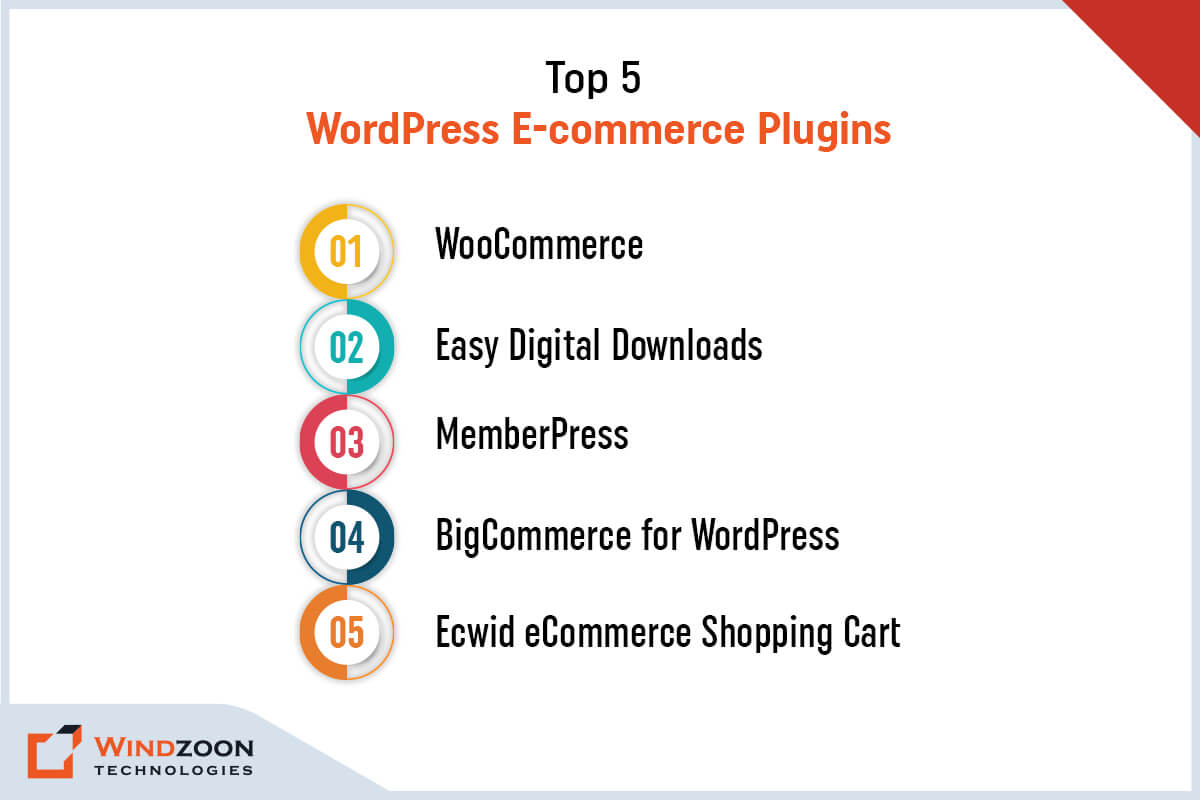
Top WordPress E-commerce Plugins

1. WooCommerce

Best for: Merging content and commerce

Price: Free but optional add-ons begin at $6/month.

WooCommerce is the most popular choice for building an online store on the WordPress platform, with 20.4% of all websites using it. Additionally, it is the most popular e-commerce plugin, and many themes support it.

Features Consist Of:

  • Management of products and inventory
  • Management of orders
  • customer profiles
  • Effective control over shipping
  • Built-in site analytics
  • Coupon management

2. Easy Digital Downloads

Best for Selling downloads (courses) and other digital products.

Price: Freemium (paid plans begin at $99.50 per year)

If you want to sell digital goods like WordPress themes, e-books, courses, artwork, and other items, Easy Digital Downloads is the best e-commerce plugin for you.

Features Consist Of:

  • Customer management panel
  • Integrated download and transaction reporting
  • Options for adding functionality through extensions
  • Access to multiple payment gateways
  • A shopping cart system for purchasing several downloads at once
  • Comprehensive payment histories

3. MemberPress

Best for: WordPress sites that follow a membership business model

Price: Starts from $15 to $35 per month

A WordPress plugin called MemberPress allows you to build a paid membership website. Although it differs from the other eCommerce plugins on this list, it’s excellent for using a membership business model to sell digital content, courses, or downloadable.

Features Consist Of:

  • Automated system for billing and membership cancellation
  • Various additional features are available in the add-on library.
  • Rules for unrestricted access that control members’ access to content
  • Customized post type for the pricing page

4. BigCommerce for WordPress

Best for: BigCommerce integration with WordPress

Price: Free, but requires a BigCommerce account which starts at $29.95 per month.

BigCommerce is an eCommerce platform that is managed and provides a headless solution. It means that the BigCommerce platform will host the eCommerce infrastructure, keeping it separate from the core of WordPress.

Features Consist Of:

  • It is simple to embed content from BigCommerce into any WordPress post or page using any of the BigCommerce blocks.
  • It supports a variety of currencies and payment gateways
  • An effective eCommerce platform with a ton of cutting-edge features and tools

5. Ecwid eCommerce Shopping Cart

Best for: Selling on various social media channels

Price: Free of charge but requires an Ecwid account

Ecwid Shopping Cart is a robust and user-friendly shopping cart solution that enables you to sell products on your WordPress website. Plus, you can also conveniently sell your products on Facebook and Instagram because Ecwid automatically syncs your products, customers, orders, and inventory between your WordPress and social storefronts.

Features Consist Of:

  • Complete integration of Ecwid panel with WordPress
  • Integrated Google Ads configuration panel
  • Both the plugin and the eCommerce platform are free to use

Now, let’s see some examples of famous WordPress e-commerce websites.

Examples of Popular E-Commerce Stores Built Using WordPress
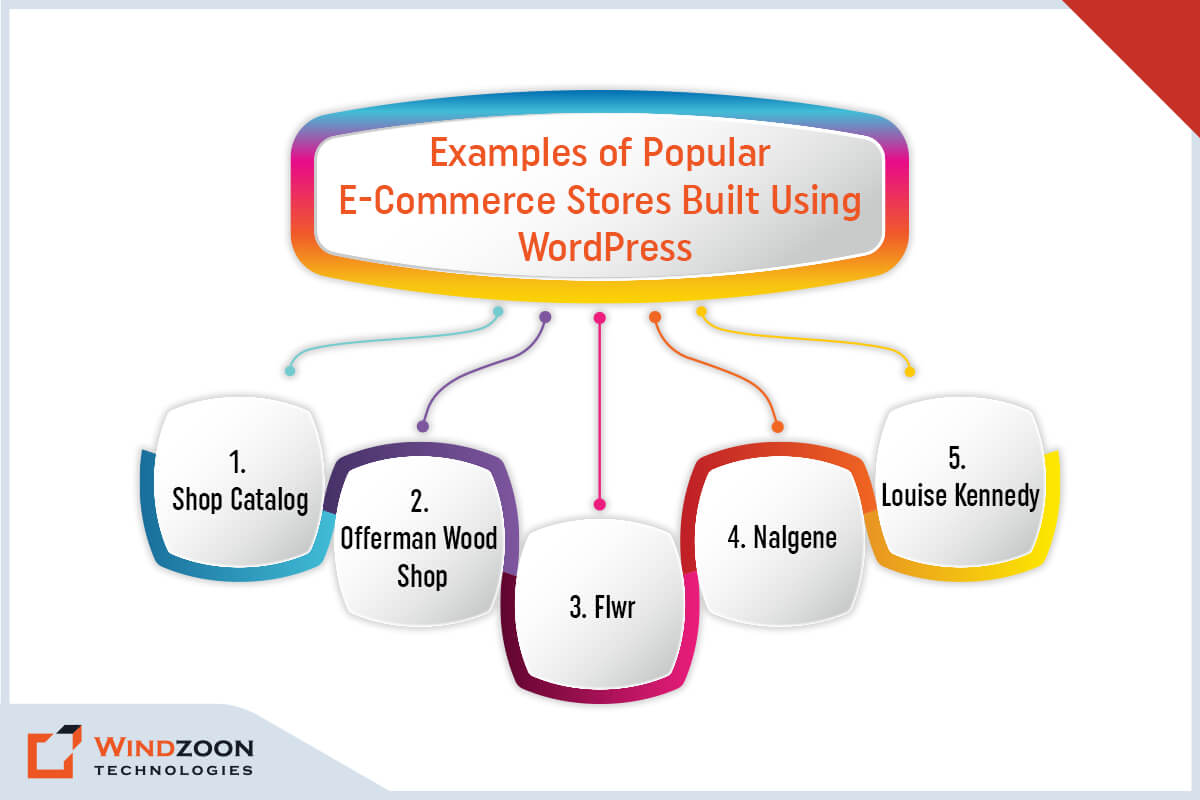
Popular E-Commerce Stores Built Using WordPress

  1. Shop Catalog
  2. Offerman Wood Shop
  3. Flwr
  4. Nalgene
  5. Louise Kennedy

Conclusion

You must now have a clear understanding of why WordPress is the best e-commerce solution. And why you should use WordPress CMS for your business website.

Developing an eCommerce site for your company is your first step into the enormous online marketplace. Thus, you’ll want an online store that is appealing and professional. As well as provides customers with what they want and functions as independently as possible.

However, to build that type of store, you will need the assistance of a professional WordPress development company.

At Windzoon, we have a team of WordPress developers with years of experience & expertise in providing cutting-edge & customized WordPress Development services. Visit wzadmin.windzoon.in/ to get a quote for our services or to learn more about our WordPress Packages.
How to Choose a WordPress Development Agency for Small Businesses: 8 Useful Tips

From budding entrepreneurs to big business titans, WordPress is widely acclaimed by all for its versatility and ease of use. As a leading content management system, WordPress powers around 43% of online websites, making it the best framework for website development. The platform remains a dominant and reliable choice for building effective websites, maintaining its relevance despite evolving technologies.

However, before you begin developing a custom WordPress website for your clients, the most common challenge you will face is deciding whether to hire an in-house developer, do it yourself (if you are an expert WordPress developer), or simply outsource it. This decision is especially important when considering the WordPress platform as the foundation for your website.

Well, seeing the current global scenario and the benefits it offers; hiring an Offshore Custom WordPress Development Agency is the best option to choose. But then again comes the question: how to choose a WordPress development agency for small businesses that fits your needs?

Continue reading to find out the answer to this question as well as learn more about how to hire an offshore development team.

Now, Let’s learn the benefits of outsourcing your WordPress development work.

5 Reasons to Outsource Your WordPress Development Work

Outsourcing your WordPress development work can be a strategic move for agencies looking to scale efficiently. By leveraging professional WordPress services, agencies can handle multiple clients at once, ensuring each project receives expert attention without overextending internal resources. This approach not only streamlines project management but also supports the agency’s growth by enabling them to take on more work and expand their client base with confidence.

1.4 Maintenance and Support

Ongoing website maintenance is a crucial part of comprehensive WordPress services. Outsourcing agencies often provide regular updates, security monitoring, and technical support to ensure your website remains secure and performs optimally. Additionally, many agencies offer web hosting solutions as part of their support packages, giving clients reliable hosting options that enhance website speed, security, and overall performance.

1. Access to Exceptional WordPress Expertise & Knowledge

In-depth programming knowledge is needed to create a custom WordPress theme. Through outsourcing, you’ll have access to a knowledgeable team that is familiar with every aspect of this platform. It comes in handy when creating custom themes for the WordPress site. Additionally, industry knowledge is crucial for delivering tailored WordPress solutions that align with market trends, customer expectations, and sector-specific requirements.

2. Assurance of High-Quality Work

Every year, WordPress updates its framework. When you work with a reputable agency, you can be confident in the quality of the coding. Because the developers stay up to date on the latest developments in this platform, including updates to the WordPress core, ensuring your website benefits from the most current and secure foundational code. As well as effectively implement those developments in your WordPress website.

3. Savings in Terms of Both Time and Money

A lot of time is wasted while looking for the right in-house developers. However, if you choose to outsource, the offshore developers will create the WordPress theme in the shortest amount of time possible. Effective project management by the agency ensures that your project is delivered on time and within budget, using structured processes and communication strategies to maximize efficiency.

It will help you save time and cut the cost of WordPress Web development by 40% to 50%. This is because the developers will work on an hourly, weekly, or monthly basis, depending on the engagement model you choose. Thus, you will only be charged for the number of hours they will spend on your project.

4. Maintenance and Support

Your WordPress website needs to be properly maintained following the successful development of custom themes. It is a continuous task that requires consistency. When you work with an outsourcing agency, you will receive prompt maintenance and support for your website’s upkeep performance. Ongoing support is essential for ensuring website security, regular updates, troubleshooting, and continuous performance improvements, helping your site stay competitive and secure.

5. It Lets You Concentrate On Your Company’s Core Operations

As was already mentioned, outsourcing will save you a ton of time. Delegating WordPress website development allows you to focus on other key business areas that require your attention and further improvement. As a result, your business operations will run more smoothly & effectively, while ensuring that website development is aligned with your overall business objectives.

Now, let’s get to know the questions you should ask before hiring any outsourcing agency.

Read More: Why Choose WordPress CMS for Your Website: Top 10 Reasons to Know

10 Questions to Ask Before Hiring an Offshore WordPress Developer/Agency

Questions to Ask Before Hiring an Offshore WordPress Developer/Agency

When considering hiring, it’s valuable to choose a development partner who can provide specialized services such as SEO services, customized solutions, WordPress migration, and custom plugin development to ensure your website’s success.

1. Experience: How many years of experience do you have in WordPress website development? When it comes to hiring expert WordPress developers, experience is everything. Inquire with your WordPress developer or agency about the number of years they have spent developing custom WordPress solutions.

2. SEO Support: Will you assist me with SEO (Search Engine Optimization) for my WordPress Website?

Although WordPress is the most SEO-friendly platform, it still requires the implementation of best SEO practices to rank your website higher in SERPs. Therefore, ask out what strategies your offshore developer plans to use to improve your site’s ranking, and whether they offer comprehensive SEO services as part of their offerings.

3. Speed Optimization: What steps will you take to speed up my WordPress site?

According to various reports, 53% of website visitors leave if it takes more than 3 seconds to load. Make sure the developer or agency is aware of how important it is to have a website that loads at lightning speed on all types of devices.

4. Coding Standards: Do you adhere to the WordPress Coding Standards?

Inquire whether the developer is familiar with The WordPress Coding Standards (WPCS) and is proficient enough to avoid coding errors and improve code readability.

5. Security: How would you make sure that my WordPress site is secure?

Currently, WordPress is the most popular open-source CMS on the market, making it a tempting target for hackers. So, to keep your WordPress site safe from hackers, ask your developer or company what plugins and security procedures they will be using. Also, inquire about how they intend to manage the WordPress site’s backup.

6. Scalability: Will you be able to convert my WordPress site into an eCommerce store in the future?

A WordPress website can be easily transformed into an enterprise-level website or an online store. Thus, ask your offshore developers/agency if they have experience scaling WordPress websites if that is something you plan to do in the future.

7. Client Reference/Portfolio: Are you able to provide client references and a portfolio?

When hiring someone for WordPress development, it’s reasonable to ask for their client references and portfolio. Review their previous projects and gather feedback from previous clients, including client testimonials, to assess the agency’s proven track record. This will help you evaluate their level of expertise, coding style, and the types of projects they’ve completed in the past.

8. After-Sales Support: Do you provide after-sales support and maintenance services?

Ask your offshore developer/agency if they will offer timely WordPress Support and Maintenance services once the development work is finished. Before making a final choice, be sure to make this clear as it may result in additional costs.

9. Pricing Models: What pricing models do you offer for WordPress Website Development?

Cost is the most essential factor to consider before making any decision. Hence, ask your offshore partner to provide information regarding their pricing model. And also inquire them about the possibility of any hidden costs.

10. Customization: Do you offer static or customized WordPress Development services?

Although WordPress provides thousands of free themes and plugins for website development, they may not always meet your exact needs. In such a case, you need to customize the specific theme or plugin to meet your requirements. Therefore, make sure the agency or developer has experience with customized solutions, theme customization, custom plugin development, and plugin development to address unique business needs before you outsource your WordPress project to them.

11. WordPress Migration and Existing Website: Do you offer WordPress migration services, and can you work with my existing website?

Ask if the agency provides WordPress migration as part of their services, including transferring or upgrading your website. Also, inquire about their ability to enhance, rebuild, or customize your existing website to meet your current and future requirements.

With this, we have come to the crux of this article and that is How to Hire WordPress Developers/ WordPress Website Development Company for your project.

8 Useful Tips for Choosing the Competent WordPress Development Agency

Useful Tips for Choosing the Competent WordPress Development Agency

Choosing a WordPress development agency is a crucial step for any business aiming to build a strong online presence. The best WordPress development agency stands out by offering a combination of technical expertise, a clear communication process, comprehensive services, and a proven track record of successful projects.

1. Look for Experience and Expertise

The best WordPress development agencies and best WordPress development companies employ experienced WordPress developers who have a deep understanding of the WordPress ecosystem. These professionals can handle complex projects, create custom plugins, and deliver custom development solutions tailored to your business needs.

2. Review Portfolios and Case Studies

When evaluating WordPress development companies and WordPress development agencies, carefully review their portfolios and case studies. This will help you assess their ability to deliver high-quality web design and technical aspects. Working with a full service agency can be especially beneficial, as they offer a wide range of services including digital marketing, SEO, and ongoing support.

3. Assess Technical Knowledge

A competent agency should demonstrate expertise in all technical aspects of WordPress development, including custom development and the creation of custom plugins to extend website functionality. Their technical knowledge should cover everything from website optimization to ongoing maintenance.

4. Evaluate the Communication Process

A clear and effective communication process is essential for a successful project. The best agencies provide timely feedback, keep you updated on progress, and use transparent methodologies to ensure your requirements are met throughout the project.

5. Consider Post-Sale Services

Ongoing client satisfaction is a hallmark of a reliable agency. Look for agencies that offer comprehensive post-launch support and remain committed to assisting you after your website goes live.

6. Flexibility and Problem-Solving

The ability to adapt and solve problems is key to delivering a successful project. Agencies with expertise in digital marketing and web design can contribute to your project’s long-term success and growth.

7. Understand the Cost

WordPress agencies vary in pricing, but the value they provide is often reflected in their expertise and range of services. Choosing the right partner ensures you get the most out of your investment.

8. Check Their Ability to Meet Deadlines

Experienced agencies are skilled at managing multiple clients and ensuring timely delivery of projects, which is critical for maintaining your business schedule.

1. Analyze the Testimonials & Client Reviews of The Agency

Nothing is more credible than the words of recommendation or review. Check out the testimonials section of the potential website development agency’s website. Or look up its online reviews on directories like Clutch and GoodFirm.

You could even request the client’s reference or request an online meeting to obtain unfiltered feedback (If you have any doubt). Most agencies would not deny such direct questions; if they are genuine, they will provide you with references from their clients.

2. An In-Depth Examination of The Agency’s Portfolio

After reading the reviews and testimonials, the next step is to thoroughly examine the portfolios of your preferred agencies.

It will give you a better idea of their work quality. Along with a clear understanding of their work strategy and development methodologies to complete the project for their client.

Thus, a Portfolio review will aid you to decide if they are suitable for your project or not.

3. Technical Knowledge and Experience

Every well-known Web Development Agency has a diverse team of WordPress developers that handles various projects based on their niche. But the best WordPress web development agency is one that stays current on WordPress tools and technology trends.

So, before working with any WordPress Website Development Agency, you should investigate their technical expertise.

You can evaluate their technical skills by asking for previous work samples. It will provide you with a sufficient overview of the agency’s WordPress knowledge and expertise.

4. A Complete Strategic Understanding Of The Project

It is a simple concept: if your ideology aligns with that of your preferred agency, you should consider moving forward; otherwise, you should not.

A dynamic and creative agency is always concerned with understanding its clients’ projects. It accomplishes all of this by developing a precise strategic approach to determining error-free project plans to meet the client’s objectives.

5. Flexibility and Problem-Solving Abilities

The most crucial factor to consider when hiring an offshore agency is its flexibility and problem-solving ability.

Your project is important to you regardless of how small or big it is. Thus, you must interact with your chosen development agency. And pay attention to how they converse with you; are they giving enough consideration to your requirements? What other ideas and initiatives are they expressing?

Such inquiries will help you decide whether this agency is a good fit for you!

6. Project Development and Service Cost

In most cases, businesses seek to cut costs by sacrificing work quality. Which later proves to be a regrettable choice.

Both the service cost and the project value are crucial aspects to consider. There may be several agencies you encounter that offer lower service costs than others. However, you must understand that it is not always about the price, but about the quality of service they provide.

7. Discuss Deadlines in Advance

Whether you have a short-term or long-term project, planning the timeline is critical. Many website development agencies failed to complete projects on time.

As a result, obtaining the appropriate timeline commitment should be a priority. The best way to get a sense of an Offshore agency’s performance is to read its customer reviews. Or you can ask them directly for the project delivery date.

8. Assistance With Post-Sale Services

After the WordPress website design & development process has been completed successfully. There are still possibilities to occur unexpected problems with website performance and other aspects.

In this situation, you have only one option, and that is to contact your hired agency. And discuss the problem and request its assistance. Thus, always search for an agency that provides prompt after-sales support for your project.

Use the tips listed below to collaborate productively with your chosen WordPress development service provider agency once you’ve hired them.

5 Essential Tips for Working With an Offshore WordPress Development Team

Tips for Working With an Offshore WordPress Development Team

1. Clearly Express Your Visions and Expectations

Inform your outsource partner in advance about your goals and expectations for the WordPress website. It will assist them in understanding what is expected of them and the requirements for the finished product.

2. Establish The Project’s Scope and Schedule in Advance

By determining the project’s scope and timeline in advance, you can build a good working relationship with your partner company. It will aid in the precise deliverable planning and aligning goals with expectations before the project begins.

3. Keep in Regular Contact With Your Developing Team

The foundation of the entire project is effective communication. If you want your offshore team to be successful, you should hold regular meetings, use shared documentation, and adopt presentation standards. The team needs to recognize that the client is simple to work with, as this will help to avoid any potential future conflicts.

4. Provide Quick Feedback or Suggestions

It takes two to tango when developing a project. Hence, ensure that you respond immediately to all of the outsourcing team’s queries, worries, and suggestions. It will increase efficiency and remove bottlenecks during the project’s development.

5. Connect Payment to Achievements

Tying payments to milestones with specific acceptance criteria will contain any features from being missed from your WordPress site. Divide a project into smaller tasks instead of assigning a massive amount of work at once to an offshore team. It will help them to complete your project quickly & effectively.

We hope this blog has answered all of your questions about hiring an offshore WordPress development agency.

And if you’re still doing WordPress web development in an old-fashioned way, it’s time to break free from convention and consult with the experts. Through this way, you’re not only choosing to keep up with the times; you’re also making moves to align with the industry’s best practices, which ensures long-term success.

And Windzoon is an excellent choice if you’re looking for a trustworthy WordPress Website Development Agency to handle your web development project. We’ve been providing WordPress Development Services for over ten years. To avail of our services or learn more about our WordPress Packages, visit wzadmin.windzoon.in/ and get a quote.

ReactJS Vs React Native – Know What’s the 10 Significant Difference?

The twenty-first century is the century of the digital revolution. And a key component of this digital revolution is Web development. Every company, product creator, service provider, or marketer needs a website or an application to communicate with customers and spread the word about their business, brand, or service.

With such significance, it is essential that you know the top frameworks for web app development and how they compare to one another. Frameworks like React simplify the process of creating web apps by providing structured, reusable components for building interactive and dynamic user interfaces. JavaScript has been an integral part of web development since its inception.

And ReactJS and React Native are the top JavaScript frameworks that have taken the world by storm, initiating numerous trends, jobs, and visually appealing websites! Websites are built using HTML, CSS, and JavaScript, and understanding these technologies is essential for developing dynamic web applications. Developers affiliated with the technological giant Facebook have developed both ReactJS & React Native.

However, many people are still unsure of the distinct differences between ReactJS and React Native. But don’t worry; as a renowned ReactJS & React Native App Development company, we are ready to assist you with this problem.

So, are you curious to know the pros and cons of ReactJS and React Native? As well as the primary difference between them. Let’s find out the answers in this blog comparing ReactJS V/s React Native.

What is ReactJS JavaScript Library?

ReactJS is an open-source front-end JavaScript library supported by Meta & a large developer community. ReactJS is a JavaScript library designed specifically for building user interfaces, enabling developers to efficiently build user interfaces for web applications. It is a front-end library that is highly functional, fast, and feature-rich. ReactJS is primarily used to create large web applications.

The features & functionality of ReactJS have established it as one of the most used JavaScript frameworks, trusted by numerous start-ups and Fortune 500 companies. ReactJS is widely used for building web applications due to its efficient rendering and reusable component structure. As a front-end library, React’s component architecture solves problems related to code reuse, UI consistency, and separation of concerns by enabling developers to create modular, reusable UI components.

Most Used Web Frameworks Among Developers

What is React Native?

Facebook and the open-source community introduced React Native, an open-source framework, on March 26, 2015. React Native is used for mobile application development, enabling developers to build native mobile applications for both iOS and Android platforms. The primary component of the framework is JavaScript. React Native is specifically designed for building native mobile applications by compiling JavaScript code into native code for each platform. It comes in particularly handy when building cross-platform applications with interactive user interfaces. React Native enables cross platform mobile development, allowing developers to build cross platform mobile applications and cross platform mobile apps for both iOS and Android platforms using a single codebase. React Native leverages native components and native platform APIs to provide native functionality and access native device features such as camera, GPS, and push notifications. React Native apps use the same native platform APIs as traditional native development, enabling direct access to device features and improved performance. React Native allows developers to write code in JavaScript, which is then bridged to native code for optimal performance and native features. React Native’s architecture enables improved performance by utilizing GPU acceleration and efficient communication between JavaScript and native modules. React Native depends on the project’s requirements, and is ideal for building cross-platform mobile applications that require high performance and native-like user experience. React Native work involves translating JavaScript and JSX components into native UI elements using a bridge or newer architectures like Turbo Modules and Fabric. React Native share code and components across platforms, and third party libraries and web development tools can be used to extend its functionality. React Native is built on the React core library and the js library, allowing developers to use familiar web development tools such as HTML, CSS, and JavaScript code to create mobile apps. React Native enables developers to build native mobile apps for both Android platforms and iOS and Android devices, providing a seamless experience on mobile devices and mobile platforms. React Native was designed with the philosophy of “learn once, use anywhere” in mind.

React Native combines the advantages of native development with the well-known JavaScript library React. Due to its ability to create native apps and offer a fantastic user experience, React Native has been widely embraced by businesses and developers since it was first released.

Most Popular Technologies Worldwide

Pros & Cons of ReactJS Framework

Advantages of ReactJS Framework

  1. ReactJS is much simpler to use and learn. Any developer with a JavaScript background can quickly grasp ReactJS and begin building web apps.
  2. JSX is a JavaScript extension. Developers can use JSX to write HTML codes in the files that contain JavaScript codes to determine the structure of the user interface rather than using complicated JavaScript DOM structures. This feature makes it easier for developers to learn and use Reactjs.
  3. Normally, when a developer makes a change, the entire real DOM is updated, which is a very slow process. The virtual DOM, a built-in feature of Reactjs, helps to solve this issue. Virtual DOM updates happen much more quickly. After that, it makes changes to the precise areas that require manipulation while sparing time and resources by comparing the changes to the actual DOM. This feature significantly improves the web app’s performance.
  4. A unidirectional data flow is a significant feature of ReactJS. This gives the developers more control over the components and makes it easier to detect errors.
  5. A ReactJS web application is composed of several components, each with its own logic and controls. These components can be reused wherever they are required. The reusable code makes it easier to build and maintain your apps.
  6. ReactJS provides a useful set of tools that simplify and make the job of developers easier. Additionally, you can choose specific components, check their current Props, and edit their State.
  7. It’s simple to test ReactJS applications. ReactJS gives developers a space where they can use native tools to test and debug their codes.
  8. There is a sizable developer community that backs ReactJS. This makes locating and fixing bugs and errors in the library simple. The same justification also drives the ongoing addition of new features, extensions, tools, and updates.
  9. Its SEO-friendly features make it possible for web pages to be rendered and indexed more quickly. It leads to faster loading times and lower bounce rates. As a result, React applications rank highly in search results.

Disadvantages of ReactJS Framework

  1. ReactJS is a framework that is rapidly evolving and has high-speed functionalities, which makes it less stable.
  2. External modules and libraries are required to build an application using ReactJS. Since its own libraries are primarily UI-based, knowledge of external libraries is required to finish development.
  3. React has more administrative expenses than React Native. This is because React requires additional components to use the UI, which requires more effort and time.
  4. JSX is both a blessing and a curse. Although the combination of HTML and JavaScript may be a boon for some, it is still thought to be very complex and has a high learning curve for novice developers.
  5. The “View” component of the Model View Controller (MVC) structure is typically built using Reactjs. As a result, other tools are needed to construct the other components.

Pros & Cons of React Native Framework

Advantages of React Native Framework

  1. Developers greatly benefit from its cross-platform functionality. Your React Native mobile app will work on multiple platforms without requiring code changes during the development process.
  2. React Native includes React’s Hot Reload feature as well as the ability to create robust UIs with minimal manual intervention.
  3. Its developer community responds quickly to questions and offers effective solutions. Thus, you’ll never be lost while developing React Native apps.
  4. JavaScript serves as the scripting language for React Native. The JavaScript V8 Engine lessens the need for code compilation and enables developers to work with the framework without writing a lot of code.
  5. React Native’s ready-to-use libraries enable developers to create intuitive and interactive user interfaces for a seamless user experience.
  6. React Native renders code components using native APIs and modules that improve the performance of the app.
  7. React Native inherits all of the benefits of a React library.
  8. Without completely rewriting the code, you can make changes by adding React Native UI components to your existing code.
  9. React Native provides a dynamic app experience by fusing the stability and strength of native development with the responsiveness and agility of web development.

Disadvantages of React Native Framework

  1. As the framework is still in its beta version, it might result in compatibility problems and bugs.
  2. Patenting and licensing may be a problem because React Native is at Facebook’s mercy. And Facebook has imposed certain licensing rules & regulations for the use of React Native. According to these regulations, they are free to halt any project that infringes on Facebook’s patents.
  3. A security vulnerability exists in React Native because it uses an open-source JavaScript library. Experts say that when developing apps with sensitive financial or banking data, React Native is not the best option.
  4. React Native is simple to use for developers who are accustomed to working with ReactJS. However, it is quite complicated and challenging to learn for new developers.
  5. One of React Native’s main drawbacks is its inadequate documentation. Even the most fundamental concepts, such as configuration and setup, are poorly explained in its documentation.

ReactJS V/s React Native: 10 Primary Points of Differences

The following are some core concepts for both React and React Native. Please take a look at it to understand what makes them different.

[wpdatatable id=8 table_view=regular]

ReactJS V/s. React Native: Which is Preferable?

Both React and React Native are crucial components of app and web development. Thus, the React vs. ReactJS contest has no winners. It all depends on the specifications of your project.

However, React Native is the best option if you want a native mobile app that should function across various platforms. Because it was specifically designed for cross-platform mobile app development.

If you want to build a web application, ReactJS is the way to go. Nevertheless, keep in mind that you will also require backend technology! And for that, you can seek assistance from a reputable ReactJS App Development Company.

Conclusion

The debate between React and React Native has long raged, and you now understand the key differences between the two.

They are remarkably dissimilar despite their striking similarities. They are important in their specific areas of app development even though developers use them for various purposes.

Although both ReactJS and React Native have numerous drawbacks and limitations, they are the best and most recommended libraries and frameworks in their respective categories.

Therefore, rather than debating which one is superior, you should choose the framework that would best serve the objectives of your business. And If you’re looking for a web development company to help you make this decision and carry it out, join forces with us!

At Windzoon, we have a team of highly experienced developers who are experts in providing ReactJS App Development Services as well as React Native Mobile App Development Services.

To avail of our services, visit wzadmin.windzoon.in/ and get a quote.

10 Amazing Tips to Improve Your React Native App Performance

In this internet era, online users have higher expectations for the apps they use in their personal and professional lives. They desire an application that is cozy and provides quick fixes for their common problems like high app start-up time, bad navigation & scrolling.

And React Native is the ideal solution to meet the rising expectations of mobile app users. It is a flexible and comprehensive framework that provides a sleek & high-quality user experience.

Although React Native apps have fantastic development features, they are not impenetrable. It does have a few problems, which can make the performance of the React Native app slower.

Therefore, you need to implement the best practices when creating React Native applications to optimize their performance. To accomplish this, you can Hire React Native App Developers or outsource your project to a web development company.

In this blog, we will go over some best practices for optimizing React Native app performance.

React Native – Overview

On March 26, 2015, Facebook and the open-source community unveiled React Native, an open-source framework. JavaScript serves as the framework’s main building block. It is especially helpful when creating cross-platform applications with interactive user interfaces. It was created with the “learn once, use anywhere” philosophy in mind.

React Native combines the benefits of native development with the well-known JavaScript library React. Since it was first released, it has been widely embraced by organizations and developers due to its capacity to produce native apps and provide a wonderful user experience.

Why Do Businesses Need To Optimize React Native App Performance?

As demand for mobile apps grows, so does the need for businesses to optimize app performance. Because if an app is too slow or buggy, users will delete it and look for a better alternative.

React Native is the most popular framework for creating high-performance, flexible mobile apps. It meets users’ expectations for a fast and responsive mobile app experience.

However, React Native apps do not always perform optimally and can harm your business if not properly optimized.

And that’s why it is essential for businesses to optimize the performance of their React Native apps. Otherwise, they run the risk of losing customers and potential income.

3 Main Reasons Why Businesses Should Optimize the Performance of Their React Native Apps:

1. For Better User Experience

A more responsive and faster app improves the overall user experience and resolves scrolling performance issues.

2. Higher Conversions & Download Rates

A high-performing app is more likely to be downloaded and used, resulting in higher conversion rates and ROI.

3. Cost Savings On Development And Maintenance

Optimizing your app can help you save money on development and maintenance in the long run.

With this, we have come to the main topic of our discussion.

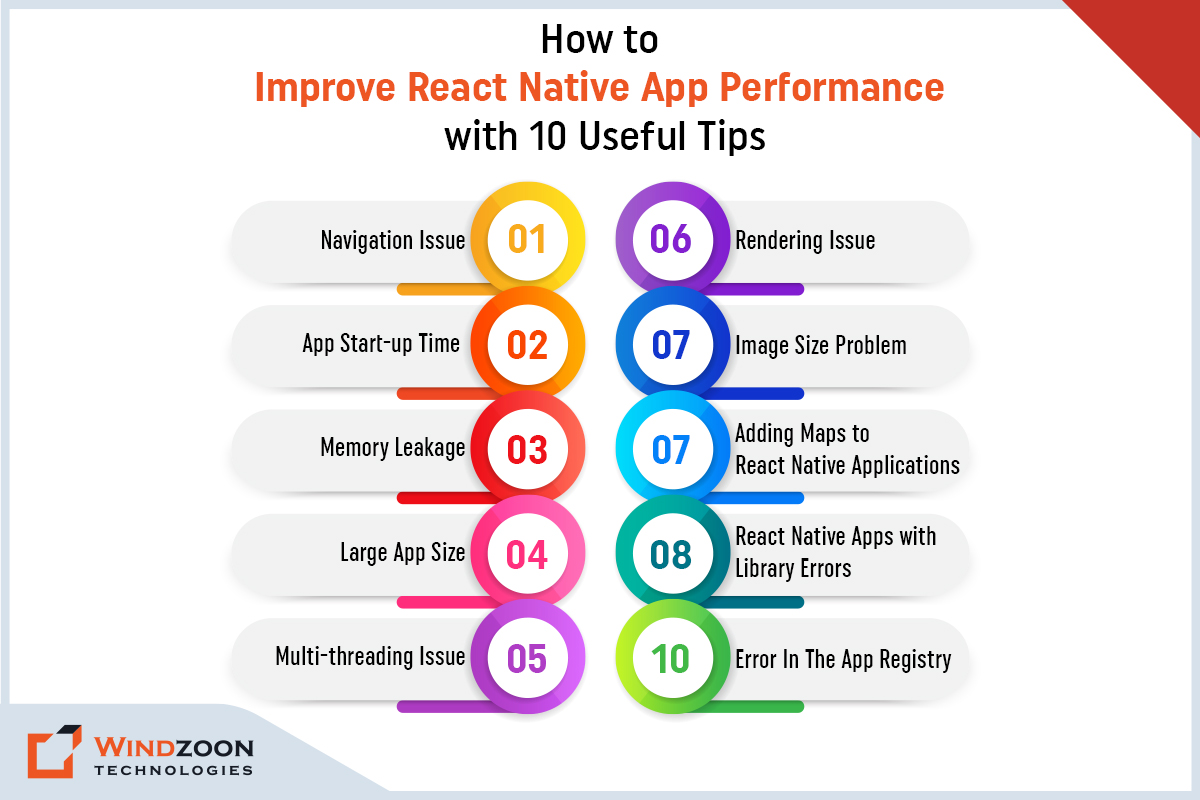
How to Improve React Native App Performance with 10 Useful Tips

How to Improve React Native App Performance

Although React Native provides excellent performance, it exhibits some potential problems with the app’s usability. And navigation is one of those issues. Poor navigation can make it difficult for users to move from one screen to another.

As a result, users may gradually stop using your app and turn to rival apps.

Potential Fix for Navigational Issues:

React Native offers you four viable libraries to build your mobile application’s navigation.

iOS Navigator: Developers can use it to create iOS apps with better navigation.

React Navigation: It allows users to transition between screens with ease.

Navigator: It is used for prototyping and developing small applications. It is not suitable for complex app development processes.

Navigation Experiment: It can be used to build the navigation of large-scale applications.

2. App Start-up Time

One of the significant issues while using a mobile app is the launch time. Users detest long startup times. There are several possible causes for the delayed app launch response.

If your mobile application has too many dependencies, the performance of your app may suffer. Additionally, the Object. Finalize element is to blame for the prolonged launch time of the mobile app. Because too many finalizers deplete memory, the app frequently displays out-of-memory errors.

Possible Solution for Launch Time Delay:

The default implementations of React Native can cause delays in the launch time. As a result, it is critical to optimize the app using the Object. finalize element.  And to do so, simply remove unnecessary dependencies and use high-performance and fast components to get the most out of the app.

3. Memory Leakage

A memory leak occurs when your app becomes sluggish or freezes the screen as a result of insufficient RAM or pointless background processes.

Potential Fix for Memory Leakage:

To resolve React Native’s memory leakage problem, cancel all subscriptions and asynchronous tasks in the useEffect cleanup function. In this scenario, you can substitute a scrolling list for ListView by using SectionList, VirtualList, or FlatList. Through this, unnecessary background processes can be stopped.

4. Large App Size

External libraries impact the size of React Native apps. It also depends on how many files you plan to include when creating the application. If the application’s graphical content or images take up a lot of space, it may cause an app to crash due to memory overload. And this negatively affects the performance of the React Native mobile application.

Solution of the Larger App Size Issue:

We are aware that the app’s larger size causes its functionality to lag. To make the mobile app smaller, you can add a few 3rd party apps and components. Additionally, reduce image size for performance improvement to shrink the app’s size.

5. Multi-threading Issue

Well, multithreading is not supported by native React apps. In other words, if you are developing an app that needs multiple components to run concurrently, react native apps won’t be helpful to you because they can only run one service at a time.

Tips for React Native Performance in this Situation:

You can write your own extension code to handle multithreading in React Native to solve the multithreading problem. Make sure you write your own code with a strong emphasis on system design and maintainability.

The extension code enables you to create a link between native and React Native components. Swift, Objective C, and Java can be used to generate these extension codes.

6. Rendering Issue

Your app needs certain features, but if you add any extra features, you might render unnecessary content. Excessive rendering may result in frame drops and screen lags. To put it another way, you will notice the UI occasionally goes blank if you scroll through your app too quickly.

Rendering issues may pose two challenges to the performance of a react native app.

Uncontrolled vs. Controlled Components:

Sometimes the user types more quickly than the device can handle. It may slow down UI responses and cause data to flicker. Here, the problem lies with the operation’s order.

Solution: To fix the issue, remove the value prop entirely from TextInput. It will each fix the data flow from the native side to the JS side separately. As a result, synchronization problems will be resolved.

Global State:

Slow rendering may be the result of a poor global state management design. Especially when a TextInput or CheckBox’s state determines how the entire application is rendered.

Solution: The performance can be improved by handling state management with specialized libraries like Redux or Overmind.js.

Furthermore, developers can optimize the applications on a single-component level by using Pure Components and memo wrappers for function components. It will take some time. But once done, your app will no longer need to re-render and perform better.

7. Image Size Problem

The image size can cause severe problems due to memory consumption. However, you can resolve this issue and improve app performance by following the below-mentioned steps.

Solutions for the image size issues:

1. Image size reduction can reduce memory consumption

Reducing the size of images can improve app performance because it takes up less space on the device. Moreover, using large images increases loading time.

2. Save loading time by converting images to WebP format

You can cut the image loading time by up to 28% by using the WebP format. Furthermore, it can reduce the CodePush bundle size by 66%, along with the Android and iOS binary sizes. Developers can use this method to make navigator transitions fluid, and enhance the performance of react native apps.

3. Local Image Caching

Apps that use image caching can save images offline to reduce loading times. However, at the moment, this feature is only accessible to iPhones.

8. Adding Maps to React Native Applications

if your app needs the map feature for any reason, it might cause the react native application to run slowly. However, you can improve the performance of React Native apps by taking a few specific steps.

Solution for improving react native app performance:

There are two steps you should take to enhance the performance of a react native app while integrating the map feature:

  • First, eliminate Console.log to prevent it from storing any information in XCode.
  • And second, turn off the auto-update of geographic locations.

9. React Native Apps with Library Errors

React Native Firebase libraries can occasionally result in errors like “FirebaseCore.h not found” or “Firebase.h not found.” It might be because your library was corrupted or improperly installed.

React Native Performance Enhancement Solution:

The solution is straightforward. All you have to do is reinstall and relink your library. However, be sure to relink it manually rather than automatically.

10. Error In The App Registry

Some inexperienced developers may encounter this simple error as a result of a minor oversight. It will display pop-ups such as “Your App is not registered.” The issue could be in the core process of developing the app.

Solution for React Native App performance enhancement:

You can easily resolve the issue by changing the application’s name in its app.json file.

Let’s look at how native react apps work in the next section.

How Do Native React Apps Work?

Well, if you’re new to the world of app development, you may want to learn about the components that enable react native apps to work. Before we move on to discuss react native performance advice, let’s talk about them.

React Native Apps operate primarily through three threads:

1. UI Thread or The Main Thread

The Main Thread is responsible for the UI. In other words, the user’s actions and the components they see are controlled by the main thread.

2. JavaScript Thread

This thread executes JavaScript code in a separate JavaScript engine after each action performed on the app. It determines how an action on the user interface will act.

3. The Shadow Tree Thread

This thread computes the JavaScript-defined layouts. Then, it sends this data to the native side of the app so that it can create a view.

Now, let’s get to know the reasons why businesses should do React Native App optimization.

Conclusion

The performance of a React Native app is crucial for the success of any mobile app development project. Businesses that fail to optimize the performance of their apps will see a decline in engagement, conversions, and revenue.

To prevent this, keep the guidelines we’ve shared in mind when developing your next React Native project, and you’ll be well on your way to providing a fast, smooth user experience that cheers your customers.

If you are still unsure about how to optimize your React Native website, you can get in touch with a reputable React Native App development company.

The developers at Windzoon are masters at integrating native functionality and features into high-quality cross-platform apps. Visit wzadmin.windzoon.in/ to leverage our premier React Native app development services and to get a quote.

15 Amazing Web Design Trends for 2023: Which You Should Use

Users form an opinion about your website in about 50 milliseconds (0.05 seconds), which determines whether they stay or leave. According to Google, 46% of consumers decided whether or not to trust a website based on how appealing and aesthetically pleasing it was. This information demonstrates how important website design is to the success of businesses operating online.

The website is the most important component of any online business. And that’s why it is crucial to build a website that allows visitors to easily understand the message and purpose of the brand.

And to create such a design, web design services providers must be familiar with current market trends. Because if they don’t then, their website, which appears modern today, may become obsolete tomorrow.

Here are the trends that every web design firm in India should be aware of in 2023.

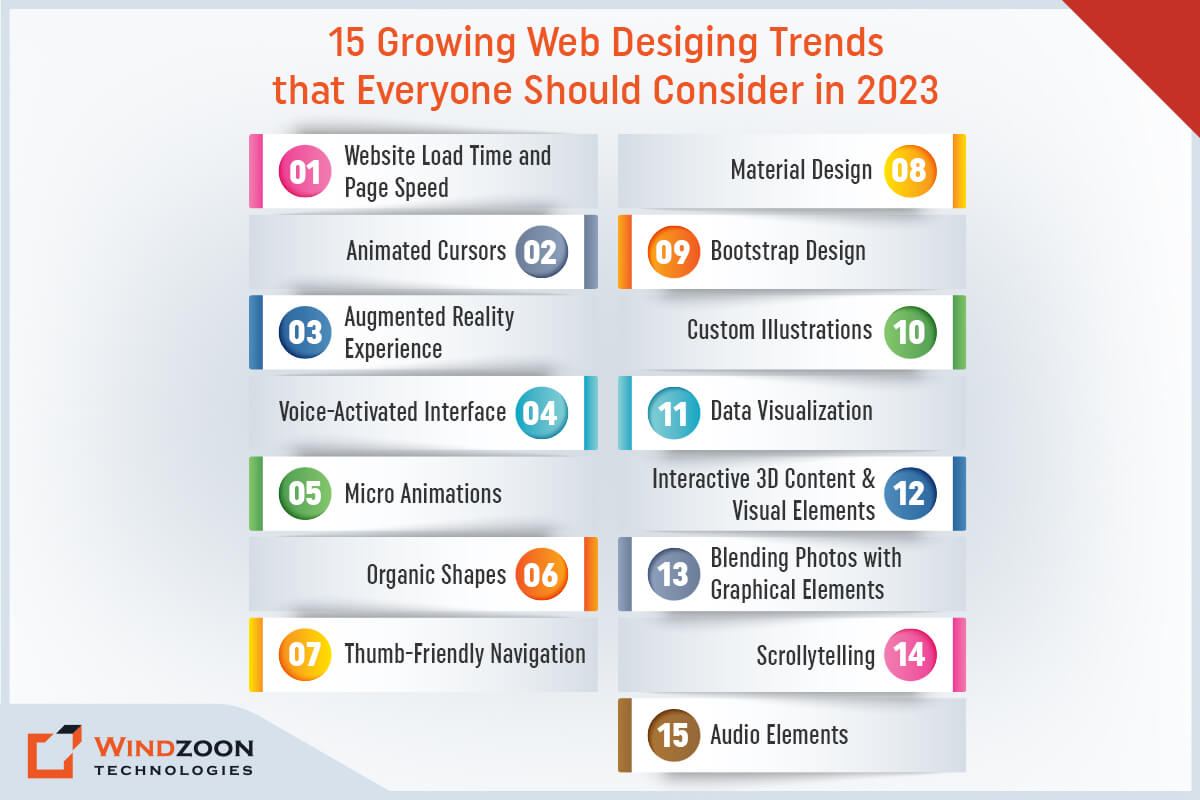
Growing Web Design Trends that Everyone Should Consider

Growing Web Design Trends that Everyone Should Consider

1. Website Load Time and Page Speed

Fast load times are among the most crucial web design requirements. For years, quick loading times have been crucial to UX and SEO. And they still rank highly for websites that want to increase their traffic and conversion rates.

As per studies, more than half of internet users expect a website to load quickly and within two seconds of clicking a link. If your website takes longer than three seconds to load, visitors will probably go to one of your competitors instead.

To avoid this, take assistance from a competent web design agency. The professionals from that agency will help you create a responsive web design with excellent UX and a fast loading speed.

2. Animated Cursors

Another enjoyable way to personalize your website’s user experience is to design how they interact with your web elements – including their cursor!

This 2023 web design trend is surprising users with its subtlety. Visitors can interact with various scrolling behaviors or on-click commands by altering the cursor’s appearance or implementing cursor-triggered animations.

3. Augmented Reality Experience

When it comes to interaction, augmented reality experiences are increasingly popular. All businesses that sell customized products should use this type of website.

Utilizing augmented reality components, the web designer can develop a platform that allows users to customize products as per their needs before making a purchase or requesting a quote.

This experience replaces the initial meeting with the seller which makes your users’ job easier and rise the selling rate.

4. Voice-Activated Interface

Our method of getting information is evolving. Today, we ask a question or make a demand rather than typing a query into Google. As a result, voice chatbots and virtual assistants are becoming more common. And web designers have to adapt to this trend.

Although most websites don’t have a voice-activated interface, this new development isn’t likely to fade away anytime soon. We can anticipate more websites incorporating voice search as a substitute for standard text search.

5. Micro Animations

Micro animations are brief animations, as you might have guessed from the name. However, in this instance, being small does not imply insignificance.

When it comes to assisting users as they navigate your website, micro animations are incredibly helpful. Additionally, they can give your website a playful touch.

6. Organic Shapes

In the year 2020, geometric shapes dominated website design, but in the year 2023, organic shapes will rule. Any shape without straight lines is considered to be organic or fluid. Think about the asymmetrical and winding shapes found in nature, such as hills and the edges of a lake or river.

With no need for sharp angles or lines, fluid shapes are a great way to divide sections of a website. They work well when used on the background web page.

7. Thumb-Friendly Navigation

Designing responsively is no longer sufficient. The goal of web design in 2023 will still be to create websites that are thumb-friendly.

What does “thumb-friendly” actually mean?

We’re referring to how we use our phones. When we hold a phone, our fingers are most likely wrapped around the back of it (or around a phone grip). Letting our thumb do all of the work.

Your site will be easier to use and have a tenfold increase in UX if the navigation bar, menu, and even the contact buttons are placed where your thumb can access them.

8. Material Design

In 2014, Google unveiled the design language known as “Material Design.” Typical web design appears uninteresting in front of it. Using color and shadows to simulate the textures of the physical world is the goal of material design.

The Gmail envelope’s shadows and the calendar’s shadows are two excellent examples of material design. It’s very subtle, but it makes a big difference in giving the icons a three-dimensional appearance. In 2023, we anticipate a significant increase in material design!

9. Bootstrap Design

Bootstrap is more than just a trendy front-end framework. It is a powerful tool for designers and developers to use when creating innovative, and mobile-first websites.

Not only that, but this amazing framework captures the attention of developers by speeding up the development process. Furthermore, websites and applications built with Bootstrap are responsive across multiple devices. And are also light, customizable, and consistent. It is undeniably a trendy tool that designers and developers must be familiar with.

10. Custom Illustrations

Custom graphics have taken the place of stock images. Illustrations aid in bringing your company’s brand to life. Custom illustrations are anticipated to take the lead while generic stock graphics fall by the wayside.

11. Data Visualization

It can be difficult to convey information in an interesting way. But the effort is worthwhile. Because using data visualization makes use of the fact that people are visual beings while still getting your point across.

Data visualization makes images from your data that pique the reader’s interest. And inspire them to discover more about your company. Graphs and infographics are some of the most widely used methods for illustrating data.

12. Blending Photos with Graphical Elements

You may have noticed overlapping graphics on some of the images in your social media feed. A standard image is given a creative and enjoyable touch by this blending technique.

Websites are also embracing this trend. Blending photography and graphics can help to reinforce your company’s branding. And also keeps your website visitors engaged with your content.

13. Interactive 3D Content & Visual Elements

Incorporating 3D elements that users can interact with has become more common thanks to developing web technology and web designers’ desire to stand out from the norm.

Implementing 3D elements isn’t the easiest task. Primarily because they overburden and slow down your website. However, 3D elements are still expected to be popular in 2023.

And they are especially suited to certain types of websites: design firms and architectural firms, for example, make excellent use of 3D elements.

14. Scrollytelling

Scrollytelling is also referred to as ‘narrative visualization.’ It entails presenting several moving visual components before revealing a chronologically-ordered story.

Users control the pace at which the site is navigated while being presented with an engaging and captivating message.

15. Audio Elements

Audio content is being used more frequently now. However, if you decide to use this element, you must pay close attention.

For starters, audio elements can slow down your website, which you never want. Second, take note of the audio track that is played when a user first enters a website. Especially if it begins automatically. If it is excessively loud or fast, the user will startle and find it annoying.

Choose soothing and relaxing audio content if it is appropriate for the type of project you are working on.

Conclusion

According to statistics, 94% of visitors form an opinion about a website based solely on its design. Therefore, everyone in the market gives it their all to create a fantastic website. And designers made this possible by utilizing the most recent web design trends to meet the objectives.

Although, there are countless web design trends, the ones mentioned above are some of the most popular and successful ones that are assisting businesses in evolving their websites. And if you need assistance putting these trends into practice, feel free to contact us.

As a leading web design company, Windzoon provides premium web design & development services at the most competitive rates. Our skilled web designers can design unique websites that are tailored to your company's needs.

Visit us at wzadmin.windzoon.in/ to take advantage of our services or to request a quote.

12 Benefits of Responsive Web Design to Boost Your Business

A website is more than just a company or brand’s online presence; it also serves as a guardian that facilitates communication with your target audience, promotes your products or services, and upholds your reputation as a whole.

Some of the key benefits of responsive web design include improved user experience, better SEO performance, and cost savings by streamlining maintenance and testing across devices.

As in the digital era, there is a large customer base on the web that is using handheld devices such as mobile phones, tablets, or other advanced devices to access the internet. Web designers play a crucial role in ensuring websites are adaptable for various devices, including tablets, laptops, and desktops. Responsive web design is especially important for optimizing layouts and images for different mobile screens, ensuring a consistent experience regardless of device.

With the rise in web traffic from mobile devices, many users now expect seamless experiences across all platforms.

However, what exactly is responsive web design? And why should businesses need one? Well, keep reading to find out the answers in this article, especially as many users access websites from different devices, making it a challenge for businesses to deliver a consistent experience.

Responsive Web Design: What Is It?

Responsive design is a web design & development technique that allows you to create a site that adjusts to the size of the user’s screen, using a layout based approach that adapts dynamically to different devices. By producing a flexible, responsive, and device-optimized web page, a responsive design will improve a user’s browsing experience.

Responsive designs are enabled by media queries and css media queries, which are CSS features that target device width, screen width, and browser width to apply different styles based on the characteristics of the user’s device or browser window.

Mobile usage has skyrocketed in recent years, and responsive design is the most efficient way to reach your customers across multiple devices. Media queries allow the website to adapt to the browser window and device width, ensuring optimal display on any user’s screen. Additionally, it guarantees a smooth user experience. Fluid layouts and flexible grids are used in grid systems to create custom web design solutions that respond to the user’s preferences and behavior.

With users increasingly reading information across different devices, responsive web design is becoming extremely important. Responsive designs are essential for accessibility and usability across all devices. And to leverage its benefits, you can choose a web design company in USA and India for developing one for yourself.

12 Astonishing Reasons Why Your Business Needs Responsive Web Design

12 Astonishing Reasons Why Your Business Needs Responsive Web Design

1. It Lowers the Cost of Maintenance

Running two versions of the same website is not a cost-effective option, as maintaining separate versions significantly increases maintenance costs. But by using responsive web design and relying on a single website, you reduce maintenance costs and simplify updates. Besides, it takes comparatively less time to set up and is easier to maintain a single website than working on two separate versions. Thus, you are making a wise decision and making an inexpensive investment in your website that is ready to be accessed through all devices. Avoiding separate versions leads to long-term savings and easier management.

2. It Improves Your SEO Efforts

Responsive websites have the most chances of getting ranked high in SERPs, as search engine optimization (SEO) is strongly influenced by how search engines prioritize mobile optimized sites. A more user-focused experience brings more attention to a website. What is more interesting is that Google also recommends making a responsive website design pattern.

Why do you think Google prefers responsive design? The main reason is that they use a single URL, which makes crawling and indexing the content on your domain much easier.

Additionally, they provide a better user experience. Providing quality content within a mobile optimized site further boosts SEO performance, as search engines favor websites that are both user-friendly and informative. And as you should be aware by this point, user experience ranks highly among Google’s SEO criteria. Thus, having a Responsive website will help you convert and retain more clients in a long term.

3. It Brings More Leads and Conversions

According to Formstack research, the average conversion rate for smartphones is 64% higher than the average conversion rate for desktops. It is obvious why developing a user-friendly, responsive website is essential for raising conversion rates. A responsive website provides an optimal user experience by adapting layouts to different devices and screen sizes, which is key to increasing leads and conversions.

As users spend more time on your website, they will start to gain trust, which will lead to higher conversion rates. It can be annoying for users to constantly be redirected when they try to sign up for a service, whether it’s your newsletters or a purchase.

4. It Offers Better Analytics That Lead To Improved Outcomes

One design for multiple devices makes tracking the growth of your website easier. As all reports and data come from a single source, your analytics teams can deliver excellent results.

Individual page analysis in terms of orientation, breakpoints, and other elements to track user behavior. And assist your developers and coders in creating newer designs to optimize the ideal visitor behavior and comprehend what causes a visitor to leave a page early.

It will give you the ability to precisely plan how to improve your landing page and put the required call-to-actions in a way that increases viewability and boosts conversion rates.

5. It Provides Flexible Layouts That Fit Into Multiple Screen Size

Responsive design layouts offer a lot of flexibility. The grid system used in responsive websites allows the websites to rearrange themselves automatically based on screen size.

For the purpose of developing more dynamic and adaptable layouts, responsive website classes are used. Websites that are responsive also use responsive texts and images. Flexible images and responsive images automatically resize images based on screen size using CSS properties like max width and maximum width, ensuring that images adapt smoothly to both larger screens and smaller screens, including small screens and even a tiny screen. Optimizing images and managing image resolution helps ensure fast loading and visual clarity across all devices. Scalable vector graphics (SVGs) are also used to maintain image quality regardless of device or resolution. Adjusting font size at different breakpoints improves readability on various devices. For just one example, a flexible image with max-width set to 100% in a fluid layout will scale proportionally to fit any screen, maintaining the integrity of the design. And Images, videos, & slides that are responsive automatically scale to fit the size of the screen.

6. It Improved Load Speed on Mobile

As per Google PageSpeed Developers, standards recommend that content above the fold on a mobile device load in less than one second, with the entire page loading in less than two seconds.

Responsive websites are designed to load quickly on all platforms, which is crucial for handling increasing mobile traffic. But they are especially fast on smartphones and tablets, helping to retain mobile visitors who expect fast and seamless experiences. Fluid grids and adaptable images shorten the time it takes for a web page to load, even for users with a slow or unreliable internet connection. It directly affects how long your users stay on your site.

And the longer a visitor stays on a page, the more engaged they are with the website. It also increases the chances of the same visitor returning. When a single user returns to the website, it gains trust and authority.

7. It Significantly Lowers the Bounce Rate

Even if a website ranks well in search results, if it does not work well for mobile and tablet users, the bounce rate will be a significant issue. Providing a consistent user experience across all devices helps keep users engaged and reduces bounce rates.

Mobile versions of websites may have a high bounce rate if the content they provide is too scaled down or too dissimilar from the content offered on the desktop version.

Google might then interpret a high bounce rate as evidence that a website isn’t providing users with relevant content, which is likely to result in a drop in rankings.

8. It Make Social Sharing More Impactful

If your website is responsive, you can increase social shares for a single URL. With a single responsive site, social sharing is streamlined and analytics tracking becomes much easier, as you only need to monitor one site across all devices. And when the link is shared, all of the content will be understandable and simple to navigate, regardless of where the content is viewed (desktop, tablet, or mobile).

Multiple versions of the same page lessen the impact of any social shares, which harms SEO.

9. It Has Fewer Issues with Duplicate Content

The benefit of using a single responsive website rather than separate desktop and mobile versions is that it eliminates the possibility of duplicate content issues, which can harm your website’s search ranking.

Additionally, any SEO work you do to rank your desktop website will automatically be applied to your mobile version as well, cutting down on redundancy.

10. It Offers You More Powerful Brand Messaging

Your website is a crucial tool for engaging your audience with your brand messaging. Numerous design components, including the colors, fonts, graphics, and logos used on your website, support the promotion of your brand and your narrative.

Responsive web design ensures that all of these elements are consistent across all devices used to access your website. This will increase brand recognition and ensure that your entire audience receives consistent messaging. Providing a seamless user experience across all devices also strengthens brand loyalty.

 11. It Makes You Stay Ahead of The Competition

It is crucial to stay one step ahead of the competition in business. If an increasing number of your users/customers are using their mobile devices to browse and make purchases online. Then you should also accommodate your audience by having a mobile-friendly site.

Only a small portion of websites are currently set up to fully benefit from responsive web design. Being an early adopter of this technology can give your company a sizable advantage over the competition. Additionally, preparing your website to adapt to new devices and technologies as they enter the market ensures your site remains accessible and effective for all users.

12. It Makes Your Website Future-proof

Technology is evolving and changing all the time. And because of this, it is challenging to predict what will happen next.

The adaptability of responsive website design to various screen sizes is just one of its many advantages. As a result, it will be optimized for and compatible with smart glasses and watches in the future!

Therefore, a responsive website design is a wise investment if you want to future-proof your website and possibly save money down the road. Investing in a responsive site also ensures long-term compatibility and value as new devices and technologies emerge.

Conclusion

Many people access the internet using their mobile phones as opposed to desktop computers and laptops. Your website must therefore look fantastic and function flawlessly across a variety of platforms.

Because 83% of mobile users believe that a seamless experience across all devices is essential. Furthermore, 57% of people would not recommend a company solely because it has a poorly designed mobile website.

If your website’s design isn’t already responsive, it’s time to enlist the aid of a reputable web design agency and redesign it to be more responsive.

Our designers at Windzoon Technologies create multi-responsive, human-centered websites by adhering to the best UI/UX design practices. To avail of our unique & bespoke web design services, visit us at wzadmin.windzoon.in/ and

How to Choose a Web Development Company: 11 Useful Tips for 2023

Have you ever wondered what people do first when they learn about a new company or brand? They simply conduct an internet search for that brand or company to learn more about it.

And what is their first choice of internet information source for their search query? The first place to look for trustworthy information is the website of that specific business or brand.

We are leaving an era in which digitalization is at its height. Today, approximately 59% of the world’s population is online. And each day, they use the internet for an average of 6 hours and 54 minutes. Given the reach and effectiveness of the online marketplace, many businesses have moved their operations online. As a result, the World Wide Web now hosts approximately 1.9 billion active websites.

But will having a website on the internet be sufficient to bring in new clients? Definitely not. The mere existence of a website is never sufficient if it fails to draw in visitors. or is unresponsive and slow for visitors to your website because 88% of internet users are less likely to return to a website after a bad experience.

Therefore, when it comes to going digital, an excellent website should be at the top of every company’s priority list. It is not easy to design and develop a good website. However, you can simplify it by outsourcing it to a capable web development company in India & the USA.

Choosing a web development partner involves a few steps and careful evaluation to ensure you select the right team for your needs.

In this blog, we will share some essential tips to choose the right web design & development company for your web development project. These tips will guide you in choosing a web development company and help you identify a good development company that meets your business goals.

So, before we go forward to tips let’s first know about the services offered by web design/development companies.

What Services Does a Web Development / Design Company Offer?

Website Development Company provides a range of web development services and web design services, which are offered by various types of providers, including web development agencies, website design agencies, and design agencies.

These offerings are typical of a professional web development business.

Website Development Services

– Static Website Development

– PHP Website Development

– Custom Website Development

– Front-End Web App Development

– Back-End Web App Development

– Content Management System (CMS) integration

– Development of e commerce websites

– CMS Website Development

– E-Commerce Website Development

– Maintenance & Support

Web developers can also create template based websites for clients seeking quick and affordable solutions. A web developer’s expertise is crucial for implementing these services effectively.

Website Design Services

– Custom Website Design

– Branding & Graphic Design

– UI/UX Design (focused on creating a user friendly and engaging experience for visitors)

– Web App Design

– Mobile App Design

– Wireframe Design

– E-Commerce Website Design

– PSD to HTML5 Conversion

A skilled web designer is essential for delivering these outcomes, ensuring your website is both effective and engaging.

Now, let’s see the characteristics of a good website design/development company.

Signs/Characteristics of a Good Web Design / Development Company

Signs/Characteristics of a Good Web Design / Development Company

When choosing the right web partner, it is crucial to look for a good development company with a proven track record. Any prominent Website Development Company consists of the following characteristics.

A good web development company will have a strong company website and a visible online presence. Be sure to evaluate their overall digital presence and digital presence, including their website, social media profiles, and content, to assess their credibility and expertise.

The best web development companies and experienced web development companies stand out due to their professionalism, client satisfaction, and ability to deliver high-quality results.

1 Work Experience

Diverse projects, industries, and clients demonstrate web development companies’ experience, with industry experience being a key aspect when evaluating a company’s background. Companies with extensive experience in a variety of technical cases are regarded as competent web development firms. Reviewing similar projects they have completed and reaching out to past or current clients can help verify the company’s expertise and reliability.

2 Portfolio

Web development firms post their portfolio on their own websites or on specialized platforms such as Clutch and GoodFirms. If the portfolio contains a variety of samples, it demonstrates the company’s technical expertise and development skills. In addition to reviewing the portfolio, consider reaching out to past clients and current clients for feedback on their experiences. A past client can provide valuable insights into the company’s reliability and quality.

3 Service Selection

Professional IT firms that offer a wide range of web design and development services are regarded as excellent choices. Their comprehensive range of services includes setup, UI/UX design, development, quality assurance, maintenance, & support. Some companies also provide additional services such as SEO optimization, content writing, or digital marketing, which can complement the core website development process.

4 Positive Feedback

Positive customer feedback on the website or business listing website is considered a good sign. It demonstrates the web design company’s credibility and efficiency. Additionally, checking third-party platforms for ratings and client reviews of a website design agency or web design companies can help you make an informed decision.

5 Well-established Procedures

Well-defined development processes are essential for completing work on time and within budget. A clear design process and website development process—covering stages like analysis, research, prototyping, design, coding, and testing—are crucial for delivering quality results. A web development company with well-established processes and methodologies is always thought to be cost-effective and skilled.

6. Simplified Communication

A dedicated web design and development company always shares updates with its clients and expresses business-related concerns. Having a dedicated project manager or experienced project managers is crucial for facilitating smooth collaboration, maintaining consistent communication, and ensuring that all team members are aligned throughout the development process. Therefore, a business that follows a proper communication methodology is thought to be the best at delivering results and fulfilling the goals of its clients.

7 Result-oriented Policy

A result-driven development firm collaborates with the client to formulate a project vision. By aligning the project with your business goals and specific web development needs, such a company ensures the website effectively supports your overall strategy. A web design and development company that focuses on results will help you save time and money on significant changes that occur during the development process.

8 Excellent Work Ethics

Work ethics are the moral standards that govern a person’s behavior. A reputable web development company with a strong work ethic will generate high-quality results. Additionally, the company’s staff will communicate with you and be attentive to your needs.

9 Exceptional Company Website

Investigating the web design and development firm’s overall online presence can reveal more about its quality standards. Therefore, to do that, examine the company’s website, social media profiles, and content.

With this, we have come to the most important topic of our discussion.

11 Essential Tips to Choose the Right Web Design / Development Company for Your Project

Tips to Choose the Right Web Design / Development Company for Your Project

When you set out to choose a web development partner, it’s crucial to ensure they have the right expertise, transparency, and a proven track record. Knowing how to choose a web or web design company that aligns with your business goals can make all the difference in your project’s success. Look for a web development partner who offers clear ownership rights, strong UI/UX design skills, and a thorough vetting process. By carefully considering these factors, you can confidently choose a web design or development company that meets your needs and ensures a successful collaboration.

1. See How Well Do They Understand the Requirements of Your Business?

To begin with, pay attention to how they react to your business needs. Get a list of their clients, then research the previous solutions they have offered. Their solutions should be tailored to the specific industry and target audience of each client.

Do all of their solutions share common traits? Did they use pre-built templates at random, or did they do any research on the target market and target audience for the clients? Or did they just use the same old trendy designs without any ingenious designs that represented the brand?

A seasoned web development company puts itself in your shoes and offers solutions that are tailored to your needs, brand, business goals, and target audience.

2. Look for Particular Cultural Fit

The project’s success or failure depends on the cultural similarities and differences between you and your web development company.

Thus, check to see if their pace, personality, and culture are similar to your own. And ensure that the agency has an agile development culture that allows it to respond quickly to unexpected changes through constant information sharing and interaction mechanisms.

In addition, inquire about the technology partners’ strategies for adapting to changing technologies and trends.

3. Examine Their Website

Analyze the web development company’s website and surmise it as your own. Do you like the layout? Is it appealing? Is it responsive?

Responsive websites are intended to provide the best viewing experience possible for desktop monitors and mobile phone users, ensuring the site works well on mobile devices such as smartphones and tablets.

If you’re looking for a web development company to create a responsive website, make sure they’ve worked with responsive design before. And also ask to see some of their previous work.

4. Review Client Testimonials, Ratings, and Feedback

Almost every website development company has a section on their website where customers can leave reviews or testimonials. Undoubtedly, it will all be positive for all visitors to see.

Hence, to ensure the credibility of the testimonials, spend some time investigating your potential web design & development partners on search engines and other third-party platforms, such as Clutch and GoodFirms.

You can also ask past clients and current clients about the firm and learn about their experiences. Reaching out to a past client can provide valuable insights into the company’s work quality, reliability, and customer service.

5. Take a Look at The Range of Web Design & Development Services They Offer

Web development firms provide a plethora of services. And you might not require all of the services included in a package.

When evaluating potential partners, consider the range of web development services, web design services, and any additional services such as SEO or digital marketing that the company offers. The best way to determine which web design & development service you require is to inquire about the various services available. And determine whether they are a better fit.

If you’re just getting started, it’s best to look for an end-to-end service provider. It can walk you through each stage of website development.

6. Request a Consultation First

Every online business is a unique entity that adheres to particular procedures for a specific target market. Therefore, seeking consultation is essential. During the consultation, discuss your web development needs to ensure the company understands your specific requirements and goals. This will help you determine if you are selecting the right partner who can deliver tailored solutions for your industry. By doing so, you’ll know if you’re selecting the right web development company for your industry.

7. Request That They Send You Their Portfolio

A portfolio demonstrates a web design & development company’s completed projects. There will always be a portfolio section on the website of a reputable web design & development firm. Here, it highlights its prior successes.

Therefore, carefully examine it to know the breadth of expertise of the design & development firm. Look for similar projects to yours, a proven track record of successful outcomes, and relevant industry experience that matches your needs. You can even inquire about the firm’s involvement in the projects you’re interested in.

8. Take Into Account Their Communication Methods

A key component of a web design & development agency is its ability to communicate. Your project may go wrong if there are any communication gaps. Thus, before signing the contract, contact the service provider. Ensure that all parties are on the same page regarding project goals and updates. Evaluate their communication culture by asking the following questions:

– Is their communication and collaboration methods on par with yours?

– Will the design & development team be available via multiple communication channels such as phone, e-mail, Skype, and so on?

– Who will you contact with any questions, comments, or concerns you may have?

– How long will it take for your queries to be answered?

9. Get to Know the Members of The Design & Development Team

A great team can make a significant difference to your project. Thus, try to get a team that is skilled in all facets of web development from programming to design.

When meeting the team, it is important to understand the composition of the web development team, including the web developers—such as front-end, back-end, or full-stack specialists—and the web designer, as each plays a crucial role in delivering a high-quality website.

And you can find such a seasoned team only at a reputable web development company. So, take out some time, and meet the team members who will be working on your project. It will make you assured about their skills &  competence.

10. Inquire About Privacy and Security Policies

In every web design & development business, there are concerns about the security of confidential data. These sensitive data are necessary for many software projects. And, if unprotected, could put the operations of the company in danger.

It is also important to clarify ownership and access rights to the content management system to ensure that you retain control over your website and its content.

As a result, a Non-Disclosure Agreement (NDA) is a requirement of law and ethics for all software development businesses. To protect your sensitive data from prying eyes, most web design and development firms follow this agreement.

11. Obtain a Final Cost Estimate and Complete All Documentation

When it comes to any business decision, the cost is always the deciding factor. Avoid companies that give you estimates that are twice as high or half as low as those from competitors.

It is crucial to inquire about the development costs of the company and to establish a clear budget from the outset. Make sure you understand all the costs involved, including upfront, ongoing, and any potential hidden expenses, to avoid surprises and keep your project on track. Professional website development can start from a few thousand dollars depending on the scope and requirements.

Some organizations might upgrade their offerings by adding new resources and tools. Managing costs and timelines can be time consuming without clear documentation and communication, so ensure everything is clearly outlined before proceeding.

Talk about how they affect the operation of your project. You need a website that prioritizes user-friendliness over all else. Spending money on other flashy features is a waste and adds unnecessary expense.

Questions to Ask Before Hiring a Web Design or Development Company

The following questions will help you comprehend the offerings of top-notch web design & development companies. And assist you in determining whether they are the right fit for growing your online business:

  • What is the experience of the people who will be working on the project?
  • What types of web design, development, and related services do you provide?
  • Can you describe your website development process, including key stages such as analysis, research, prototyping, design, coding, and testing?
  • How do you approach keyword research and integrate it into the website development process?
  • Do you include search engine optimization (SEO) as part of your web design and development services? What strategies do you use for ongoing SEO optimization?
  • What is your method for staying up to date with the latest industry & technology trends?
  • Could you please give some examples of successful case studies and portfolio items? Why were they successful?
  • Do you have any prior experience in our market, or industry, or resolving a problem similar to ours?
  • What is the project management process for a website design/development project?
  • How do you handle ongoing maintenance and support after launching a new website?
  • What is your experience as a web development partner and as a reliable technology partner for businesses?
  • Do you collaborate with a marketing agency for digital marketing needs or can you recommend trusted marketing agencies?
  • How frequently will you evaluate the outcomes, and which metrics will you apply?
  • What are the costs of your services, and should we be prepared for any extra charges?
  • After the site goes live, do you provide ongoing support and maintenance?

In the digital world, your business is represented by its website. Hence, your website must effectively and efficiently reflect your core values. As a result, you should never skimp when designing and developing it.

As a reliable web design company, Windzoon offers high-quality web design & development services at the best market price. We have talented web designers and developers who are proficient in a variety of programming languages and can build custom websites to suit your company’s needs and budget!

You can count on us for everything from mobile app development to website services. To find out more about our services or to request a quote, go to wzadmin.windzoon.in/.