Unlock Global Talent: Your Guide to Hire Web Developers India for Superior Tech Solutions

In today’s competitive business landscape, the demand for high-quality web development solutions is on the rise. But where can businesses find top-notch professionals without breaking the bank? The answer lies in the booming tech scene of India, where an array of talented web developers offers cost-effective, innovative, and high-quality web development services. In this blog post, we’ll guide you through the process of how to hire web developers from India and the key benefits they bring to the table.

Key Takeaways

  • Hire web developers from India for cost-effective, innovative solutions with a skilled talent pool.
  • Evaluate portfolios and client testimonials to find the right company in India that offers quality work & advanced technologies.
  • Ensure successful collaboration by emphasizing clear communication, managing time zones, demonstrating cultural sensitivity & considering legal/security aspects such as data protection and NDAs.

Why Hire Web Developers from India?

why-hire-web-developers-india

India has become a global hub for web development, thanks to the combination of cost-effective solutions, a skilled talent pool, and a penchant for innovation. Collaborating with Indian web developers allows businesses to access a vast pool of expertise, harness cutting-edge technologies, and enjoy cost savings without compromising on quality. This winning combination has made India an attractive destination for organizations worldwide seeking top-tier web development services.

1. Cost-Effective Solutions

Indian web developers are known for providing cost-effective solutions without sacrificing quality, including custom web development services. Businesses can reduce their web development costs by up to 30-40% when they hire web developers from India, as opposed to their counterparts in Western Europe, the US, or Canada. The cost of engaging a web development company in India may range from $500 to $5000, depending on factors such as project scope, developer expertise, project complexity, and timeline for completion.

Opting for Indian web developers offers several benefits for businesses:

  • It allows businesses to allocate their resources more efficiently and shift their focus to core business activities.
  • The cost savings do not compromise the quality of work.
  • Indian web developers are known to consistently produce high-quality work.
  • They have technical expertise and adopt the latest industry trends.

2. Skilled Talent Pool

India boasts a substantial pool of skilled web developers with expertise in various technologies and frameworks, including web application development, and software development, ensuring the ideal fit for your project needs. Indian web developers are proficient in technologies such as mobile app development, HTML5, CSS 3, Progressive Web Apps (PWA), JavaScript, PHP, Python, Ruby, Java, React, Angular, Vue.js, and Bootstrap.

They also have experience with content management systems like WordPress, Drupal, Joomla, etc.

Indian web developers also bring their experience from diverse industries to the table, ranging from banking and finance to e-learning and digital marketing. Hiring Indian web developers enables businesses to tap into a large talent pool that can craft solutions tailored to their unique needs and objectives.

3. Quality Work and Innovation

Indian web developers have a reputation for delivering quality work and innovative solutions that help businesses stay ahead of the competition. They are adept at employing advanced technologies and methods to generate solutions of superior quality, addressing the requirements of various industries. India’s tech scene is continuously evolving, and Indian web developers stay at the forefront of technological advancements, bringing innovative approaches to projects.

For example, Alpha Information System, a leading Indian web development company, utilizes advanced technologies like Magento, SpreeCommerce, and PrestaShop for eCommerce solutions. Partnering with Indian web developers allows businesses to utilize advanced technologies and creative approaches, helping them achieve exceptional results and maintain their competitive edge in the market.

To know more about the benefits of outsourcing web development in India, read our detailed blog on “Advantages of Outsourcing Web Development Project to an Indian Company“.

Finding the Right Web Development Company in India

how-to-find-right-developers

Choosing the right leading web development company in India involves evaluating their portfolio, client testimonials, and technical proficiency in various technologies and frameworks, including those of a mobile app development company. Considering these factors enables businesses to select the best web development company from the best web development companies and web development firms for their web development needs.

1. Portfolio and Client Testimonials

A company’s portfolio and client testimonials provide valuable insights into their capabilities and the quality of their work. Reviewing a web development company’s portfolio allows you to evaluate their design and development abilities, while client testimonials offer insights into the company’s standing and client satisfaction.

To assess a company’s portfolio, it is important to evaluate the following:

  • Design and user experience
  • Variety of projects
  • Mobile responsiveness
  • Functionality and features
  • Performance and loading speed
  • Client testimonials
  • Case studies

Examining the portfolio and client testimonials allows businesses to gauge the competence and reliability of a web development company, helping them choose the most suitable partner for their project.

2. Technologies and Frameworks

Assessing a company’s expertise in various technologies and frameworks ensures they can deliver the desired results for your project. Indian web developers are proficient in a wide array of technologies, such as:

  • Angular.js
  • WordPress
  • Drupal
  • Joomla
  • Node.js
  • Vue.js

Evaluating a web development company’s technical expertise helps businesses ensure that they are partnering with a company that can address their unique needs and objectives, including website development services.

Moreover, expertise in multiple technologies and frameworks provides flexibility, scalability, and innovation, allowing the company to adapt to the needs of each project and provide the most suitable solution. Choosing a web development company with a diverse range of technical expertise ensures businesses receive a solution tailored to their specific needs.

3. Communication and Project Management

Effective communication and project management are crucial for successful collaboration with development companies in India, especially when working with a web development company. Indian developers are renowned for their excellent communication skills and proficiency in English, which is the language of choice in the tech industry. The web development company in India is committed to meeting deadlines and keeps the client informed through regular communication.

Establishing clear and consistent communication channels helps businesses stay updated on the project progress, address any concerns, and provide timely feedback to the development team. This fosters a positive working relationship and enables smooth collaboration between teams, ultimately leading to the successful completion of the project.

To know more about how to find the right web development company, read our comprehensive blog “11 Useful Tips To Choose the Right Web Design & Development Company in 2023“.

Different Engagement Models for Hiring Indian Web Developers

different-engagement-models

There are various engagement models for hiring Indian web developers, including dedicated teams, staff augmentation, and project-based engagements. Each model caters to different project needs and budgets, providing businesses with flexible options to choose from based on their unique requirements.

1. Dedicated Teams

Dedicated teams provide a complete team of web developers focused solely on your project, ensuring efficient and timely delivery. A dedicated team typically comprises roles such as:

  • Business Analyst
  • Project Manager
  • Product Manager
  • Solution Architect
  • UI/UX Designer
  • Web Developer
  • Front-End Developer

These team members collaborate to accomplish the project objectives and deliverables.

Hiring a dedicated team of web developers from India offers numerous benefits, such as:

  • Cost-effectiveness
  • Improved productivity
  • Expedited responses to urgent matters
  • Access to specialized expertise

Engaging a dedicated team allows businesses to retain full control over the development process and work with a team experienced in efficient and effective collaboration.

2. Staff Augmentation

Staff augmentation allows you to add skilled Indian web developers to your existing team, providing flexibility and scalability. This model entails the temporary hiring of specialized remote development teams on either a part-time or full-time basis through an outsourcing company, allowing businesses to benefit from a pool of talented Indian web developers who can work on specific projects or tasks.

The benefits of staff augmentation include:

  • Cost-effectiveness
  • Flexibility
  • Access to skilled and experienced developers
  • Retaining control over the development process

By leveraging the skills and expertise of Indian web developers through staff augmentation, businesses can achieve superior tech solutions.

3. Project-Based Engagements

Project-based engagements involve hiring Indian web developers for specific projects, ensuring a focused approach and cost-effective solutions. This model is ideal for developing custom software applications, constructing new websites, or assessing and optimizing existing systems.

Employing a project-based engagement model offers businesses benefits such as:

  • a well-defined scope and deliverables
  • cost-effectiveness
  • flexibility
  • expertise in specialized areas

This model enables a dedicated and concentrated approach to completing the project within the specified scope, budget, and timeframe.

Tips for Effective Collaboration with Indian Web Developers

tips-for-effective-collaboration

Maintaining clear communication, effectively managing time zones, and displaying cultural sensitivity are key to ensuring successful collaboration with Indian web developers. Adhering to these best practices will help foster a positive working relationship with Indian web developers and ensure the successful completion of your project.

1. Clear Communication

Clear communication is essential for successful collaboration, ensuring both parties understand project requirements and expectations. Establishing and maintaining open lines of communication allows businesses to provide timely feedback, address concerns, and keep all parties on the same page throughout the project.

Utilizing tools such as:

  • Google Hangouts
  • Shift
  • 1Fellow
  • Slack
  • Zoom
  • Trello
  • Google Drive

can facilitate clear communication in remote collaborations. These tools enable teams to communicate effectively and collaborate efficiently in remote work settings, reducing the risk of miscommunication and fostering a positive working environment.

2. Time Zone Management

Time zone management is crucial for coordinating work schedules and meetings, ensuring smooth collaboration between teams. Scheduling periodic meetings and developing comprehensive action plans can help businesses manage projects across different time zones effectively.

Proactively addressing time zone differences can minimize delays in decision-making and progress, ultimately leading to successful project completion. Implementing effective time zone management practices ensures seamless collaboration with Indian web development partners.

3. Cultural Sensitivity

Being culturally sensitive and respectful of differences fosters a positive working relationship with Indian web developers. Here are some tips to help you achieve that:

  • Understand and respect communication styles
  • Build trust-based relationships
  • Recognize hierarchies and formalities
  • Be open to gut feelings and intuition

By following these tips, you can establish effective collaboration and a positive working environment.

Acknowledging and respecting cultural differences can help to build trust and understanding between the client and development team, ultimately leading to a successful collaboration and the completion of the project.

legal-and-security-consideration

Legal and security aspects such as data protection, intellectual property rights, and non-disclosure agreements should be considered when hiring Indian web developers. Ensuring these measures are in place helps safeguard sensitive information and maintain client trust.

1. Data Protection

Ensuring data protection measures are in place helps safeguard sensitive information and maintain client trust. Indian web developers use encryption techniques like HTTP and SSL to secure the integrity, confidentiality and authentication of data. These methods also prevent unauthorized access to personal and sensitive information.

Moreover, India has implemented the Digital Personal Data Protection Act, 2023 (DPDP Act), which further strengthens data privacy standards in the country. Prioritizing data protection helps businesses safeguard their sensitive information and uphold client trust.

2. Intellectual Property Rights

Establishing intellectual property rights ensures ownership of the work produced by Indian web developers. The relevant laws pertaining to Intellectual Property Rights in the field of web development in India are The Copyrights Act, 1957, The Trade Marks Act, 1999, and The Patents Act, 1970.

Drafting comprehensive work-for-hire agreements, registering copyrights, trademarks, and patents, and creating confidentiality and non-disclosure agreements can help businesses protect their intellectual property rights and ensure they retain ownership of the work produced by Indian web developers.

3. Non-Disclosure Agreements

Non-disclosure agreements protect confidential information and maintain the privacy of your project. These legally binding contracts ensure that confidential information shared between parties is not disclosed to third parties without consent.

Establishing NDAs helps businesses safeguard sensitive project details, trade secrets, proprietary information, and other valuable assets. In addition, NDAs provide legal recourse in case of any breaches or unauthorized disclosures, ensuring the confidentiality and integrity of your project.

Summary

In conclusion, hiring Indian web developers offers numerous benefits, such as cost-effective solutions, access to a skilled talent pool, and high-quality work with innovative approaches. By finding a professional website development company in India, employing different engagement models, and following best practices for effective collaboration, businesses can leverage the skills and expertise of Indian web developers for superior tech solutions. So, don’t hesitate to unlock the potential of India’s thriving tech scene and enjoy the benefits of collaborating with web developers in India for your next project.

At Windzoon, we have an amazing team of skilled and experienced web developers who can go to any length to fulfil our clients’ requirements. Hire web developers from us to leverage customized services that meet your project needs.  Get in touch with us to get a quote and to know more about us.

Frequently Asked Questions

How much does it cost to hire a Web Developer in India?

Hiring a Web Developer in India can cost anywhere between 50,000 – 2,50,000 ($600 – $7200), depending on the type of website.

How can I find a Web Developer in India?

If you are looking for a Web Developer in India, you can find the best Web developers from us. Get in touch with us to find the perfect match for your needs.

How do I hire a good Web Developer?

To hire a good Web Developer, use reliable platforms and tools to find potential candidates, create a detailed job description and budget, review applications and portfolios, and interview qualified candidates before agreeing to any contracts. To learn about the process of hiring web developers from India, kindly refer to this post “How to Hire Web Developers from India in 2024

What are the main benefits of hiring web developers from India?

Hiring web developers from India offers cost-effective solutions, access to a skilled talent pool, and high-quality work with innovative approaches.

What are the different engagement models for hiring Indian web developers?

The different engagement models for hiring Indian web developers include dedicated teams, staff augmentation and project-based engagements. These options provide flexibility in terms of resource allocation and engagement duration.
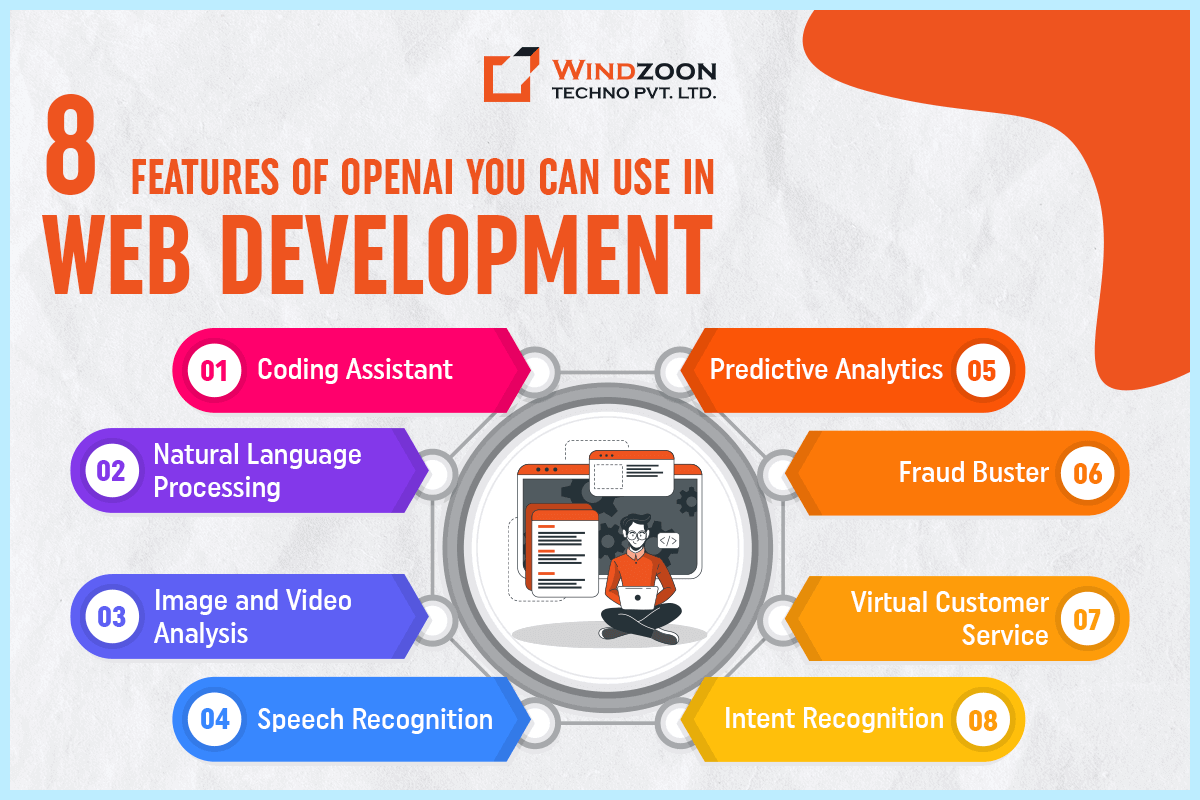
OpenAI in Web Development: 8 Useful Features for Your Web Apps

Greetings, fellow web wizards! Do you ever wish for your websites to get a little bit of fairy dust and turn into truly magical? Well, hold onto your broomsticks, because I’ve got something that might just do the trick, and its name is Open AI!

Open AI is like having a team of genies at your fingertips, ready to grant your every web development wish. It is an artificial intelligence platform with numerous advantages for web app development. Given that it has received over $1 billion in funding, it is also one of the most financially secure machine-learning startups worldwide.

With its ability to analyze vast amounts of data and learn from user behavior, Open AI can help you create websites that are smarter, more intuitive, and more engaging than ever before.

But that’s not all – Open AI has a ton of other use cases and benefits for web development services in India that you won’t want to miss. So, come with me on a journey into the enchanted world of Open AI, and let’s see what kind of magic we can create together!


What is OpenAI?

OpenAI is like having a super-smart buddy who’s always ready to help you out. However, instead of being human, it’s an artificial intelligence platform that’s constantly learning and growing.

Think of OpenAI as a brain on steroids – it has the ability to process and analyze huge amounts of data in lightning-fast time. This means that it can help people in a wide range of industries, from healthcare to finance to education.

The team at OpenAI is made up of some of the most brilliant minds in the AI world, and they’re always pushing the boundaries of what’s possible. They’re working on some seriously cool projects, like developing robots that can learn from humans and play games like chess and Go.

But even more than that, they’re dedicated to making AI accessible to everyone. They believe that this technology has the power to change the world for the better, and they want to make sure that everyone has the chance to be a part of that change.

Now, let’s learn about some striking data & statistics regarding Open AI.

  • According to the most recent ChatGPT-4 data, OpenAI is working on a mobile app powered by GPT-4.
  • According to industry insiders, ChatGPT-4 will be available on Bing Chat as well.
  • ChatGPT was built on top of GPT-3.5, and Microsoft’s Bing Search uses GPT-3 and GPT-3.5, as well as a patented technology called Prometheus, to give answers faster while making proper use of real-time data.
  • According to the most recent ChatGPT-4 data, if GPT-4 is trained on 100 trillion parameters, it will have the same parameter set as the human brain.
  • By the end of 2023, OpenAI’s sales will be around $200 million.
  • ChatGPT crossed the 100 million user threshold in January 2023.
  • Within a week after its launch, ChatGPT had surpassed 1 million members.
  • Microsoft has invested over $10 billion in OpenAI, acquiring a 46 percent share in the company.
  • According to the most recent ChatGPT figures, the parent company of ChatGPT is worth over $29 billion in 2023.
  • ChatGPT can only collect data prior to 2021 because the creators ceased training that year.
  • ChatGPT has over 57 million monthly users within the first month of its inception.
  • ChatGPT’s owner, OpenAI, expects the company to produce roughly $1 billion in revenue over the next two years.
  • By January 2023, ChatGPT had almost 13 million unique active users every day.
  • Experts estimate that the enormous volumes of data in ChatGPT-4 might be nearly 571 times larger than the 175 billion parameter training data size of GPT-3.

After this, let’s understand the importance of OpenAI in the web development industry.

Significance of OpenAI in the Web Development Industry

First off, OpenAI is a game-changer when it comes to creating web applications. With its natural language processing capabilities, OpenAI can help web developers create websites and apps that can communicate with users like humans. This means that web development can be taken to a whole new level, making it possible to create websites that are more intuitive, responsive, and user-friendly.

Secondly, OpenAI can save web developers a ton of time and effort. Its machine learning algorithms can be used to automate a variety of tasks, from content creation to website design. This can free up developers to focus on more creative aspects of web development, such as user experience and branding.

Thirdly, OpenAI can help businesses improve their online presence. By providing personalized recommendations and search results, OpenAI can help businesses connect with customers and create a more engaging online experience. This can lead to increased traffic, higher conversion rates, and better customer retention.

Overall, OpenAI is a powerful tool for web developers and businesses alike. It can help create more intelligent and intuitive web applications, save time and effort in development, and improve online engagement and customer experiences.

So, if you’re a business looking to improve your online presence, you should definitely consider web development services in India & the USA for incorporating OpenAI into your web development toolkit.

Now, let’s get to know about some interesting use cases of OpenAI in web development.

8 Features of OpenAI You Can Use in Web Development

features-of-opanai-use-in-webapps

1. Coding Assistant: Your AI-powered coding buddy!

If you’re a developer, you know that coding can be challenging and time-consuming. That’s where a coding assistant comes in – it’s an AI-powered tool that helps you write code more quickly and accurately. OpenAI’s coding assistant is here to help you write better code in less time!

Example Application of Coding Assistant:

  • Autocomplete code as you type: Say goodbye to typos and syntax errors!
  • Suggest fixes for errors and bugs: Your coding assistant can catch mistakes before they become big problems.
  • Offer suggestions for optimizing code: Let your assistant help you write code that’s faster, more efficient, and easier to maintain.
  • Help with refactoring and code review: Your assistant can make suggestions for cleaning up and improving existing code.

How OpenAI can improve coding in web development?

By using OpenAI’s coding assistant, developers can be more productive and save time and money. You’ll be able to write better code, catch errors before they cause problems, and optimize your code for maximum efficiency. Your assistant will be your new best friend in web development!

What OpenAI tool is used as a coding assistant?

OpenAI Codex is the perfect tool to use as your coding assistant. It uses machine learning to understand natural language and generate code based on your input. With Codex, you’ll be able to write code faster and more accurately than ever before!

2. Natural Language Processing: A Human-like Virtual Assistance

Have you heard about natural language processing (NLP)? It’s an AI-powered tool that can help web applications understand and process natural language queries from users. OpenAI’s NLP tools are like magic wands that can make web applications more intelligent and interactive.

Example Application of Natural Language Processing:

  • Chatbots and Virtual Assistants: Have you ever chatted with a bot on a website? That’s NLP in action. OpenAI’s NLP tools can help create chatbots and virtual assistants that can talk to users like humans do.
  • Sentiment Analysis: NLP can also be used to determine the tone and emotion of the text. This can be useful for analyzing customer feedback, social media posts, and reviews.
  • Language Translation: Want to create a multilingual website? NLP can help translate text from one language to another.
  • Text Classification and Summarization: NLP can analyze and categorize large amounts of text. This can be useful for summarizing articles, categorizing emails, and more.

How can OpenAI improve NLP in web development?

OpenAI’s NLP tools are some of the most advanced in the industry. With OpenAI’s NLP tools, web developers can build more intelligent and interactive web applications that can understand and respond to user input in more sophisticated ways. This means that websites can provide a more personalized experience for users, making them feel heard and understood.

What OpenAI tool is used for NLP?

OpenAI GPT-3 is a powerful tool that can be used for natural language processing. It’s like a language wizard that can generate natural-sounding responses to user queries. With GPT-3, web developers can build chatbots, virtual assistants, and other conversational interfaces that can understand and respond to users in a more human-like way.

3. Image and Video Analysis: Let AI Make Sense of What You See!

The Image & Video Analysis feature is an AI-powered tool that can be integrated into web applications using OpenAI tools. This feature allows web applications to analyze and interpret visual data in a more sophisticated way, making them more intelligent and responsive to visual input.

Example Application of Image & Video Analysis

  • Object recognition and detection: Identify and locate objects in images and videos.
  • Facial recognition and analysis: Recognize and analyze faces in images and videos.
  • Image and video captioning: Generate descriptions for images and videos.
  • Scene understanding and segmentation: Analyze and interpret the content of an image or video.

How OpenAI can help improve image and video analysis in web development?

OpenAI’s image and video analysis tools are seriously advanced. By leveraging these tools, web developers can create applications that can better understand and interpret visual input. This means your website or app can become smarter and more intuitive!

What OpenAI tool can you use for image and video analysis?

The answer is OpenAI CLIP! This powerful tool can classify and recognize objects in images and videos. With CLIP, you can build applications that can analyze and interpret visual data with ease.

So, let AI help you make sense of what you see with image and video analysis from OpenAI!

4. Speech Recognition: Your AI-powered transcriber!

If you’re creating a web application that involves spoken input, you know how important accurate speech recognition can be. That’s where OpenAI’s speech recognition tools come in – they’re AI-powered tools that can transcribe spoken words into text with high accuracy.

Example Application of Speech Recognition:

  • Voice assistants and chatbots: Your application can listen and respond to user input through spoken words.
  • Closed captioning for videos: Make your videos accessible to a wider audience by providing accurate captions.
  • Transcription of audio recordings: Quickly and easily transcribe interviews, podcasts, and other spoken content.
  • Dictation for text input: Allow users to input text through voice commands, making it easier and more convenient for them.

How OpenAI can improve speech recognition in web development?

OpenAI’s speech recognition tools are some of the most accurate in the industry. By using OpenAI’s tools, web developers can make their applications more accessible and user-friendly. Users can feel confident that their spoken words will be accurately transcribed into text, making the application easier to use.

What OpenAI tools are used for speech recognition?

OpenAI’s GPT-3 and Wav2vec 2.0 are two powerful tools that can be used for speech recognition. They use advanced machine learning techniques to accurately transcribe spoken words into text, making it easy to build voice-enabled applications like chatbots and voice assistants.

5. Predictive Analytics: Your crystal ball for the web!

As a business owner or analyst, you know that data can be overwhelming and making accurate predictions can be tricky. However, with an AI-powered tool, predictive analytics, you can analyze data and predict future events. OpenAI’s predictive analytics tools are the top dogs in the industry, helping you build smarter and more data-driven web applications.

Example applications of predictive analytics:

  • Understand customer behavior: Predict what customers will buy next and what they’re most likely to be interested in.
  • Forecast sales: Know how much inventory you’ll need and when to restock to avoid stockouts.
  • Detect fraud: Identify potential fraudulent transactions and prevent loss.
  • Manage risks: Evaluate potential risks and make decisions based on data-driven insights.

How OpenAI can improve predictive analytics in web development?

OpenAI’s predictive analytics tools are like having a crystal ball for the web. You can make smarter business decisions and take proactive actions based on insights and predictions about customer behavior, sales, fraud, and other critical metrics. It’s akin to possessing a hidden weapon in your armory!

What OpenAI tools are used for predictive analytics?

OpenAI’s GPT-3 and DALL-E are the heavy hitters in predictive analytics. They can analyze massive amounts of data and make accurate predictions about future events. You won’t find better tools anywhere else! So, let OpenAI’s predictive analytics tools be your crystal ball for the web!

6. Fraud Buster: The Ultimate Guardian Angel for Your Web Application!

If you’re running a web application, the last thing you want is to fall victim to fraudsters who can steal your valuable data and resources. But fret not, because OpenAI’s fraud detection tools are here to save the day! It’s an AI-powered tool that helps you detect and prevent fraud in real-time.

Example Application of Fraud Buster:

  • Credit card fraud detection: Detect unauthorized transactions and protect your users’ financial information.
  • Account takeover detection: Stop hackers from taking control of your users’ accounts and stealing their personal data.
  • Identity verification: Verify the identity of your users and prevent fake accounts from being created.
  • Anti-money laundering: Identify suspicious transactions and prevent money laundering activities.

How OpenAI can improve fraud detection in web development?

OpenAI’s Fraud Buster tools are some of the most advanced in the industry. By using OpenAI’s tools, web developers can build more secure and trustworthy web applications that can detect and prevent fraud in real-time. Thus, say goodbye to sleepless nights worrying about fraudsters trying to exploit your web app!

What OpenAI tools are used for fraud detection?

OpenAI’s GPT-3 and Anomaly Detection are some of the most powerful tools in the industry that can be used for fraud detection. They analyze large datasets and identify patterns and anomalies that could indicate fraudulent activity. With OpenAI’s fraud detection tools, you’ll have the ultimate guardian angel for your web application!

7. Virtual Customer Service: Your AI-Powered Support Team!

Are you worn out of responding to never-ending support and customer inquiries? Virtual customer service is here to save the day! Powered by OpenAI, this cutting-edge tool can provide automated customer support for your web applications, making your customers’ experience more responsive and user-friendly than ever before.

Example Application of Virtual Customer Service:

  • Chatbots and virtual assistants: Let your AI-powered support team handle customer inquiries and requests.
  • Automated email responses: Your virtual customer service can help you manage incoming emails and respond to common queries automatically.
  • Self-service portals: Provide your customers with self-service options that allow them to quickly find the information they need.
  • Voice-enabled customer support: Give your customers the option to interact with your support team through voice commands.

How OpenAI can improve virtual customer service in web development?

OpenAI’s virtual customer service tools are some of the most advanced in the industry. By integrating OpenAI’s technology into your web applications, you can provide your customers with fast, efficient, and personalized support through chatbots, virtual assistants, and other automated channels.

What OpenAI tools are used for virtual customer service?

OpenAI’s GPT-3.5 is the perfect tool to power your virtual customer service. With their ability to generate natural-sounding responses to customer inquiries, this tool can help you build chatbots and other conversational interfaces that feel like real human interaction. So why not give your customers the best support experience possible with Virtual Customer Service?

8. Intent Recognition: Understand What Your Users Want!

Every businessman has this hidden desire to understand their customer or users better. Well, it is now possible with intent recognition. This AI-powered tool can help you interpret what your users really mean when they interact with your web applications. OpenAI’s intent recognition tools are top-notch and can help you build more intelligent and user-friendly web applications.

Example Application of Intent Recognition:

  • Chatbots and virtual assistants: Improve your chatbots and virtual assistants by accurately understanding what your users are saying.
  • Search engine optimization: Optimize your search results by understanding the intent behind user queries.
  • Personalization of content and recommendations: Deliver personalized content and recommendations based on user intent.
  • Voice-enabled interfaces: Make your voice-enabled interfaces more intuitive and user-friendly by accurately interpreting user intent.

How OpenAI can improve intent recognition in web development?

OpenAI has some of the coolest intent recognition tools out there! With these tools, you can create web applications that really get your users. They can analyze what people say in natural language and give you the right interpretation of what they mean. This means that you can give your users personalized and accurate responses that match their needs.

What OpenAI tools are used for intent recognition?

OpenAI’s GPT-3 and Dialogue Systems are incredibly powerful tools that can help you with intent recognition. They can analyze natural language inputs and accurately interpret user intent. With these tools, you can build more intelligent and user-friendly web applications that truly understand your users.

Conclusion

OpenAI’s integration in web development has unlocked a new realm of possibilities for businesses to enhance their operations and provide exceptional customer experiences. With its vast array of features, OpenAI has transformed the way businesses interact with their customers.

As the technology continues to evolve, the potential for OpenAI in web development is limitless. Businesses that leverage OpenAI will undoubtedly gain a competitive advantage and position themselves for success in the ever-evolving digital landscape.

So don’t contemplate anymore. Connect with any reliable web development company in India & the USA to avail the full potential of OpenAI.

Windzoon has been a prominent web development services provider for a decade. We have an amazing team of skilled and experienced developers who can help you leverage OpenAI in the best possible way.

Hence, contact us today and get a quote to reap the benefits of our world-class services.

8 Best PHP Web Development Tools To Develop Top Websites in 2023

Have you ever spent hours working on a website, only to be left with a mediocre result? As a developer or IT company owner, you know that building exceptional websites requires the right tools. Read more about the importance of websites for your small business growth.

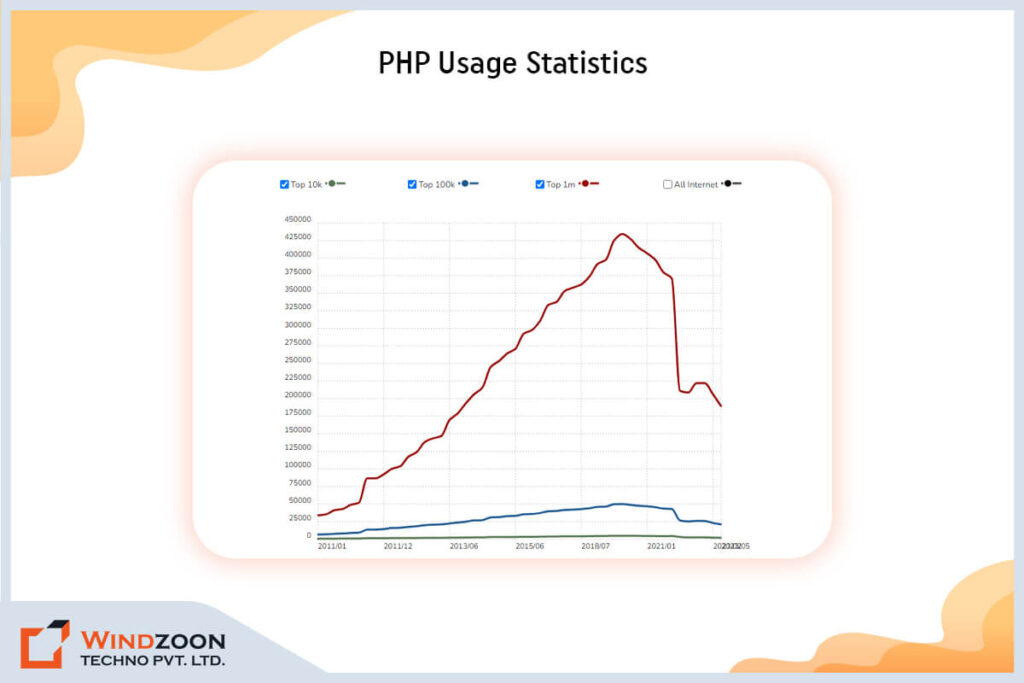
PHP, which stands for “hypertext preprocessor,” is a popular server-side scripting language designed for web development. It enables dynamic content generation and robust backend functionality. And currently, in the web development market, PHP has the best web development tools. It is used by 77.5% of websites around the world. This widespread adoption is supported by a large community and an active developer community, making it easier to find support, resources, and learning opportunities.

With the help of a PHP development company and the right php development tools, you can create a website that not only looks beautiful but also performs flawlessly. Developers often use a php framework to build complex and scalable applications efficiently. In this article, we’ll take you on a journey through the 10 best PHP development tools that will help you develop top-notch websites in 2023.

So sit back, grab a cup of coffee, and get ready to have an answer to the very first question, that is:

What Type of Technology is PHP?

PHP is a super useful programming language that’s perfect for web development. It’s been around since the mid-90s (yep, that’s right – it’s been around longer than some of us have been alive!) and it’s still going strong today. So what makes PHP so great?

Well, for starters, it’s super easy to learn. Even if you’re a total coding newbie, you can pick up the basics of PHP pretty quickly. And once you’ve got the hang of it, you can use it to build all sorts of cool stuff – from simple websites to complex web applications.

Currently, there are around 86,868,821 PHP-powered websites all over the world.

php-usage-statistics

One of the things that sets PHP apart from other programming languages is its ability to work with databases. If you’re building a website that needs to store and retrieve data (like user profiles, blog posts, or product information), PHP can help you do that.

It’s also great for creating dynamic content that changes based on user input or other factors.

Another awesome thing about PHP is that it’s open-source, which means that anyone can use it and contribute to its development.

This has helped to create a huge community of developers who are constantly improving and expanding the language.

To make the most of PHP’s features and streamline your workflow, developers often rely on various PHP tools that assist with database management, security, code quality, and productivity.

However, to build a website using PHP, you would need the appropriate PHP development tool, and that becomes our very next question.

Read More: PHP vs WordPress: Which is Better for Your Business?

What is the PHP Development Tool

PHP development tools are like superheroes for developers, swooping in to save the day and make their lives so much easier. They come in all shapes and sizes, from simple text editors to fancy IDEs with all the bells and whistles, like code highlighting, autocomplete, and debugging. Many PHP development tools come with robust features that enhance productivity and code quality, making them essential for modern web development.

You’ve probably heard of some of the most popular PHP development tools out there, like Visual Studio Code, PhpStorm, and Sublime Text.

So what’s the point of these tools?

Well, they’re designed to make the process of developing PHP applications faster, easier, and more efficient by simplifying tasks for developers at every stage of the workflow.

With the help of these shining stars, you can spot errors in a flash, write code like a boss, and manage big, complex projects without breaking a sweat.

Whether you’re a newbie or a seasoned pro, using a PHP development tool is an absolute game-changer. If you’re working with PHP and not taking advantage of one of these tools, you’re seriously missing out.

So check out the next question to find out the best way to choose the right PHP development tools.

Setting up a PHP Development Environment

Before you can dive into building powerful PHP web applications, it’s essential to set up a robust PHP development environment. A well-configured environment not only helps PHP developers write and test PHP code efficiently but also streamlines the entire development process, from initial coding to final deployment.

The foundation of any PHP development environment includes a few essential tools:

  • Code Editor or IDE: Choosing the right code editor or Integrated Development Environment (IDE) is the first step. Tools like Visual Studio Code, PHPStorm, and Sublime Text are popular among PHP developers for their advanced features such as syntax highlighting, code completion, and integrated debugging. These tools make it easier to write clean, efficient PHP code and manage your web projects effectively.
  • Web Server: To run and test your PHP web applications locally, you’ll need a web server. Apache and Nginx are the most commonly used web servers in PHP development. Many developers opt for all-in-one packages like XAMPP, WAMP, or MAMP, which bundle a web server, PHP, and a database management system into a single, easy-to-install package. This setup allows you to simulate a live server environment on your local machine, making it simple to test and debug your PHP web projects before going live.
  • Database Management System: Most dynamic web applications require a database to store and retrieve data. MySQL and MariaDB are widely used with PHP, but you can also use PostgreSQL or SQLite depending on your project needs. Effective database management is crucial for handling user data, content, and other information within your PHP web applications.

By combining these essential tools, PHP developers can create a seamless development environment that supports the entire lifecycle of a PHP application. Whether you’re building a simple website or a complex web application, having the right setup ensures you can write, test, and deploy your PHP code with confidence. Plus, a well-organized development environment helps reduce errors, improve code quality, and makes collaboration with other developers much smoother.

Setting up your PHP development environment might seem daunting at first, but with the right tools and a bit of practice, you’ll be ready to tackle any PHP project that comes your way!

Setting up a PHP Development Environment

Before you can dive into building powerful PHP web applications, it’s essential to set up a robust PHP development environment. A well-configured environment not only helps PHP developers write and test PHP code efficiently but also streamlines the entire development process, from initial coding to final deployment.

The foundation of any PHP development environment includes a few essential tools:

  • Code Editor or IDE: Choosing the right code editor or Integrated Development Environment (IDE) is the first step. Tools like Visual Studio Code, PHPStorm, and Sublime Text are popular among PHP developers for their advanced features such as syntax highlighting, code completion, and integrated debugging. These tools make it easier to write clean, efficient PHP code and manage your web projects effectively.
  • Web Server: To run and test your PHP web applications locally, you’ll need a web server. Apache and Nginx are the most commonly used web servers in PHP development. Many developers opt for all-in-one packages like XAMPP, WAMP, or MAMP, which bundle a web server, PHP, and a database management system into a single, easy-to-install package. This setup allows you to simulate a live server environment on your local machine, making it simple to test and debug your PHP web projects before going live.
  • Database Management System: Most dynamic web applications require a database to store and retrieve data. MySQL and MariaDB are widely used with PHP, but you can also use PostgreSQL or SQLite depending on your project needs. Effective database management is crucial for handling user data, content, and other information within your PHP web applications.

By combining these essential tools, PHP developers can create a seamless development environment that supports the entire lifecycle of a PHP application. Whether you’re building a simple website or a complex web application, having the right setup ensures you can write, test, and deploy your PHP code with confidence. Plus, a well-organized development environment helps reduce errors, improve code quality, and makes collaboration with other developers much smoother.

Setting up your PHP development environment might seem daunting at first, but with the right tools and a bit of practice, you’ll be ready to tackle any PHP project that comes your way!

How to Choose the Right Tools for PHP Development?

Sometimes choosing the right tools for PHP development can be a bit of a challenge, but fear not – I’ve got some tips to help you out. First things first, think about your own skill level and what you’re trying to accomplish. Before selecting a tool, carefully evaluate your project requirements to ensure the tool aligns with the needs and scope of your development project. If you’re a beginner, you might want to stick with a simpler text editor with basic features. On the other hand, if you’re a pro with a big, complex project to tackle, you’ll probably want an IDE with all the bells and whistles.

Next up, consider what features are most important to you. Are you looking for something with great code highlighting and autocomplete, or do you need more advanced debugging capabilities? The right tools can also help streamline your development workflow, making it easier to write, test, and deploy your PHP applications. Create a list of the features you must have, then use it to direct your search.

Another essential factor you should think about is your budget. Some PHP development tools are free, while others require a paid license. Determine the amount you’re willing to spend, then go forward from there.

When choosing PHP development tools, pay attention to whether they support coding standards and offer comprehensive documentation. Adhering to coding standards ensures code quality and security, while comprehensive documentation simplifies the development process and provides valuable resources.

Lastly, don’t be afraid to try out different tools until you find the one that works best for you. Many PHP development tools offer free trials or have a free, basic version, so take advantage of those opportunities to test the waters. Remember, the choice of tool can significantly impact the success of your development project.

Choosing the right tools for PHP development might take a bit of trial and error, but with a little research and experimentation, you’ll be well on your way to finding the perfect fit. If you still need help then you can consult any experienced PHP web development company

Read More: Top 11 Reasons to Choose PHP for Your Web App Development Needs

With this, we have reached the most interesting part of this article, which is:

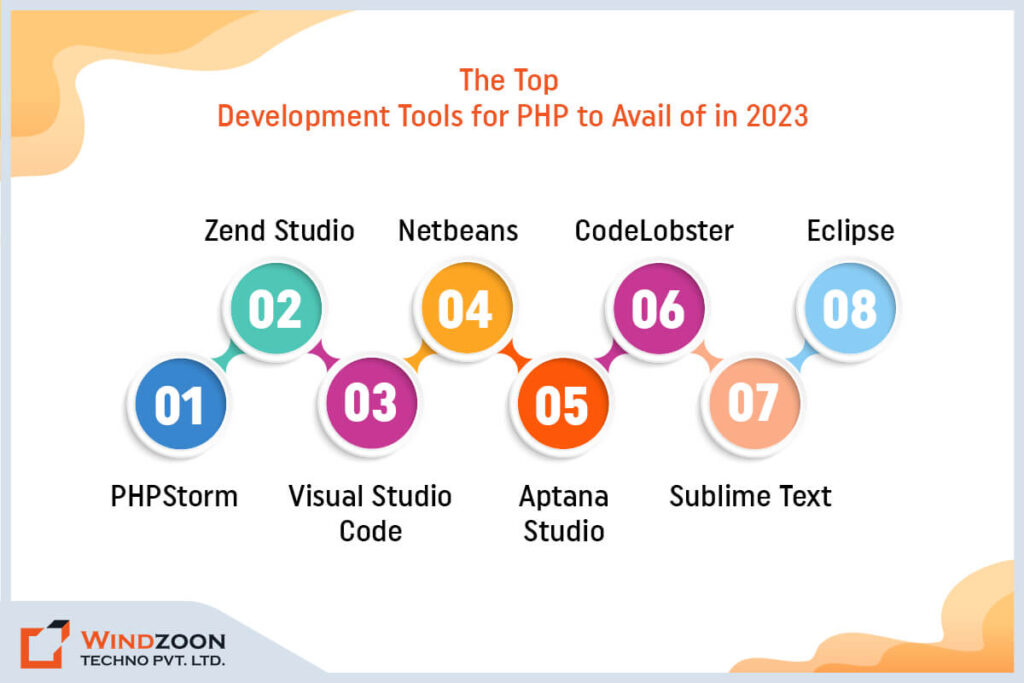
The Top Development Tools for PHP to Avail of in 2023

top-php-development-tools

In this section, we will learn about what tools are used in PHP and how they compare to other PHP development tools available in the market. These tools are designed with a focus on enhancing productivity for PHP developers by streamlining workflows and accelerating development. This in-depth information will help you pick the best PHP development tool that best suits your requirements.

1. PHPStorm

PhpStorm is a popular IDE (Integrated Development Environment) designed specifically for PHP development. It’s developed by JetBrains, a company known for creating high-quality software tools for developers. The php storm IDE is recognized for its comprehensive feature set, supporting PHP frameworks, front-end technologies, database integration, remote deployment, version control, debugging, and other essential development tools.

PHPStorm is jam-packed with features that make it a great choice for developers of all skill levels. Here are some of its significant and exclusive features:

  • Powerful code editing features like code completion, code analysis, and quick fixes, make it easier to write clean and error-free code.
  • You can debug your code with Xdebug, Zend Debugger, and other popular debuggers, including inline debugging.
  • PHPStorm has built-in support for Git, SVN, Mercurial, and other version control systems.
  • Built-in support for various databases, including MySQL, PostgreSQL, and Oracle. This means you can work with your databases directly from the IDE without needing a separate tool.
  • It makes it easy to manage your PHP projects with features like project-wide search & replace, code templates, and live templates.
  • Offers automated refactorings that help you quickly and safely clean up and optimize your code.
  • Support for a wide range of web technologies, including HTML, CSS, JavaScript, and more.
  • Includes project management features to help organize and manage your coding projects efficiently within the IDE.

PHPStorm is highly extensible, allowing developers to enhance its capabilities with various plugins that tailor the IDE to specific project needs.

Now, let’s compare the advantages and disadvantages of PHPStorm:

One notable advantage is that PHPStorm offers a smooth transition for developers moving from other IDEs, with support resources and features that minimize disruptions during migration.

Advantages of PHPStorm

  • Powerful and feature-rich
  • Smart code completion and analysis
  • Debugging capabilities
  • Version control integration
  • Wide range of web technology support

Disadvantages of PHPStorm

  • Paid license required
  • The steep learning curve for beginners
  • Can be resource-intensive
  • Can be overwhelming with too many features
  • Limited customization options

Overall, PHPStorm is an excellent choice for experienced PHP developers who need a robust and powerful tool for their projects.

However, beginners may find it challenging to learn and navigate, and the paid license may not be feasible for those on a tight budget. But if you’re looking for a top-of-the-line PHP development tool, PHPStorm is definitely worth considering.

Some Additional Information:

Platforms supported: Linux, Mac OS X, and Microsoft Windows

Language supported: JavaScript, HTML, and PHP 5.3, 5.4, 5.5, 5.6, and 7.0

Price: USD $249 for the initial year; subsequent use is less expensive.

2. Zend Studio

Zend Studio is a professional Integrated Development Environment (IDE) designed specifically for PHP development. It provides developers with the necessary tools to create, test, and deploy high-quality PHP applications quickly and efficiently.

Zend Studio has a plethora of features that make it an excellent choice for developers of all skill levels. Here are some of its notable and unique features:

  • Code assist and syntax highlighting for PHP, HTML, CSS, and JavaScript
  • Advanced debugging capabilities, including remote debugging and profiling
  • Ability to set breakpoints during debugging to pause code execution and inspect variables
  • Provides detailed stack traces to help diagnose issues by showing the code path leading to errors and exceptions
  • Integration with Git, SVN, and GitHub for version control
  • Support for popular PHP frameworks like Symfony, Laravel, and Zend Framework
  • Code generation and scaffolding to speed up development time
  • Cloud deployment options for easy hosting and management of applications
  • Debugging and profiling tools to identify and resolve bugs quickly
  • Code completion and code formatting features to improve code quality and consistency
  • Integration with Zend Server for efficient deployment and management of PHP applications
  • Ability to work with a variety of databases including MySQL, Oracle, and PostgreSQL
  • Support for testing frameworks such as PHPUnit, Codeception, and Pest, enabling unit testing directly within the IDE

Zend Studio also allows developers to write tests for their PHP applications and measure code coverage, ensuring that unit testing is thorough and effective.

Let’s now evaluate Zend Studio’s advantages and disadvantages:

Advantages of Zend Studio

  • Robust debugging features for finding and fixing errors
  • Seamless integration with popular version control systems
  • Support for popular PHP frameworks and libraries
  • High level of customization and flexibility
  • Cloud deployment options for easy application management

Disadvantages of Zend Studio

  • Expensive licensing costs for a professional version
  • The steep learning curve for beginners
  • Resource-intensive and may require powerful hardware
  • Limited community support compared to other IDEs
  • Not as feature-rich as some other IDEs on the market

Overall, Zend Studio is a powerful and versatile IDE that offers a wide range of features for PHP developers. However, it’s high cost and steep learning curve may make it less accessible for beginners or those on a tight budget.

Nonetheless, it remains a popular choice for professional developers who require advanced debugging and integration capabilities.

Some Additional Information:

Platforms supported: Mac OS, Linux, Windows, and IBM i
Languages supported: JavaScript, PHP, LESS, Sass, CSS, and Markdown.

Price: $89 for personal use and $189 for business use (both are perpetual licenses with a year of free updates). A 30-day free trial is included.

License: PDF of the Zend Studio License.

3. Visual Studio Code

Visual Studio Code is considered to be one of the most prominent code editors on the market. It is a lightweight yet powerful code editor developed by Microsoft for Windows, macOS, and Linux. It comes with a wide range of features and extensions, making it a versatile tool for all kinds of programming projects. Visual Studio Code can also help optimize your development workflow by streamlining tasks such as writing, testing, and deploying code.

The following are some of the main attributes and advantages of Visual Studio Code:

  • Intuitive and customizable user interface
  • Robust debugging capabilities
  • Integration with other version control systems and support for Git
  • A vast marketplace of extensions and add-ons, with options for every language and framework
  • Availability of various plugins to extend functionality and tailor the editor to specific project needs
  • Multi-platform support
  • Live sharing and collaboration capabilities
  • Built-in terminal

Now, let’s compare some of the advantages and disadvantages of Visual Studio Code:

Advantages of Visual Studio Code

  • Free and open-source
  • Lightweight and customizable
  • Large and active community
  • Robust debugging capabilities
  • The extensive marketplace of extensions
  • Cross-platform support
  • Built-in Git integration

Disadvantages of Visual Studio Code

  • Can be slower when working with larger codebases
  • ome users may prefer a more traditional, integrated development environment
  • Some advanced features may require installing extensions
  • Some users may find the user interface overwhelming or confusing
  • Can be resource-intensive
  • Limited support for enterprise-level projects
  • Limited debugging capabilities compared to some other IDEs

All in all, Visual Studio Code is a powerful and versatile tool that can be customized to fit the needs of any developer.

Its active community and vast marketplace of extensions make it a go-to choice for many developers, and its intuitive interface and robust debugging capabilities make it a great option for both beginners and advanced users alike.

Some Additional Information:

Platforms supported: Linux, Microsoft Windows, and Mac OS X.

Languages supported: Java, HandleBars, Ini, Lua, Makefile, Objective-C, Perl, PowerShell, Python, R, Razor, Ruby, Rust, SQL, Visual Basic, Batch, C++, Clojure, CoffeeScript, DockerFile, Elixir, F#, Go, Pug template language and XML.

Price: FREE (MIT License)

4. Netbeans

Netbeans is basically an awesome open-source integrated development environment (IDE) that allows developers to create software using various programming languages such as Java, JavaScript, HTML5, and more. It’s been around since 1997 and has undergone many upgrades since then. NetBeans supports an efficient development workflow by providing tools that streamline writing, testing, and maintaining PHP applications.

Let’s dive into some of the cool things that NetBeans has to offer:

  • It’s cross-platform, meaning you can use it on your Windows, Mac OS, or Linux computer.
  • It has a code refactoring feature that helps you improve your code without changing its behavior.
  • The GUI builder lets you easily create graphical user interfaces for your applications.
  • The built-in debugger helps you find and fix errors in your code.
  • You can integrate NetBeans with popular version control systems like Git, SVN, and Mercurial.
  • NetBeans offers robust project management features, making it easier to organize and manage your coding projects.
  • In addition to Java and PHP, NetBeans supports other languages such as C, C++, HTML, and JavaScript.

Now, let’s talk about the good and the not-so-good things about using NetBeans:

Advantages of Netbeans

  • Works on different operating systems
  • Code refactoring feature
  • GUI builder
  • Built-in debugger
  • Integrates with version control systems

Disadvantages of Netbeans

  • Can take up a lot of memory
  • Might be slow on older computers
  • Not as customizable as some other IDEs
  • Limited support for some languages
  • The steep learning curve for beginners

Moreover, NetBeans is a robust and versatile IDE that provides a range of features to help developers build high-quality software.

While it may not be the best choice for beginners or those working on mobile app development, it is a solid option for developers looking for a free, open-source IDE that supports multiple languages and platforms.

Some Additional Information:

Platforms supported: Linux, Mac OS X, Microsoft Windows, and Solaris

Languages Supported: Java ME & SE, XML, Groovy, JavaScript, HTML5, PHP, C/C++, Javadoc, and JSP

Price: FREE (GPLv2 or CDDL)

5. Aptana Studio

Aptana Studio is a renowned open-source Integrated Development Environment (IDE) for web development. It was first released in 2006 and has since been a popular choice among web developers. Aptana Studio supports various web development languages like HTML, CSS, JavaScript, PHP, and more. It can also assist with database operations for web applications, making it easier to manage and interact with databases during development.

Let’s take a closer look at some of the significant and exclusive features of Aptana Studio:

  • Built-in support for popular web technologies like HTML, CSS, JavaScript, PHP, and Ruby on Rails
  • Integrated Git and SVN version control
  • Open source and has a deployment wizard for RoR
  • Code assist and syntax highlighting for various languages
  • Integrated debugger for JavaScript and Ruby on Rails
  • Built-in terminal and command line support
  • Support for FTP, SFTP, and FTPS file transfer protocols
  • Customizable user interface with multiple themes and plugins
  • Support for integrating web services, enabling seamless communication with APIs and external platforms

Now, let’s compare the advantages and disadvantages of using Aptana Studio:

Advantages of Aptana Studio

  • Supports multiple languages and frameworks
  • Built-in version control and terminal support
  • Customizable interface with multiple themes
  • Integrated debugger for JavaScript and Ruby
  • Open-source and free-to-use
  • Git integration
  • FTP/SFTP support

Disadvantages of Aptana Studio

  • Can be slow on older computers
  • Limited support for some latest web technologies
  • Might not be as beginner-friendly
  • Not as customizable as some other IDEs
  • Some users report stability issues
  • Lack of customer support and documentation
  • Not as widely used or popular as some other IDEs

Basically, Aptana Studio is a solid IDE that is great for web developers who work with multiple languages. Its code assist feature, Git integration, built-in debugger, FTP/SFTP support, and pre-built code templates make it a versatile tool.

However, it might not be the best choice if you have an older computer, or if you’re a beginner looking for a more user-friendly IDE.

Some Additional Information:

Platform supported: Mac OS X, Linux, and Microsoft Windows.

Languages Supported: Ruby on Rails, PHP, Python, Perl, HTML5, CSS3, DOM, JavaScript.

Price: FREE (GPL)

6. CodeLobster

CodeLobster is a free, cross-platform integrated development environment (IDE) that’s designed for web development. It supports a variety of programming languages, including PHP, HTML, CSS, JavaScript, and more. CodeLobster has a simple, intuitive interface that makes it easy for developers to use. It also supports PHP environments, allowing seamless development and testing with any web server that supports PHP.

Here are some of the significant and exclusive features of CodeLobster:

  • CodeLobster automatically highlights and formats code to make it more readable.
  • It includes a library of code snippets that developers can use to speed up their workflow.
  • Built-in PHP debugger for easy debugging of PHP code.
  • Version control integration with Git, SVN, and Mercurial.
  • Built-in FTP client for easy file management.
  • Supports multiple frameworks like CakePHP, CodeIgniter, Laravel, Symfony, and Yii.
  • Intuitive interface with customizable panels and a dark mode option.
  • Tools for managing databases, including integration with popular database management systems.

Now, let’s compare the advantages and disadvantages of using CodeLobster:

Advantages of CodeLobster

  • Supports various programming languages
  • Code highlighting, formatting, and completion
  • Built-in PHP debugger for easy debugging
  • Version control integration with Git, SVN, and Mercurial
  • Built-in FTP client for easy file management
  • Supports multiple frameworks

Disadvantages of CodeLobster

  • Not suitable for large-scale projects
  • Limited plugin support
  • Limited code refactoring options
  • Some features require a paid license
  • Occasional stability issues
  • Limited customer support

In general, CodeLobster is a lightweight and intuitive IDE that is great for small to medium-sized projects. Its built-in features and plugins make it efficient for developers to create quality code.

However, it may not be suitable for large-scale projects due to limited capabilities and plugin support.

Some Additional Information:

Platform Supported: Windows, Linux, and macOS.

Languages Supported: JavaScript, TypeScript, HTML, XML, CSS, Sass, LESS, Node.js, PHP, and SQL

Price: $59.95 for the first year (for a maximum of three devices), $19.95 after that, with a free 30-day trial.

7. Sublime Text

Sublime Text is a popular cross-platform text editor that’s designed for code editing. It was first released in 2008 and has gained a loyal following among developers because of its speed, ease of use, and powerful set of features. Sublime Text is known for its minimalist design and customizable interface.

Here are some of the significant and exclusive features of Sublime Text:

  • Sublime Text allows developers to work with multiple cursors simultaneously, which can save a lot of time when editing code.
  • Its Goto Anything feature allows developers to quickly navigate to files, symbols, or lines of code using keyboard shortcuts.
  • It has the Command Palette that allows developers to access any feature in Sublime Text with just a few keystrokes.
  • Sublime Text has a distraction-free mode that allows developers to focus on their code without any distractions.
  • It has a built-in package manager that makes it easy for developers to install and manage plugins.
  • Sublime Text has a powerful plugin API that allows you to customize and extend its functionality to suit your needs.

Now, let’s compare the advantages and disadvantages of using Sublime Text:

Advantages of Sublime Text

  • Sleek and responsive interface
  • Quick and efficient editing capabilities
  • Wide range of customization options
  • Cross-platform compatibility
  • Multiple cursors
  • Package control for plugins
  • Multiple selection and command palette
  • Powerful plugin API

Disadvantages of Sublime Text

  • Only offers a limited free trial after that paid license required
  • Some users may prefer a more feature-packed IDE
  • No built-in debugger
  • Can be more expensive compared to other text editors
  • Limited user interface customization
  • The steep learning curve for new users
  • Limited support for certain programming languages
  • No integrated terminal

Moreover, Sublime Text is a great choice for developers who value speed, efficiency, and powerful features over a more customizable user interface.

While it may take some time to learn its unique workflow, Sublime Text’s flexibility and extensibility make it a popular choice among experienced developers

Some Additional Information:

Platform Supported: Mac OS X, Linux and MS Windows

Languages Supported: All widely used languages

Price: Sublime costs $80 one time, with a free trial available.

8. Eclipse

Eclipse is an IDE (integrated development environment) that developers use to build software applications. It has existed since 2001 and is still active today. Since it is open-source, anyone can use and modify it for no charge. Eclipse is known for its extensibility, which means it’s easy to add plugins and features to the IDE.

Let’s take a look at some of Eclipse’s significant and exclusive features:

  • Multi-language support, including Java, C++, Python, and more
  • Highly customizable interface with drag-and-drop functionality
  • Advanced code editing, debugging and testing tools, including real-time error reporting and code profiling
  • Integrated development environment for web applications with support for HTML, CSS, and JavaScript
  • Supports PHP development environments, allowing seamless integration with any web server that supports PHP for both GUI and non-GUI web applications
  • Code completion and code refactoring features to streamline coding processes
  • Rich Client Platform as well as supports Tomcat, GlassFish, and other servers & Web Tools Platform.
  • Large and active community support with regular updates and plugins available
  • Integration with popular build systems and version control tools like Maven and Git
  • A modular architecture that allows developers to customize and extend the functionality of the IDE
  • An extensive plugin ecosystem that provides additional features and tools
  • Availability of various plugins to extend Eclipse’s functionality and tailor the IDE to specific project needs

Eclipse’s collaboration features can also facilitate communication and collaboration with non technical stakeholders, making it easier for teams to work together throughout the development process.

Now let’s compare the advantages and disadvantages of using Eclipse:

Advantages of Eclipse

  • Open-source and free-to-use
  • Wide range of programming language support
  • Advanced code editing and debugging tools
  • Modular architecture for customization
  • Integrated debugger
  • Customizable interface
  • Built-in code analysis tools

Disadvantages of Eclipse

  • Can be slow and resource-intensive on older systems
  • Can be overwhelming due to the abundance of features
  • Heavy reliance on plugins for additional functionality
  • Large download size
  • Some plugins may not work with all versions of Eclipse
  • Requires Java to run
  • Limited support for certain programming languages
  • Limited visual design tools for UI development

Overall, Eclipse is a powerful and versatile IDE with a lot of features for developers to use.

However, it can be overwhelming for beginners and may require a bit of a learning curve to become proficient. Additionally, it may be slow on older systems due to its resource-intensive nature.

Nevertheless, its extensive plugin ecosystem and customization options make it a popular choice among developers.

Some Additional Information:

Platform supported: Linux, Mac OS X, Microsoft Windows, and Solaris

Languages supported: PHP, Prolog, Python, R, Ruby, Ruby on Rails, Rust, Scala, Clojure, Groovy, Scheme, Ada, ABAP, C, C++, COBOL, D, Fortran, Haskell, Java, JavaScript, Julia, Lasso, Lua, NATURAL, Perl, and Erlang, LaTeX, Mathematica.

Price: FREE (Eclipse Public License).

And that’s a wrap, folks! We’ve covered eight of the best PHP development tools out there for building top-notch websites. Each of these tools has its strengths and weaknesses, and it’s up to you to decide which one works best for your particular project.

Whether you’re a seasoned developer or just starting out, there’s a PHP development tool on this list that can help you streamline your workflow, catch errors in your code, and build better websites. From NetBeans to Sublime Text, CodeLobster to Eclipse, and Aptana Studio to PhpStorm, these tools offer a range of features and functionality to suit a variety of needs.

If you feel like you need help choosing the best one for your purpose then you can collaborate with any reliable PHP development company.

With 8+ years of experience, Windzoon is a seasoned web app development services provider. Hire PHP developers from us to build avant-garde PHP web solutions tailored to your needs.

To reap the benefits of our services or learn more about them, please reach out to us and get a quote.

What Is a Full-Stack Developer? A Guide to Full-Stack Development

The world is always in search of multi-talented people, Full-Stack developers are one of them. If you are someone who is passionate to display your talent as a developer. Or, you want a wide approaching framework for your business, then Full-Stack development will be an excellent option to choose. Even if you want to outsource this service, then there are multiple Full Stack Development Company in the industry.

This article will educate you about full-stack development skills, which are needed to pick full-stack for your business or as your career.

What Is Full Stack Development?

In this high paced software world, It indicated the development of the front end and back end parts of the website.

The stack is an appropriate analogy to explain the layers implicated in development.

A full-stack website is comprised of all the elements required for the front back end of the development. The accumulation of a stack may involve attributes special for mobile app development.

While few people believe that full-stack developers are jack of all trades, masters of none. You must comprehend that these creators are usually experts of technologies, and known with the rest of other frameworks.

Who is a Full-Stack Developer?

There are many tools, applications & websites that are user friendly & offers a flawless user experience. There’s a lot that happens in the backend to make it perfect. For example: when we use any social media platform; we can refresh the whole feed just by reloading it. This attribute is boosted with the support of backend frameworks.

A Full Stack Designer is connected with the development of any website or application from beginning to end. He develops the front & backend of an app while assuring its efficiency, trustworthiness, and additional essential attributes.

What is Front-End Development?

Everything you detect on a website is constructed by a frontend developer. It is his responsibility to carry forward the concept and layout and execute it via code.

As said above, he mainly has to do with controlling what the visitor interacts with and glimpse in an application.

Maintaining web pages or apps that are effortlessly navigable and attractive is crucial for visitors to continue using your software.

HTML & CSS are two of the main technologies for any web page. HTML specifies the formation of a web page, and CSS controls the graphical formation. JavaScript is a coding language created for vibrant web pages.

Multiple JavaScript frameworks also live to speed up and facilitate the development procedure. Likewise, there are many technologies that support HTML and CSS.

What is Back-End Development?

Back-end development controls everything that the visitor generally cannot glimpse. Backend Developers play a crucial role that goes behind the scenes. But their job ensures the functionality of each software task.

Whatever front-end technology is constructed for visitors to visualize, back-end designers are looking out from backstage to direct these attributes with their code.

Back-end development would implicate languages that function well when it comes to servers like Python or C++. Particularly Node.js is mostly the choice of back-end developers.

Skills that a Full-Stack Developer have

A Full-Stack Designer skillset is the collection of both Frontend and Backend Developer talents. This is an occupation, where the developers are highly valued by companies in the domain of development.

They mainly can be addressed as mobile developers, front-end developers and back-end developers.

Whether you are aspiring to become a full-stack developer or want a full-stack developer for your business. Then it is vital to get knowledge about the subsequent skills:

1) Front-end technology

Full-stack developers must be experts in basic front-end technologies like HTML, CSS, & JavaScript. He should also know other third-party libraries.

2) Hosting system

The hosting system involves a computer’s operating system along with some supportive devices like DNS, email, Apache and SSH.

A Full-stack developer should have basic knowledge of the same.

3) Application Stack

The web developer must have knowledge of servers like IIS and Apache, with a few of the relational databases like Oracle. The vibrant server-side coding languages include Ruby, Python, NodeJS.

4) Web development

This unit incorporates multiple frameworks associated with Django, Agavi along with numerous models like SQL Alchemy, Propel.

A few of the front-end development incorporated in this are HTML, CSS, JavaScript.

Read our previous blog to know a step to step guide on becoming a Web Developer

5) Design Skills

A responsive format enables a business to launch its brand in the market. A Full Stack Developer should have knowledge of designing & its aspects. Developers should be mindful of primary design strategies as it is essential for developing uncluttered and user-friendly sites that impress visitors.

Kinds of Full Stacks

A stack is a mechanism of clarifying the diverse technologies to inculcate into a development task.

A few widespread tech stacks are described below:

1) LAMP Stack

It is a broadly utilised model for website stacks.
LAMP is an acronym of 4 open-source elements.

  • L= Linux: It is an open-source operating system
  • A= Apache: Boardly operated webserver software
  • M= MySQL: Widespread open-source database
  • P=PHP: Server with open-source scripting terminology

Multiple widespread websites and applications are operated on a LAMP stack, for instance, “Facebook”.

2) MERN Stack

It is a group of JavaScript-based technologies:

  • M=MongoDB: It is a famous NoSQL database
  • E=Express: It is a light and portative web framework
  • R=React: It is basically a javascript library for constructing user-friendly interfaces
  • N=Node.js: It is an open-source JavaScript runtime constructed on chrome.

This stack is presently in a huge demand, it is mainly used to create applications.

3) MEAN Stack

This stack is a growing trend, it is an open-source that is used to develop applications.

  • M = MongoDB: It is a cross-platform record oriented program
  • E = Express: It is easy to utilize portable web framework
  • A = Angular.js: It is a strong framework for creating HTML & JavaScript programs.
  • N = Node.is: It is an open-source JavaScript runtime constructed on chrome.

Why hire Full-Stack Development for your business?

Businesses like to Hire Full Stack Developers based on the concerns that an individual full stack developer can analyse for them. A full-stack designer has the benefit over the other creators as they can decode multiple issues.

A startup needs developers that can effortlessly perform on an expansive spectrum of programming assignments. With an undersized team, a startup consistently desires to employ a full-stack developer who can effortlessly work on multiple frameworks. He can construct an expansive range of web & app development tasks that different designers cannot.

Read our insightful blog, to know Importance of hiring a web development company

Why choose Full-Stack Development for your career?

Full-stack developers have achieved global rage and demand with the amount of versatility IT skills they have. These IT ninjas oversee the industry in their class, even though their job & duties make them unusual. Full-stack development is always a great option to pick as a career. Many people believe that it is a dying profession, but it carries enormous demand in the industry.

Full-stack designers are experts in their niche. Their knowledge and understanding of the whole stack of software enable them to dive into anything that comes to them. It is an assured career with great growth, impressive salary, and craftwork that brags real talent.

Conclusion

May it is for the establishment of a victorious career or someone who wants one in their team, a Full-Stack development should indeed be a pick.

A Full-Stack Developer can construct an app end-to-end, do the trial and deploy codes, cache data utilising MongoDB, and a lot more.

At Windzoon, We cater to all the essential craftworks associated with web & app development. We hope this article helped you know more about a full-stack developer. If you have any requirements, feedback, or queries on the topic, kindly drop us an email on [email protected] or drop a comment. And if you are looking for the best development assistance then Hire Remote Full Stack Developers from us.