Have you ever spent hours working on a website, only to be left with a mediocre result? As a developer or IT company owner, you know that building exceptional websites requires the right tools. Read more about the importance of websites for your small business growth.
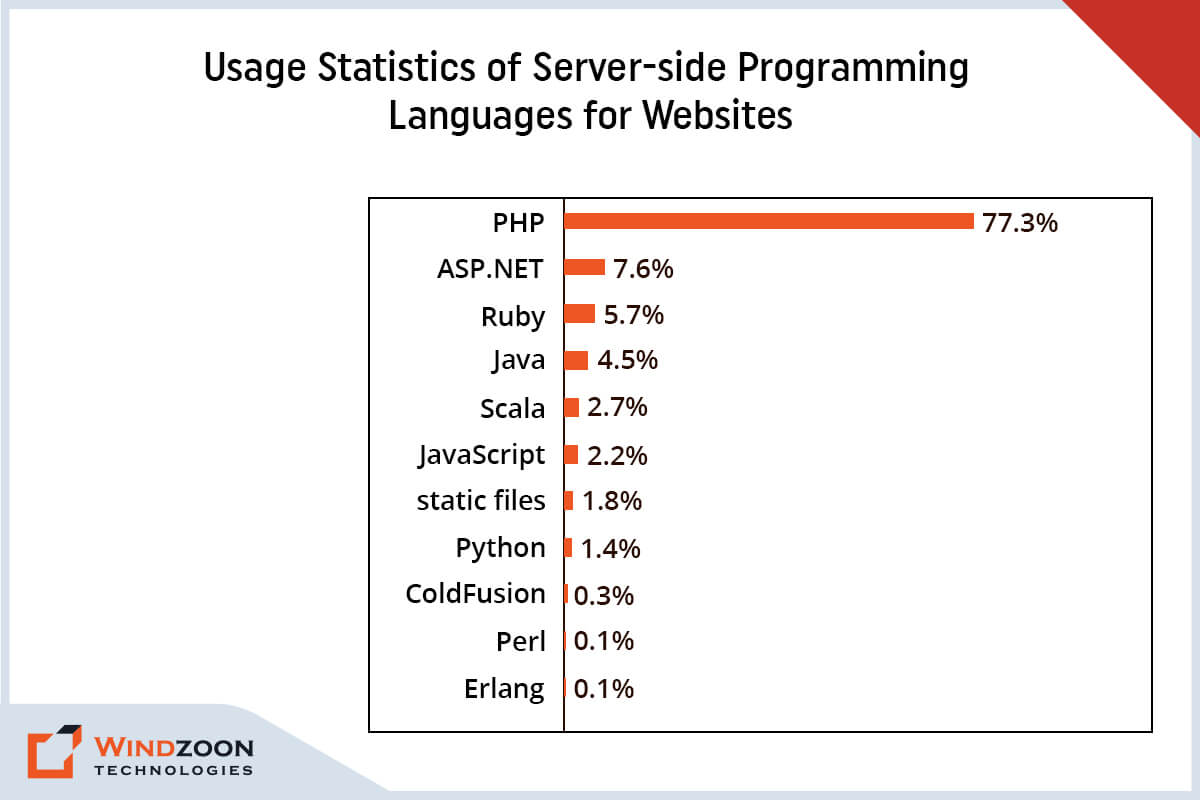
PHP, which stands for “hypertext preprocessor,” is a popular server-side scripting language designed for web development. It enables dynamic content generation and robust backend functionality. And currently, in the web development market, PHP has the best web development tools. It is used by 77.5% of websites around the world. This widespread adoption is supported by a large community and an active developer community, making it easier to find support, resources, and learning opportunities.
With the help of a PHP development company and the right php development tools, you can create a website that not only looks beautiful but also performs flawlessly. Developers often use a php framework to build complex and scalable applications efficiently. In this article, we’ll take you on a journey through the 10 best PHP development tools that will help you develop top-notch websites in 2023.
So sit back, grab a cup of coffee, and get ready to have an answer to the very first question, that is:
What Type of Technology is PHP?
PHP is a super useful programming language that’s perfect for web development. It’s been around since the mid-90s (yep, that’s right – it’s been around longer than some of us have been alive!) and it’s still going strong today. So what makes PHP so great?
Well, for starters, it’s super easy to learn. Even if you’re a total coding newbie, you can pick up the basics of PHP pretty quickly. And once you’ve got the hang of it, you can use it to build all sorts of cool stuff – from simple websites to complex web applications.
Currently, there are around 86,868,821 PHP-powered websites all over the world.
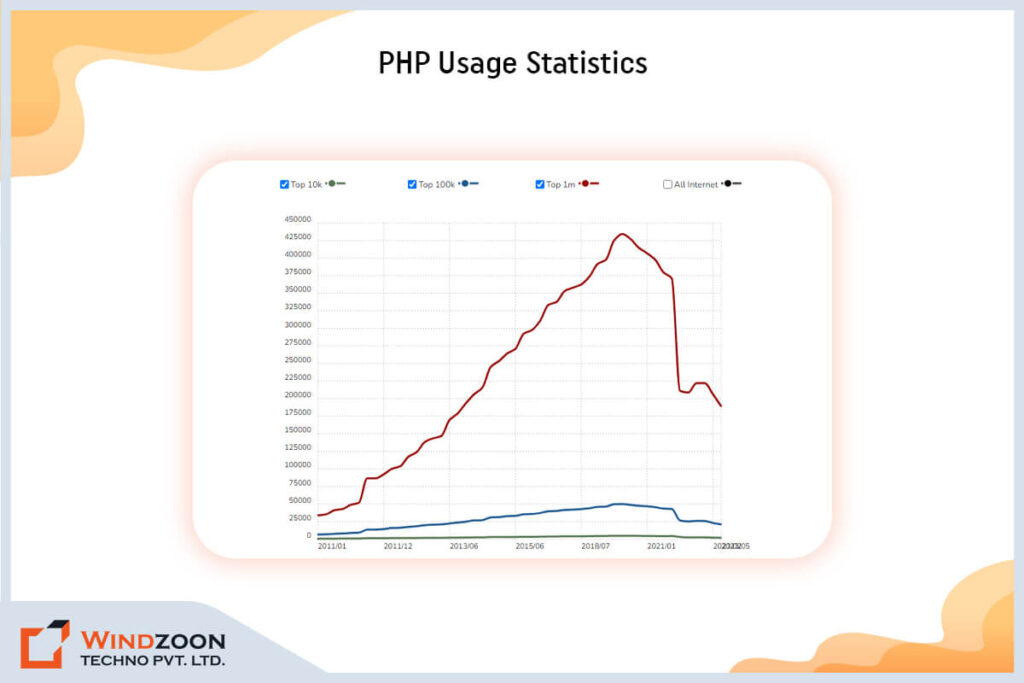
One of the things that sets PHP apart from other programming languages is its ability to work with databases. If you’re building a website that needs to store and retrieve data (like user profiles, blog posts, or product information), PHP can help you do that.
It’s also great for creating dynamic content that changes based on user input or other factors.
Another awesome thing about PHP is that it’s open-source, which means that anyone can use it and contribute to its development.
This has helped to create a huge community of developers who are constantly improving and expanding the language.
To make the most of PHP’s features and streamline your workflow, developers often rely on various PHP tools that assist with database management, security, code quality, and productivity.
However, to build a website using PHP, you would need the appropriate PHP development tool, and that becomes our very next question.
Read More: PHP vs WordPress: Which is Better for Your Business?
What is the PHP Development Tool
PHP development tools are like superheroes for developers, swooping in to save the day and make their lives so much easier. They come in all shapes and sizes, from simple text editors to fancy IDEs with all the bells and whistles, like code highlighting, autocomplete, and debugging. Many PHP development tools come with robust features that enhance productivity and code quality, making them essential for modern web development.
You’ve probably heard of some of the most popular PHP development tools out there, like Visual Studio Code, PhpStorm, and Sublime Text.
So what’s the point of these tools?
Well, they’re designed to make the process of developing PHP applications faster, easier, and more efficient by simplifying tasks for developers at every stage of the workflow.
With the help of these shining stars, you can spot errors in a flash, write code like a boss, and manage big, complex projects without breaking a sweat.
Whether you’re a newbie or a seasoned pro, using a PHP development tool is an absolute game-changer. If you’re working with PHP and not taking advantage of one of these tools, you’re seriously missing out.
So check out the next question to find out the best way to choose the right PHP development tools.
Setting up a PHP Development Environment
Before you can dive into building powerful PHP web applications, it’s essential to set up a robust PHP development environment. A well-configured environment not only helps PHP developers write and test PHP code efficiently but also streamlines the entire development process, from initial coding to final deployment.
The foundation of any PHP development environment includes a few essential tools:
- Code Editor or IDE: Choosing the right code editor or Integrated Development Environment (IDE) is the first step. Tools like Visual Studio Code, PHPStorm, and Sublime Text are popular among PHP developers for their advanced features such as syntax highlighting, code completion, and integrated debugging. These tools make it easier to write clean, efficient PHP code and manage your web projects effectively.
- Web Server: To run and test your PHP web applications locally, you’ll need a web server. Apache and Nginx are the most commonly used web servers in PHP development. Many developers opt for all-in-one packages like XAMPP, WAMP, or MAMP, which bundle a web server, PHP, and a database management system into a single, easy-to-install package. This setup allows you to simulate a live server environment on your local machine, making it simple to test and debug your PHP web projects before going live.
- Database Management System: Most dynamic web applications require a database to store and retrieve data. MySQL and MariaDB are widely used with PHP, but you can also use PostgreSQL or SQLite depending on your project needs. Effective database management is crucial for handling user data, content, and other information within your PHP web applications.
By combining these essential tools, PHP developers can create a seamless development environment that supports the entire lifecycle of a PHP application. Whether you’re building a simple website or a complex web application, having the right setup ensures you can write, test, and deploy your PHP code with confidence. Plus, a well-organized development environment helps reduce errors, improve code quality, and makes collaboration with other developers much smoother.
Setting up your PHP development environment might seem daunting at first, but with the right tools and a bit of practice, you’ll be ready to tackle any PHP project that comes your way!
Setting up a PHP Development Environment
Before you can dive into building powerful PHP web applications, it’s essential to set up a robust PHP development environment. A well-configured environment not only helps PHP developers write and test PHP code efficiently but also streamlines the entire development process, from initial coding to final deployment.
The foundation of any PHP development environment includes a few essential tools:
- Code Editor or IDE: Choosing the right code editor or Integrated Development Environment (IDE) is the first step. Tools like Visual Studio Code, PHPStorm, and Sublime Text are popular among PHP developers for their advanced features such as syntax highlighting, code completion, and integrated debugging. These tools make it easier to write clean, efficient PHP code and manage your web projects effectively.
- Web Server: To run and test your PHP web applications locally, you’ll need a web server. Apache and Nginx are the most commonly used web servers in PHP development. Many developers opt for all-in-one packages like XAMPP, WAMP, or MAMP, which bundle a web server, PHP, and a database management system into a single, easy-to-install package. This setup allows you to simulate a live server environment on your local machine, making it simple to test and debug your PHP web projects before going live.
- Database Management System: Most dynamic web applications require a database to store and retrieve data. MySQL and MariaDB are widely used with PHP, but you can also use PostgreSQL or SQLite depending on your project needs. Effective database management is crucial for handling user data, content, and other information within your PHP web applications.
By combining these essential tools, PHP developers can create a seamless development environment that supports the entire lifecycle of a PHP application. Whether you’re building a simple website or a complex web application, having the right setup ensures you can write, test, and deploy your PHP code with confidence. Plus, a well-organized development environment helps reduce errors, improve code quality, and makes collaboration with other developers much smoother.
Setting up your PHP development environment might seem daunting at first, but with the right tools and a bit of practice, you’ll be ready to tackle any PHP project that comes your way!
How to Choose the Right Tools for PHP Development?
Sometimes choosing the right tools for PHP development can be a bit of a challenge, but fear not – I’ve got some tips to help you out. First things first, think about your own skill level and what you’re trying to accomplish. Before selecting a tool, carefully evaluate your project requirements to ensure the tool aligns with the needs and scope of your development project. If you’re a beginner, you might want to stick with a simpler text editor with basic features. On the other hand, if you’re a pro with a big, complex project to tackle, you’ll probably want an IDE with all the bells and whistles.
Next up, consider what features are most important to you. Are you looking for something with great code highlighting and autocomplete, or do you need more advanced debugging capabilities? The right tools can also help streamline your development workflow, making it easier to write, test, and deploy your PHP applications. Create a list of the features you must have, then use it to direct your search.
Another essential factor you should think about is your budget. Some PHP development tools are free, while others require a paid license. Determine the amount you’re willing to spend, then go forward from there.
When choosing PHP development tools, pay attention to whether they support coding standards and offer comprehensive documentation. Adhering to coding standards ensures code quality and security, while comprehensive documentation simplifies the development process and provides valuable resources.
Lastly, don’t be afraid to try out different tools until you find the one that works best for you. Many PHP development tools offer free trials or have a free, basic version, so take advantage of those opportunities to test the waters. Remember, the choice of tool can significantly impact the success of your development project.
Choosing the right tools for PHP development might take a bit of trial and error, but with a little research and experimentation, you’ll be well on your way to finding the perfect fit. If you still need help then you can consult any experienced PHP web development company
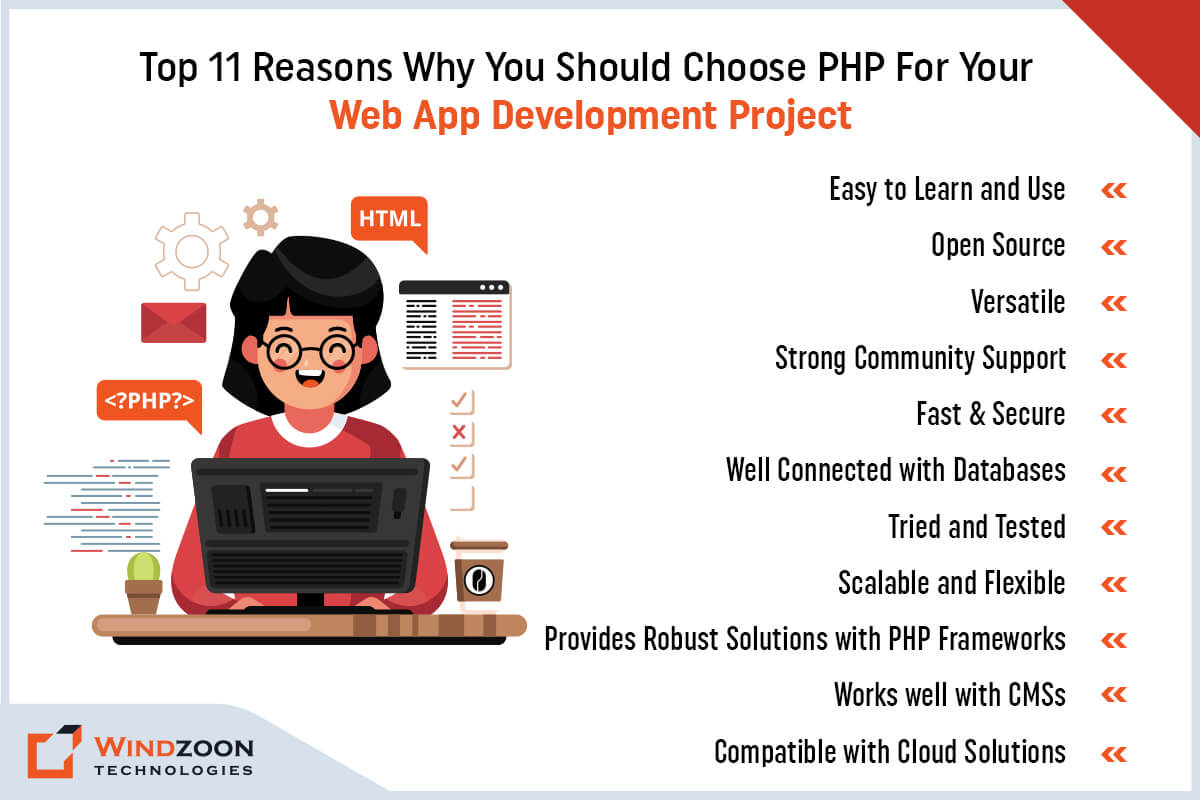
Read More: Top 11 Reasons to Choose PHP for Your Web App Development Needs
With this, we have reached the most interesting part of this article, which is:
The Top Development Tools for PHP to Avail of in 2023
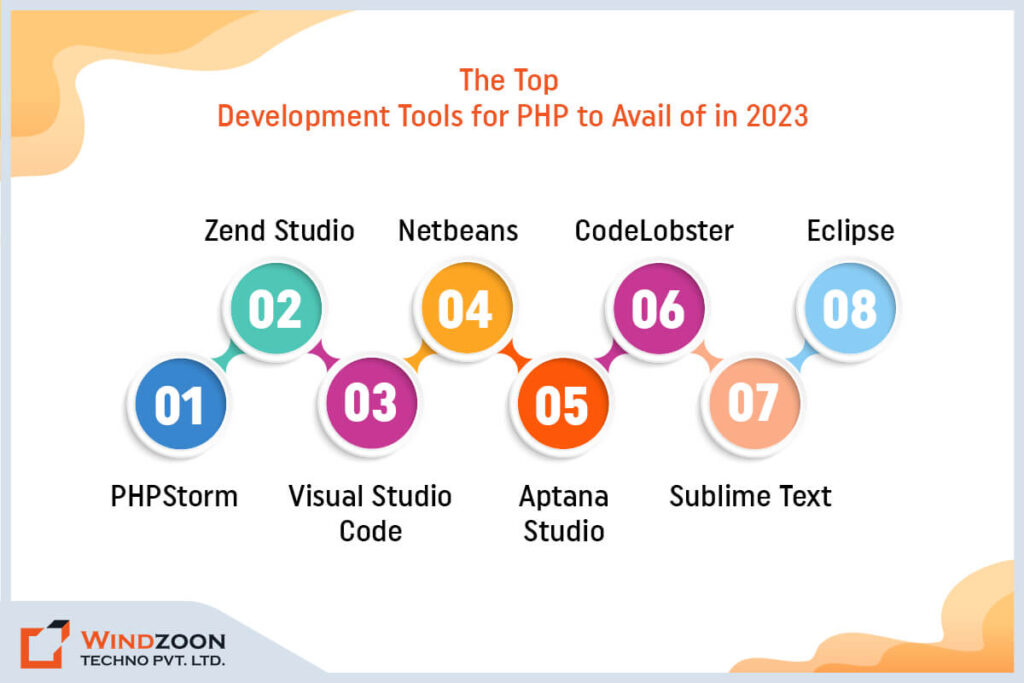
In this section, we will learn about what tools are used in PHP and how they compare to other PHP development tools available in the market. These tools are designed with a focus on enhancing productivity for PHP developers by streamlining workflows and accelerating development. This in-depth information will help you pick the best PHP development tool that best suits your requirements.
1. PHPStorm
PhpStorm is a popular IDE (Integrated Development Environment) designed specifically for PHP development. It’s developed by JetBrains, a company known for creating high-quality software tools for developers. The php storm IDE is recognized for its comprehensive feature set, supporting PHP frameworks, front-end technologies, database integration, remote deployment, version control, debugging, and other essential development tools.
PHPStorm is jam-packed with features that make it a great choice for developers of all skill levels. Here are some of its significant and exclusive features:
- Powerful code editing features like code completion, code analysis, and quick fixes, make it easier to write clean and error-free code.
- You can debug your code with Xdebug, Zend Debugger, and other popular debuggers, including inline debugging.
- PHPStorm has built-in support for Git, SVN, Mercurial, and other version control systems.
- Built-in support for various databases, including MySQL, PostgreSQL, and Oracle. This means you can work with your databases directly from the IDE without needing a separate tool.
- It makes it easy to manage your PHP projects with features like project-wide search & replace, code templates, and live templates.
- Offers automated refactorings that help you quickly and safely clean up and optimize your code.
- Support for a wide range of web technologies, including HTML, CSS, JavaScript, and more.
- Includes project management features to help organize and manage your coding projects efficiently within the IDE.
PHPStorm is highly extensible, allowing developers to enhance its capabilities with various plugins that tailor the IDE to specific project needs.
Now, let’s compare the advantages and disadvantages of PHPStorm:
One notable advantage is that PHPStorm offers a smooth transition for developers moving from other IDEs, with support resources and features that minimize disruptions during migration.
Advantages of PHPStorm
- Powerful and feature-rich
- Smart code completion and analysis
- Debugging capabilities
- Version control integration
- Wide range of web technology support
Disadvantages of PHPStorm
- Paid license required
- The steep learning curve for beginners
- Can be resource-intensive
- Can be overwhelming with too many features
- Limited customization options
Overall, PHPStorm is an excellent choice for experienced PHP developers who need a robust and powerful tool for their projects.
However, beginners may find it challenging to learn and navigate, and the paid license may not be feasible for those on a tight budget. But if you’re looking for a top-of-the-line PHP development tool, PHPStorm is definitely worth considering.
Some Additional Information:
Platforms supported: Linux, Mac OS X, and Microsoft Windows
Language supported: JavaScript, HTML, and PHP 5.3, 5.4, 5.5, 5.6, and 7.0
Price: USD $249 for the initial year; subsequent use is less expensive.
2. Zend Studio
Zend Studio is a professional Integrated Development Environment (IDE) designed specifically for PHP development. It provides developers with the necessary tools to create, test, and deploy high-quality PHP applications quickly and efficiently.
Zend Studio has a plethora of features that make it an excellent choice for developers of all skill levels. Here are some of its notable and unique features:
- Code assist and syntax highlighting for PHP, HTML, CSS, and JavaScript
- Advanced debugging capabilities, including remote debugging and profiling
- Ability to set breakpoints during debugging to pause code execution and inspect variables
- Provides detailed stack traces to help diagnose issues by showing the code path leading to errors and exceptions
- Integration with Git, SVN, and GitHub for version control
- Support for popular PHP frameworks like Symfony, Laravel, and Zend Framework
- Code generation and scaffolding to speed up development time
- Cloud deployment options for easy hosting and management of applications
- Debugging and profiling tools to identify and resolve bugs quickly
- Code completion and code formatting features to improve code quality and consistency
- Integration with Zend Server for efficient deployment and management of PHP applications
- Ability to work with a variety of databases including MySQL, Oracle, and PostgreSQL
- Support for testing frameworks such as PHPUnit, Codeception, and Pest, enabling unit testing directly within the IDE
Zend Studio also allows developers to write tests for their PHP applications and measure code coverage, ensuring that unit testing is thorough and effective.
Let’s now evaluate Zend Studio’s advantages and disadvantages:
Advantages of Zend Studio
- Robust debugging features for finding and fixing errors
- Seamless integration with popular version control systems
- Support for popular PHP frameworks and libraries
- High level of customization and flexibility
- Cloud deployment options for easy application management
Disadvantages of Zend Studio
- Expensive licensing costs for a professional version
- The steep learning curve for beginners
- Resource-intensive and may require powerful hardware
- Limited community support compared to other IDEs
- Not as feature-rich as some other IDEs on the market
Overall, Zend Studio is a powerful and versatile IDE that offers a wide range of features for PHP developers. However, it’s high cost and steep learning curve may make it less accessible for beginners or those on a tight budget.
Nonetheless, it remains a popular choice for professional developers who require advanced debugging and integration capabilities.
Some Additional Information:
Platforms supported: Mac OS, Linux, Windows, and IBM i
Languages supported: JavaScript, PHP, LESS, Sass, CSS, and Markdown.
Price: $89 for personal use and $189 for business use (both are perpetual licenses with a year of free updates). A 30-day free trial is included.
License: PDF of the Zend Studio License.
3. Visual Studio Code
Visual Studio Code is considered to be one of the most prominent code editors on the market. It is a lightweight yet powerful code editor developed by Microsoft for Windows, macOS, and Linux. It comes with a wide range of features and extensions, making it a versatile tool for all kinds of programming projects. Visual Studio Code can also help optimize your development workflow by streamlining tasks such as writing, testing, and deploying code.
The following are some of the main attributes and advantages of Visual Studio Code:
- Intuitive and customizable user interface
- Robust debugging capabilities
- Integration with other version control systems and support for Git
- A vast marketplace of extensions and add-ons, with options for every language and framework
- Availability of various plugins to extend functionality and tailor the editor to specific project needs
- Multi-platform support
- Live sharing and collaboration capabilities
- Built-in terminal
Now, let’s compare some of the advantages and disadvantages of Visual Studio Code:
Advantages of Visual Studio Code
- Free and open-source
- Lightweight and customizable
- Large and active community
- Robust debugging capabilities
- The extensive marketplace of extensions
- Cross-platform support
- Built-in Git integration
Disadvantages of Visual Studio Code
- Can be slower when working with larger codebases
- ome users may prefer a more traditional, integrated development environment
- Some advanced features may require installing extensions
- Some users may find the user interface overwhelming or confusing
- Can be resource-intensive
- Limited support for enterprise-level projects
- Limited debugging capabilities compared to some other IDEs
All in all, Visual Studio Code is a powerful and versatile tool that can be customized to fit the needs of any developer.
Its active community and vast marketplace of extensions make it a go-to choice for many developers, and its intuitive interface and robust debugging capabilities make it a great option for both beginners and advanced users alike.
Some Additional Information:
Platforms supported: Linux, Microsoft Windows, and Mac OS X.
Languages supported: Java, HandleBars, Ini, Lua, Makefile, Objective-C, Perl, PowerShell, Python, R, Razor, Ruby, Rust, SQL, Visual Basic, Batch, C++, Clojure, CoffeeScript, DockerFile, Elixir, F#, Go, Pug template language and XML.
Price: FREE (MIT License)
4. Netbeans
Netbeans is basically an awesome open-source integrated development environment (IDE) that allows developers to create software using various programming languages such as Java, JavaScript, HTML5, and more. It’s been around since 1997 and has undergone many upgrades since then. NetBeans supports an efficient development workflow by providing tools that streamline writing, testing, and maintaining PHP applications.
Let’s dive into some of the cool things that NetBeans has to offer:
- It’s cross-platform, meaning you can use it on your Windows, Mac OS, or Linux computer.
- It has a code refactoring feature that helps you improve your code without changing its behavior.
- The GUI builder lets you easily create graphical user interfaces for your applications.
- The built-in debugger helps you find and fix errors in your code.
- You can integrate NetBeans with popular version control systems like Git, SVN, and Mercurial.
- NetBeans offers robust project management features, making it easier to organize and manage your coding projects.
- In addition to Java and PHP, NetBeans supports other languages such as C, C++, HTML, and JavaScript.
Now, let’s talk about the good and the not-so-good things about using NetBeans:
Advantages of Netbeans
- Works on different operating systems
- Code refactoring feature
- GUI builder
- Built-in debugger
- Integrates with version control systems
Disadvantages of Netbeans
- Can take up a lot of memory
- Might be slow on older computers
- Not as customizable as some other IDEs
- Limited support for some languages
- The steep learning curve for beginners
Moreover, NetBeans is a robust and versatile IDE that provides a range of features to help developers build high-quality software.
While it may not be the best choice for beginners or those working on mobile app development, it is a solid option for developers looking for a free, open-source IDE that supports multiple languages and platforms.
Some Additional Information:
Platforms supported: Linux, Mac OS X, Microsoft Windows, and Solaris
Languages Supported: Java ME & SE, XML, Groovy, JavaScript, HTML5, PHP, C/C++, Javadoc, and JSP
Price: FREE (GPLv2 or CDDL)
5. Aptana Studio
Aptana Studio is a renowned open-source Integrated Development Environment (IDE) for web development. It was first released in 2006 and has since been a popular choice among web developers. Aptana Studio supports various web development languages like HTML, CSS, JavaScript, PHP, and more. It can also assist with database operations for web applications, making it easier to manage and interact with databases during development.
Let’s take a closer look at some of the significant and exclusive features of Aptana Studio:
- Built-in support for popular web technologies like HTML, CSS, JavaScript, PHP, and Ruby on Rails
- Integrated Git and SVN version control
- Open source and has a deployment wizard for RoR
- Code assist and syntax highlighting for various languages
- Integrated debugger for JavaScript and Ruby on Rails
- Built-in terminal and command line support
- Support for FTP, SFTP, and FTPS file transfer protocols
- Customizable user interface with multiple themes and plugins
- Support for integrating web services, enabling seamless communication with APIs and external platforms
Now, let’s compare the advantages and disadvantages of using Aptana Studio:
Advantages of Aptana Studio
- Supports multiple languages and frameworks
- Built-in version control and terminal support
- Customizable interface with multiple themes
- Integrated debugger for JavaScript and Ruby
- Open-source and free-to-use
- Git integration
- FTP/SFTP support
Disadvantages of Aptana Studio
- Can be slow on older computers
- Limited support for some latest web technologies
- Might not be as beginner-friendly
- Not as customizable as some other IDEs
- Some users report stability issues
- Lack of customer support and documentation
- Not as widely used or popular as some other IDEs
Basically, Aptana Studio is a solid IDE that is great for web developers who work with multiple languages. Its code assist feature, Git integration, built-in debugger, FTP/SFTP support, and pre-built code templates make it a versatile tool.
However, it might not be the best choice if you have an older computer, or if you’re a beginner looking for a more user-friendly IDE.
Some Additional Information:
Platform supported: Mac OS X, Linux, and Microsoft Windows.
Languages Supported: Ruby on Rails, PHP, Python, Perl, HTML5, CSS3, DOM, JavaScript.
Price: FREE (GPL)
6. CodeLobster
CodeLobster is a free, cross-platform integrated development environment (IDE) that’s designed for web development. It supports a variety of programming languages, including PHP, HTML, CSS, JavaScript, and more. CodeLobster has a simple, intuitive interface that makes it easy for developers to use. It also supports PHP environments, allowing seamless development and testing with any web server that supports PHP.
Here are some of the significant and exclusive features of CodeLobster:
- CodeLobster automatically highlights and formats code to make it more readable.
- It includes a library of code snippets that developers can use to speed up their workflow.
- Built-in PHP debugger for easy debugging of PHP code.
- Version control integration with Git, SVN, and Mercurial.
- Built-in FTP client for easy file management.
- Supports multiple frameworks like CakePHP, CodeIgniter, Laravel, Symfony, and Yii.
- Intuitive interface with customizable panels and a dark mode option.
- Tools for managing databases, including integration with popular database management systems.
Now, let’s compare the advantages and disadvantages of using CodeLobster:
Advantages of CodeLobster
- Supports various programming languages
- Code highlighting, formatting, and completion
- Built-in PHP debugger for easy debugging
- Version control integration with Git, SVN, and Mercurial
- Built-in FTP client for easy file management
- Supports multiple frameworks
Disadvantages of CodeLobster
- Not suitable for large-scale projects
- Limited plugin support
- Limited code refactoring options
- Some features require a paid license
- Occasional stability issues
- Limited customer support
In general, CodeLobster is a lightweight and intuitive IDE that is great for small to medium-sized projects. Its built-in features and plugins make it efficient for developers to create quality code.
However, it may not be suitable for large-scale projects due to limited capabilities and plugin support.
Some Additional Information:
Platform Supported: Windows, Linux, and macOS.
Languages Supported: JavaScript, TypeScript, HTML, XML, CSS, Sass, LESS, Node.js, PHP, and SQL
Price: $59.95 for the first year (for a maximum of three devices), $19.95 after that, with a free 30-day trial.
7. Sublime Text
Sublime Text is a popular cross-platform text editor that’s designed for code editing. It was first released in 2008 and has gained a loyal following among developers because of its speed, ease of use, and powerful set of features. Sublime Text is known for its minimalist design and customizable interface.
Here are some of the significant and exclusive features of Sublime Text:
- Sublime Text allows developers to work with multiple cursors simultaneously, which can save a lot of time when editing code.
- Its Goto Anything feature allows developers to quickly navigate to files, symbols, or lines of code using keyboard shortcuts.
- It has the Command Palette that allows developers to access any feature in Sublime Text with just a few keystrokes.
- Sublime Text has a distraction-free mode that allows developers to focus on their code without any distractions.
- It has a built-in package manager that makes it easy for developers to install and manage plugins.
- Sublime Text has a powerful plugin API that allows you to customize and extend its functionality to suit your needs.
Now, let’s compare the advantages and disadvantages of using Sublime Text:
Advantages of Sublime Text
- Sleek and responsive interface
- Quick and efficient editing capabilities
- Wide range of customization options
- Cross-platform compatibility
- Multiple cursors
- Package control for plugins
- Multiple selection and command palette
- Powerful plugin API
Disadvantages of Sublime Text
- Only offers a limited free trial after that paid license required
- Some users may prefer a more feature-packed IDE
- No built-in debugger
- Can be more expensive compared to other text editors
- Limited user interface customization
- The steep learning curve for new users
- Limited support for certain programming languages
- No integrated terminal
Moreover, Sublime Text is a great choice for developers who value speed, efficiency, and powerful features over a more customizable user interface.
While it may take some time to learn its unique workflow, Sublime Text’s flexibility and extensibility make it a popular choice among experienced developers
Some Additional Information:
Platform Supported: Mac OS X, Linux and MS Windows
Languages Supported: All widely used languages
Price: Sublime costs $80 one time, with a free trial available.
8. Eclipse
Eclipse is an IDE (integrated development environment) that developers use to build software applications. It has existed since 2001 and is still active today. Since it is open-source, anyone can use and modify it for no charge. Eclipse is known for its extensibility, which means it’s easy to add plugins and features to the IDE.
Let’s take a look at some of Eclipse’s significant and exclusive features:
- Multi-language support, including Java, C++, Python, and more
- Highly customizable interface with drag-and-drop functionality
- Advanced code editing, debugging and testing tools, including real-time error reporting and code profiling
- Integrated development environment for web applications with support for HTML, CSS, and JavaScript
- Supports PHP development environments, allowing seamless integration with any web server that supports PHP for both GUI and non-GUI web applications
- Code completion and code refactoring features to streamline coding processes
- Rich Client Platform as well as supports Tomcat, GlassFish, and other servers & Web Tools Platform.
- Large and active community support with regular updates and plugins available
- Integration with popular build systems and version control tools like Maven and Git
- A modular architecture that allows developers to customize and extend the functionality of the IDE
- An extensive plugin ecosystem that provides additional features and tools
- Availability of various plugins to extend Eclipse’s functionality and tailor the IDE to specific project needs
Eclipse’s collaboration features can also facilitate communication and collaboration with non technical stakeholders, making it easier for teams to work together throughout the development process.
Now let’s compare the advantages and disadvantages of using Eclipse:
Advantages of Eclipse
- Open-source and free-to-use
- Wide range of programming language support
- Advanced code editing and debugging tools
- Modular architecture for customization
- Integrated debugger
- Customizable interface
- Built-in code analysis tools
Disadvantages of Eclipse
- Can be slow and resource-intensive on older systems
- Can be overwhelming due to the abundance of features
- Heavy reliance on plugins for additional functionality
- Large download size
- Some plugins may not work with all versions of Eclipse
- Requires Java to run
- Limited support for certain programming languages
- Limited visual design tools for UI development
Overall, Eclipse is a powerful and versatile IDE with a lot of features for developers to use.
However, it can be overwhelming for beginners and may require a bit of a learning curve to become proficient. Additionally, it may be slow on older systems due to its resource-intensive nature.
Nevertheless, its extensive plugin ecosystem and customization options make it a popular choice among developers.
Some Additional Information:
Platform supported: Linux, Mac OS X, Microsoft Windows, and Solaris
Languages supported: PHP, Prolog, Python, R, Ruby, Ruby on Rails, Rust, Scala, Clojure, Groovy, Scheme, Ada, ABAP, C, C++, COBOL, D, Fortran, Haskell, Java, JavaScript, Julia, Lasso, Lua, NATURAL, Perl, and Erlang, LaTeX, Mathematica.
Price: FREE (Eclipse Public License).
And that’s a wrap, folks! We’ve covered eight of the best PHP development tools out there for building top-notch websites. Each of these tools has its strengths and weaknesses, and it’s up to you to decide which one works best for your particular project.
Whether you’re a seasoned developer or just starting out, there’s a PHP development tool on this list that can help you streamline your workflow, catch errors in your code, and build better websites. From NetBeans to Sublime Text, CodeLobster to Eclipse, and Aptana Studio to PhpStorm, these tools offer a range of features and functionality to suit a variety of needs.
If you feel like you need help choosing the best one for your purpose then you can collaborate with any reliable PHP development company.
With 8+ years of experience, Windzoon is a seasoned web app development services provider. Hire PHP developers from us to build avant-garde PHP web solutions tailored to your needs.
To reap the benefits of our services or learn more about them, please reach out to us and get a quote.