How to Hire Flutter Developers?

It used to be difficult to create apps that function across various platforms and devices. But now that cross-platform app development technologies like Flutter exist, which is a powerful cross platform framework, it’s not a problem. With Flutter, you can easily find Flutter developers who can build high-quality iOS apps as well as Android apps, ensuring your mobile application reaches a wider audience.

Flutter makes it simple for businesses to create cross-platform apps. With Flutter, you can build apps for both iOS and Android from a single codebase, making development more efficient. This allows businesses to create mobile applications that run seamlessly on multiple platforms, maximizing reach and performance. However, to leverage this framework, you must hire Flutter app developers who are capable of meeting your specific business requirements.

But, since Flutter is a new technology, it can be difficult to locate skilled Flutter developers. Therefore, we have created this hiring guide to make things easier for you. It will provide you with in-depth information about hiring the best Flutter experts for your short- or long-term project.

Additionally, you will receive a comprehensive description of the hiring procedure and the qualifications you should consider when choosing Flutter professionals, including how to find Flutter developers for your project.

So, let’s start this guide by getting some basic information about Flutter.

What Is Flutter Development Platform?

You may already be aware of Flutter, which is a framework for creating cross-platform mobile applications. It builds multiple applications from a single codebase. However, its capabilities do not stop there. It has a variety of features like a rendering engine, hot reload, powerful SDKs, and more. The framework provides various features that enhance functionality, user experience, and ease of development. These incredible Flutter features make the process of developing apps faster and simpler.

Flutter uses the Dart programming language as its core language, which is essential for creating well-structured and maintainable code. The Flutter SDK is a key component, providing the necessary tools and libraries for efficient app development and seamless project collaboration.

In addition to cross-platform mobile apps, Flutter offers specialized assistance for building web and embedded applications. It also allows you to extend the functionality and features of your existing apps. Flutter supports different operating systems, including iOS, Android, and more, by managing platform-specific code and utilizing platform channels to ensure compatibility across various operating systems. Above all, it is supported by Google, giving it the credibility and appeal necessary to be considered one of the most promising platforms for future app creation.

Now that you are aware of the Flutter app development technology, let’s find out why business requires Flutter app developers.

Why Would a Business Need Flutter Developers?

Flutter experts support businesses in creating digital products, applications, and solutions for cross-platform devices. The following are some major advantages of hiring a Flutter developer for your upcoming project.

  • Hire an experienced app developer skilled in Flutter to build high-quality mobile applications with optimized code and performance.
  • Access to a flexible and responsive user experience that works with many different platforms, supported by a well-designed user interface that is visually appealing and user-friendly.
  • Quick and simple conversion from iOS or Android apps to Flutter apps, as well as full support for freshly built apps.
  • Integration of cutting-edge technology, such as artificial intelligence and machine learning, to make the apps future-proof.
  • Benefit from third party integration, as Flutter developers can implement custom API development to connect external services and enhance app functionality.
  • 360-degree consultation and support to produce software products and solutions that are quality-driven, following software development best practices for efficient and reliable results.
  • Ensure the highest level of security for Flutter apps and safeguard client privacy and data.
  • Detailed analytics to monitor the appropriate KPIs and metrics of the app to make the required alterations.
  • Develop apps with the necessary customizations for various platforms whenever required.
  • For the best user experience, maintain apps after they are released, correct bugs, and address any potential app vulnerabilities.
  • Update & optimize apps on a frequent basis to take advantage of the most recent innovations & maintain the functionality of the application. If you are interested to know how Flutter app developers optimize the speed & functionality of your application, learn it through our Flutter app performance optimization guide.

A Flutter developer is in charge of creating, developing, testing, optimizing and deploying cross-platform applications that help businesses achieve their objectives. However, for hiring the best Flutter expert for your project, you should take into account the following crucial factors:

Important Factors to Take into Account When Hiring Flutter App Developers

Factors to Take Account When Hiring Flutter App Developers

Before you hire a Flutter app developer, it’s crucial to clearly define your project requirements. This ensures that the scope, skill needs, and specific criteria are well understood from the outset, setting the foundation for a successful project.

3.1 Experience

When evaluating potential Flutter developers, consider their experience not only in Flutter but also in project management. Strong project management skills are valuable for coordinating a development team, organizing tasks, and ensuring smooth collaboration throughout the project.

3.2 Skills

Look for developers with a solid grasp of Dart, Flutter, and mobile app development best practices. Additionally, prioritize candidates who demonstrate clear communication and provide regular updates during the development process. This helps maintain transparency, fosters collaboration, and keeps the project on track.

3.3  Portfolio

Review the developer’s portfolio to assess their previous work and ability to deliver high-quality Flutter apps similar to your project.

3.4 Project Delivery Time

Discuss expected delivery timelines and ensure the developer can meet your deadlines. Setting project milestones is essential to track progress and ensure timely delivery, as well as to facilitate payment processing upon milestone completion.

3.5 Development Strategy

Ask about their development strategy and preferred workflows. Many successful teams use agile methodology to structure, manage, and iterate throughout the application development lifecycle, ensuring flexible and efficient delivery. Also, inquire about their approach to project documentation, as organized and detailed records of objectives, scope, and technical details are vital for clarity and streamlined development.

3.6 Communication and Support

Effective communication is key to a successful partnership. Ensure the developer is responsive and provides ongoing support. Comprehensive project documentation further supports clarity and smooth collaboration.

For complex projects, consider hiring a dedicated development team. A well-coordinated team can offer specialized skills, better project oversight, and more efficient collaboration, leading to a higher chance of project success.

1. Experience

It’s important to keep in mind while selecting a professional developer that they can help you get the best outcomes. However, businesses do need to devote a lot of time to training and other components to achieve that. Therefore, employing experienced professionals can help you save plenty of time and money. As well as enable developers to quickly tackle complicated issues. Experienced Flutter developers often possess strong project management skills, which help coordinate teams and ensure project success.

2. Skills

In the development cycle, skills are the most crucial component. It affects a number of things, including performance and development. Make sure the developers have both the soft and hard skills necessary to complete your project successfully. Clear communication and providing regular updates throughout the development process are essential soft skills, as they help maintain collaboration, track progress, and ensure project momentum.

3. Review the Portfolio

The developer’s portfolio is the next important factor. However, it goes without saying that a developer with experience will have a legitimate portfolio. You must connect with their former clients and learn about their working experience with developers. It will give you an indication of the types of projects they have worked on previously.

4. Project Delivery Time

Your success is primarily determined by how quickly you complete projects. Thus, discuss the project schedule during the interview and make a strict note that there will be no project delays. Clearly defining project milestones at the outset is crucial for tracking progress and managing expectations throughout the project. Choose a time that works for you and the developer by asking them all at the meeting. Talking about this can also help you to understand how seriously developers take a project’s delivery.

5. Talk About the Development Strategy

A process for app development is another important aspect. Discuss the development approach to understand the process concept and standards the developer will adhere to for effective project delivery. The methodological concept will make it simpler to monitor progress and guarantee the consistency of the procedure. Most of the time, Flutter developers use agile methodology as a preferred strategy for structuring, managing, and iterating throughout the application development lifecycle to ensure flexible and efficient delivery. Additionally, maintaining thorough project documentation is essential to ensure clarity, consistency, and streamlined development.

6. Knowledge of Current Market Trends

The only way to remain competitive in this technological world is to stay up to date. The same applies to developers, who must stay current with market norms. Their updated knowledge will show their enthusiasm and assist you in achieving your business objectives.

Now, we will understand the qualifications of the different Flutter app developers.

Flutter App Development: Everything You Need to Know

Qualifications Of Flutter App Developers

Flutter developers come in three different subcategories. These are their names:

When building a successful Flutter project, it’s important to consider not only Flutter developers but also skilled Flutter programmers and experienced software developers, as they each play a crucial role in delivering high-quality results. For complex or long-term Flutter development needs, hiring a dedicated team can provide ongoing, committed resources and flexible staffing options to ensure your project is completed efficiently and to a high standard.

1. Junior Flutter developers

Most developers start their careers knowing just one programming language. As a result, if you’re hiring Flutter developers with no to little experience, be patient. They might not be fully familiar with the framework. Additionally, learning the architecture and logic of the framework will take extra time for novice developers.

2. Mid-level Flutter developers

The common experience range for mid-level Flutter developers is two to four years. Mid-level Flutter developers are capable of working alone on minor projects. Thus, businesses can consider hiring such developers immediately into the core development process to accelerate development.

3. Senior Flutter developers

Senior Flutter developers have a minimum of four years of industry experience. Hiring them will help you produce a high-end cross-platform solution. Besides, they not only oversee the development process but also mentor junior and mid-level developers.

Senior Flutter developers bring a higher degree of knowledge to the table, but they also charge a lot more than novice and mid-level developers.

After this, let’s look at the necessary skills required from the Flutter app developers

Skills To Look For When You Hire Flutter App Developers

Essential Hard Skills Required to Hire Flutter App Developers

  • Extensive knowledge of Flutter technology and version control systems such as Git.
  • A strong grasp of the Scooped Model or Business Logic Components.
  • A deep understanding of Dart (the programming language used by the Flutter framework) and back-end web services such as Node.js or Firebase.
  • Proficiency in state management techniques for organizing and handling application state effectively in Flutter projects.
  • Experience with third-party integration, such as connecting APIs or external services to enhance app functionality.
  • Exceptionally skilled at creating Android or iOS mobile apps.
  • Practical knowledge of Kotlin or Swift.
  • Excellent knowledge of various architectural patterns
  • SQL proficiency

Essential Soft Skills Needed to Hire Flutter App Developers

  • Communication and collaboration abilities
  • Excellent command of the English language
  • Capability to work as a team
  • Creative thinking
  • Work-related Dedication

Now that you are aware of the knowledge and skill sets that your Flutter developers need to possess, let’s take a closer look at some of their most important roles and responsibilities.

Responsibilities Of Flutter App Developers

The following are some of the roles and responsibilities of a Flutter developer:

  • Design and build cross-platform applications from scratch. When necessary, incorporate essential features.
  • Work on a variety of Flutter projects, tackling diverse tasks and challenges that arise during app development.
  • Running tests (automated and manual) to evaluate the functioning of the app in a real, controlled setting.
  • Construct readable, clean code. Adhere to the best coding conventions, procedures, and guidelines.
  • Locate any potential flaws, problems, or vulnerabilities in the application. Take the required action to address them as soon as possible.
  • Migrate an existing app to Flutter, ensuring that core functionalities are preserved and risks are managed effectively.
  • Follow the most recent developments in Flutter development tools and technologies to offer suggestions for changes to app architecture.
  • Work with cross-functional teams of project managers, UI/UX designers, QA specialists, and other professionals to keep track of the whole app development life cycle.
  • To introduce upgrades and changes; keep up with the newest trends and market expectations.
  • Take responsibility for delivering the product on time and within the allotted budget.

The development journey of creating and deploying Flutter applications involves a structured, milestone-based approach, highlighting ongoing progress, testing, and deployment stages throughout the process.

Types Of Engagement Models to Hire Flutter App Developers

Types Of Engagement Models to Hire Flutter App Developers

As we continue with our discussion of how to hire developers, let’s also cover another crucial idea: the kind of team that works best for development projects. There are several options available to you, like hiring freelancers, hiring remote teams, or hiring in-house developers. You can also hire Flutter programmers from various regions, which allows you to access top talent and experience from countries known for their expertise in Flutter app development.

1. In-house

You shouldn’t look beyond the typical full-time engagement model if your project is long-term and your budget is flexible. When you employ skilled Flutter app developers, they are in charge of helping your business with all of its software-related problems. This model also calls on you to implement a successful onboarding procedure to find candidates that are a good fit for the job description.

While doing so, it’s also important to consider other factors like the cost of accommodation, taxes, social security, employee benefits, insurance, and the price of maintaining appropriate working conditions, among others. As a result, selecting this model might be expensive and time-consuming.

Where to find in-house Flutter app developers?

One can find flutter app developers from the following talent-hunting sites.

  • LinkedIn
  • Indeed
  • Glassdoor
  • Dice

2. Freelancer

The simplest approach to accessing flutter expertise is to hire freelancers. Freelance developers are self-employed experts who work on specific projects for a variety of businesses. This engagement model is ideal for businesses with short-term objectives and a small budget.

However, because the developers are hired on a part-time basis, this strategy carries the greatest risk. Their level of engagement is also lesser because they are serving multiple clients at the same time. It becomes challenging to receive both quality and quantity in this situation.

Where to find freelance Flutter app developers?

Following are the places where you can find skilled freelance developers

  • Upwork
  • Fiverr
  • com
  • Guru
  • Peopleperhour

3. Outsourcing

Outsourcing combines the best elements of the two aforementioned methods. It enables your business to connect with the top talent worldwide. It is a cost-effective solution to establish a full team or hire a skilled Flutter developer.

In this model, you collaborate with a reputable Flutter app development company that can assist you in selecting qualified developers without having to deal with the difficulties of hiring. Additionally, you receive 24/7 support to address potential faults and persistent problems.

Where to find competent outsourcing firms for Flutter app development?

Following are the places where you can find the best outsourcing firms for your project.

  • Clutch
  • GoodFirms
  • GlassDoor
  • IT Firms

Now, let’s learn to pick the right company to hire seasoned Flutter app developers for your app development project.

How Do You Pick the Best Company to Hire Flutter App Developers?

Each app development project is distinct and has particular needs. As a result, not all developers can offer the optimal solution for your app project. For this reason, you should do extensive research on the business or individual you plan to hire to develop Flutter apps. Here are a few things to think about before hiring Flutter developers or companies.

  • For a deeper understanding of the developer/company and their working methods, look for verified reviews, client testimonials, and case studies.
  • Check their prior work to see if they have the aptitude to offer the abilities you require. You can also speak with their previous clients to learn about their working experience with the developer/company.
  • Check to see if they are open to genuine cooperation with a clear understanding of the objectives and goals of the customer.
  • Before hiring, thoroughly assess the developer/company to ensure that you can keep a long-term partnership for as long as the app is in the market.

After this, we’ll learn about the steps to follow while hiring Flutter app developers.

Steps to Follow While Hiring Flutter App Developers

Steps to Follow While Hiring Flutter App Developers

When you want to hire Flutter app developers, it’s important to follow a structured process. Start by identifying your project requirements, then find Flutter developers who match your needs. The next steps involve screening and interviewing candidates to ensure you hire developers with the right skills and experience for your project.

1. Define Your Project Requirements

Clearly outline your project goals, features, and timeline. This will help you communicate your expectations and find Flutter developers who are best suited for your specific needs.

2. Source Candidates

Use reputable platforms and networks to find Flutter developers. Look for professionals with proven experience in Flutter app development and a strong portfolio.

3. Screen Candidates

Evaluate each candidate’s technical expertise and experience. Pay special attention to their app developer skills, including their ability to solve problems and build high-quality mobile applications.

4. Conduct Interviews

Interview shortlisted candidates to assess their communication skills, problem-solving abilities, and cultural fit. Ask about their previous projects and how they approach challenges in app development.

5. Finalize and Hire Developers

Once you have identified the right talent, discuss terms, finalize the contract, and hire developers who can deliver your project successfully.

1. Finalize your Hiring Model

First and foremost, you must determine your hiring approach based on your company’s needs. It is critical to pick how you want to hire a Flutter developer for your project from the options listed above: hire an in-house team, outsource, or recruit freelancers.

2. Create a Job Description

Now that you are aware of what you need, it is time to write a job description. Clearly defining the project requirements at this stage is crucial to ensure all expectations and needs are communicated. You should outline the project’s requirements, relevant skills, and the job’s precise tasks and responsibilities in the job description.

3. Start Screening Candidates

Once you receive all of the candidates’ resumes, you must go through them. During this process, it is important to assess each candidate’s app developer skills and experience to ensure they meet the technical requirements of your project. After that, you must narrow down the group to a select few who best fit your project idea or the other hiring requirements. On that premise, you must select the most adaptable options for working on your projects.

4. Set up an Interview

An important step in the process is the interview. It is the ideal chance to learn in-depth information about the prospects and their working profiles. During the interview, inquire about their previous projects and experiences. It will give you a sense of their expertise, originality, and working manner. Plus, do ask a variety of questions about their hard and soft skills to confirm that the skills shown on their résumé correspond to those they have.

5. Choose the Best Ones

After the interview, inquire about candidates’ prior clients’ work if feasible by connecting on various social media networks or reading reviews on various platforms. It will help you determine the developers’ credibility. Choosing the best Flutter developers is crucial to ensure your project benefits from top-tier expertise and proven experience. This will assist you in selecting the best team members and avoiding future problems.

6. Sign the Contract

Once you’ve chosen a developer, you should execute agreements with them that should specify the project’s timeframe and confidentiality. By signing a contract, you can legally save your personal and other crucial data. Timing and the bond period should also be mentioned to ensure business continuity.

Flutter is the greatest choice for businesses that need to create apps fast for both Android and iOS. It meets all of your cross-platform development requirements while also offering unique capabilities that can take your projects to the next level. It enables you to get lucrative results while sharply reducing expenses.

However, to get the intended results, hiring the right talent is essential. If you are having trouble locating skilled Flutter app developers, you can seek assistance from any Flutter app development company.

As a prominent mobile app development company, Windzoon has assisted businesses in creating exceptional cross-platform apps since 2017. Our skilled team of Flutter app developers will assist you in creating cutting-edge, industry-specific mobile apps. You can also benefit from our exceptional Flutter app development services by visiting wzadmin.windzoon.in/ and requesting a quote.

Flutter App Development: Everything You Need to Know

They claim that the world now lies in our hands and knowledge is at our fingertips. There is no doubt about it. The increasing use of the internet and applications has completely transformed how we connect with others, share information, and live our lives.

The majority of people’s time is spent online or on apps. It could be done for a variety of purposes, such as making a purchase, using a service, reading a blog, having fun, or anything else.

Given the amount of time people spend on apps, the majority of businesses want to have their own apps. If you are one of these businesses, you should consider leveraging Flutter and Flutter App Development Company.

Currently, Flutter is one of the well-liked open-source software development kits that makes it simple and easy to create cross-platform apps. In this article, we will provide you with an in-depth insight into the Flutter app development platform.

However, before we begin our discussion, let’s learn about some basic terms that will help you understand this topic well.

Some Common Web App Development Jargon

Following are the three common web app development terms.

Library:

It includes several reusable user interface (UI) components, such as sliders, buttons, codes, and text input, that you may use in your app to carry out a variety of common functions.

Framework:

It is the architecture or structure of an application. However, it comprises numerous tools that create the foundation of an app, requiring you to write code to complete the entire structure and get the required results.

SDK:

It consists of a variety of tools that will meet all of your software development needs, including libraries, documentation, APIs, frameworks, and many more.

Now, let’s get detailed knowledge about Flutter framework technology.

What is Flutter?

Google introduced the open-source technology Flutter in 2017. It enables you to create cross-platform mobile apps for Android, iOS, and Windows from a single codebase.

Flutter is neither a framework nor a library; it is a software development kit(SDK). Moreover, it provides both its widget-based UI library and SDK. Therefore, everything required to create cross-platform apps is provided by Flutter framework technology.

In a word, Google’s Flutter is a UI toolkit for creating cross-platform mobile applications from a single code base for multiple devices.

Now, let’s get to know about the architecture of Flutter SDK.

Flutter SDK Architecture

Flutter SDK Architecture

Flutter SDK Architecture

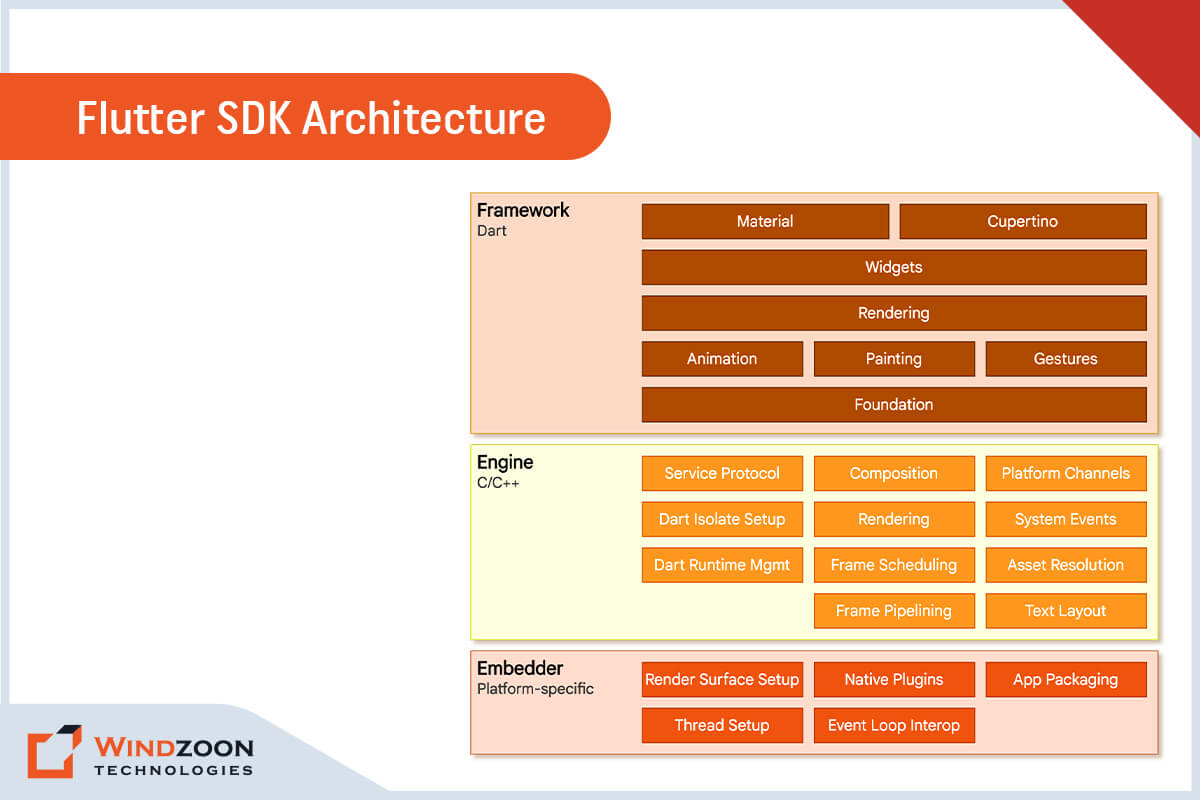
The Flutter SDK includes a rendering engine, testing, integration APIs, and widgets that are ready to use. Flutter’s architecture layer comprises several components, as seen in the graphic below. Let’s examine it and discover how it functions basically.

The primary structural layers are classified into three types. Let’s begin from the bottom and move upward.

Embedder:

It incorporates a platform-specific programming language, enabling the application to run on any platform or operating system.

Engine:

An engine written in C/C++ supports the Flutter core APIs at a low level. The engine includes components for graphics (via the Skia 2D graphics library), text layout, file and network I/O, accessibility support, plugin architecture, a runtime for Dart, and a compilation toolchain.

Framework:

The Dart programming language is the foundation of the Flutter framework. Additionally, it offers a vast collection of libraries that are separated into four categories.

  • Fundamental Foundational Classes
  • Rendering Layer
  • Widgets Layer
  • Cupertino Libraries and Materials

Flutter’s Widget-Based UI Library

The development process for Flutter apps is fairly unique due to its declarative UI writing. Flutter’s main objective is to enable developers to construct the whole user interface by merging various widgets.

Widgets are critical components of the user interface in Android, iOS, and classic web apps that follow design standards. The Flutter app interface contains a number of nested widgets that can be any object.

The developer can utilize widgets to customize the app, which applies to everything from buttons to padding. Furthermore, it allows you to change existing widgets and create your own.

App Testing in Flutter

Flutter provides a simple method for testing. It offers an automated testing toolset for its several forms of testing, including unit testing, widget testing, and integration testing.

What Programming Language is the Foundation of Flutter?

The Google-created Dart programming language serves as the foundation for the Flutter SDK. It aims to replace traditional JavaScript. Dart programs can be run directly on a server, but in a browser, they are transcompiled into JavaScript using the Dart2js transcompiler.

Dart is used to creating apps for Google’s new platform, Fuchsia. It has a structure that is reminiscent of popular object-oriented programming languages like Java or C#.

After learning about what exactly Flutter is, let’s see what kind of applications you can and can not build using Flutter.

What Kind of Apps Can You Develop with Flutter?

Flutter is an excellent choice for developing 2D cross-platform apps that will run on both iOS & Android devices. It is already being used by numerous organizations worldwide, including some Fortune 500 corporations.

With the release of Flutter 2.0, you may now construct the following:

  • Android and iOS cross-platform mobile applications
  • Web apps, such as Progressive Web Apps (PWAs) and Single-Page Apps (SPAs), as well as the web-based expansion of current Flutter mobile apps
  • Desktop apps with Flutter 3.0 (Windows, Mac, and Linux)

What Kind of Apps are not Suitable to Build with Flutter?

Flutter has severe limitations in terms of video apps. Because of this, Flutter is unsuitable for applications that require UI rendering.

Additionally, Flutter isn’t ideal for apps that closely interface with the hardware that powers them. These apps, like mobile stock market apps, require extensive performance optimization.

Furthermore, if you are developing an augmented reality (AR) app, you should avoid Flutter. AR demands deep integration with native systems; therefore, creating a cross-platform app would be useless.

What Makes Flutter Different from Other App Development Frameworks?

Have you ever created a mobile app with a cross-platform framework like React Native or Xamarin? If so, you would be aware that before your code is rendered on the device, it will pass through a bridge or switch that converts it into a WebView using JavaScript.

But Flutter renders apps natively rather than leaving that up to the platform. All Flutter requires is a canvas to render widgets on the screen and access events like tap and services like the device’s camera.

By using Dart’s capabilities for just-in-time and ahead-of-time compilation, Flutter targets the ARM of the device by converting the code into native ARM code. It improves consistency and makes Flutter apps incredibly fast and responsive.

Advantages of Flutter Framework

Advantages of Flutter Framework

Advantages of Flutter Framework

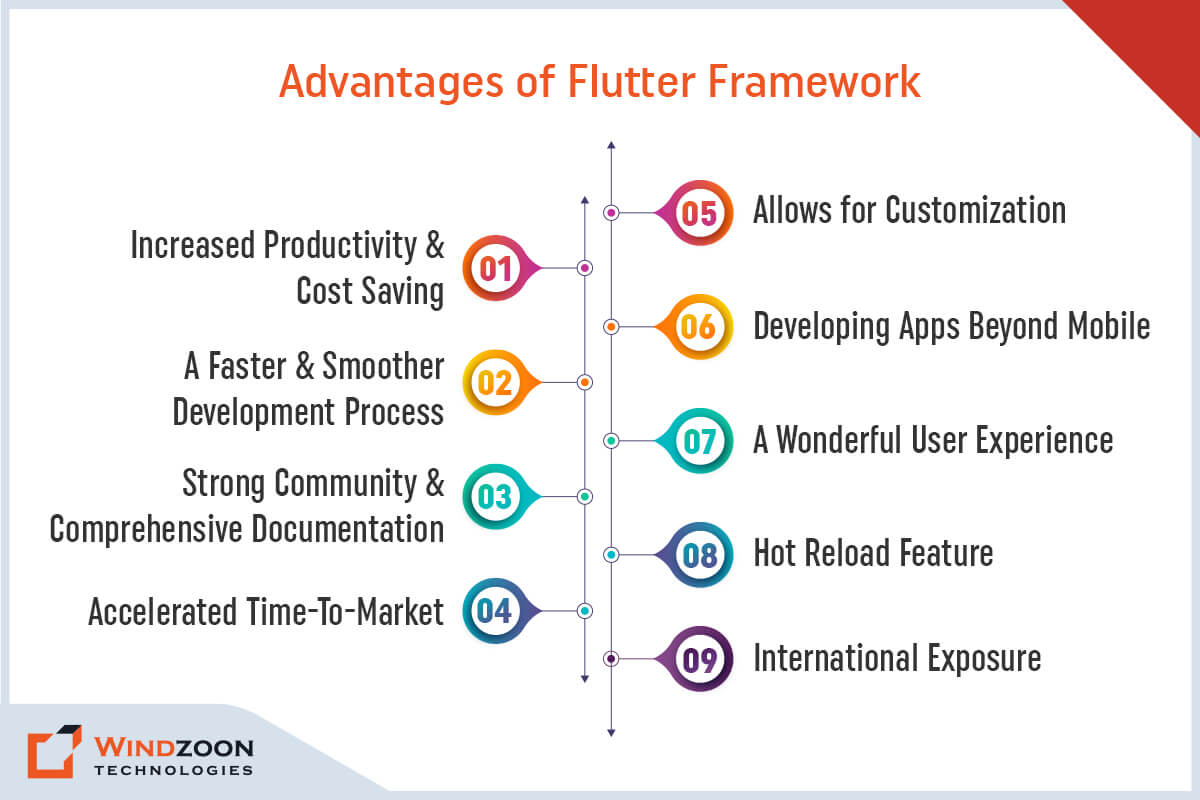
1. Increased Productivity and Cost Saving

Flutter enables developers to construct iOS and Android apps using the same code. As a result, they can save time and costs by avoiding the need to develop two separate apps. The native widgets in Flutter help minimize testing time by ensuring compatibility with various operating systems. It significantly increases the developers’ productivity and allows you to get the functionality of two apps for the price of one.

2. A Faster and Smoother Development Process

Flutter developers can design mobile apps without relying on OEM widgets or a large amount of code, making the process considerably easier and simpler.

3. Strong Community And Comprehensive Documentation

The extensive documentation and tools that aid developers in finding solutions are among the factors influencing many businesses to adopt Flutter. Additionally, Flutter has fantastic community hubs like Flutter Community and Flutter Awesome, where developers can share ideas and find solutions to problems.

4. Accelerated Time-To-Market

As a cross-platform mobile development solution, Flutter significantly shortens app delivery time. Since it makes one code reusable across two target platforms, it aids businesses in reducing delivery times and acquiring users on both Android and iOS.

5. Allows for Customization

One of the most significant advantages of adopting Flutter is the flexibility to customize everything on the screen, regardless of its complexity. Although native platforms also permit customization, it is typically far more difficult to accomplish the same thing.

6. Developing Apps Beyond Mobile

Flutter enables developers to do more than create mobile apps. Flutter for Web and Flutter Desktop Embeddings are further options. Developers can launch Flutter applications in a browser using one of these technologies without changing the source code. Even though the framework’s non-mobile components aren’t yet ready for production, a skilled Flutter developer can run a Flutter app on web browsers, Windows, macOS, and Linux.

7. A Wonderful User Experience

Flutter certainly lives up to Google’s claim that it makes it possible to create a “flexible and expressive UI.” Developers are able to design beautiful user interfaces with the help of a large array of reusable, adaptable widgets. Additionally, Flutter’s native capabilities enable a smooth user experience and exceptional app performance.

8. Hot Reload Feature

Flutter’s “hot reload” feature allows developers to make changes to the code and see the results in the app preview without having to recompile it. In this manner, developers may quickly fix bugs and experiment with other UI elements and functionality later.

9. International Exposure

Businesses looking to enter international markets will be pleased to learn that Flutter supports localization in over 20 languages. With built-in currencies, dates, and units, along with other built-in features, the SDK also makes localizing the software for your app simple.

Disadvantages of Flutter Framework

Disadvantages of Flutter Framework

Disadvantages of Flutter Framework

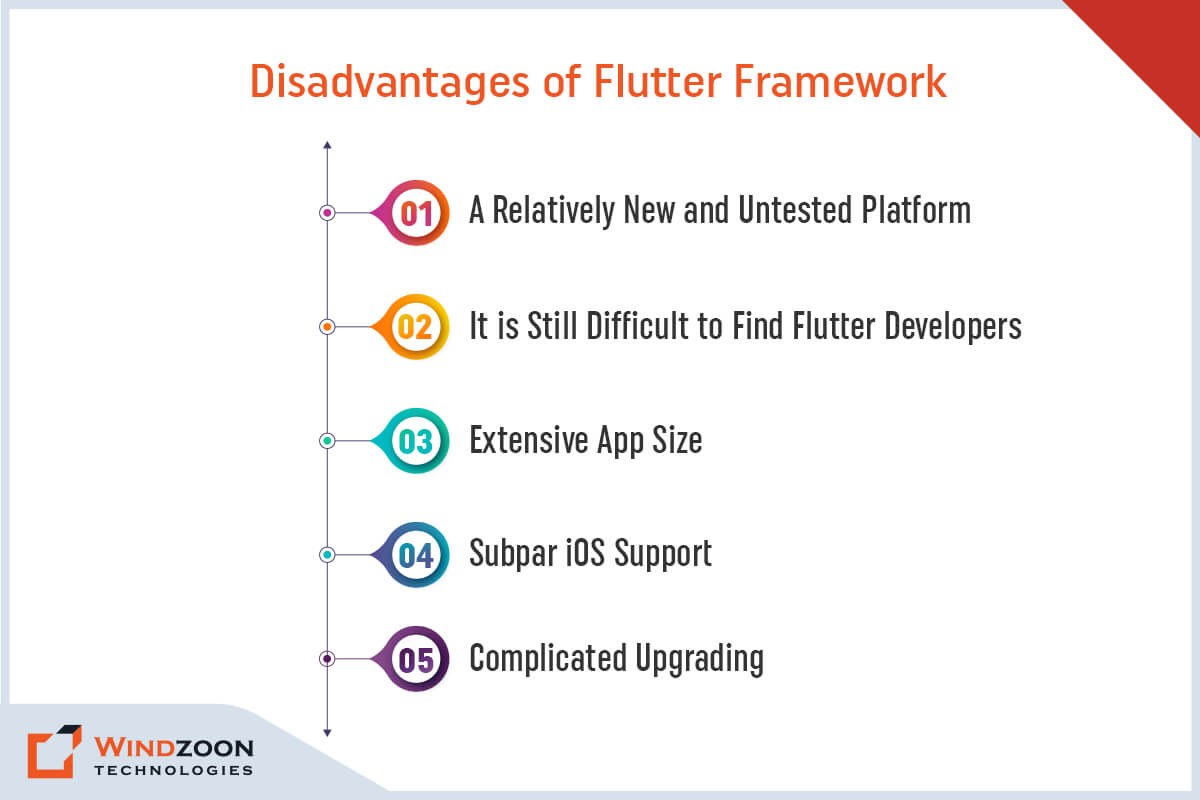
1. A Relatively New and Untested Platform

Flutter is still a new framework, despite its popularity among cross-platform developers. It indicates that few learning resources are available, along with a shortage of plugins and packages.

Thus, developers might need to utilize custom scripts to implement some functions. It will take some time for Flutter to build specific tools, increase functionality, and grow the community.

2. It is Still Difficult to Find Flutter Developers

While Flutter is easy to use, finding developers that are familiar with it might be tough. Flutter utilizes the Dart programming language for app development. Compared to JavaScript, it has a much smaller community of app developers.

As a result, the pool of Flutter-fluent developers will be considerably less than that of other tools and frameworks.

3. Extensive App Size

In software development, there’s always some give and take. Although Flutter offers fast time to market and excellent UI, its apps are usually incredibly large. It might become a concern when creating apps for devices that cannot handle large applications.

However, the size of the Flutter app can be decreased by using particular libraries and packages, asset compression, and the deletion of unneeded resources. Furthermore, you can Hire Flutter App Developers to reduce your Flutter app’s size and optimize its performance.

4. Subpar iOS Support

Since Flutter is a Google product, iOS support is far inferior to Android support. Even the majority of SDK features that operate correctly on Android behave poorly on iOS.

5. Complicated Upgrading

Flutter modules must be updated to stay up with changing programming needs. Since the modules are integral components of the program, they must be rebuilt and reinstalled onto devices.

Read More: Flutter App Performance Tips

Popular Applications Built Using Flutter

Applications Built Using Flutter Framework

Applications Built Using Flutter Framework

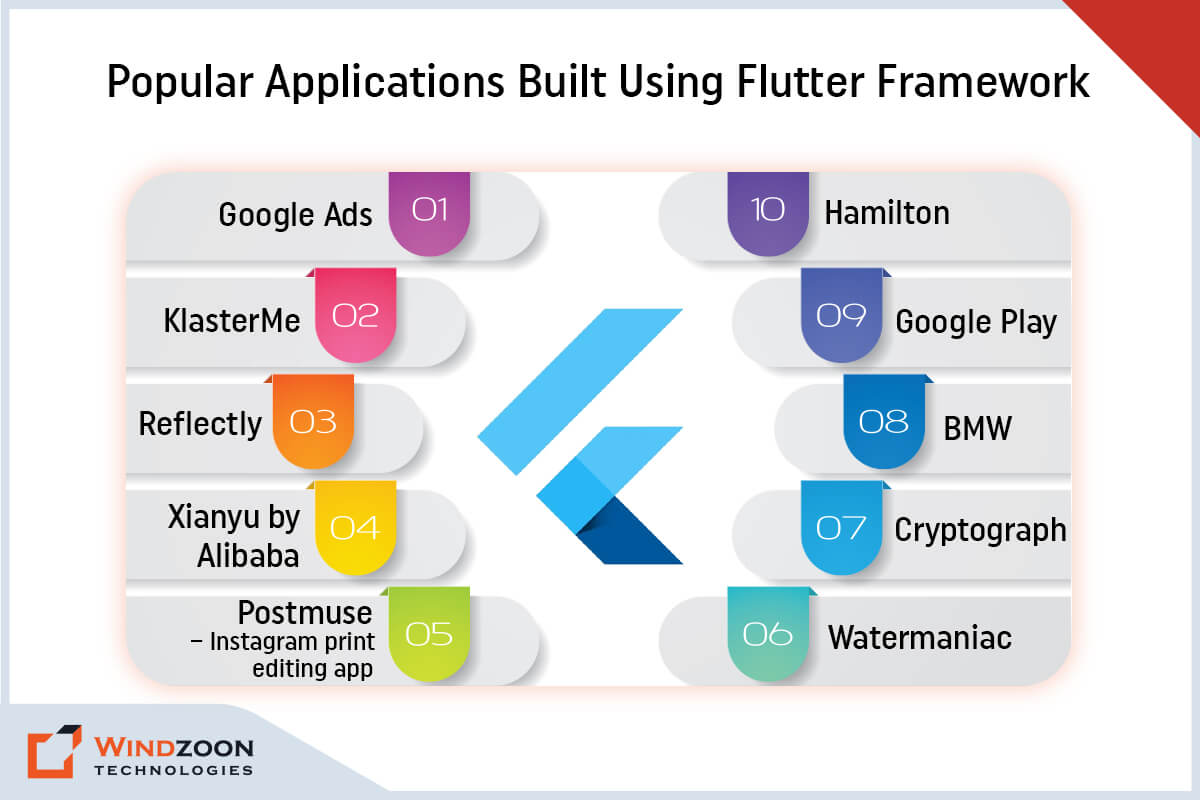
The following is a list of the most popular apps that were built entirely with Flutter or recently upgraded to Flutter.

List of Apps:

  1. Google Ads
  2. KlasterMe
  3. Reflectly
  4. Xianyu by Alibaba
  5. Postmuse – Instagram print editing app
  6. Hamilton
  7. BMW
  8. Google Play
  9. Watermaniac
  10. Cryptograph

Conclusion

Although Flutter has a few small but real drawbacks, they are outweighed by its advantages. Due to its numerous unique features, Flutter has become a remarkably rewarding and exceptionally powerful tool for app development. These capabilities are expanding even further with the release of Flutter 3.0.

If you want to create a cross-platform application, enlisting the assistance of one of the best Mobile app development companies and utilizing Flutter may be your best option.

At Windzoon, we have a team of experienced developers. They would be delighted to hear your ideas and assist you if you require guidance or assistance as you embark on your app development journey.

Visit wzadmin.windzoon.in/ to learn more about our excellent Flutter App Development Services and to request a quote.

Flutter App Performance: Best Tips for How to Measure & Optimize It

App performance is an essential aspect of any cutting-edge mobile application. Unfortunately, a lot of things, like skipped frames and freezes, make the app less reliable and usable. It creates a negative impression on users, eventually harming the company’s reputation.

In most cases, the performance outcomes are adequate when you build apps in Flutter. It is used by around 3.76% of total applications with more than 12 billion downloads. However, this does not mean that your flutter apps are immune to issues like performance leg.

That’s why you must pay close attention to best practices and performance enhancements for your Flutter app during its development. You can also hire Flutter App Developers to help you troubleshoot and optimize the app’s performance.

In this article, we will walk you through some of the best practices for optimizing the performance of your Flutter app.

However, before we go deep into our discussion, let’s learn about the methods to measure the performance of your flutter application.

How to Measure Flutter App Performance?

Flutter performance testing is essential for determining whether or not your app is performing well. You can do this testing by yourself or by taking help from any reliable Flutter App Development Services provider. There are various tools and methods for conducting flutter performance testing. However, the most efficient ones are listed below.

1. Performance Overlay

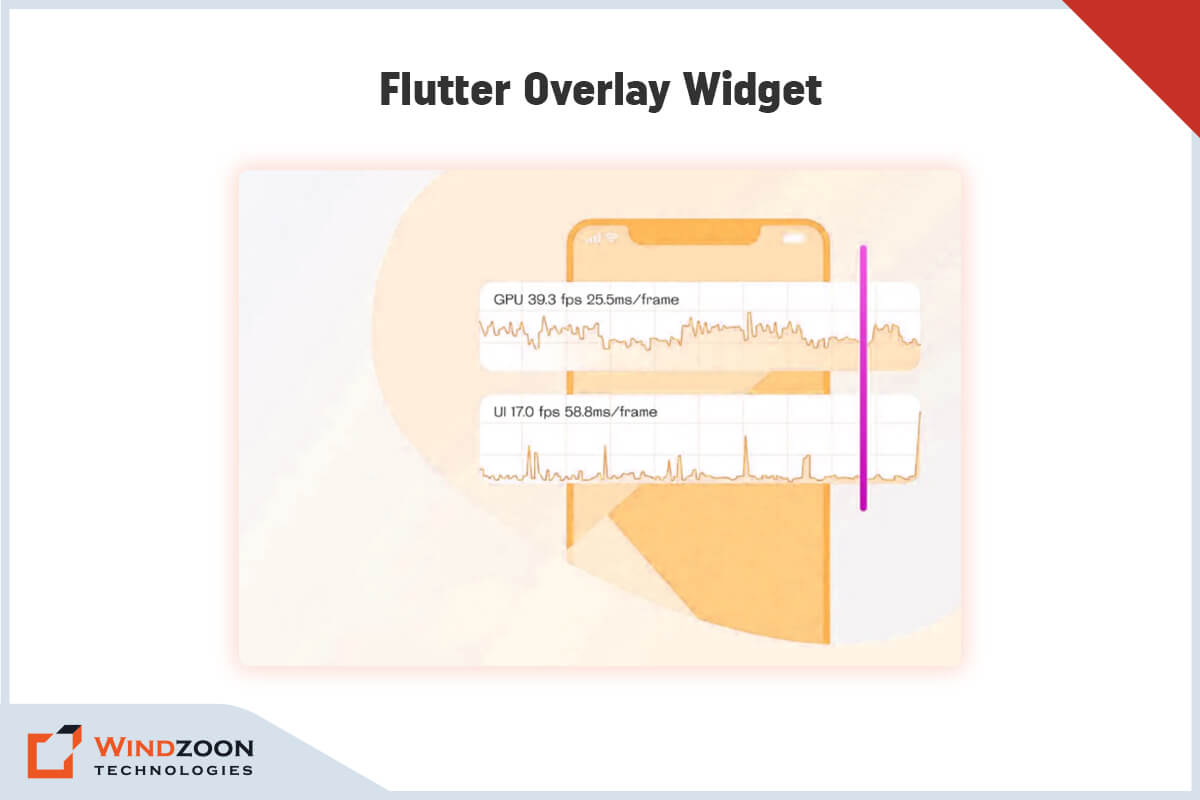
The Performance widget is one of the methods for running Flutter performance tests. The overlay widget places two graphs on top of the app.

The top ‘GPU’ graph displays raster thread performance or communication between the app’s layer tree and the device’s GPU. Although it is labeled “GPU,” the graph depicts how CPU resources are used.

Flutter Overlay Widget

Flutter Overlay Widget

The lower “UI” graph displays the UI thread, which contains the written code that the Flutter framework executes.

If a frame is displayed for more than 16.6 milliseconds (indicating that the app’s performance has dropped below 60 frames per second), the blue graph will collapse to reveal a white background and a red vertical line.

If this occurs in the “FPS” graph OR ‘GPU’ graph, it indicates that the visual elements on the screen are too complex to render in time. And if it occurs in the “UI” graph, it indicates that the Dart code is too expensive to execute in time. If both graphs show a red bar, look into the UI thread for any problems.

There are several ways to start the performance overlay, including:

  • Flutter inspector: Run the application in Profile mode, startup DevTools, and switch to Inspector view. The Performance Overlay button can be found there.
  • The command line: To activate the performance widget, first use the flutter run -profile command, and then use the P key.

2. Performance View

Another way to test the performance of the flutter app is to use the performance view, which includes three tools:

1. Flutter frames chart:

It includes details about each frame, including what work is done during rendering from the UI thread and the raster (GPU) thread.

2. Timeline events chart:

It monitors all events occurring within the application, including scene drawing, frame building, HTTP traffic, and other events.

3. CPU profiler:

It displays how much time each frame takes up on the CPU and method trace.

3. Benchmark

Flutter performance benchmark tests can also be used to assess app performance. Developers use integration testing to conduct benchmark tests. These tests demonstrate metrics like startup time, battery usage, and jank (skipped frames).

Now, let’s get to know about some of the key Flutter app performance issues.

Significant Flutter Performance Issues

Here are some of the most common performance issues with Flutter development.

  • Compared to other development methods, the Flutter application’s APK size is larger. As a result, you’ll see that it uses up more CPU resources, takes up more memory, and potentially slows down your device.
  • When it comes to CPU-intensive performance, Flutter is noticeably slower than native languages Swift and Objective-C.
  • When using the animation builder or any other development feature, you frequently use multiple widgets. These widgets can have a negative impact on performance. It might be necessary to recognize the widgets and integrate them effectively into your systems.
  • You might experience UI lags during the Dart Engine through Skia interfacing, which is characterized as slow performance.
  • Image assets or other aspects of your graphics could also be to blame for the poor performance of your application.

With this, we have come to the most important aspect of our discussion and that is:

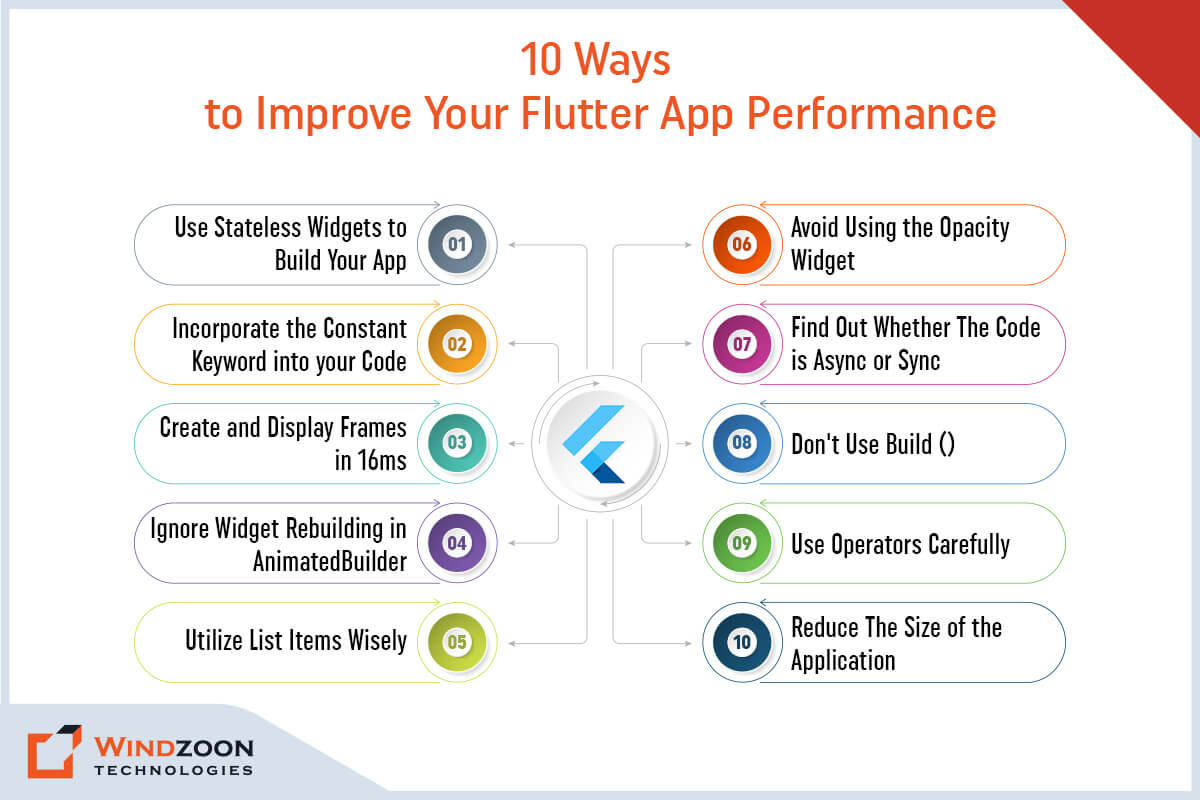
10 Ways to Improve Your Flutter App Performance

Ways to Improve Your Flutter App Performance

Ways to Improve Your Flutter App Performance

1. Use Stateless Widgets to Build Your App

What occurs when an application uses too many stateful widgets? It may extend build times, hamper app performance and raise the cost of the entire app development process. Stateless widgets are a good alternative to setState() for all the functions you want to create.

A few tips for better performance:

  • Rebuild widgets with setState(); only if you believe it will improve the interface without affecting performance.
  • Make sure you have a solid plan before you use rebuilding widgets.
  • Make sure you’ve divided complex widgets into several primary and sub widgets. And to define the sub-widgets, use Stateless functions.
  • Make sure you don’t render the UI by using helper functions during interface development. There might be a few performance gaps. You should try to create Stateless widgets whenever possible for all rendering operations. It will save time, simplify the process, and boost performance.
  • Please keep in mind that stateless widgets should only be used for functions that do not change dynamically.

2. Incorporate the Constant Keyword into your Code

After breaking up the widgets in your app into smaller sub-widgets and using stateless widgets whenever possible, it’s time to optimize the resulting widgets. One way to accomplish this is to reduce the memory usage of my app’s widgets.

You can accomplish this by using the constant keyword wherever it is applicable. It can be an effective way to lower memory usage, which could affect rendering. As a result, your app will run more effectively. At the same time, you can avoid the time- and memory-intensive widget-rebuilding process.

3. Create and Display Frames in 16ms

There are two sections on the display: the structure and the image. For an ideal 60 Hz display, developers need 8 ms for the picture and an additional 8 ms for the structure.

If you observe that the app skips frames, check which frames require more than 16 milliseconds to build and render. As there are separate threads for building and rendering, you should aim for each frame to be built in 8ms or less and rendered in 8ms or less to achieve a total of 16ms or less.

If frames are rendered in less than 16ms, it will not make a significant visual difference for users, but it may improve battery life and cause the device to heat up less.

4. Ignore Widget Rebuilding in AnimatedBuilder

Animation is one of the most appealing features of any web or mobile application. Although it draws the user’s attention, it also decreases the application’s performance.

During app development, developers typically use AnimationController. But, it rebuilds a number of widgets in AnimatedBuilder, and this is the usual cause of Flutter’s poor performance.

To avoid poor performance, use CounterWidget, which allows you to create animation without having to rebuild multiple widgets.

5. Utilize List Items Wisely

You might add several list items when creating the interface or business layer for your Flutter application. Due to the method used to load them, these items may take a while to render.

It can get a little tangled, especially when dealing with long and complex lists. The reason for this is that each item in the list is gradually rendered into the system and viewed from there.

Use the ListView() function to optimize the performance and shorten the rendering time. It can speed up list loading and enhance rendering. It might be beneficial for you to stay away from widgets like SingleChildScrollView() and Column().

6. Avoid Using the Opacity Widget

Many developers use the Opacity Widget when creating business applications. The primary purpose of this is to conceal another widget. While wrapping it in opacity widgets is common in programming languages such as Objective-C, it may cause performance issues in Flutter app development.

As an alternative, you can rebuild the widget in a way that also reconstructs the text widget to conceal the widget. If you want it to be visible on the screen, you can use the visibility widget.

7. Find Out Whether The Code is Async or Sync

Before you begin compiling the code, you should decide whether you want it to run asynchronously or synchronously.

It’s important to keep in mind that debugging async codes can be challenging, which can delay testing and launch times. However, incorporating this into your code can enhance both readability and performance. Over time, it might affect how well the application performs.

You should therefore locate the places where you intend to use async codes and incorporate them quickly.

8. Don’t Use Build ()

When you use the Build() method in your code to create interface elements or widgets, you may consume a lot of memory. It can be costly because it consumes CPU power as well.

If you use the Build method in your code repeatedly, it will have an impact on overall performance and slow down your app. Instead of utilizing this technique to create a large application, divide your code into numerous small iterations. In this manner, you can easily render the method without having to use it everywhere.

9. Use Operators Carefully

Operators are language-specific and, when used properly, can improve the performance of your application. To save time when developing the Flutter application, use the null-check and nullable operators. It can also aid in the development of a robust solution and improve code readability. Furthermore, it also aids in error logging and effective solution coding.

10. Reduce The Size of the Application

We considered having solid code, plugins, and numerous features when creating the app to ensure that users would have a positive experience. However, we forget one thing: storing all of this data takes a lot of memory, which reduces performance.

Gradle, one of Flutter’s internal tools, aids in minimizing the size of applications. You can optimize flutter performance by reducing the size of the flutter application. Google has introduced a packaging system, which allows you to assemble collections of Android apps. The best thing about the app bundle is that you can download the original code directly from the Play Store.

Conclusion

Flutter is Google’s framework for developing high-performance mobile apps. It is intended to shorten the development process and enhance app performance. However, if you don’t spend the time optimizing your Flutter app for Performance, your users will receive a poorer-than-expected experience.

The best way to avoid this is to keep the advice we’ve given in mind as you create your next Flutter project. By doing so, you’ll be well on your way to giving your customers a quick, easy user experience.

You can even seek help from a reliable Flutter App Development Company if you’re still unsure how to optimize your Flutter application.

The Flutter developers at Windzoon are experts at creating high-quality, well-coded cross-platform apps. To reap the benefits of our top-notch cross-platform app development services and to receive a quote, visit wzadmin.windzoon.in/.